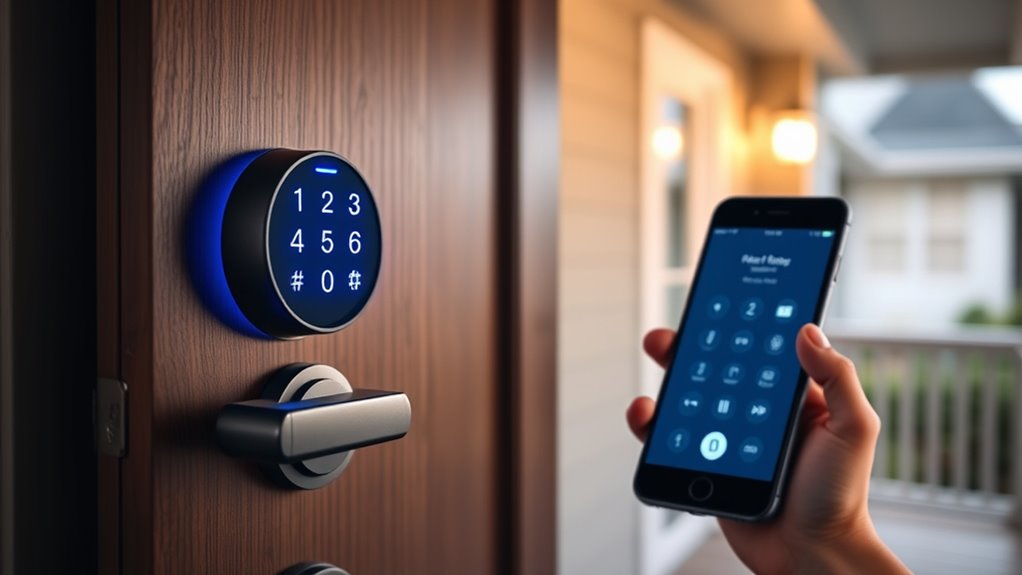

Smart lock deadbolts have become a popular choice for modern home security, offering keyless convenience and remote access. The Veise VE017 Fingerprint Smart Door Lock stands out as the overall best pick thanks to its reliable fingerprint recognition and app control. For those prioritizing seamless integration, the Philips WiFi Smart Lock offers excellent compatibility with smart home systems. Meanwhile, the ULTRALOQ Bolt SE is a top choice for users seeking versatile control with Matter support. However, choosing the right model involves balancing features, ease of use, and price. Continue reading for a detailed breakdown of the top options and what to consider before making your decision.

Get the latest gadgets delivered free with Prime
- Fast, free delivery on millions of items
- Prime Video, Amazon Music and more included
- Member-only deals all year
Complete the kit



Key Takeaways
- The best smart lock deadbolts combine biometric access, Wi-Fi connectivity, and ease of installation for versatile security.
- Top models like the Veise VE017 excel in biometric features, but may lack some smart home integrations found in premium options.
- Auto-lock and backup key options remain important tradeoffs—more advanced locks often include these features, but at a higher price.
- Compatibility with voice assistants and smart home platforms varies, so check if your existing setup aligns with the lock’s ecosystem.
- Price ranges significantly, with premium models offering more features but requiring a higher investment; value often depends on specific needs.
| Veise VE017 Fingerprint Smart Door Lock with App Control, Satin Nickel |  | Best Overall Smart Lock with Versatile Access | Material: All-zinc alloy, scratch-resistant | Battery Life: ≥12 months | Battery Type: 4 AA/LR6 alkaline batteries (not included) | VIEW ON AMAZON | See Our Full Breakdown |
| eufy Security Smart Lock C220, Fingerprint Keyless Entry Door Lock |  | Best for Long-Lasting Battery Life and Easy Setup | Unlock Methods: Fingerprint, keypad, app, voice, physical key | Battery Life: 8 months | Batteries: 8 AA batteries | VIEW ON AMAZON | See Our Full Breakdown |
| Wyze Auto-Lock Bolt v2 Fingerprint Keyless Entry Smart Lock with Wi-Fi, Auto-Lock, and Backup Keys |  | Best for Fast Access and Weather Resistance | Model Number: WLCKB2 | Recommended Uses: Home | Weather Resistance: IP53 | VIEW ON AMAZON | See Our Full Breakdown |
| Tapo Smart Wi-Fi Deadbolt Door Lock, Keyless Tactile Buttons, DL100 |  | Best for Long Battery Life and Seamless Integration | Power: 4xAA batteries (included) | Battery Life: Up to 200 days | Certification: BHMA Grade 3 | VIEW ON AMAZON | See Our Full Breakdown |
| Veise VE017 Fingerprint Smart Door Lock with App Control, Matte Black |  | Best for Secure Multi-Method Access with Easy DIY Setup | Material: All-zinc alloy, scratch-resistant | Battery Life: ≥12 months | Connectivity: Wi-Fi via G1 Gateway (sold separately) | VIEW ON AMAZON | See Our Full Breakdown |
| Schlage Encode Smart WiFi Deadbolt Lock with Century Trim, Matte Black |  | Best Overall Smart Lock Deadbolt | Connectivity: WiFi | Finish: Matte Black | Compatibility: Alexa, Google Home | VIEW ON AMAZON | See Our Full Breakdown |
| TEEHO TE001 Keyless Entry Deadbolt with Keypad for Front Door, Bronze |  | Best Budget Keyless Deadbolt | Access Codes: 20 | Battery Life: up to 365 days | Battery Type: 4 AA batteries (not included) | VIEW ON AMAZON | See Our Full Breakdown |
| Philips WiFi Keypad Deadbolt with Handle, Built-in WiFi, App Remote Control |  | Best for Multi-Method Access and Biometric Entry | Connectivity: WiFi 2.4GHz | Auto-Lock: Yes, customizable | Battery Life: Up to 6 months | VIEW ON AMAZON | See Our Full Breakdown |
| Philips Wi-Fi Smart Lock for Front Door, Fingerprint Keyless Entry, Electronic Keypad Deadbolt, App Remote Control, Auto Lock, Compatible with Alexa and Google |  | Best for High Security and Multiple Unlocking Options | Connectivity: Wi-Fi | Recommended Uses: front, back, garage, side door | Number of Items: 1 | VIEW ON AMAZON | See Our Full Breakdown |
| Philips Wi-Fi Smart Deadbolt Lock, Keyless Entry Door Lock |  | Best for Remote Access and User Management | Connectivity: Wi-Fi (2.4GHz) | Supported Doors: 1-3/8″ to 2″ thick | Auto-Lock Timer: 10-180 seconds | VIEW ON AMAZON | See Our Full Breakdown |
| Philips Wi-Fi Smart Deadbolt Lock, Keyless Entry Door Lock |  | Best Overall Smart Lock with Multiple Unlocking Methods | Unlocking Methods: Fingerprint, Passcode, Key, Voice, App | Connectivity: WiFi | Fingerprint Recognition Speed: 0.3 seconds | VIEW ON AMAZON | See Our Full Breakdown |
| TEEHO TE001 Keyless Entry Deadbolt with Keypad for Front Door, Satin Nickel |  | Best Budget-Friendly Keyless Deadbolt with Reliable Security | Material: Aluminum alloy | Battery: 4 AA batteries (not included) | Battery Life: Up to 365 days | VIEW ON AMAZON | See Our Full Breakdown |
| TEHO Keyless Entry Deadbolt with Keypad for Front Door, Matte Black |  | Best Durable Keyless Deadbolt with Long Battery Life | Material: Aluminum alloy | Color: Matte Black | Battery: 4 AA batteries (not included) | VIEW ON AMAZON | See Our Full Breakdown |
| ULTRALOQ Bolt SE Wi-Fi Smart Lock with Matter Over Thread and App Remote Access |  | Best Premium Smart Lock with Extensive Access Options | Keyless Entry Types: Fingerprint, Passcodes, Smartphone App, Web Portal, EKey/Code Sharing, Voice Control, Mechanical Keys | Connectivity: Wi-Fi (2.4 GHz), Matter over Thread | Battery Life: 18 months | VIEW ON AMAZON | See Our Full Breakdown |
| smart lock deadbolt | Battery Life | Connectivity |
|---|---|---|
| Veise VE017 Fingerprint Smart | ≥12 months | Wi-Fi (via G1 Gateway, sold separately) |
| eufy Security Smart Lock C220 | 8 months | — |
| Wyze Auto-Lock Bolt v2 Fingerp | Up to 8 months | — |
| Tapo Smart Wi-Fi Deadbolt Door | Up to 200 days | Wi-Fi, Bluetooth |
| Veise VE017 Fingerprint Smart | ≥12 months | Wi-Fi via G1 Gateway (sold separately) |
| Schlage Encode Smart WiFi Dead | Up to 6 months | WiFi |
| TEEHO TE001 Keyless Entry Dead | up to 365 days | — |
| Philips WiFi Keypad Deadbolt w | Up to 6 months | WiFi 2.4GHz |
| Philips Wi-Fi Smart Lock for F | — | Wi-Fi |
| Philips Wi-Fi Smart Deadbolt L | Not specified | Wi-Fi (2.4GHz) |
| Philips Wi-Fi Smart Deadbolt L | — | WiFi |
| TEEHO TE001 Keyless Entry Dead | Up to 365 days | — |
| TEHO Keyless Entry Deadbolt wi | Up to 365 days | — |
| ULTRALOQ Bolt SE Wi-Fi Smart L | 18 months | Wi-Fi (2.4 GHz), Matter over Thread |
More Details on Our Top Picks
Veise VE017 Fingerprint Smart Door Lock with App Control, Satin Nickel
The Veise VE017 stands out for its combination of biometric security and multiple access options, making it a top choice for those prioritizing convenience and advanced security. Its AI-powered fingerprint recognition offers quick, accurate access, while the ability to control via app, keypad, key, or fob ensures flexibility. Compared to the Wyze Lock Bolt v2, the VE017’s biometric features are more sophisticated, but it requires a separate G1 Gateway for remote control with Alexa or Google, adding cost and complexity. The design is durable with scratch-resistant zinc alloy, and installation is straightforward, taking about 15 minutes. However, batteries are not included and may need frequent replacement depending on usage, and some setup steps require familiarity with smart home apps. This lock is ideal for users seeking high security and multiple access methods in a DIY-friendly package.
Pros:- AI-powered biometric recognition for fast, accurate fingerprint access
- Multiple unlocking options including app, keypad, key, and fob
- Remote access management with activity logs
Cons:- Requires separate G1 Gateway for remote control with Alexa/Google
- Batteries not included and may need frequent replacement
Best for: Homeowners or multi-tenant properties needing biometric security and remote management
Not ideal for: Users who prefer an all-in-one solution without extra accessories or who require remote control without additional purchases
- Material:All-zinc alloy, scratch-resistant
- Battery Life:≥12 months
- Battery Type:4 AA/LR6 alkaline batteries (not included)
- Connectivity:Wi-Fi (via G1 Gateway, sold separately)
- Compatibility:Alexa, Google Assistant (requires G1 Gateway)
Our verdict“This pick suits tech-savvy users who want a secure, multi-method lock with biometric features and DIY installation.”
eufy Security Smart Lock C220, Fingerprint Keyless Entry Door Lock
The eufy Security Smart Lock C220 offers a compelling blend of convenience and reliability, especially with its self-learning AI that enhances fingerprint accuracy over time. Its multiple unlocking methods—fingerprint, keypad, app, voice, and physical key—make it versatile for various user preferences. Compared to the Wyze Lock Bolt v2, the C220’s longer battery life of up to 8 months minimizes maintenance, though its Grade 3 certification might be less secure than higher grades. Installation is quick, taking about 15 minutes, and the waterproof design suits most weather conditions. However, battery life can vary with usage, and Wi-Fi stability affects remote access. This model fits well for users seeking an easy-to-install, durable lock that integrates into a broader smart home ecosystem.
Pros:- Self-learning AI improves fingerprint accuracy over time
- Multiple unlocking options including app, keypad, voice, and key
- Long battery life with up to 8 months of use
Cons:- Battery life may vary with heavy usage
- Requires Wi-Fi for remote control, dependent on network stability
Best for: Families or individuals wanting reliable, multi-method access with long battery life
Not ideal for: Users requiring a higher security grade or operating in extremely harsh weather conditions
- Unlock Methods:Fingerprint, keypad, app, voice, physical key
- Battery Life:8 months
- Batteries:8 AA batteries
- AI Recognition:Self-learning fingerprint recognition
- Waterproof:IP53
Our verdict“This lock is best suited for users who prioritize ease of installation, long-term reliability, and flexible access options.”
Wyze Auto-Lock Bolt v2 Fingerprint Keyless Entry Smart Lock with Wi-Fi, Auto-Lock, and Backup Keys
The Wyze Lock Bolt v2 emphasizes speed and durability, with its fingerprint scanner unlocking in under half a second—ideal for busy households. Its learning capability improves recognition over time, and its weather-resistant IP53 rating makes it suitable for most outdoor conditions. Compared to the eufy C220, the Wyze offers quicker fingerprint access and a compact design, though its weather resistance isn’t rated for extreme rain or snow. It supports remote control via Wi-Fi and multiple unlocking methods, including keypad and backup keys, providing flexibility. Battery life extends up to 8 months, but heavy usage can affect longevity. Its straightforward installation makes it accessible for DIYers, yet weather resistance limits use in harsher climates.
Pros:- Unlocks in under 0.5 seconds with fingerprint scanner
- Learns and adapts for more accurate recognition
- Weather-resistant design for outdoor use
Cons:- Weather resistance rated IP53, not suitable for heavy rain or snow
- Battery life may vary with heavy use
Best for: Busy households seeking fast, reliable access with weather resistance and quick setup
Not ideal for: Environments with extreme weather or users needing a higher security certification
- Model Number:WLCKB2
- Recommended Uses:Home
- Weather Resistance:IP53
- Battery Life:Up to 8 months
- Included Components:AA Batteries x8
Our verdict“This lock is perfect for users who need speedy access, weather resilience, and easy DIY installation in moderate climates.”
Tapo Smart Wi-Fi Deadbolt Door Lock, Keyless Tactile Buttons, DL100
The Tapo DL100 offers a multi-method approach with keypad, Bluetooth, Wi-Fi, and voice commands, making it a flexible choice for users wanting integrated smart home control. Its long battery life—up to 300 days in Bluetooth mode—reduces maintenance, and the auto-lock feature adds convenience. Compared to the Veise VE017, the DL100’s emphasis on durability and long-lasting batteries makes it well-suited for busy households. Installation is relatively straightforward but may require some technical knowledge, especially for configuring smart home integrations like Alexa or Google. While its BHMA Grade 3 certification provides standard durability, it isn’t as robust as Grade 1 options for high-security needs. This lock appeals to users seeking reliable, long-term smart lock operation with broad compatibility.
Pros:- Multiple unlocking methods including keypad, Bluetooth, Wi-Fi, and voice
- Long battery life with easy emergency power options
- Seamless integration with major smart home platforms
Cons:- Batteries need replacement after extended use
- Installation may require some technical skills
Best for: Tech-savvy homeowners wanting a durable lock with long battery life and smart home compatibility
Not ideal for: Users needing the highest security grade or with limited technical experience
- Power:4xAA batteries (included)
- Battery Life:Up to 200 days
- Certification:BHMA Grade 3
- Connectivity:Wi-Fi, Bluetooth
- Dimensions:5.88 x 2.65 x 2.2 inches (outdoor)
Our verdict“This lock is best for users who prioritize long battery life, multiple access options, and smart home integration at an accessible price point.”
Veise VE017 Fingerprint Smart Door Lock with App Control, Matte Black
The Veise VE017 Matte Black offers a sleek, durable solution with its scratch-resistant all-zinc alloy build and versatile access options. Its advanced AI fingerprint verification allows quick and accurate recognition, while app control, keypad, key, and mechanical entry ensure flexibility. Compared with the Wyze Bolt v2, the VE017’s biometric features and local encrypted storage provide a higher security profile. Installation is simple, taking around 15 minutes with no drilling required. However, remote access and smart home integration depend on purchasing the G1 Gateway separately, adding extra cost. Batteries are not included, which could be inconvenient for ongoing use. This lock appeals to users who want a secure, multi-method lock with straightforward DIY installation and smart home compatibility.
Pros:- Multiple unlocking options including fingerprint, app, keypad, and key
- Advanced AI fingerprint recognition with learning capability
- Easy DIY installation without drilling
Cons:- G1 Gateway needed for remote control and smart integrations
- Batteries not included, requiring replacement roughly annually
Best for: Homeowners or landlords seeking secure, multi-access solutions with easy installation
Not ideal for: Users needing remote control without additional accessories or those in extremely harsh climates
- Material:All-zinc alloy, scratch-resistant
- Battery Life:≥12 months
- Connectivity:Wi-Fi via G1 Gateway (sold separately)
- Compatibility:Alexa, Google
- Security Standards:BHMA/ANSI certified
Our verdict“This lock is ideal for users wanting a secure, versatile, and easy-to-install smart lock with biometric features and local encryption.”
Schlage Encode Smart WiFi Deadbolt Lock with Century Trim, Matte Black
The Schlage Encode stands out for its seamless integration of remote control and monitoring via WiFi, making it ideal for those who want to manage their lock from anywhere. Unlike the Philips Wi-Fi Deadbolt, it offers a more reliable built-in security alarm and a straightforward installation process without hardwiring. This model is better suited to homeowners prioritizing security and ease of use, though its battery life of about six months can be a minor inconvenience compared to more frequent replacements in other models. Its compatibility with Alexa and Google Home enhances convenience, but it depends heavily on WiFi stability for remote access, which could be a drawback for users with spotty internet. This pick makes the most sense for users who seek a high-security, easy-to-install smart deadbolt that can be managed remotely without wiring hassles.
Pros:- Remote access and control via WiFi and mobile app
- Compatible with Alexa and Google Assistant
- Easy installation with no hardwiring required
- Built-in customizable alarm for added security
Cons:- Battery life may require replacement every six months
- Dependent on WiFi stability for remote features
- Limited to standard door sizes and backset options
Best for: Homeowners seeking a reliable, secure, and easy-to-install WiFi-enabled deadbolt with remote access and voice control compatibility.
Not ideal for: Renters or users with unstable WiFi connections, as remote features depend on consistent internet access, and those with very limited DIY experience due to installation nuances.
- Connectivity:WiFi
- Finish:Matte Black
- Compatibility:Alexa, Google Home
- Battery:Four AA batteries (included)
- Battery Life:Up to 6 months
- Backset:2-3/8 in or 2-3/4 in
- Door Thickness:1-3/8 in to 1-3/4 in
- Alarm:Built-in, customizable
Our verdict“This is the best choice for users who want a high-security, remotely manageable deadbolt with straightforward installation and voice assistant compatibility.”
TEEHO TE001 Keyless Entry Deadbolt with Keypad for Front Door, Bronze
The TEEHO TE001 offers a straightforward keypad and keyless entry, making it an excellent option for users who want simple, reliable security without the bells and whistles of WiFi connectivity. Compared with the Philips WiFi Keypad Deadbolt, this model forgoes app control but compensates with a long-lasting battery and weather resistance, making it ideal for those on a budget or with minimal smart home integration. Its automatic locking feature adds convenience, but resetting before first use can be an extra step some may find cumbersome. While it doesn’t support remote management, its core function of secure keypad entry makes it suitable for users who prioritize offline reliability over remote access. This lock is perfect for budget-conscious homeowners who want a durable, keypad-only deadbolt that works reliably in various weather conditions.
Pros:- Multiple access codes including one-time guest code
- Automatic locking enhances security
- Weather-resistant and durable construction
- Long battery life (~1 year)
Cons:- Requires 4 AA batteries (not included)
- No remote control or app integration
- Reset needed before first use for optimal operation
Best for: Budget-conscious homeowners who prefer a simple, durable keypad deadbolt without the need for remote management.
Not ideal for: Users seeking remote access or smart home integration, as this lock lacks WiFi and app control features, and those who dislike manual reset procedures.
- Access Codes:20
- Battery Life:up to 365 days
- Battery Type:4 AA batteries (not included)
- Weather Resistance:IP54
- Door Hole Size Compatibility:2-1/8″ (54mm)
Our verdict“This lock suits users who want a dependable keypad deadbolt with long battery life and weather resistance, without the complexity of smart features.”
Philips WiFi Keypad Deadbolt with Handle, Built-in WiFi, App Remote Control
The Philips WiFi Keypad Deadbolt emphasizes versatility, offering multiple unlocking options including keypad, fingerprint, app, and voice commands. This makes it ideal for households with varied access needs. Compared to the simpler TEEHO TE001, it integrates biometric access, which can significantly speed up entry, especially for quick household access. However, its app setup can be more complex, and batteries are not included, which might delay installation. It’s primarily designed for right-opening doors, requiring resets for left-opening doors, and its auto-lock feature must be manually enabled. For users seeking a flexible, multi-method smart lock with biometric options, this model balances security with convenience, though it demands a bit more setup effort.
Pros:- Multiple unlocking methods including fingerprint, PIN, app, and voice
- Remote management with app and real-time access logs
- Supports up to 50 fingerprints and 100 passcodes
- Easy installation on most standard doors
Cons:- Batteries are not included, requiring separate purchase
- App setup can be complex for some users
- Designed mainly for right-opening doors, may need reset for left-opening doors
Best for: Families looking for a versatile deadbolt that combines keypad, biometric, and app control for quick, flexible access.
Not ideal for: Users who prefer simple, straightforward locks without biometric features or those who want a plug-and-play solution without setup complexity.
- Connectivity:WiFi 2.4GHz
- Auto-Lock:Yes, customizable
- Battery Life:Up to 6 months
- Batteries Included:No
- Fingerprint Speed:0.3 seconds
Our verdict“This lock offers a highly versatile access system ideal for larger households or those wanting biometric options, though it requires a more involved setup process.”
Philips Wi-Fi Smart Lock for Front Door, Fingerprint Keyless Entry, Electronic Keypad Deadbolt, App Remote Control, Auto Lock, Compatible with Alexa and Google
The Philips Wi-Fi Smart Lock excels by offering a comprehensive range of unlocking methods, including fingerprint, PIN, app, voice, and physical key, making it suitable for varied household needs. Its remote control features and activity logs provide high security and peace of mind, especially compared to more basic locks like the TEEHO TE001. The auto-lock feature adds convenience, but it’s important to note that it requires 8 AA batteries—more than some competitors—and these batteries need regular replacement. While installation is straightforward on most standard doors, its reliance on Wi-Fi and the lack of a door sensor means it can’t automatically detect if the door is closed, which could impact security if overlooked. This model is ideal for users who want maximum flexibility and security features in a smart deadbolt.
Pros:- Multiple unlocking options including fingerprint, PIN, app, voice, and physical key
- Remote control and activity logs via Wi-Fi
- Supports up to 50 fingerprints and 100 passcodes
- Auto-lock feature for added convenience
Cons:- Requires 8 AA batteries, which need regular replacement
- Some users find app setup and connectivity complex
- No door sensor for automatic door status detection
Best for: Security-conscious homeowners who want a versatile, multi-unlocking method deadbolt with remote management and activity logs.
Not ideal for: Users seeking a simple, battery-efficient lock without the need for multiple unlocking options or those with inconsistent Wi-Fi connections.
- Connectivity:Wi-Fi
- Recommended Uses:front, back, garage, side door
- Number of Items:1
- Included Components:Exterior and interior assemblies, 2 keys, install sets
- Model Number:DDL-241-BK
- Manufacturer:PHILIPS
Our verdict“This model suits users seeking a highly secure, flexible deadbolt with multiple unlocking methods and remote management, provided they’re prepared for regular battery changes.”
Philips Wi-Fi Smart Deadbolt Lock, Keyless Entry Door Lock
The Philips Wi-Fi Smart Deadbolt offers reliable remote control via Wi-Fi, making it a practical choice for users who want to manage access from afar. Its support for multiple unlocking methods—including app, passcode, fingerprint, and voice—provides high flexibility, especially compared to simpler keypad-only locks like the TEEHO. It also features real-time notifications and support for multiple user codes, ideal for households or rental properties. However, it requires 2.4GHz Wi-Fi and batteries are not included, which could lead to frequent replacements, especially in high-traffic households. Its auto-lock feature is customizable, but it lacks a door sensor, so users must remember to check if the door is fully closed. This lock is well-suited for those who prioritize remote control and multi-user access, with some setup considerations.
Pros:- Multiple unlocking options including app, passcode, fingerprint, and voice
- Remote control with real-time activity notifications
- Supports multiple user codes and activity logs
- Easy DIY installation on most standard doors
Cons:- Requires 2.4GHz Wi-Fi network, not compatible with 5GHz
- Batteries not included, may need frequent replacement
- No door sensor for automatic door status detection
Best for: Homes needing flexible, remote-controlled access management with multiple user codes and notifications.
Not ideal for: Users with limited Wi-Fi or seeking a simple, offline deadbolt, as it depends heavily on Wi-Fi connectivity and regular battery replacement.
- Connectivity:Wi-Fi (2.4GHz)
- Supported Doors:1-3/8″ to 2″ thick
- Auto-Lock Timer:10-180 seconds
- Battery Life:Not specified
- Additional Features:Multiple user codes, real-time alerts
Our verdict“This model fits users who want extensive remote access control and activity monitoring, accepting regular battery changes and Wi-Fi reliance.”
Philips Wi-Fi Smart Deadbolt Lock, Keyless Entry Door Lock
The Philips Wi-Fi Smart Deadbolt stands out for its versatility, offering fingerprint, passcode, key, voice commands, and app control. Compared with the ULTRALOQ Bolt SE, it provides faster biometric recognition at 0.3 seconds, making it ideal for those prioritizing quick access. Its remote alerts and real-time notifications enhance security, but the reliance on WiFi can complicate setup and requires stable internet. Battery management is another consideration, as regular monitoring is necessary to avoid lockouts. This model’s broad compatibility with Alexa and Google Assistant makes it a flexible choice for tech-savvy homeowners who want multiple entry options in one device.
Pros:- Multiple convenient unlocking options including biometric and voice control
- Remote access and real-time alerts for enhanced security
- Fast fingerprint recognition and customizable passcodes
Cons:- Requires WiFi connection for full functionality
- Potential complexity in setup for some users
- Battery life may require regular monitoring
Best for: Tech-savvy homeowners who want maximum convenience and multiple unlocking options
Not ideal for: Users with unstable WiFi or minimal technical experience, as setup and connectivity could be challenging
- Unlocking Methods:Fingerprint, Passcode, Key, Voice, App
- Connectivity:WiFi
- Fingerprint Recognition Speed:0.3 seconds
- Maximum Passcodes:100
- Auto Lock:Yes
- Compatibility:Amazon Alexa, Google Assistant
Our verdict“This pick makes sense for those seeking a highly versatile, feature-rich smart deadbolt, willing to handle more complex setup and connectivity needs.”
TEEHO TE001 Keyless Entry Deadbolt with Keypad for Front Door, Satin Nickel
The TEEHO TE001 offers a straightforward, reliable approach to keyless entry, with a 20-code keypad including one-time guest access. Compared to the more advanced ULTRALOQ Bolt SE, it lacks app control and WiFi connectivity but excels in ease of installation and durability. Its weather-resistant design makes it suitable for outdoor use, but it does require 4 AA batteries, which are not included, and resetting is needed before first use. This lock’s simplicity appeals to those who want dependable security without smart features, especially in environments where internet or app control is unnecessary.
Pros:- Multiple access codes including one-time guest code
- Automatic locking and low battery indicator
- Weather-resistant and durable construction
Cons:- Requires 4 AA batteries (not included)
- Not compatible with 38mm door holes
- Resetting needed before first use
Best for: Homeowners seeking simple, weather-resistant security without smart connectivity
Not ideal for: Tech enthusiasts wanting remote access or app integration, as this lock lacks digital connectivity
- Material:Aluminum alloy
- Battery:4 AA batteries (not included)
- Battery Life:Up to 365 days
- Weather Resistance:IP54
- Door Hole Size Compatibility:2-1/8″ (54mm)
Our verdict“This lock is best for those prioritizing straightforward, reliable security over smart features or remote control capabilities.”
TEHO Keyless Entry Deadbolt with Keypad for Front Door, Matte Black
This model emphasizes durability with its matte black aluminum alloy construction and provides secure keyless entry through a 20-code keypad, including a one-time guest code. Compared to the Satin Nickel version, it offers the same core features but with a sleek finish that better matches modern aesthetics. Its automatic locking and weather resistance make it suitable for outdoor use, though it shares the same limitations: requiring 4 AA batteries that are not included and limited compatibility with certain door thicknesses. It’s a solid choice for those who want a dependable, no-fuss deadbolt with long-lasting batteries and straightforward installation.
Pros:- Secure keyless entry with multiple user codes
- Automatic locking and one-touch auto-lock feature
- Weather-resistant and durable construction
Cons:- Requires 4 AA batteries (not included)
- Limited to specific door thicknesses
- No remote or app control
Best for: Homeowners looking for a durable, weather-resistant deadbolt with a simple keypad entry
Not ideal for: Smart home enthusiasts wanting app control or remote access, as it lacks digital connectivity
- Material:Aluminum alloy
- Color:Matte Black
- Battery:4 AA batteries (not included)
- Battery Life:Up to 365 days
- Weather Resistance:IP54
- Door Hole Compatibility:2-1/8″ (54mm)
Our verdict“This deadbolt makes the most sense for users needing rugged, weatherproof security with long-lasting batteries and simple operation.”
ULTRALOQ Bolt SE Wi-Fi Smart Lock with Matter Over Thread and App Remote Access
The ULTRALOQ Bolt SE excels with its support for multiple access methods, including fingerprint, passcodes, app control, voice commands, and mechanical keys. Compared to the Philips Wi-Fi Deadbolt, it offers a more straightforward DIY installation process and an impressive 18-month battery life, appealing to users who want long-term reliability. Its support for Matter over Thread makes it a future-proof choice, but it requires a compatible hub for remote access via Matter and only works on 2.4 GHz Wi-Fi networks. The absence of a door sensor may be a drawback for some, but overall, this lock provides a high level of flexibility for tech-savvy users seeking comprehensive control and security.
Pros:- Supports multiple access methods including fingerprint, passcodes, app, and voice control
- Easy DIY installation with detailed instructions
- Long battery life of up to 18 months with low-energy mesh network
Cons:- Requires a compatible Matter over Thread hub for remote access via Matter
- Limited to 2.4 GHz Wi-Fi networks
- Door sensor not included
Best for: Tech-savvy homeowners wanting a versatile, long-lasting smart lock with advanced access options
Not ideal for: Users without a compatible Matter hub or on 5 GHz Wi-Fi networks, as these limit remote features
- Keyless Entry Types:Fingerprint, Passcodes, Smartphone App, Web Portal, EKey/Code Sharing, Voice Control, Mechanical Keys
- Connectivity:Wi-Fi (2.4 GHz), Matter over Thread
- Battery Life:18 months
- Material:Zinc alloy
- Water Resistance:IP65 waterproof
- Installation:DIY, 10 minutes
Our verdict“This premium pick suits users seeking extensive access flexibility and long-term reliability, provided they have the right hub for remote features.”

How We Picked
The products in this roundup were evaluated based on a combination of performance, build quality, usability, smart home compatibility, and value. We prioritized locks that offer reliable biometric or keyless entry, seamless app control, and robust security features. Ease of installation and maintenance were also key factors, as well as the breadth of control options like auto-lock, backup keys, and voice assistant support. The ranking reflects a balanced view of these attributes, emphasizing real-world usefulness over flashy features alone. Our aim was to identify options suitable for a variety of user needs, from basic keyless entry to fully integrated smart home security systems.Factors to Consider When Choosing Smart Lock Deadbolts
Choosing the right smart lock deadbolt involves understanding several key factors beyond just the feature list. First, consider compatibility with your existing smart home ecosystem to ensure seamless control via voice assistants or apps. Second, evaluate security features such as biometric access, encryption levels, and backup options to protect against lockouts or hacking. Third, installation complexity varies; some locks are DIY-friendly, while others may require professional setup. Fourth, look at connectivity options—Wi-Fi, Bluetooth, or Zigbee—based on your home network and future scalability. Lastly, consider your budget and how much you’re willing to invest in features like auto-lock, keypad entry, and remote access, balancing cost with security needs.Compatibility with Your Smart Home Ecosystem
Ensure the lock integrates smoothly with your existing smart home devices, whether that’s Alexa, Google Assistant, or Apple HomeKit. Compatibility impacts not just convenience but also security, as some locks offer more secure and encrypted communication channels with certain platforms. Choosing a lock that works with your current setup can save money and reduce frustration during installation and daily use.
Security and Access Features
Beyond basic keyless entry, look for biometric options like fingerprint recognition or facial scanning, which offer faster and more secure access. Backup methods such as physical keys or keypad codes are essential in case of power or connectivity issues. Also, check encryption standards to prevent hacking and unauthorized access, especially if the lock supports Wi-Fi or cloud control.
Ease of Installation and Maintenance
Some smart locks are designed for DIY installation, fitting into standard deadbolt holes without extra tools. Others may require professional help, especially if they involve wiring or complex integration. Maintenance considerations include battery life, ease of replacing batteries, and app updates to keep the lock functioning smoothly over time.
Connectivity Options and Future Scalability
Wi-Fi-enabled locks provide remote access and simpler setup, but may draw more power and be susceptible to network issues. Bluetooth locks are easier to set up but lack remote control unless connected through a hub. Consider your home’s existing network setup and whether you plan to expand your smart home system, choosing a lock with compatible protocols like Zigbee or Z-Wave if needed.
Frequently Asked Questions
Can I install a smart lock deadbolt myself or do I need a professional?
Many smart lock deadbolts are designed for DIY installation, often fitting into existing deadbolt holes without additional wiring. Clear instructions and mounting templates make this straightforward for most homeowners. However, if your door requires modifications, or if you want to integrate the lock into a complex smart home system, hiring a professional can ensure proper setup and optimal security.
What happens if my Wi-Fi goes down? Can I still access my smart lock?
Most smart locks include a backup method such as a keypad code or physical key, allowing access during connectivity issues. Some models also support local Bluetooth control, which doesn’t rely on Wi-Fi. It’s important to check these options if you want reliable access regardless of network status, especially for essential security and convenience.
Are biometric smart locks secure enough for high-security homes?
Biometric locks like fingerprint recognition are generally considered secure when they use advanced encryption and anti-spoofing technology. However, no system is completely foolproof. Combining biometric access with secondary methods like keypad codes or physical keys can enhance security, particularly in high-risk environments. Regular firmware updates also play a key role in maintaining security standards.
How long do the batteries last in a typical smart lock deadbolt?
Battery life varies depending on usage and features, but most smart locks offer several months to a year of operation on standard batteries. Locks with energy-efficient designs and low-power Bluetooth or Wi-Fi modules tend to last longer. It’s wise to choose models with low-battery alerts and easy battery replacement to avoid lockouts.
Is it worth paying more for a premium smart lock deadbolt?
Higher-priced models often offer advanced features such as biometric access, better integration with smart home systems, and enhanced security protocols. If these features align with your security priorities or if you want a more durable, aesthetic design, investing in a premium lock can be worthwhile. However, for basic keyless entry and remote control, more affordable options may suffice without compromising security.
Conclusion
For most homeowners, the Veise VE017 Fingerprint Smart Door Lock offers a well-rounded blend of security, convenience, and ease of use, making it the best overall choice. Those seeking value without sacrificing key features should consider models like the Wyze Auto-Lock Bolt v2, which provides reliable performance at a lower price point. If your home already has a robust smart system, the Philips WiFi Smart Lock stands out for its compatibility and smart features. Beginners or those installing their first smart lock might prefer simpler models like the TEEHO TE001, while high-security users will appreciate premium options with biometric access and advanced encryption. Ultimately, your choice depends on your specific security needs, smart home setup, and budget.