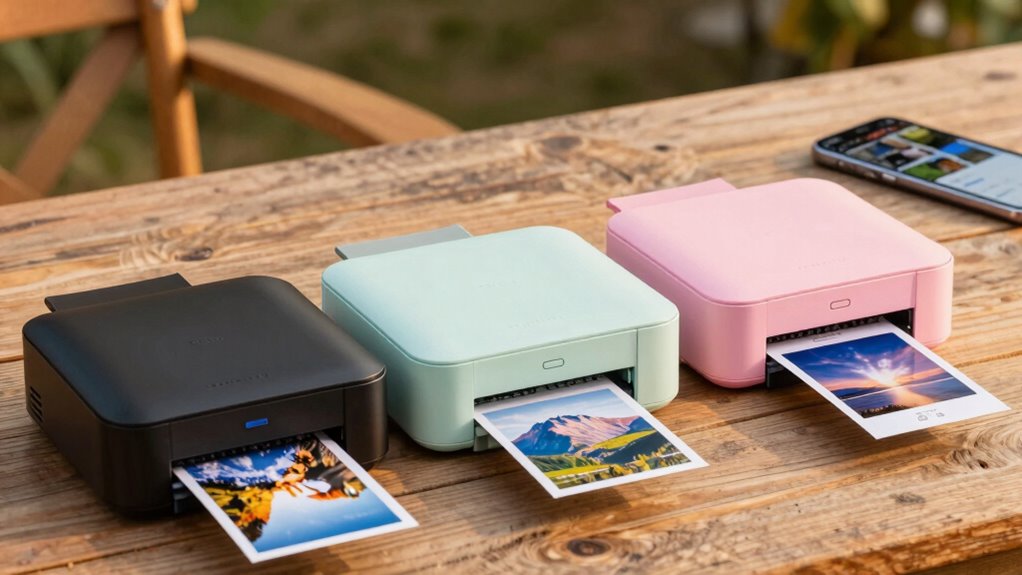

Portable photo printers make it possible to print high-quality images wherever you are, whether at parties, travel, or outdoor shoots. Among the many options, the KODAK Step Instant Smartphone Photo Printer stands out as the best overall for its balance of quality and ease of use. The Canon Ivy 2 Mini impresses with its sticky-back prints, perfect for on-the-go scrapbooking, while the HP Sprocket 2×3 offers a compact, budget-friendly choice for quick snaps. But every model involves tradeoffs—some sacrifice print quality for portability, others limit paper sizes or connectivity options. Keep reading to find the right match for your needs.

Get the latest gadgets delivered free with Prime
- Fast, free delivery on millions of items
- Prime Video, Amazon Music and more included
- Member-only deals all year
Complete the kit



Key Takeaways
- The best portable photo printers balance print quality, size, and ease of connectivity for on-the-go use.
- Higher-end models like the Canon Selphy offer better image resolution but come at a higher price and bulkier design.
- Compact Zink-based printers excel for quick prints and sticker projects but often have limited paper sizes and color vibrancy.
- Print speed varies significantly; premium options tend to produce photos faster with more consistent results.
- Compatibility with smartphones and ease of setup are critical, especially for beginners or casual users.
| KODAK Step Instant Smartphone Photo Printer |  | Best Overall for Compact, Ink-Free Printing | Print Size: 2×3 inches | Connectivity: Bluetooth, NFC | Technology: Zero Ink (ZINK) | VIEW ON AMAZON | See Our Full Breakdown |
| Liene Pearl N200 Pro Portable Photo Printer |  | Best for Vibrant, High-Resolution Sticker Prints on the Go | Printer Type: Dye Sublimation | Output Type: Color; Monochrome | Item Weight: 340 g | VIEW ON AMAZON | See Our Full Breakdown |
| Canon Ivy 2 Mini Photo Printer, Print from iOS & Android Devices, Sticky-Back Prints, Pure White |  | Best for Easy Mobile Printing with Improved Quality | Technology: ZINK (Zero Ink) | Connectivity: Bluetooth 5.0 | Compatibility: iOS & Android | VIEW ON AMAZON | See Our Full Breakdown |
| KODAK Mini 2 Retro 2×3 Portable Photo Printer, 4PASS, 38 Sheets, White |  | Best for High-Quality, Waterproof Prints for Travel and Events | Printer Type: Dye Sublimation | Output Type: Color | Item Weight: 255 g | VIEW ON AMAZON | See Our Full Breakdown |
| Liene M100 4×6 Photo Printer, Portable Wireless Instant Photo Printer for iPhone and Android |  | Best for Larger, Water-Resistant Photos with Wireless Convenience | Print Size: 4×6 inches | Technology: Thermal dye sublimation | Connectivity: Wi-Fi | VIEW ON AMAZON | See Our Full Breakdown |
| KODAK Dock Plus 4×6 Photo Printer, Smartphone Docking, 50 Sheets |  | Best Overall for High-Quality, Versatile Home Printing | Print Size: 4×6 inches | Sheets Included: 50 sheets | Printing Technology: 4PASS dye sublimation | VIEW ON AMAZON | See Our Full Breakdown |
| Liene Amber M110 Bluetooth Photo Printer 80 Sheets, Portable Photo Printer for iPhone, Thermal Dye Sublimation, 60 Sheets 4×6 Paper & 20 Sheets 3″ Square Sticker Paper & 2 Cartridges |  | Best for Versatile On-the-Go Printing with Customization | Paper Tray: Dual 4×6″ & 3×3″ | Connectivity: Bluetooth | Technology: Thermal dye sublimation | VIEW ON AMAZON | See Our Full Breakdown |
| Liene Pearl N200 Pro Portable Photo Printer |  | Best Compact for Sharp, Vibrant Photos with AI Features | Print Technology: Thermal dye sublimation | Print Size: 2×3 inches | Sheets Included: 50 adhesive sheets | VIEW ON AMAZON | See Our Full Breakdown |
| HP Sprocket 2×3 Instant Smartphone Photo Printer – Portable Color Wireless Mobile Printer – Zink Sticky-Back Photos – Print from Compatible iOS & Android Devices with Bluetooth – Purple |  | Best for Small, Fun Prints at Parties and Events | Print Size: 2×3 inches | Technology: ZINK Zero Ink | Connectivity: Bluetooth 5.3 | VIEW ON AMAZON | See Our Full Breakdown |
| Liene Pearl K100 2×3” Photo Printer Bundle with 50 Zink Adhesive Paper, Bluetooth 5.2 Compatible for iOS & Android |  | Best Budget-Friendly, Inkless Portable Photo Printer | Printer Type: Zink Technology | Output Size: 2×3 inches | Connectivity: Bluetooth 5.2 | VIEW ON AMAZON | See Our Full Breakdown |
| HP Sprocket Portable Photo Printer (2nd Edition) – Luna Pearl |  | Best for On-the-Go Social Sharing | Model: 2nd Edition | Color: Luna Pearl | Print Size: 2×3 inches | VIEW ON AMAZON | See Our Full Breakdown |
| KODAK Mini 2 Retro 2×3 Portable Photo Printer, 4PASS, 38 Sheets, Yellow |  | Best for Durable, High-Quality Wallet Photos | Printing Technology: 4PASS dye sublimation | Sheet Count: 38 sheets | Print Size: 2×3 inches | VIEW ON AMAZON | See Our Full Breakdown |
| Canon Selphy CP1500 Wireless Compact Photo Printer (Black) |  | Best for Larger, Professional-Quality Portable Prints | Connectivity: Wi-Fi, USB, memory card | Display: 3.5-inch | Water Resistance: Yes | VIEW ON AMAZON | See Our Full Breakdown |
| photo printers portable | Connectivity | Print Size |
|---|---|---|
| KODAK Step Instant Smartphone | Bluetooth, NFC | 2×3 inches |
| Liene Pearl N200 Pro Portable | Bluetooth, USB Type C | — |
| Canon Ivy 2 Mini Photo Printer | Bluetooth 5.0 | 2 x 3 inches |
| KODAK Mini 2 Retro 2×3 Portabl | Bluetooth | — |
| Liene M100 4×6 Photo Printer | Wi-Fi | 4×6 inches |
| KODAK Dock Plus 4×6 Photo Prin | Bluetooth | 4×6 inches |
| Liene Amber M110 Bluetooth Pho | Bluetooth | — |
| Liene Pearl N200 Pro Portable | Bluetooth | 2×3 inches |
| HP Sprocket 2×3 Instant Smartp | Bluetooth 5.3 | 2×3 inches |
| Liene Pearl K100 2×3” Photo Pr | Bluetooth 5.2 | — |
| HP Sprocket Portable Photo Pri | Bluetooth 5.0 | 2×3 inches |
| KODAK Mini 2 Retro 2×3 Portabl | Bluetooth | 2×3 inches |
| Canon Selphy CP1500 Wireless C | Wi-Fi, USB, memory card | Larger than 2×3 inches |
More Details on Our Top Picks
KODAK Step Instant Smartphone Photo Printer
The KODAK Step Printer stands out for its portability and affordability, especially with its zero-ink (ZINK) technology that eliminates ongoing ink costs. It produces crisp, water- and tear-resistant 2×3 inch photos that are perfect for casual use or on-the-go sharing. Compared with the Canon Ivy 2, it offers a larger app ecosystem for customizing images but is limited to a small print size and has a shorter battery life, making it less ideal for extended sessions. This model suits users who prioritize quick, durable prints without fussing over ink or large sizes, but it may fall short for those wanting bigger, black-and-white options or longer printing bursts.
Pros:- Portable and lightweight for easy carrying
- Zero-ink technology reduces ongoing costs
- Customizable with filters, stickers, and borders via app
- Water- and tear-resistant prints
Cons:- Limited to 2×3 inch print size
- No black-and-white or larger format options
- Battery life may fall short during heavy use
Best for: Travelers and event attendees who want quick, durable prints without ink worries
Not ideal for: Photographers needing larger, professional-quality prints or monochrome options
- Print Size:2×3 inches
- Connectivity:Bluetooth, NFC
- Technology:Zero Ink (ZINK)
- Battery Life:Prints 25 photos per charge
- Included Paper:Starter ZINK photo paper
- Power:Rechargeable Lithium-Ion battery
Our verdict“This printer is perfect for casual users seeking quick, durable prints on the move without extra ink expenses.”
Liene Pearl N200 Pro Portable Photo Printer
The Liene Pearl N200 Pro excels in delivering vivid, high-resolution dye-sublimation prints, making it a top choice for those who want vibrant, waterproof images. Its AI-powered editing and quick Bluetooth pairing make it especially convenient for group printing at events or for creating personalized stickers, surpassing the Canon Ivy 2 in resolution and color fidelity. However, it is limited to 2×3 inch stickers and only prints in color or monochrome, which can be restrictive for users needing larger or black-and-white prints. Its battery life supports printing around 27 stickers per charge, suitable for moderate use, but not for high-volume demands.
Pros:- Compact and lightweight for portability
- Vivid, high-resolution dye-sublimation prints
- AI-powered editing enhances creative options
- Supports group printing with quick Bluetooth pairing
Cons:- Limited to 2×3 inch sticker prints
- No larger print sizes or black-and-white option
- Battery supports only about 27 stickers per charge
Best for: Event organizers and sticker enthusiasts who value vivid, compact prints with quick editing features
Not ideal for: Photographers seeking larger or professional-grade photos or monochrome options
- Printer Type:Dye Sublimation
- Output Type:Color; Monochrome
- Item Weight:340 g
- Print Media:Labels
- Resolution:300 x 300 dpi
- Connectivity:Bluetooth, USB Type C
Our verdict“Ideal for users who want vibrant, waterproof stickers on the move, especially at events or for creative projects.”
Canon Ivy 2 Mini Photo Printer, Print from iOS & Android Devices, Sticky-Back Prints, Pure White
The Canon Ivy 2 Mini offers a convenient way to print colorful, adhesive-backed photos directly from smartphones, with improved Bluetooth connectivity and print quality over earlier versions like the HP Sprocket. Its simplicity makes it attractive for casual users who want quick, sticky-back prints for scrapbooking or sharing, but the small 2×3 inch size limits versatility. It requires a compatible device and doesn’t specify battery life, which could be a concern for extended use. Compared to the KODAK Step Printer, it provides better Bluetooth stability and slightly improved print quality, but still lacks the larger formats or advanced editing features.
Pros:- No ink needed due to ZINK technology
- Easy wireless printing from mobile devices
- Sticky-back for versatile placement
- Improved Bluetooth connectivity
Cons:- Limited to 2×3 inch prints
- Requires a compatible smartphone or tablet
- Battery life not specified
Best for: Casual smartphone users who want quick, fun, sticky-back prints for personal projects
Not ideal for: Photographers or users needing larger, professional-quality prints or extensive customization
- Technology:ZINK (Zero Ink)
- Connectivity:Bluetooth 5.0
- Compatibility:iOS & Android
- Print Size:2 x 3 inches
- Backed:Peel & Stick
Our verdict“A straightforward option for casual users seeking quick, adhesive-backed prints directly from their phones.”
KODAK Mini 2 Retro 2×3 Portable Photo Printer, 4PASS, 38 Sheets, White
The KODAK Mini 2 Retro combines the portability of earlier KODAK models with dye sublimation technology that produces water- and fingerprint-resistant 2.1 x 3.4 inch photos. Its quick 55-second print speed makes it suitable for parties, travel, or scrapbooking, especially considering its included multiple sheets and cartridges for immediate use. Compared to the Liene Pearl N200 Pro, it offers a similar high-quality output but with a slightly larger print size and a traditional dye sublimation process. Its limited media size and modest print speed mean it’s best for casual, on-the-go printing rather than high-volume needs.
Pros:- Portable and lightweight design
- High-quality dye sublimation with water and fingerprint resistance
- Easy wireless Bluetooth connection
- Includes multiple sheets and cartridges for quick start
Cons:- Limited media size (2.1 x 3.4 inches)
- Print speed of 55 seconds per photo can be slow
- Requires compatible smartphones and app
Best for: Travelers or party-goers who want durable, waterproof prints with minimal fuss
Not ideal for: Photographers needing larger or monochrome prints or high-volume printing
- Printer Type:Dye Sublimation
- Output Type:Color
- Item Weight:255 g
- Maximum Media Size:2.1 x 3.4 inches
- Maximum Sheet Capacity:15
- Connectivity:Bluetooth
Our verdict“Perfect for casual, durable prints during travel or parties where water resistance matters most.”
Liene M100 4×6 Photo Printer, Portable Wireless Instant Photo Printer for iPhone and Android
The Liene M100 offers a significant upgrade with its ability to produce 4×6 inch photos, making it a better fit for framing or gifting compared to the smaller 2×3 options. Its Wi-Fi connectivity allows multiple devices to print simultaneously, and its water- and scratch-resistant dye sublimation process ensures durable results. Compared to the KODAK Mini 2 Retro, it provides larger prints and supports multiple device connections, but it requires proper cartridge installation and may involve higher costs for additional sheets and cartridges. This printer is well-suited for users who want larger, high-quality prints with wireless flexibility for casual or semi-professional use.
Pros:- Produces vibrant, water- and scratch-resistant 4×6 inch photos
- Wireless Wi-Fi connection supports multiple devices
- Supports customization via dedicated app
- Compact and portable design
Cons:- Requires correct cartridge installation for optimal results
- Limited to 4×6 inch photo size
- Additional sheets and cartridges may be costly for extended use
Best for: Families or hobbyists wanting larger, durable prints with multi-device support
Not ideal for: Travelers needing ultra-compact size or quick, small prints for immediate sharing
- Print Size:4×6 inches
- Technology:Thermal dye sublimation
- Connectivity:Wi-Fi
- Paper Sheets Included:100
- Cartridges Included:3
- Compatibility:iPhone, Android, PC
Our verdict“Ideal for users seeking larger, durable prints with wireless flexibility, especially for family or hobbyist projects.”
KODAK Dock Plus 4×6 Photo Printer, Smartphone Docking, 50 Sheets
The KODAK Dock Plus stands out as a comprehensive home photo printer that seamlessly combines convenience with durability. Its dye sublimation technology ensures vibrant, water- and scratch-resistant 4×6 prints, making it ideal for framing or gifting. Unlike the HP Sprocket, which offers smaller 2×3 prints, the Dock Plus handles standard photo sizes, appealing to users who want larger, more display-worthy images. The built-in docking station simplifies charging and connection, rendering it a tidy, all-in-one solution. However, its reliance on a power outlet and slower print speed of around 55 seconds per photo could be drawbacks for those seeking quick, on-the-go printing. Overall, this pick suits home users prioritizing quality and ease of use over portability.
Pros:- Produces vibrant, long-lasting 4×6 prints with dye sublimation
- Integrated docking station for charging and connection
- Wireless printing via Bluetooth and dedicated app
Cons:- Limited to 4×6-inch print size, less versatile for different formats
- Requires an external power source, reducing portability
Best for: Families or hobbyists wanting high-quality, durable prints from their smartphones at home.
Not ideal for: Someone seeking a portable, battery-operated device for quick prints outdoors or at events.
- Print Size:4×6 inches
- Sheets Included:50 sheets
- Printing Technology:4PASS dye sublimation
- Connectivity:Bluetooth
- Compatible Devices:iOS and Android
- Print Speed:Approximately 55 seconds per photo
Our verdict“This model is perfect for home users valuing quality and convenience over portability.”
Liene Amber M110 Bluetooth Photo Printer 80 Sheets, Portable Photo Printer for iPhone, Thermal Dye Sublimation, 60 Sheets 4×6 Paper & 20 Sheets 3″ Square Sticker Paper & 2 Cartridges
The Liene Amber M110 excels as a portable, multifunctional photo printer that caters to creative users. Its dual trays support 4×6 photos and 3-inch stickers, making it more adaptable than the HP Sprocket, which only prints small 2×3 photos. Using thermal dye sublimation, it delivers water- and scratch-resistant prints with vivid color. The AI-enhanced editing and quick Bluetooth pairing make it appealing for spontaneous gatherings or creative projects. Nonetheless, its limited print size and reliance on app-driven customization might frustrate users seeking straightforward, larger-format prints. This printer suits those who want flexibility and quality in a compact device, especially for stickers and small photos on the go.
Pros:- Supports both 4×6 and 3-inch sticker paper for versatility
- High-quality, water- and scratch-resistant prints via dye sublimation
- AI-powered editing features for creative customization
Cons:- Limited to specific paper sizes and types, reducing flexibility
- Requires app for full features, adding complexity for some users
Best for: Creative individuals and small groups wanting versatile, durable prints from their smartphones.
Not ideal for: Users needing larger photo formats or frequent high-volume printing, due to its size constraints and limited sheet capacity.
- Paper Tray:Dual 4×6″ & 3×3″
- Connectivity:Bluetooth
- Technology:Thermal dye sublimation
- Prints Included:60 sheets 4×6, 20 sheets 3″ stickers
- Cartridges:2
- Print Speed:Fast, instant print
Our verdict“This printer is ideal for creative users who value customization and portability over larger photo sizes.”
Liene Pearl N200 Pro Portable Photo Printer
The Liene Pearl N200 Pro offers a sleek, 3-inch portable solution that emphasizes sharp, vibrant images. Its use of advanced dye-sublimation technology results in high-quality prints, comparable to larger models like the KODAK Dock Plus, but in a much smaller package. The AI-enhanced editing features provide creative flexibility, making it appealing for spontaneous shoots and group printing. Its support for long-lasting, adhesive 2×3 stickers adds extra versatility. The main tradeoff lies in its small print size, which may not satisfy those wanting larger displays. Battery life supports about 27 stickers per charge, suitable for short outings but less ideal for extended events. This model fits users who prioritize high-quality prints in a highly portable form factor.
Pros:- Produces sharp, vibrant 2×3 inch photos with dye-sublimation
- AI-powered editing for creative customization
- Supports group printing and adhesive stickers
Cons:- Limited to 2×3 inch prints, less suitable for framing or displays
- Battery life may be insufficient for large batches
Best for: Photographers or creative users wanting high-quality, small-format prints on the go with AI editing capabilities.
Not ideal for: Those seeking larger prints or high-volume printing for events, due to its small size and limited battery life.
- Print Technology:Thermal dye sublimation
- Print Size:2×3 inches
- Sheets Included:50 adhesive sheets
- Connectivity:Bluetooth
- Battery Life:Up to 27 stickers per charge
- Additional Features:AI editing
Our verdict“This device suits mobile users who want high-quality, small photos with creative editing features.”
HP Sprocket 2×3 Instant Smartphone Photo Printer – Portable Color Wireless Mobile Printer – Zink Sticky-Back Photos – Print from Compatible iOS & Android Devices with Bluetooth – Purple
The HP Sprocket 2×3 is a compact, lightweight printer designed for casual, on-the-go printing. Its ZINK technology eliminates the need for ink, providing quick, colorful, sticky-backed photos that resist water, smudges, and tears. Compared to larger models like the KODAK Dock Plus, the Sprocket’s small size makes it perfect for parties, events, or scrapbooking. Its customizable filters and frames via the HP app add fun creative options. However, the limited 2×3-inch print size and shorter battery life—around 35 prints per charge—may restrict its use to casual or short-term settings. This device makes the most sense for users who want instant, fun photos without fuss or bulk.
Pros:- Extremely portable and lightweight for on-the-go use
- No ink needed—uses ZINK zero ink technology
- Water- and smudge-resistant sticky-back photos
Cons:- Limited to 2×3 inch print size, less versatile for framing
- Battery life supports only about 35 prints per charge
Best for: Event attendees or party-goers wanting quick, fun, small photos to share or stick on surfaces.
Not ideal for: Users needing larger, display-ready prints or high-volume printing in a professional setting.
- Print Size:2×3 inches
- Technology:ZINK Zero Ink
- Connectivity:Bluetooth 5.3
- Power:Rechargeable battery
- Prints per Charge:35
- Additional Features:Customizable filters and borders
Our verdict“This printer is ideal for casual users seeking fun, small photos at parties or outings.”
Liene Pearl K100 2×3” Photo Printer Bundle with 50 Zink Adhesive Paper, Bluetooth 5.2 Compatible for iOS & Android
The Liene Pearl K100 offers a straightforward, budget-conscious option for printing 2×3-inch photos on the go. Its Zink technology produces water- and fade-resistant images without ink, making it a low-maintenance choice compared to traditional inkjet or dye sublimation models like the KODAK Dock Plus. Its compact size and Bluetooth 5.2 connectivity make it highly portable, perfect for quick snaps and sticker printing. However, the limitation to a single photo per print run and the requirement of a calibration card for cleaning add some inconvenience. This pick is well-suited for casual users or those new to portable printing who prioritize affordability and ease of use over high-volume or larger-format prints.
Pros:- Wireless Bluetooth 5.2 for easy, quick printing
- Uses inkless Zink technology for durable photos
- Lightweight and highly portable
Cons:- Limited to 1 photo per print run, reducing efficiency
- Requires calibration card for cleaning, adding maintenance steps
Best for: Casual users or beginners wanting an affordable, portable printer for small photos and stickers.
Not ideal for: Power users or those needing larger prints or high-volume output, due to its print size and capacity limits.
- Printer Type:Zink Technology
- Output Size:2×3 inches
- Connectivity:Bluetooth 5.2
- Included Sheets:50 adhesive sheets
- Maximum Copies Per Run:1
- Additional Features:Limited maintenance with calibration card
Our verdict“This printer is best suited for casual users seeking a simple, affordable way to print small photos and stickers on the go.”
HP Sprocket Portable Photo Printer (2nd Edition) – Luna Pearl
The HP Sprocket 2nd Edition stands out for its pocket-sized design and instant sticky-backed 2×3-inch photos, making it ideal for quick, social media-ready prints. Compared with the Canon Selphy CP1500, it offers a more compact form factor but sacrifices larger print sizes and higher resolution. Its Bluetooth 5.0 connection and app support enable easy customization and augmented reality features, perfect for sharing moments on the fly. However, its limited print size and reliance on ZINK paper mean it’s best suited for casual use rather than professional-quality prints. Battery life can also be a concern if used frequently during events. This pick makes the most sense for casual users who want instant, portable photo sharing with fun features.
Pros:- Extremely compact and lightweight, fits in any pocket or bag
- Supports multiple device connections and customization via app
- Includes augmented reality features for interactive sharing
Cons:- Limited to small 2×3-inch prints, not suitable for larger photos
- Requires ZINK peel-and-stick paper, which can be more expensive over time
- Battery life may diminish with frequent use during long outings
Best for: Social media enthusiasts, party hosts, or travelers who want immediate, shareable prints
Not ideal for: Photographers seeking larger, more detailed prints or those needing durable, professional-grade photos
- Model:2nd Edition
- Color:Luna Pearl
- Print Size:2×3 inches
- Connectivity:Bluetooth 5.0
- Paper Type:ZINK peel-and-stick photo paper
- Included Sheets:10 sheets
- Dimensions:Smartphone-sized
- Weight:Under 1 pound
- Warranty:One-year limited hardware warranty
Our verdict“This printer is best for casual users who prioritize portability and fun, social photo sharing over professional print quality.”
KODAK Mini 2 Retro 2×3 Portable Photo Printer, 4PASS, 38 Sheets, Yellow
The KODAK Mini 2 Retro 4PASS is a strong choice for those wanting high-quality, water- and fade-resistant prints from their smartphone photos. Its dye sublimation technology produces durable images that last up to 100 years, making it ideal for personal keepsakes or scrapbooking. Compared to the Canon Selphy CP1500, it offers a more portable, lightweight design but with slower print speeds—about 55 seconds per photo—and fewer connectivity options. Its ease of use via Bluetooth and the dedicated app makes it suitable for casual users on-the-go. However, its limited to wallet-sized 2×3-inch prints, and the need for cartridges adds ongoing costs. This device is perfect for travelers and event-goers who want durable prints for keepsakes.
Pros:- Compact and lightweight, easy to carry anywhere
- Produces water- and fade-resistant, high-quality prints
- Wireless Bluetooth connection with simple app interface
Cons:- Limited to wallet-sized 2×3-inch images, not suitable for larger photos
- Prints are slower than some competitors, taking about 55 seconds each
- Requires cartridges, adding recurring costs
Best for: Travelers, event attendees, or scrapbookers needing durable, small-format prints
Not ideal for: Photographers or users who prefer larger or faster printing capabilities
- Printing Technology:4PASS dye sublimation
- Sheet Count:38 sheets
- Print Size:2×3 inches
- Connectivity:Bluetooth
- Color:Yellow
- Included Accessories:4 cartridges, USB Type-C cable, user guide
- Water Resistance:Yes
- Durability:Up to 100 years
Our verdict“This printer is ideal for those who value durable, small photos and portability over speed or larger formats.”
Canon Selphy CP1500 Wireless Compact Photo Printer (Black)
The Canon Selphy CP1500 offers a sleek, portable solution for those who want high-quality, water-resistant photos that can last for a century. Its Wi-Fi, USB, and memory card support provide versatile connectivity options, making it more flexible than the HP Sprocket for printing from multiple sources. Compared to the KODAK Mini 2 Retro, the Selphy produces larger, more detailed images and offers a 3.5-inch display for easy editing before printing. However, it requires an optional battery for true portability, which can increase the overall cost and weight. Its print cost can also be higher due to ink and paper requirements. This model suits users seeking a portable printer capable of producing larger, professional-looking photos.
Pros:- Portable and lightweight with multiple connectivity options
- Produces water-resistant, long-lasting photos
- Large, easy-to-use 3.5-inch display for preview and editing
Cons:- Requires an optional battery, adding to the cost and weight
- Limited to specific photo sizes, not suitable for larger prints
- Higher ongoing costs for ink and paper
Best for: Photographers, event organizers, or hobbyists who need a portable printer with larger, high-quality output
Not ideal for: Casual users or travelers who prioritize pocket-sized convenience or durability over print size and detail
- Connectivity:Wi-Fi, USB, memory card
- Display:3.5-inch
- Water Resistance:Yes
- Photo Longevity:Up to 100 years
- Size:Compact
- Print Size:Larger than 2×3 inches
- Battery:Optional
- Weight:Lightweight
Our verdict“This printer is best for users who want portable, high-quality photos with larger formats and are willing to carry extra accessories.”

How We Picked
These products were evaluated based on multiple criteria that matter to users: print quality, size and portability, connectivity options (Bluetooth, Wi-Fi, app support), paper capacity, ease of use, and overall value. We prioritized models that offer reliable performance in real-world conditions and considered user feedback and expert insights. The ranking reflects a balance between cost, versatility, and quality, helping buyers identify options suited for different needs—from casual snapping to more serious photo printing. Tradeoffs are inevitable: smaller, cheaper models may sacrifice some image fidelity, while premium units offer richer colors but with larger footprints and higher costs.Factors to Consider When Choosing Photo Printers Portable
Choosing the right portable photo printer involves evaluating several factors beyond just print quality. Size and weight are critical if you plan to carry the device regularly. Connectivity options like Bluetooth or Wi-Fi determine how easily you can print from your devices. Consider the paper size supported—most portable models print 2×3 or 4×6 photos, but your choice depends on your preferred print style. Cost per print and initial investment vary widely; some printers require ongoing ink or dye cartridges, while others use Zink technology with zero ink. Durability and battery life are also essential for outdoor or travel use, ensuring your printer can keep up with your adventures. Finally, think about the ecosystem—app support, compatibility, and additional features like stickers or templates can enhance the overall experience.Print Quality and Paper Size
The core difference between models often lies in their image resolution and color accuracy. Premium printers like the Canon Selphy deliver sharp, vibrant photos suitable for framing, but they tend to be larger and more expensive. Cheaper models, especially those using Zink technology, produce decent snapshots but may lack the color depth of higher-end options. Paper size is equally important; 4×6 prints are versatile for framing, while 2×3 photos are perfect for stickers and quick sharing. Understanding your primary use—whether for keepsakes or quick sharing—helps narrow down the best size and quality tradeoff.Portability and Size
Size and weight directly impact how portable a printer truly is. Compact models fit easily into bags or pockets, ideal for travel or events. Larger units, like the Canon Selphy, offer better features and higher quality but sacrifice some mobility. Battery life is another key factor—some printers last for dozens of prints on a single charge, while others require frequent recharging. If you plan to print outdoors or away from power sources, prioritize models with longer battery life and sturdy build quality. Remember, the smallest device may lack some features or paper capacity, so weigh size against your printing volume needs.Connectivity and Ease of Use
Seamless connection to smartphones and tablets is essential for a smooth printing experience. Most portable printers support Bluetooth, with some adding Wi-Fi or app integration for more features. User-friendly apps make it easier to edit, crop, and add filters before printing. However, complex setups or unreliable connections can frustrate users, especially beginners. It’s worthwhile to check for app updates, compatibility with your device’s OS, and straightforward pairing procedures. A reliable connection ensures you spend less time troubleshooting and more time printing your favorite moments.Cost and Paper Supply
Initial costs vary significantly—some printers are budget-friendly but require buying proprietary paper or ink cartridges regularly. Zink printers, which use heat to develop images without ink, have a higher upfront cost but lower ongoing expenses. In contrast, dye-sublimation printers like the Canon Selphy generally produce more durable, vibrant prints but at a higher per-photo price. Consider your typical print volume and whether the ongoing costs align with your budget. Also, availability of compatible paper and accessories can influence long-term satisfaction with your choice.Durability and Battery Life
If you plan to use your printer outdoors or during travel, durability and battery longevity should be high on your list. Look for models with sturdy construction and protective features like water resistance or shock absorption. Battery life varies, with some devices capable of dozens of prints per charge, while others require frequent recharging. A longer-lasting battery reduces interruptions during outings, especially if power sources are scarce. Additionally, consider how easy it is to replace or recharge batteries if needed, as this impacts overall convenience for on-the-go printing.Frequently Asked Questions
Can I print photos directly from my smartphone without using Wi-Fi?
Yes, most portable photo printers support direct printing via Bluetooth from smartphones and tablets. Bluetooth provides a quick, cable-free connection, making it ideal for spontaneous printing sessions. However, some models may require a dedicated app or initial pairing setup, so it’s worth checking compatibility with your device. Wireless options like Wi-Fi can enable larger image transfers and cloud printing, but Bluetooth remains the simplest for quick, on-the-spot prints. Remember, a stable Bluetooth connection ensures your images transfer smoothly without interruptions.
Are portable photo printers suitable for professional photo printing?
While portable printers are excellent for casual use, snapshots, and immediate sharing, they often lack the resolution and color fidelity required for professional-quality prints. High-end models like the Canon Selphy can produce sharp images, but they still fall short of lab-quality results. For professional needs, larger, dedicated photo printers with higher resolutions and color management are better options. However, for on-the-go client proofs or quick thumbnails, a portable printer can be surprisingly useful, provided expectations are aligned with its capabilities.
How long do portable photo prints typically last?
The longevity of prints depends on the technology used. Dye-sublimation and some high-quality Zink prints are designed to be quite durable, resisting water, smudges, and fading for several years if kept away from direct sunlight. Cheaper Zink prints may be less resistant over time. To maximize longevity, store prints in albums or frames and keep them out of direct sunlight. The choice of printer and paper type significantly impacts how well your photos will stand up to the test of time.
Can I print from social media directly with these printers?
Many portable printers support printing directly from social media apps through their companion apps or via cloud services. Bluetooth or Wi-Fi connectivity often makes it easy to access images stored online or in social media accounts. Some models even allow direct printing from specific apps, making it convenient to print your favorite Instagram shots or Facebook albums. Always verify whether the printer’s app supports the social media platforms you use, and ensure your device has a reliable internet connection if needed.
What is the typical cost per print for portable photo printers?
The cost per print varies widely depending on the printer technology and paper type. Zink-based printers tend to have lower ongoing costs since they don’t require ink cartridges, but the specialized paper can be more expensive per sheet. Dye-sublimation printers usually offer more vibrant results but at a higher per-photo cost due to ink and paper expenses. Budget models may cost just a few cents per print, while premium options can range up to 50 cents or more. Consider your expected print volume and quality preferences when evaluating ongoing costs.
Conclusion
For casual users and quick snaps, the HP Sprocket 2×3 offers affordability and simplicity. Those seeking the best overall balance of quality and portability should consider the KODAK Step, which provides reliable performance without complexity. If you’re willing to invest more for superior image fidelity and durability, the Canon Selphy CP1500 stands out as the premium choice. Beginners or those new to portable printing will appreciate models with straightforward apps and minimal setup, while outdoor enthusiasts should prioritize battery life and rugged design. By matching your specific needs with these highlights, you’ll find a portable printer that makes printing fun and effortless wherever you go.