The best gaming handhelds balance the games you want to play with comfort, battery life, and a control scheme you can live with. My best overall pick is the Valve Steam Deck OLED for its strong fit with portable PC gaming, while the ASUS ROG Xbox Ally stands out for players who want a Windows handheld with a 120Hz screen, and the Retroid Pocket Flip 2 suits Android gaming and emulation. The main tradeoffs are between PC performance and portability, ease of use and flexibility, and dedicated retro or cloud play versus a broad game library. Screen size, storage, operating system, and the games you already own can matter as much as raw hardware. Read on for how the 15 picks differ and which one fits your play style.

Get the latest gadgets delivered free with Prime
- Fast, free delivery on millions of items
- Prime Video, Amazon Music and more included
- Member-only deals all year
Complete the kit



Key Takeaways
- The Steam Deck OLED is the roundup’s most balanced PC gaming pick: its 1TB capacity and OLED screen make it a strong all-rounder, while Windows-based options offer a different level of compatibility and flexibility.
- The Windows models serve distinct needs: the ASUS ROG Xbox Ally emphasizes a 7-inch, 120Hz format, while the MSI Claw A8 and Lenovo Legion Go S give more room to play on 8-inch displays.
- More power comes with a portability cost: the high-spec GPD Win 5 is aimed at buyers who want a handheld PC with substantial memory and storage, not those prioritizing a compact, simple device.
- Android and cloud handhelds are not substitutes for every PC handheld: the Retroid Pocket Flip 2 targets Android play and emulation, while the abxylute One Pro is aimed at streaming games rather than running demanding titles locally.
- Retro-focused picks differ by screen, form, and simplicity: the MANGMI AIR X offers a touchscreen and 5.5-inch FHD panel; smaller 4-inch options and the Atari Pocket Player suit narrower, more straightforward play.
| MANGMI AIR X Android Handheld Game Console, 5.5-Inch FHD IPS Touchscreen, 4GB RAM, 64GB Storage, Black |  | Best for Android and Cloud Gaming | Processor: Qualcomm Snapdragon 662 octa-core, up to 2.1 GHz | Operating system: Android 14 | Display: 5.5-inch FHD IPS touchscreen, 1920 × 1080, 400 nits | VIEW LATEST PRICE | See Our Full Breakdown |
| RG56PRO Retro Handheld Game Console with EVA Hard Case, 128GB |  | Best for a Large Preloaded Retro Library | Processor: Rockchip RK3562 quad-core, up to 2.0GHz | Operating system: Linux | Display: 5.5-inch IPS LCD, 1280 × 720 | VIEW LATEST PRICE | See Our Full Breakdown |
| ASUS ROG Xbox Ally Gaming Handheld, 7-inch 120Hz Touchscreen, Ryzen Z2 A, 16GB RAM, 512GB SSD, Windows 11 Home, with DKZ Hub |  | Best Overall for PC Storefront Access | Processor: AMD Ryzen Z2 A | Operating system: Windows 11 Home | Display: 7-inch 1080p IPS touchscreen, 120Hz, 500 nits | VIEW LATEST PRICE | See Our Full Breakdown |
| RG43H Pro Retro Handheld Game Console, 64GB |  | Best Compact Retro Pick | Processor: Rockchip RK3562 quad-core | Gaming systems: EmuELEC and RGBOX | Display: 4.3-inch IPS, 1024 × 768 | VIEW LATEST PRICE | See Our Full Breakdown |
| ASUS ROG Xbox Ally 7-inch 1080p 120Hz Gaming Handheld |  | Best for Xbox Game Pass Starters | Processor: AMD Ryzen Z2 A | Operating system: Windows 11 | Display: 7-inch 1080p touchscreen, 120Hz, FreeSync Premium | VIEW LATEST PRICE | See Our Full Breakdown |
| RF40H Handheld Retro Game Console with 4-Inch IPS Display |  | Best for a Large Preloaded Retro Library | Operating system: Linux | Display: 4-inch IPS, 720 × 720 | Storage: 64 GB | VIEW LATEST PRICE | See Our Full Breakdown |
| Valve Steam Deck OLED 1TB Handheld Gaming Console |  | Best Overall for Steam Gaming | Platform: Steam Deck | Display: 7.4-inch HDR OLED | Resolution: 1280 × 800 | VIEW LATEST PRICE | See Our Full Breakdown |
| Lenovo Legion Go S Handheld Gaming Console, Ryzen Z2 Go, 8-inch 120Hz Display, 16GB RAM, 512GB Storage, Glacier White |  | Best for a Large, Fast Windows Display | Platform: Windows | Processor: AMD Ryzen Z2 Go | Graphics: AMD Radeon | VIEW LATEST PRICE | See Our Full Breakdown |
| abxylute One Pro Cloud Gaming Handheld, 7-Inch 1080p Touchscreen, 64GB |  | Best for Cloud and Remote Play | Platform: Android | Chipset: MediaTek Genio 510 | Display: 7-inch 1080p touchscreen | VIEW LATEST PRICE | See Our Full Breakdown |
| RG52MINI Retro Handheld Game Console with 5.5-Inch IPS Display |  | Best Retro Pick for HDMI Play | Processor: Rockchip RK3562 quad-core Cortex-A53, 2.0 GHz | Memory: 2+4 GB RAM | Display: 5.5-inch IPS, 720 × 1280 | VIEW LATEST PRICE | See Our Full Breakdown |
| My Arcade Atari Pocket Player with 100 Games |  | Best for Atari Fans | Games: 100 total: 80 Atari 2600 games and 20 bonus games | Screen: 2.75-inch color LCD | Power: Four AA batteries or USB-C | VIEW LATEST PRICE | See Our Full Breakdown |
| GPD Win 5 Handheld Gaming PC, Ryzen AI Max+ 395, 32GB RAM, 2TB SSD, Radeon 8060S |  | Best for Maximum PC Performance | Processor: AMD Ryzen AI Max+ 395, 16-core | Graphics: Radeon 8060S, 40 CUs, RDNA 3.5 | Memory: 32GB LPDDR5X, 8000 MT/s | VIEW LATEST PRICE | See Our Full Breakdown |
| Retroid Pocket Flip 2 Android Handheld Game Console, 5.5-Inch AMOLED 1080p Display, 8GB RAM, 128GB Storage, Black | 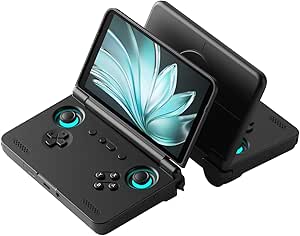 | Best Clamshell Android Handheld | Operating system: Android 13 | Processor: Qualcomm Snapdragon 865 | Graphics: Adreno 650 | VIEW LATEST PRICE | See Our Full Breakdown |
| MSI Claw A8 Gaming Handheld, AMD Ryzen Z2 Extreme, 8-inch FHD+ 120Hz Display, 24GB LPDDR5x, 1TB NVMe SSD, White |  | Best Large-Screen Windows Handheld | Processor: AMD Ryzen Z2 Extreme | Display: 8-inch FHD+ (1920 × 1200), 120Hz | Memory: 24GB LPDDR5x | VIEW LATEST PRICE | See Our Full Breakdown |
| MSI Claw Gaming Handheld, Intel Arc G3 Extreme, 8-inch FHD+ 120Hz Display, 32GB RAM, 1TB SSD, Windows 11 Home, Void Purple |  | Best for Memory-Heavy Multitasking | Operating system: Windows 11 Home | Processor: Intel Arc G3 Extreme | Processor speed: 1.5 GHz; maximum CPU speed 4.7 GHz | VIEW LATEST PRICE | See Our Full Breakdown |
| gaming handheld | Display | Storage | Processor | Connectivity |
|---|---|---|---|---|
| MANGMI AIR X Android Handheld | 5.5-inch FHD IPS touchscreen, 1920 × 1080, 400 nits | 64GB; expandable via microSD | Qualcomm Snapdragon 662 octa-core, up to 2.1 GHz | Wi-Fi, USB, and 5G Wi-Fi mirroring |
| RG56PRO Retro Handheld Game Co | 5.5-inch IPS LCD, 1280 × 720 | 128GB | Rockchip RK3562 quad-core, up to 2.0GHz | Wi-Fi, HDMI, and USB Type-C |
| ASUS ROG Xbox Ally Gaming Hand | 7-inch 1080p IPS touchscreen, 120Hz, 500 nits | 512GB SSD | AMD Ryzen Z2 A | Wi-Fi 6E, Bluetooth 5.4, and USB |
| RG43H Pro Retro Handheld Game | 4.3-inch IPS, 1024 × 768 | 64GB; expandable up to 512GB | Rockchip RK3562 quad-core | 2.4GHz Wi-Fi, HDMI output, and USB Type-C with OTG |
| ASUS ROG Xbox Ally 7-inch 1080 | 7-inch 1080p touchscreen, 120Hz, FreeSync Premium | 512GB SSD | AMD Ryzen Z2 A | — |
| RF40H Handheld Retro Game Cons | 4-inch IPS, 720 × 720 | 64 GB | — | Wi-Fi |
| Valve Steam Deck OLED 1TB Hand | 7.4-inch HDR OLED | 1TB NVMe SSD | — | Wi-Fi 6E |
| Lenovo Legion Go S Handheld Ga | 8-inch PureSight IPS, 1920 × 1080, 120Hz, 16:10 | 512GB | AMD Ryzen Z2 Go | — |
| abxylute One Pro Cloud Gaming | 7-inch 1080p touchscreen | 64 GB | — | Wi-Fi, HDMI, and USB |
| RG52MINI Retro Handheld Game C | 5.5-inch IPS, 720 × 1280 | 64 GB; expandable up to 1TB via TF card | Rockchip RK3562 quad-core Cortex-A53, 2.0 GHz | 2.4 GHz Wi-Fi and HDMI output |
| My Arcade Atari Pocket Player | — | — | — | — |
| GPD Win 5 Handheld Gaming PC | High-resolution, high-refresh-rate display; resolution and refresh rate unspecified | 2TB | AMD Ryzen AI Max+ 395, 16-core | — |
| Retroid Pocket Flip 2 Android | 5.5-inch AMOLED, 1080p, 500 nits, 60Hz | 128GB UFS 3.1 | Qualcomm Snapdragon 865 | Wi-Fi 6, Bluetooth 5.1, USB-C DisplayPort, 3.5 mm audio jack |
| MSI Claw A8 Gaming Handheld | 8-inch FHD+ (1920 × 1200), 120Hz | 1TB NVMe SSD | AMD Ryzen Z2 Extreme | Thunderbolt 4, Bluetooth, Wi-Fi |
| MSI Claw Gaming Handheld | 8-inch FHD+, 120Hz | 1TB NVMe SSD | Intel Arc G3 Extreme | Bluetooth and Wi-Fi |
More Details on Our Top Picks
MANGMI AIR X Android Handheld Game Console, 5.5-Inch FHD IPS Touchscreen, 4GB RAM, 64GB Storage, Black
The MANGMI AIR X suits players who want Android games, retro titles, and cloud streaming in one compact handheld. Its 5.5-inch 1080p touchscreen is sharper than the 720p panel on the RG56PRO, while Hall-effect sticks and triggers offer a control setup aimed at longer play sessions. Android 14 also gives it access to a broader app-based experience than the RG56PRO’s Linux system, though setup and game compatibility can vary by app.
The tradeoff is performance headroom: the Snapdragon 662 and 4GB RAM make this a better fit for Android and streamed games than demanding PC gaming. Built-in storage is limited to 64GB, so a microSD card may be needed for a larger library. Active cooling and a stated battery life of up to eight hours add flexibility, but runtime depends on use.
Pros:- 1080p IPS touchscreen with 400-nit brightness
- Android 14 supports Android games, retro gaming, and cloud-streaming apps
- Hall-effect joysticks and triggers with active cooling
- microSD expansion and a stated battery life of up to eight hours
Cons:- 64GB built-in storage can fill quickly with games and apps
- Snapdragon 662 and 4GB RAM are not aimed at demanding PC games
- Actual battery runtime may be shorter than the stated maximum
Best for: Players who want an Android handheld for mobile games, retro emulation, and cloud streaming, with a sharp touchscreen and expandable storage.
Not ideal for: Buyers seeking a Windows PC gaming handheld or a large preloaded retro library; its processor and 64GB built-in storage are better suited to lighter, app-based play.
- Processor:Qualcomm Snapdragon 662 octa-core, up to 2.1 GHz
- Operating system:Android 14
- Display:5.5-inch FHD IPS touchscreen, 1920 × 1080, 400 nits
- Memory:4GB RAM
- Storage:64GB; expandable via microSD
- Battery:5000mAh; stated up to 8 hours of gameplay
- Controls:RGB Hall-effect joysticks and linear Hall triggers
- Connectivity:Wi-Fi, USB, and 5G Wi-Fi mirroring
Our verdict“Choose the MANGMI AIR X for Android and cloud play with a sharper screen than the RG56PRO, but skip it if you want PC-class gaming performance.”
RG56PRO Retro Handheld Game Console with EVA Hard Case, 128GB
The RG56PRO is the clearest pick here for players who want a retro-focused handheld with a large included game collection. Its 128GB card and stated library of more than 31,000 games give it a different appeal from the MANGMI AIR X, which is an Android device for building a library through apps and services. A 5.5-inch 720p IPS display, dual joysticks, and Hall-effect shoulder controls make the RG56PRO more suited to varied retro control schemes than a simpler pocket console.
It also has HDMI output, Wi-Fi for compatible multiplayer, active cooling, and an EVA case. The limits are in the details: multiplayer support is restricted to compatible games and devices, and the battery information gives both up-to-eight-hour and six-hour-average estimates. Unlike the Windows-based ASUS ROG Xbox Ally, this Linux model is not presented as a way to access PC game storefronts.
Pros:- 128GB game card and a stated library of more than 31,000 games
- 5.5-inch IPS display with HDMI output
- Hall-effect shoulder controls, dual joysticks, and active cooling
- EVA hard case is included
Cons:- Battery estimates conflict: up to eight hours is stated, while specs also list six hours average
- Wi-Fi multiplayer is limited to compatible games and devices
- 720p Linux handheld is not positioned for Windows PC storefront gaming
Best for: Retro players who want a broad included game library, physical storage, HDMI output, and a carrying case in one package.
Not ideal for: Buyers who want current PC storefronts, a high-resolution screen, or clearly specified battery runtime; the Linux platform and conflicting battery estimates may not fit.
- Processor:Rockchip RK3562 quad-core, up to 2.0GHz
- Operating system:Linux
- Display:5.5-inch IPS LCD, 1280 × 720
- Storage:128GB
- Included games:More than 31,000
- Battery:5000mAh; stated up to 8 hours, with 6 hours average also listed
- Connectivity:Wi-Fi, HDMI, and USB Type-C
- Included accessory:EVA hard case
Our verdict“Pick the RG56PRO for a ready-to-play retro library and included case, not for PC storefront access or unambiguous battery expectations.”
ASUS ROG Xbox Ally Gaming Handheld, 7-inch 120Hz Touchscreen, Ryzen Z2 A, 16GB RAM, 512GB SSD, Windows 11 Home, with DKZ Hub
The ASUS ROG Xbox Ally is the most versatile gaming choice in this group for buyers who want access to Xbox, Steam, Epic Games, and other PC platforms on one handheld. That flexibility sets it apart from the Linux-based RG56PRO and Android MANGMI AIR X, which serve narrower gaming ecosystems. Its 7-inch 1080p, 120Hz touchscreen gives fast-moving games room to breathe, while FreeSync Premium is intended to reduce visible tearing during play.
The Ryzen Z2 A, 16GB memory, and 512GB SSD make this the PC-style option here, but a Windows handheld brings more software complexity than a dedicated retro device. Storage can also become tight when several large games are installed. The 60Wh battery supports fast charging, and contoured grips are designed for longer sessions. One purchasing detail needs checking: the listed weight differs between the description and item details.
Pros:- Windows 11 access to Xbox, Steam, Epic Games, and other PC platforms
- 7-inch 1080p touchscreen with 120Hz refresh rate and FreeSync Premium
- 16GB LPDDR5X memory and a 512GB SSD
- 60Wh battery with fast charging and contoured grips
Cons:- 512GB storage may require managing a large PC game library
- Windows adds setup and software complexity compared with the RG56PRO
- Product details give conflicting weight figures
Best for: Players who want a Windows handheld for games across Xbox, Steam, Epic Games, and other PC storefronts, plus a large high-refresh-rate screen.
Not ideal for: Buyers who want a lightweight, low-maintenance retro device or a clearly documented carry weight; Windows setup and conflicting weight listings may be a poor fit.
- Processor:AMD Ryzen Z2 A
- Operating system:Windows 11 Home
- Display:7-inch 1080p IPS touchscreen, 120Hz, 500 nits
- Memory:16GB LPDDR5X, 6400MHz
- Storage:512GB SSD
- Graphics:AMD RDNA 2
- Battery:60Wh
- Connectivity:Wi-Fi 6E, Bluetooth 5.4, and USB
- Included accessory:DKZ Hub
Our verdict“Choose this ROG Xbox Ally when PC storefront access and a 120Hz screen matter more than simple setup or unambiguous weight specifications.”
RG43H Pro Retro Handheld Game Console, 64GB
The RG43H Pro is the compact, retro-first choice for players who prefer a smaller screen and a focused handheld over the RG56PRO’s larger 5.5-inch display. Its 4.3-inch IPS panel, dual joysticks, shoulder buttons, and two listed gaming systems give it the basics for varied retro play. HDMI output also lets owners send gameplay to a TV, a useful option that is not listed for the MANGMI AIR X.
Its 64GB storage can expand up to 512GB, so there is room to grow a collection, but the included capacity is smaller than the RG56PRO’s 128GB. The RK3562 processor and EmuELEC/RGBOX setup position this as a retro device rather than a Windows alternative to the ROG Xbox Ally. Battery life is not specified, and product information conflicts on battery type, making endurance harder to judge before buying.
Pros:- Compact 4.3-inch IPS display with 1024 × 768 resolution
- EmuELEC and RGBOX systems are listed
- Storage can expand from 64GB up to 512GB
- HDMI output, dual joysticks, and vibration motor
Cons:- Smaller display than the 5.5-inch RG56PRO
- Battery runtime is not specified
- Product information conflicts on the battery type
Best for: Retro players who want a smaller 4.3-inch handheld with dual joysticks, expandable storage, and the option to play on a TV.
Not ideal for: Players who want a large display, a stated battery runtime, or a PC gaming handheld; the compact screen and incomplete battery information are limiting.
- Processor:Rockchip RK3562 quad-core
- Gaming systems:EmuELEC and RGBOX
- Display:4.3-inch IPS, 1024 × 768
- Storage:64GB; expandable up to 512GB
- Battery:4000mAh; runtime not specified
- Connectivity:2.4GHz Wi-Fi, HDMI output, and USB Type-C with OTG
- Controls:Dual 3D joysticks, shoulder buttons, and action keys
- Audio:Stereo speakers and 3.5mm headphone jack
Our verdict“Choose the RG43H Pro for compact retro play and TV output, but opt for the RG56PRO if you want a larger screen and more included storage.”
ASUS ROG Xbox Ally 7-inch 1080p 120Hz Gaming Handheld
This ASUS ROG Xbox Ally shares the Ryzen Z2 A, 16GB memory, 512GB SSD, and 7-inch 120Hz display of the other ROG Xbox Ally listed here, but its standout package detail is three months of Xbox Game Pass Premium. That makes it a natural fit for players who want to start with a subscription library rather than a retro collection like the RG56PRO’s. Windows also opens access to Steam, Epic Games, and other PC storefronts, giving it more platform range than the Android MANGMI AIR X.
The tradeoffs are the same kind that come with a PC handheld: Windows is less straightforward than a dedicated retro system, and 512GB can fill with installed games. Game Pass features and available titles vary by plan and region, so the included subscription is not a promise of identical access everywhere. Its 60Wh battery and fast charging help between sessions, while dual USB-C ports add connection options.
Pros:- Three months of Xbox Game Pass Premium included
- Windows access to Xbox, Steam, Epic Games, and other PC platforms
- 7-inch 1080p touchscreen with 120Hz refresh and FreeSync Premium
- 60Wh battery, fast charging, and dual USB Type-C ports
Cons:- 512GB SSD may be restrictive for a large installed game library
- Game Pass features and game availability vary by plan and region
- Windows handheld setup is more involved than using a retro-focused system such as the RG56PRO
Best for: New PC handheld owners who plan to use Xbox Game Pass and want access to Steam, Epic Games, and other PC game libraries.
Not ideal for: Retro-focused buyers or players who do not want a subscription-based starting point; its Windows setup and 512GB storage may also frustrate large-library owners.
- Processor:AMD Ryzen Z2 A
- Operating system:Windows 11
- Display:7-inch 1080p touchscreen, 120Hz, FreeSync Premium
- Memory:16GB LPDDR5, 6400MHz
- Storage:512GB SSD
- Battery:60Wh
- Charging:0% to 50% in 30 minutes
- Ports:Dual USB Type-C
- Included subscription:3 months of Xbox Game Pass Premium
Our verdict“Pick this ROG Xbox Ally if you want to begin PC handheld gaming with an included Game Pass subscription, and check regional access and storage needs first.”
RF40H Handheld Retro Game Console with 4-Inch IPS Display
The RF40H is a straightforward pick for players who want a wide range of older games ready to browse, rather than a modern PC library. Its 20,000+ preloaded games and support for 20+ emulators give it a broader retro focus than the abxylute One Pro, which is better suited to streaming and Android games. The 4-inch, 720 × 720 IPS display keeps the device compact, while Wi-Fi adds online multiplayer support. A 4,000 mAh battery is listed for 6–8 hours, though actual runtime can vary. The 64 GB card and included case and screen film make it ready to carry, but buyers should not assume every included game will suit their tastes. I’d skip it if you want current PC games or a large screen; the Steam Deck OLED and Legion Go S are much stronger fits for that.
Pros:- Includes more than 20,000 preloaded games and supports over 20 emulators
- Compact 4-inch IPS display with a square 720 × 720 resolution
- Wi-Fi supports online multiplayer
- Includes a 64 GB TF card, organizer bag, screen film, and USB-C cable
Cons:- The 6–8-hour battery estimate is a range rather than a guaranteed runtime
- Its small display is less suited to games designed for larger screens
- The retro-focused Linux system is not a substitute for a modern PC handheld
Best for: Retro-game fans who want a compact device with a large preloaded library and several emulator options.
Not ideal for: Players seeking current PC releases, a large display, or a clearly curated game collection.
- Operating system:Linux
- Display:4-inch IPS, 720 × 720
- Storage:64 GB
- Preloaded games:20,000+
- Emulator support:20+ emulators
- Connectivity:Wi-Fi
- Battery:4,000 mAh; listed for 6–8 hours
- Audio:Stereo speakers and 3.5 mm headphone jack
Our verdict“Choose the RF40H for a compact, ready-to-play retro library, but pick the Steam Deck OLED or Legion Go S for modern PC gaming.”
Valve Steam Deck OLED 1TB Handheld Gaming Console
The Steam Deck OLED earns the leading spot for buyers who want a capable handheld built around a substantial PC game library. Its 7.4-inch HDR OLED display, up to 90Hz refresh rate, and etched anti-glare glass give games more screen space and contrast than the smaller RF40H, while the 1TB NVMe SSD leaves more room for a sizeable installed library. Wi-Fi 6E and microSD expansion add useful flexibility, and the included case helps with travel. It is a more natural match for Steam players than the Windows-based Legion Go S, though the Legion’s 8-inch, 120Hz display is larger and faster on paper. The main compromise is battery variability: the listed 3–12-hour span means demanding games may cut sessions short. Choose the Deck for Steam-first play, not a guaranteed all-day battery.
Pros:- 7.4-inch HDR OLED display with anti-glare etched glass
- 1TB NVMe SSD plus microSD card expansion
- Wi-Fi 6E connectivity
- Carrying case includes a removable liner
Cons:- Battery life is listed as 3–12 hours and depends on the content being played
- Its 1280 × 800 resolution is below the Legion Go S’s 1920 × 1080 display
- A large installed library can still require microSD expansion
Best for: Steam users who want a premium handheld screen, generous built-in storage, and a portable way to play PC games.
Not ideal for: Players who need consistent long sessions away from power or specifically want a larger 8-inch display.
- Platform:Steam Deck
- Display:7.4-inch HDR OLED
- Resolution:1280 × 800
- Refresh rate:Up to 90Hz
- Storage:1TB NVMe SSD
- Connectivity:Wi-Fi 6E
- Battery:50Wh; listed for 3–12 hours depending on content
- Memory card support:microSD
Our verdict“Pick the Steam Deck OLED if your priority is a polished Steam-focused handheld with a vivid screen and substantial storage.”
Lenovo Legion Go S Handheld Gaming Console, Ryzen Z2 Go, 8-inch 120Hz Display, 16GB RAM, 512GB Storage, Glacier White
The Legion Go S makes sense for players who put screen size and refresh rate ahead of pocketability. Its 8-inch, 1920 × 1080, 120Hz touchscreen provides more room than the Steam Deck OLED’s 7.4-inch panel and offers a higher listed refresh rate, while the 500-nit brightness and 100% sRGB coverage suit vivid, detailed play. Windows gives it a different role from the Steam Deck’s Steam-focused experience, and its ergonomic TrueStrike controllers are designed for longer sessions. The tradeoff is that a large screen and Windows handheld form factor do not guarantee a long unplugged session: battery runtime is not specified. Its 512GB storage is also half the Steam Deck OLED’s built-in capacity. Rapid charging can help between sessions, but buyers who want a defined battery estimate may prefer a model with one.
Pros:- Large 8-inch 1920 × 1080 touchscreen with a 120Hz refresh rate
- 500-nit brightness and 100% sRGB color accuracy
- Ergonomic TrueStrike controllers with anti-slip texture
- Rapid charging is listed as 50% in 30 minutes and a full charge in 90 minutes
Cons:- Battery life duration is not specified
- 512GB storage is less than the Steam Deck OLED’s 1TB
- Its 8-inch screen makes it less compact than smaller retro handhelds
Best for: Windows PC players who want a large, high-refresh touchscreen and ergonomic built-in controls.
Not ideal for: Travelers who need a stated battery runtime or buyers who want more built-in storage without using expansion.
- Platform:Windows
- Processor:AMD Ryzen Z2 Go
- Graphics:AMD Radeon
- Display:8-inch PureSight IPS, 1920 × 1080, 120Hz, 16:10
- Brightness:500 nits
- Memory:16GB
- Storage:512GB
- Battery and charging:55.5Wh; 50% in 30 minutes and full charge in 90 minutes
Our verdict“Choose the Legion Go S if a large, fast Windows gaming screen matters more to you than a specified battery runtime or maximum built-in storage.”
abxylute One Pro Cloud Gaming Handheld, 7-Inch 1080p Touchscreen, 64GB
The abxylute One Pro is the clearest fit here for players who want to stream games from services or another device instead of installing a large PC library. Its 7-inch 1080p touchscreen is larger and sharper than the RF40H’s 4-inch panel, and its Android platform also supports local Android games and retro emulation. At 430 g, it is a portable option with an advertised 8+ hours of battery life; it can also send video to a display at up to 4K. Unlike the Steam Deck OLED and Legion Go S, though, it depends heavily on a good Wi-Fi connection for cloud and remote play. Some services also need separate subscriptions, and 64 GB of storage is modest for local games. I’d choose it for streaming flexibility, not as a replacement for a full PC handheld.
Pros:- Supports cloud gaming and remote play across multiple services
- 7-inch 1080p touchscreen also suits local Android and retro games
- Advertises more than 8 hours of battery life
- Supports video output up to 4K
Cons:- Cloud and remote play depend on Wi-Fi, and some services require subscriptions
- 64 GB of internal storage is limited for a large local game collection
- The microSD capacity limit and software update support are not specified
Best for: Players with reliable broadband Wi-Fi who want one handheld for cloud services, remote play, Android games, and retro emulation.
Not ideal for: Gamers who often play offline, want a large locally installed PC library, or do not want service subscriptions.
- Platform:Android
- Chipset:MediaTek Genio 510
- Display:7-inch 1080p touchscreen
- Storage:64 GB
- Video output:Up to 4K
- Connectivity:Wi-Fi, HDMI, and USB
- Battery life:Advertised 8+ hours
- Weight:430 g
Our verdict“Choose the abxylute One Pro if strong Wi-Fi and streaming access matter more than offline PC gaming or ample built-in storage.”
RG52MINI Retro Handheld Game Console with 5.5-Inch IPS Display
The RG52MINI is a stronger choice than the RF40H for retro players who want a larger screen and a way to connect the handheld to a TV. Its 5.5-inch, 720 × 1280 IPS display, dual 3D joysticks, and mechanical buttons make it better suited to games that benefit from more screen area and varied controls. The EmuELEC and RGBOX systems give it a different software setup from the RF40H’s Linux environment, while HDMI output adds a living-room option not listed for the abxylute One Pro as a retro-focused feature. Its 64 GB storage can expand via TF card up to 1TB, and the 5,000 mAh battery is rated for up to eight hours. The tradeoffs are a modest RK3562 processor and unclear game-count information; treat it as a retro device, not a modern PC gaming rival.
Pros:- 5.5-inch IPS display provides more screen area than the RF40H
- EmuELEC and RGBOX systems with broad emulator support
- Storage expands from 64 GB to up to 1TB via TF card
- HDMI output, Wi-Fi, dual joysticks, and a 5,000 mAh battery
Cons:- Game counts vary between the title and product description
- Up to eight hours is a stated maximum, not a guaranteed runtime
- The RK3562 processor is aimed at retro play rather than demanding modern PC games
Best for: Retro players who want dual joysticks, expandable storage, and the option to connect their handheld to a television.
Not ideal for: Buyers seeking modern PC games, a clearly documented game library, or a dependable eight-hour battery guarantee.
- Processor:Rockchip RK3562 quad-core Cortex-A53, 2.0 GHz
- Memory:2+4 GB RAM
- Display:5.5-inch IPS, 720 × 1280
- Storage:64 GB; expandable up to 1TB via TF card
- Operating systems:EmuELEC and RGBOX
- Controls:Dual 3D joysticks and mechanical buttons
- Connectivity:2.4 GHz Wi-Fi and HDMI output
- Battery:5,000 mAh; up to 8 hours of gameplay
Our verdict“Pick the RG52MINI for a retro handheld with a larger screen, expandable storage, and HDMI output, while treating its game count and battery estimate cautiously.”
My Arcade Atari Pocket Player with 100 Games
For a simple dose of classic gaming, the Atari Pocket Player is the most straightforward pick here: its 100 built-in games are ready to play without downloading titles or setting up an account. That makes it easier to start with than the Retroid Pocket Flip 2, which runs Android but arrives without games. The tradeoff is a 2.75-inch screen and a collection centered on Atari-era play, so it is a poor fit for players seeking modern games, extensive libraries, or a large display. Brightness and volume controls, a speaker, and a headphone jack give it useful everyday flexibility. Power comes from AA batteries or USB-C, but neither batteries nor a cable are included, and battery use calls for standard non-rechargeable cells.
Pros:- Includes 100 games, with 80 Atari 2600 titles
- Compact, lightweight handheld design
- Built-in speaker and 3.5 mm headphone jack
- Brightness and volume controls
Cons:- The 2.75-inch screen is small for extended play
- AA batteries and USB-C cable are not included
- Battery operation requires standard non-rechargeable AA batteries
Best for: Atari fans and gift buyers who want a compact, ready-to-play collection of classic games without configuring a general-purpose gaming device.
Not ideal for: Players who want modern PC or Android games, a large screen, or rechargeable battery power included in the box.
- Games:100 total: 80 Atari 2600 games and 20 bonus games
- Screen:2.75-inch color LCD
- Power:Four AA batteries or USB-C
- Audio:Built-in speaker and 3.5 mm headphone jack
- Players:1
- Dimensions:5.8 x 1.5 x 2.8 inches
- Weight:250 g
Our verdict“Choose this for accessible Atari-era gaming, not for a modern handheld library or a larger-screen experience.”
GPD Win 5 Handheld Gaming PC, Ryzen AI Max+ 395, 32GB RAM, 2TB SSD, Radeon 8060S
The GPD Win 5 is the performance-first choice in this group, pairing a 16-core Ryzen AI Max+ 395 with Radeon 8060S graphics, 32GB of memory, and a 2TB SSD. That hardware makes it a more ambitious gaming PC than the MSI Claw A8, whose listed configuration has a Ryzen Z2 Extreme and 1TB of storage. The extra capacity can accommodate a sizeable PC library, while Windows 11 gives buyers access to a familiar PC environment. There are meaningful compromises: at 915 g, it is a substantial load for handheld play, and the display’s resolution and refresh rate are not specified in the supplied details. Its included 80Wh battery is external, so buyers should check whether that setup suits how they plan to hold and carry it.
Pros:- 16-core Ryzen AI Max+ 395 processor and Radeon 8060S graphics
- 32GB of LPDDR5X memory
- 2TB of storage for a large PC game library
- Includes an external 80Wh battery
Cons:- Weighs 915 g, making it a heavy handheld
- Display resolution and refresh rate are not specified
- External battery setup may be less convenient to carry and use
Best for: PC gamers who prioritize a powerful processor, Radeon graphics, and ample game storage over a light, easy-to-carry handheld.
Not ideal for: Commuters and players seeking a clearly specified screen or a lightweight, self-contained handheld setup.
- Processor:AMD Ryzen AI Max+ 395, 16-core
- Graphics:Radeon 8060S, 40 CUs, RDNA 3.5
- Memory:32GB LPDDR5X, 8000 MT/s
- Storage:2TB
- Operating system:Windows 11
- Display:High-resolution, high-refresh-rate display; resolution and refresh rate unspecified
- Battery:External 80Wh battery included
- Weight:915 g
Our verdict“Pick the Win 5 if high-end PC hardware and 2TB storage matter more to you than weight and detailed display specifications.”
Retroid Pocket Flip 2 Android Handheld Game Console, 5.5-Inch AMOLED 1080p Display, 8GB RAM, 128GB Storage, Black
The Retroid Pocket Flip 2 suits players who want an Android handheld with a screen that folds shut for protection. Its 5.5-inch 1080p AMOLED display offers a sharper, more vivid viewing experience than the small LCD on the My Arcade Atari Pocket Player, while the Snapdragon 865, active cooling, and Hall-effect sticks give it more scope for app-based gaming. Wi-Fi 6 and Google Play access add flexibility, but buyers need to supply their own games and configure the device; unlike the Atari model, it is not ready with a built-in game collection. The 5,000mAh battery supports 27W fast charging, though its runtime is not specified. This is a better fit for someone comfortable managing Android apps than for a player who wants a simple, preloaded retro system.
Pros:- 5.5-inch 1080p AMOLED display
- Clamshell design protects the screen when closed
- Hall-effect analog sticks are designed to resist drift
- Active cooling and 27W fast charging
Cons:- Games are not preloaded and must be sourced through apps or other means
- Battery life duration is not specified
- Android setup and game selection require more buyer involvement than a preloaded console
Best for: Android users who want a portable gaming device with a protected clamshell screen, vivid visuals, and access to games through Google Play.
Not ideal for: Buyers who want games included, a simple plug-and-play retro collection, or published battery-runtime information.
- Operating system:Android 13
- Processor:Qualcomm Snapdragon 865
- Graphics:Adreno 650
- Memory:8GB LPDDR4x
- Storage:128GB UFS 3.1
- Display:5.5-inch AMOLED, 1080p, 500 nits, 60Hz
- Controls:Hall-effect analog sticks
- Battery and charging:5,000mAh; 27W fast charging
- Connectivity:Wi-Fi 6, Bluetooth 5.1, USB-C DisplayPort, 3.5 mm audio jack
Our verdict“Choose the Flip 2 if you want an Android handheld with a folding screen and are happy to set up your own games.”
MSI Claw A8 Gaming Handheld, AMD Ryzen Z2 Extreme, 8-inch FHD+ 120Hz Display, 24GB LPDDR5x, 1TB NVMe SSD, White
The MSI Claw A8 puts a roomy 8-inch, 1920 × 1200 display at the center of its Windows handheld design. Its 120Hz refresh rate is suited to smoother motion, while 24GB of memory and a 1TB NVMe SSD give it a solid base for PC gaming. Compared with the GPD Win 5, the Claw A8 lists a specific display resolution and refresh rate, but it offers less memory and storage and does not claim the same 16-core processor configuration. Thunderbolt 4 and an SD card reader add useful connection and storage options. At 1.7 pounds, it is still substantial to hold, and the software update support date is listed as unknown. Buyers who value a defined, large, fast display should weigh that against the device’s heft and support uncertainty.
Pros:- Large 8-inch 1920 × 1200 display with a 120Hz refresh rate
- AMD Ryzen Z2 Extreme processor
- 24GB LPDDR5x memory and 1TB NVMe SSD
- Thunderbolt 4 and SD card reader
Cons:- Weighs 1.7 pounds
- Software update support date is listed as unknown
- Has less listed memory and storage than the GPD Win 5
Best for: Windows handheld players who want a large, high-refresh display and built-in expansion options for a PC game library.
Not ideal for: Players who prefer a lightweight device, need a confirmed software update support timeline, or prioritize the GPD Win 5’s listed 2TB storage.
- Processor:AMD Ryzen Z2 Extreme
- Display:8-inch FHD+ (1920 × 1200), 120Hz
- Memory:24GB LPDDR5x
- Storage:1TB NVMe SSD
- Operating system:Windows 11 Home
- Connectivity:Thunderbolt 4, Bluetooth, Wi-Fi
- Weight:1.7 pounds
- Warranty:1-year limited manufacturer warranty
Our verdict“Choose the Claw A8 if a large, clearly specified 120Hz screen matters more than a lighter build or maximum listed storage.”
MSI Claw Gaming Handheld, Intel Arc G3 Extreme, 8-inch FHD+ 120Hz Display, 32GB RAM, 1TB SSD, Windows 11 Home, Void Purple
This MSI Claw pairs a large 8-inch, 120Hz FHD+ display with 32GB of DDR5 memory and a 1TB NVMe SSD, making it a Windows handheld for buyers who want generous memory without stepping up to the GPD Win 5’s listed 2TB drive. Its Intel Arc G3 Extreme platform distinguishes it from the AMD-powered MSI Claw A8, which lists a Ryzen Z2 Extreme and 24GB of memory. Both share a 1.7-pound weight and a fast, large display, so this model is not the more portable choice. The contoured grip and high-capacity battery are intended to support longer gaming sessions, but no battery-runtime figure is supplied. The listed processor speed is useful context, yet the product details do not specify display resolution beyond FHD+ or offer enough information to predict performance in particular games.
Pros:- 8-inch FHD+ display with a 120Hz refresh rate
- 32GB DDR5 memory
- 1TB NVMe SSD
- Contoured grip and high-capacity battery design
Cons:- Weighs 1.7 pounds
- Battery life duration is not specified
- The supplied specifications do not establish performance in specific games
Best for: Windows handheld buyers who want 32GB of memory, a large 120Hz screen, and a contoured grip for gaming and multimedia use.
Not ideal for: Players seeking a light handheld, a documented battery runtime, or more than 1TB of built-in storage.
- Operating system:Windows 11 Home
- Processor:Intel Arc G3 Extreme
- Processor speed:1.5 GHz; maximum CPU speed 4.7 GHz
- Display:8-inch FHD+, 120Hz
- Memory:32GB DDR5
- Storage:1TB NVMe SSD
- Connectivity:Bluetooth and Wi-Fi
- Ports:2 USB ports and 2 Thunderbolt ports
- Weight:1.7 pounds
Our verdict“Pick this Claw for its 32GB memory and large 120Hz display if its 1.7-pound weight and unspecified battery runtime suit your play style.”

How We Picked
I compared these handhelds by the kind of gaming they support, how approachable their software and controls are, and whether their hardware fits their intended use. For PC-focused models, I weighed processor class, memory, storage, screen size, refresh rate, and the practical flexibility of their operating systems. For Android, cloud, and retro devices, I focused on screen quality, portability, library fit, and how clearly each product serves a particular play style.
The ranking favors devices with a broad use case and a clear balance of capability and usability, rather than simply rewarding the largest specifications. That puts the Steam Deck OLED ahead as the most balanced PC option, while Windows handhelds rank according to their screen, hardware, and likely appeal to buyers who want PC flexibility. More specialized Android, cloud, and retro picks sit lower for general-purpose gaming, but can be a better fit for their intended audience. I also account for meaningful limitations: demanding PC hardware can be less portable, and retro or streaming-focused devices do not replace a locally capable PC handheld.
| gaming handheld | Operating system |
|---|---|
| MANGMI AIR X Android Handheld | Android 14 |
| RG56PRO Retro Handheld Game Co | Linux |
| ASUS ROG Xbox Ally Gaming Hand | Windows 11 Home |
| RG43H Pro Retro Handheld Game | — |
| ASUS ROG Xbox Ally 7-inch 1080 | Windows 11 |
| RF40H Handheld Retro Game Cons | Linux |
| Valve Steam Deck OLED 1TB Hand | — |
| Lenovo Legion Go S Handheld Ga | — |
| abxylute One Pro Cloud Gaming | — |
| RG52MINI Retro Handheld Game C | — |
| My Arcade Atari Pocket Player | — |
| GPD Win 5 Handheld Gaming PC | Windows 11 |
| Retroid Pocket Flip 2 Android | Android 13 |
| MSI Claw A8 Gaming Handheld | Windows 11 Home |
| MSI Claw Gaming Handheld | Windows 11 Home |
Factors to Consider When Choosing Best Gaming Handhelds
Before choosing from the best gaming handhelds, match the device to your games and where you plan to play. These broader tradeoffs can prevent paying for power you will not use—or buying a specialized handheld that cannot run the games you expect.
Start With the Games You Actually Play
Make a short list of the games and services you expect to use, then check how each device handles that library. PC handhelds offer access to many PC games, but a Windows interface does not guarantee that every title feels comfortable on a small screen or works smoothly with handheld controls. Android models suit mobile games and compatible emulation, while cloud devices depend on streaming access rather than running demanding games locally. A common mistake is treating all handhelds as smaller versions of a gaming laptop. If a favorite game relies on a launcher, anti-cheat system, or particular control setup, verify compatibility before choosing. Your library should shape the shortlist before screen size or headline specifications do.
Decide How Much Setup You Want
Operating systems change the daily experience as much as the hardware does. A device built around a console-like interface can be easier to pick up and play, while a Windows handheld can offer broader PC flexibility alongside more desktop-style management. That added flexibility may mean more configuration, updates, and troubleshooting. Buyers who enjoy tailoring settings may see that as a benefit; anyone who wants a simple routine may prefer a more focused system. Do not assume a familiar game library will feel equally simple to access on every device. Think about whether you want a handheld to behave like a console or a compact computer.
Balance Screen Size Against Comfort
A larger screen makes menus and detailed games easier to read, but it can make a handheld bulkier to carry and hold for long sessions. A smaller device is easier to pack, yet fine text and intricate interfaces may feel cramped. Refresh rate and resolution matter most when the games and hardware can make good use of them; they should not outweigh grip, weight, or the size you can comfortably manage. If possible, compare the overall dimensions and control layout rather than judging by display measurements alone. Buyers often focus on screen specifications and only later notice that a large device is awkward for commuting. Choose for the way you will hold and carry it, not just the image it can display.
Treat Storage as Part of the Purchase
Game libraries can fill internal storage quickly, especially when you install several large PC titles at once. A high-capacity drive gives more room to keep games ready, but storage needs vary with how often you rotate through a library and whether the device supports expansion. Check how the handheld handles additional storage and whether you are comfortable managing installations. Cloud streaming can reduce the need to store large games locally, but it cannot remove the need for a reliable connection. A common misstep is comparing storage numbers without considering game size, download access, and how often you switch titles. Plan around your habits rather than buying capacity just because it is available.
Match Performance to Play Sessions
More powerful hardware can support demanding games and higher visual settings, but it can also bring greater bulk, heat, and power demands. A handheld used mostly for older, lighter, or streamed games may not benefit from a premium processor or extensive memory. Think about where you play: long trips and time away from outlets make battery endurance and charging habits more relevant than peak performance. For home use near power, a larger, more capable model may be a sensible tradeoff. Do not assume that the most powerful device is automatically the best portable choice. Buy for the games and session lengths you expect, not for specifications you may rarely use.
Know When a Specialized Handheld Makes Sense
A retro, Android, or cloud handheld can be a better choice than a general-purpose PC device when its limits match your plans. Focused devices can simplify a particular library or reduce the temptation to pay for hardware that will go unused. The tradeoff is a narrower range of games and, for streaming, greater dependence on network quality and service access. Before choosing a retro model, check which systems and games it supports rather than assuming every classic title is included. For a cloud device, think about where you have dependable Wi-Fi and whether your game services are already set up. Pay for broader capability only when you expect to use it.
Frequently Asked Questions
Should I choose the Steam Deck OLED or a Windows gaming handheld?
Choose based on the games you need to run and how much system setup you want. The Steam Deck OLED is my balanced pick for portable PC play, while Windows models can suit buyers who want a Windows environment and broader desktop-style flexibility. Check the compatibility of your specific games, especially if they depend on launchers or anti-cheat tools. Also compare screen size and controls, since a larger display may be less comfortable to carry. The best choice is the one that fits both your library and your tolerance for configuration.
Is a cloud gaming handheld a good choice if I do not have reliable Wi-Fi?
A cloud-focused device is a poor match when you regularly play away from a dependable connection, because its main purpose is streaming rather than running demanding games locally. Check whether your home network can support stable gameplay and whether the services you use work with the device. For travel, consider how often you will have suitable Wi-Fi or mobile data access. A local-play handheld is a safer fit when you need games available offline. Cloud play can still be appealing at home if your network and game access are already in place.
Do I need a high-end handheld PC to play retro games?
No. Retro gaming usually does not call for the same hardware as demanding modern PC games, so a specialized device may be enough if its supported library matches your needs. Check the systems and titles it can run rather than relying on broad labels such as “retro.” A more powerful PC handheld gives you access to a wider range of uses, but it may be larger and require more setup. If you mainly want a focused collection of older games, paying for high-end PC capability may not add much value. Choose the device that fits your actual library, not its maximum potential.
How much storage should I look for in a gaming handheld?
The right amount depends on whether you install large PC games, keep a rotating selection, or mostly stream and play smaller titles. A larger internal drive makes it easier to keep multiple games ready, but it does not matter as much to someone who installs one or two games at a time. Check whether the device supports storage expansion and how straightforward it is to use. Also account for system software taking up some of the listed capacity. If you often travel without a strong connection, local storage deserves more weight in your decision.
Is an 8-inch handheld better than a 7-inch model?
An 8-inch display can make text and game details easier to see, but the larger handheld may take up more space and feel less comfortable during long sessions. A 7-inch model can be easier to carry while still providing room to play full PC games. Display size alone does not tell you how the controls feel or how readable a specific game will be. Consider the device’s overall dimensions and the kinds of games you play most. If you commute or pack light, portability may matter more than the extra screen area.
Conclusion
For most buyers seeking one flexible handheld for PC games, my best overall recommendation is the Valve Steam Deck OLED. The ASUS ROG Xbox Ally is a strong alternative for players who want a Windows-based 7-inch, 120Hz device, while the GPD Win 5 is the best premium pick for buyers who prioritize high-end handheld PC hardware and can accept a more specialized form factor. For best value, first decide whether you need PC gaming at all: a focused retro or Android device may suit a narrower library better than paying for unused PC capability. The best choice for beginners is the handheld whose game library and interface feel most familiar; the Steam Deck OLED is the clearest broad-use starting point here. Choose the Retroid Pocket Flip 2 for Android play and emulation, the abxylute One Pro for streaming, or a retro-focused model for a simpler, narrower library. Match the device to your games, comfort, and connection needs, and its tradeoffs will make more sense than any spec sheet alone.
Halloween Picks
halloween
As an affiliate, we earn on qualifying purchases.