
For most buyers, the Samsung Galaxy Tab S11 is the best overall Android tablet here, while the Lenovo Idea Tab Pro stands out for a larger, sharper screen and bundled pen accessories. The Samsung Galaxy Tab S10 FE is a more balanced pick for everyday use, with an S Pen included. The main tradeoffs are paying for premium performance and display quality, choosing a manageable size, and deciding whether bundled accessories or expandable storage matter more. Budget-focused models can cover browsing and video, but may offer less headroom for demanding apps. Read on for the full comparison and help matching a tablet to your needs.

Get the latest gadgets delivered free with Prime
- Fast, free delivery on millions of items
- Prime Video, Amazon Music and more included
- Member-only deals all year
Complete the kit



Key Takeaways
- The Galaxy Tab S11 is the strongest all-rounder for buyers prioritizing a current premium Samsung tablet over a lower-cost bundle.
- The Lenovo Idea Tab Pro favors screen space; its 12.7-inch 3K display and included pen and folio are better suited to study, drawing, and split-screen work than compact use.
- The Galaxy Tab S10 FE is the practical middle ground, pairing an S Pen with a more approachable size than the Idea Tab Pro.
- Samsung’s A11+ models and Lenovo’s standard Idea Tab target everyday value, but buyers should compare memory, storage, and included extras rather than assume model names tell the whole story.
- Accessory bundles and storage add-ons need scrutiny: the TABWEE bundle and FEONAL’s LTE appeal to specific needs, while the SD-card-included S10 FE listing is not the same configuration as built-in storage.
| TABWEE T90 11-Inch Android 16 Tablet with Keyboard, Mouse, and Stylus |  | Best Accessory Bundle | Operating system: Android 16 | Display: 11-inch FHD IPS, 1920 × 1200, 380 nits | Processor: Unisoc T615 octa-core | VIEW LATEST PRICE | See Our Full Breakdown |
| Lenovo Idea Tab Pro 12.7-Inch 3K Tablet with Pen and Folio Case |  | Best for Big-Screen Entertainment and Productivity | Display: 12.7-inch 3K LCD | Processor: MediaTek Dimensity 8300 | Memory: 8GB | VIEW LATEST PRICE | See Our Full Breakdown |
| Lenovo Idea Tab 11-Inch 2.5K Tablet with Tab Pen and Folio Case | 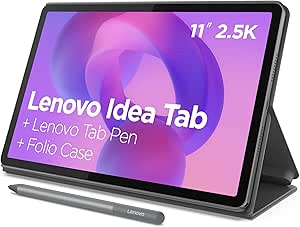 | Best Mid-Size Study Tablet | Display: 11-inch 2.5K IPS touchscreen | Refresh rate: 90Hz | Processor: MediaTek Dimensity 6300, up to 2.4GHz | VIEW LATEST PRICE | See Our Full Breakdown |
| Samsung Galaxy Tab S10 FE 10.9-Inch Wi-Fi Tablet with S Pen, 128GB, 8GB RAM, Gray |  | Best for Durability and S Pen Features | Display: 10.9-inch IPS LCD, 2304 × 1440, adaptive 90Hz | Processor: Exynos 1580 octa-core | Memory: 8GB | VIEW LATEST PRICE | See Our Full Breakdown |
| Samsung Galaxy Tab S10 Lite, 6GB RAM, 128GB Storage, Gray |  | Best for Everyday Samsung Note-Taking | Display: 10.9-inch LCD | Processor: Exynos 1380 | Memory: 6GB | VIEW LATEST PRICE | See Our Full Breakdown |
| Samsung Galaxy Tab S9 11-inch Wi-Fi Tablet, 256GB, Graphite |  | Best for Premium Display and Durability | Display: 11-inch Dynamic AMOLED 2X | Refresh rate: 120Hz | Processor: Snapdragon 8 Gen 2 | VIEW LATEST PRICE | See Our Full Breakdown |
| Lenovo Idea Tab 11-Inch 2.5K Tablet with Tab Pen and Folio Case |  | Best Ready-to-Use Student Bundle | Display: 11-inch 2.5K IPS touchscreen | Refresh rate: 90Hz | Processor: MediaTek Dimensity 6300, up to 2.4GHz | VIEW LATEST PRICE | See Our Full Breakdown |
| Samsung Galaxy Tab A11+ 11-inch Wi-Fi Tablet, 128GB, 6GB RAM, Gray, with Charger |  | Best for Samsung Kids and Family Use | Display: 11-inch TFT LCD, 1920 × 1200 | Refresh rate: Up to 90Hz | Processor: MediaTek Dimensity 7300, octa-core, 4nm | VIEW LATEST PRICE | See Our Full Breakdown |
| Samsung Galaxy Tab S11 128GB Wi-Fi Android Tablet, Gray |  | Best for Multitasking and Long-Term Flexibility | Display: 11-inch Dynamic AMOLED 2X | Processor: 3nm MediaTek processor | Memory: 12GB RAM | VIEW LATEST PRICE | See Our Full Breakdown |
| Samsung Galaxy Tab S10 FE 10.9-Inch Tablet, 8GB RAM, 128GB Storage with 128GB SD Card |  | Best for S Pen Work and Listed Battery Life | Display: 10.9-inch WUXGA+ touchscreen, 2304 × 1440 | Refresh rate: 90Hz | Processor: Exynos 1580, up to 2.9GHz | VIEW LATEST PRICE | See Our Full Breakdown |
| Samsung Galaxy Tab A11+ 11th Gen Tablet, 6GB RAM, 128GB Storage, Expandable Storage, Gray |  | Best for Everyday Family Use | Display: 11-inch, up to 90Hz | RAM: 6GB | Storage: 128GB, expandable via microSD | VIEW LATEST PRICE | See Our Full Breakdown |
| Jeazans X7 11-Inch Android 16 Tablet, 128GB Storage | 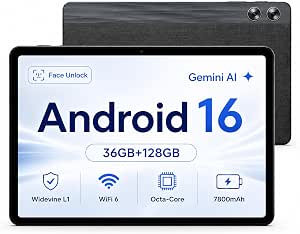 | Best for Expandable Streaming Storage | Operating system: Android 16 | Display: 11-inch IPS, 1280 × 800 | Processor: Octa-core Allwinner | VIEW LATEST PRICE | See Our Full Breakdown |
| FEONAL 11-inch Android 16 Tablet (2026 Edition) with Octa-Core Processor, 128GB Storage, and 4G LTE |  | Best for Mobile Data on the Go | Operating system: Android 16 | Display: 11-inch, 1280 × 800 | Processor: MTK8786 octa-core | VIEW LATEST PRICE | See Our Full Breakdown |
| TCL TAB 10 Gen 4 Android Tablet, 10.1-Inch FHD Display, 4GB RAM, 128GB Storage |  | Best for a Sharper Screen in a Lightweight Design | Display: 10.1-inch IPS, 1920 × 1200, 16:10 | Processor: Octa-core MediaTek | Operating system: Android 15 | VIEW LATEST PRICE | See Our Full Breakdown |
| Samsung Galaxy Tab S10 FE Tablet, 10.9-Inch, 8GB RAM, 256GB Storage |  | Best for Note-Taking and Creative Work | Display: 10.9-inch WUXGA+, 2304 × 1440, 90Hz | Processor: Exynos 1580, 2.9GHz | RAM: 8GB | VIEW LATEST PRICE | See Our Full Breakdown |
| Android tablet | Display | Storage | Processor | Memory |
|---|---|---|---|---|
| TABWEE T90 11-Inch Android 16 | 11-inch FHD IPS, 1920 × 1200, 380 nits | 128GB, expandable by up to 2TB via TF card | Unisoc T615 octa-core | 8GB built-in RAM plus 16GB virtual memory |
| Lenovo Idea Tab Pro 12.7-Inch | 12.7-inch 3K LCD | 128GB | MediaTek Dimensity 8300 | 8GB |
| Lenovo Idea Tab 11-Inch 2.5K T | 11-inch 2.5K IPS touchscreen | 256GB | MediaTek Dimensity 6300, up to 2.4GHz | 8GB |
| Samsung Galaxy Tab S10 FE 10.9 | 10.9-inch IPS LCD, 2304 × 1440, adaptive 90Hz | 128GB, expandable via dedicated microSD slot | Exynos 1580 octa-core | 8GB |
| Samsung Galaxy Tab S10 Lite | 10.9-inch LCD | 128GB, expandable by up to 2TB via microSD | Exynos 1380 | 6GB |
| Samsung Galaxy Tab S9 11-inch | 11-inch Dynamic AMOLED 2X | 256GB | Snapdragon 8 Gen 2 | — |
| Lenovo Idea Tab 11-Inch 2.5K T | 11-inch 2.5K IPS touchscreen | 128GB | MediaTek Dimensity 6300, up to 2.4GHz | 4GB |
| Samsung Galaxy Tab A11+ 11-inc | 11-inch TFT LCD, 1920 × 1200 | 128GB | MediaTek Dimensity 7300, octa-core, 4nm | 6GB RAM |
| Samsung Galaxy Tab S11 128GB W | 11-inch Dynamic AMOLED 2X | 128GB, expandable via microSD | 3nm MediaTek processor | 12GB RAM |
| Samsung Galaxy Tab S10 FE 10.9 | 10.9-inch WUXGA+ touchscreen, 2304 × 1440 | 128GB built-in plus 128GB SD card | Exynos 1580, up to 2.9GHz | 8GB RAM |
| Samsung Galaxy Tab A11+ 11th G | 11-inch, up to 90Hz | 128GB, expandable via microSD | — | — |
| Jeazans X7 11-Inch Android 16 | 11-inch IPS, 1280 × 800 | 128GB, expandable up to 1TB via microSD | Octa-core Allwinner | — |
| FEONAL 11-inch Android 16 Tabl | 11-inch, 1280 × 800 | 128GB, expandable up to 1TB via TF card | MTK8786 octa-core | 20GB listed: 8GB physical plus 12GB virtual |
| TCL TAB 10 Gen 4 Android Table | 10.1-inch IPS, 1920 × 1200, 16:10 | 128GB, expandable by microSD up to 1TB | Octa-core MediaTek | 4GB physical RAM plus 8GB expandable RAM |
| Samsung Galaxy Tab S10 FE Tabl | 10.9-inch WUXGA+, 2304 × 1440, 90Hz | 256GB total: 128GB built-in plus 128GB SD card | Exynos 1580, 2.9GHz | — |
More Details on Our Top Picks
TABWEE T90 11-Inch Android 16 Tablet with Keyboard, Mouse, and Stylus
The TABWEE T90 makes the most sense for buyers who want a ready-to-use study or light-work setup in one box. Its included keyboard, mouse, and stylus cover more tasks than the Lenovo Idea Tab Pro’s pen-and-folio bundle, while the 11-inch FHD screen is suited to streaming, reading, and everyday documents. Storage can expand by up to 2TB, a practical advantage for downloaded media and school files. The tradeoff is processing headroom: the Unisoc T615 is a modest everyday chip, and the advertised 24GB memory includes 16GB of virtual memory rather than physical RAM. The claimed video runtime is up to 11 hours, not a guarantee for mixed use. I’d choose it for accessory value, not demanding games or heavy multitasking.
Pros:- Keyboard, mouse, and stylus are included
- Expandable storage supports a TF card up to 2TB
- FHD IPS screen supports Widevine L1 streaming
- Two-year warranty
Cons:- The 24GB memory figure includes 16GB of virtual memory, not physical RAM
- Unisoc T615 is better suited to everyday tasks than demanding apps
- Up to 11 hours of video playback is a stated maximum
Best for: Students and home users who want a keyboard, mouse, and stylus included for basic notes, browsing, and streaming.
Not ideal for: Buyers who need strong gaming or demanding multitasking performance, or who want the sharper screen and faster processor of the Lenovo Idea Tab Pro.
- Operating system:Android 16
- Display:11-inch FHD IPS, 1920 × 1200, 380 nits
- Processor:Unisoc T615 octa-core
- Memory:8GB built-in RAM plus 16GB virtual memory
- Storage:128GB, expandable by up to 2TB via TF card
- Battery:8000mAh; up to 11 hours of video playback
- Cameras:13MP rear, 5MP front
- Connectivity:Dual-band Wi-Fi, Bluetooth 5.0, GPS, GLONASS, Galileo, and BeiDou
- Included accessories:Keyboard, mouse, and stylus
Our verdict“Choose the TABWEE T90 for an all-in-one accessory bundle and expandable storage, but pick the Lenovo Idea Tab Pro for stronger performance and a sharper display.”
Lenovo Idea Tab Pro 12.7-Inch 3K Tablet with Pen and Folio Case
The Lenovo Idea Tab Pro is the strongest fit here for buyers who want a roomy screen for split-screen study, video, and work. Its 12.7-inch 3K display gives documents and media more space and detail than the 11-inch Lenovo Idea Tab, while the Dimensity 8300 offers a higher-performance foundation than the TABWEE T90’s T615. Quad JBL speakers with Dolby Atmos also make it a more compelling pick for watching without headphones. Lenovo includes a pen and folio case, so note-taking and basic protection are covered from the start. That larger display makes the tablet less compact to carry, and the listed 128GB storage comes without a specified expansion capacity. I’d favor it over smaller options for a desk or shared viewing, but not for the lightest everyday carry.
Pros:- Large 12.7-inch 3K LCD provides generous workspace and detailed video
- MediaTek Dimensity 8300 is a stronger performance tier than the TABWEE T90’s T615
- Pen and folio case are included
- Quad JBL speakers with Dolby Atmos and Wi-Fi 6E
Cons:- Larger screen makes it less convenient to carry than 10.9- and 11-inch options
- Expandable storage capacity is not specified
- Warranty is listed as one-year mail-in service
Best for: Students and entertainment-focused users who want a large, high-resolution screen, included pen, and folio case.
Not ideal for: Travelers prioritizing a compact tablet, or users who need a clearly stated expandable-storage capacity or a domestic warranty beyond the listed mail-in coverage.
- Display:12.7-inch 3K LCD
- Processor:MediaTek Dimensity 8300
- Memory:8GB
- Storage:128GB
- Wireless:Wi-Fi 6E
- Speakers:Quad JBL speakers with Dolby Atmos
- Battery life:Over 11 hours of video streaming
- Charging:45W quick charge
- Included components:Lenovo Tab Pen Plus and folio case
Our verdict“Pick the Idea Tab Pro for a spacious screen, strong performance, and better built-in entertainment than smaller alternatives.”
Lenovo Idea Tab 11-Inch 2.5K Tablet with Tab Pen and Folio Case
The Lenovo Idea Tab balances portability and useful study features more neatly than the larger Idea Tab Pro. Its 11-inch 2.5K display with a 90Hz refresh rate gives text a crisp look and makes scrolling feel smoother, while the included pen and folio case support handwritten notes without a separate accessory purchase. With 256GB of storage, it also offers twice the listed capacity of the Idea Tab Pro’s 128GB configuration. The Dimensity 6300 is a more modest processor than the Pro’s Dimensity 8300, so I’d reserve the Pro for heavier workloads and more demanding apps. Lenovo lists up to 12 hours of battery life and quad Dolby Atmos-tuned speakers, though the supplied 20W charging description gives no charging-time figure. This is the more manageable study companion, not the performance leader.
Pros:- 2.5K IPS screen combines sharp detail with a smooth 90Hz refresh rate
- 256GB storage exceeds the listed capacity of the Lenovo Idea Tab Pro
- Tab Pen and folio case are included
- Up to 12 hours of stated battery life and quad Dolby Atmos-tuned speakers
Cons:- Dimensity 6300 is less powerful than the Idea Tab Pro’s Dimensity 8300
- No charging-time estimate is provided for the 20W charging description
- Warranty is limited to one year of parts and labor
Best for: Students and note-takers seeking a portable 11-inch tablet with a sharp, smooth display, included pen, and ample built-in storage.
Not ideal for: Users who regularly run demanding apps or want the larger screen and higher-performance processor of the Lenovo Idea Tab Pro.
- Display:11-inch 2.5K IPS touchscreen
- Refresh rate:90Hz
- Processor:MediaTek Dimensity 6300, up to 2.4GHz
- Memory:8GB
- Storage:256GB
- Battery:7216mAh; up to 12 hours of stated battery life
- Audio:Quad Dolby Atmos-tuned speakers
- Included accessories:Lenovo Tab Pen and folio case
Our verdict“Choose this Idea Tab for portable study, pen input, and 256GB of storage; step up to the Idea Tab Pro for a larger screen and faster processor.”
Samsung Galaxy Tab S10 FE 10.9-Inch Wi-Fi Tablet with S Pen, 128GB, 8GB RAM, Gray
The Galaxy Tab S10 FE stands out for combining a useful S Pen, expandable storage, and water and dust resistance in a mid-size Android tablet. Those traits make it a better fit for sketching, notes, and less sheltered environments than the Lenovo Idea Tab Pro, which has a larger, sharper display but no stated water- and dust-resistance rating. The Samsung’s adaptive 90Hz screen supports smoother scrolling, and its dedicated microSD slot lets owners add space without replacing the tablet. The tradeoffs are meaningful: this listing is Wi-Fi only, its included 25W charger is generic, and it has no domestic warranty. Its 10.9-inch screen is also smaller than Lenovo’s 12.7-inch option. I’d select it for the S Pen and durability features only if the international-model warranty terms suit you.
Pros:- S Pen is included for handwriting and drawing
- Dedicated microSD slot supports expandable storage
- Water and dust resistance is listed
- Adaptive 90Hz display and Wi-Fi 6E
Cons:- Wi-Fi only, with no cellular network support
- International model has no domestic warranty
- Included 25W charger is generic rather than Samsung branded
Best for: S Pen users who want expandable storage and water- and dust-resistance features in a Wi-Fi tablet.
Not ideal for: Buyers who need cellular connectivity, a domestic warranty, or a large-screen experience like the Lenovo Idea Tab Pro.
- Display:10.9-inch IPS LCD, 2304 × 1440, adaptive 90Hz
- Processor:Exynos 1580 octa-core
- Memory:8GB
- Storage:128GB, expandable via dedicated microSD slot
- Operating system:Android 15 with One UI 7
- Battery:8000mAh; up to 20 hours of stated use
- Connectivity:Wi-Fi 6E and Bluetooth 5.3; Wi-Fi only
- Cameras:13MP rear, 12MP ultrawide front
- Included components:S Pen and generic 25W charger
Our verdict“Choose the Galaxy Tab S10 FE for its S Pen, expandable storage, and resistance features if you accept the Wi-Fi-only setup and lack of domestic warranty.”
Samsung Galaxy Tab S10 Lite, 6GB RAM, 128GB Storage, Gray
The Galaxy Tab S10 Lite is the more straightforward Samsung choice for everyday notes, drawing, and media when the S10 FE’s added durability features are not a priority. It includes an S Pen and supports Samsung Notes tools, Circle to Search, and SmartThings controls, giving it a useful role beyond casual browsing. Compared with the Lenovo Idea Tab, it has less listed RAM and storage, but Samsung’s familiar note-taking features and up-to-2TB microSD expansion can suit users who want to grow their media library later. The 10.9-inch LCD is described without a resolution or refresh-rate figure, so display comparisons are limited. Battery life is rated for up to 16 hours of video playback; the 45W charger is sold separately. I’d pick it for Samsung’s pen and software ecosystem, not as a spec-first alternative to the sharper Lenovo screen.
Pros:- S Pen is included for writing, drawing, and note-taking
- Storage can expand by up to 2TB via microSD
- Samsung Notes tools, Circle to Search, and SmartThings are supported
- Up to 16 hours of stated video playback
Cons:- 6GB RAM and 128GB storage are less generous than the Lenovo Idea Tab’s 8GB and 256GB
- Display resolution and refresh rate are not specified
- 45W charger is sold separately
Best for: Samsung users who want an included S Pen for handwritten notes and drawing, plus microSD expansion for a growing media collection.
Not ideal for: Buyers who prioritize a specified high-resolution, high-refresh-rate display, or who need a 45W charger included in the box.
- Display:10.9-inch LCD
- Processor:Exynos 1380
- Memory:6GB
- Storage:128GB, expandable by up to 2TB via microSD
- Battery life:Up to 16 hours of video playback
- Included components:S Pen, data cable, ejection pin, and quick start guide
- Software features:Samsung Notes tools, Circle to Search, and SmartThings controls
- Warranty:Two years
Our verdict“Pick the Galaxy Tab S10 Lite for Samsung’s included S Pen and note-taking tools, but choose the Lenovo Idea Tab if display detail and listed memory matter more.”
Samsung Galaxy Tab S9 11-inch Wi-Fi Tablet, 256GB, Graphite
The Galaxy Tab S9 is the strongest fit here for buyers who want a compact Android tablet with a premium screen and rugged protection. Its 11-inch Dynamic AMOLED 2X panel at 120Hz gives motion and scrolling a smoother feel than the 90Hz displays on the Lenovo Idea Tab and Galaxy Tab S10 FE, while the Snapdragon 8 Gen 2 is suited to demanding apps. The included S Pen, quad Dolby Atmos speakers, and IP68 rating add useful versatility for drawing, streaming, and travel.
Compared with the newer Galaxy Tab S11, the S9 offers twice the listed storage, but less listed memory and an older processor generation. Its main drawback is that battery runtime is not specified, and some AI functions require an internet connection and Samsung account. I’d choose it for its display and protection, not for the newest platform.
Pros:- 11-inch Dynamic AMOLED 2X display with a smooth 120Hz refresh rate
- Snapdragon 8 Gen 2 processor for demanding apps
- S Pen included for handwriting and drawing
- IP68 water and dust resistance with quad Dolby Atmos speakers
Cons:- Battery capacity and runtime are not specified in the supplied product details
- Some AI features require an internet connection and Samsung account
- Galaxy Tab S11 offers a newer processor generation and more listed RAM
Best for: Buyers who want a compact premium display, included stylus, and water- and dust-resistant tablet for media, drawing, and everyday work.
Not ideal for: Multitaskers who want the newest processor and more memory, or buyers who need a stated battery-runtime figure before choosing.
- Display:11-inch Dynamic AMOLED 2X
- Refresh rate:120Hz
- Processor:Snapdragon 8 Gen 2
- Storage:256GB
- Connectivity:Wi-Fi 7
- Durability:IP68 water and dust resistance
- Included accessory:S Pen
- Audio:Quad speakers with Dolby Atmos
Our verdict“Choose the Galaxy Tab S9 if a 120Hz AMOLED screen, S Pen, and IP68 protection matter more than having Samsung’s newest hardware.”
Lenovo Idea Tab 11-Inch 2.5K Tablet with Tab Pen and Folio Case
The Lenovo Idea Tab makes a practical case for students who want a tablet setup that is ready for class: a Tab Pen and folio case are included, alongside study apps and an 11-inch 2.5K screen. Its 90Hz refresh rate and quad Dolby Atmos-tuned speakers suit note-taking, reading, and video lessons, while Lenovo states up to 12 hours of YouTube playback. That listed runtime gives buyers a clearer reference point than the Galaxy Tab S9’s supplied details do.
The tradeoff is performance headroom. With 4GB of memory and a Dimensity 6300 processor, this is less suited to heavy multitasking than the 8GB Galaxy Tab S10 FE or 12GB Galaxy Tab S11. I’d pick Lenovo for its bundled accessories and study focus, but skip it if demanding apps or many open tasks are central to your routine.
Pros:- 2.5K 11-inch touchscreen with a 90Hz refresh rate
- Tab Pen and folio case are included
- Lenovo states up to 12 hours of YouTube playback
- Quad Dolby Atmos-tuned speakers for lessons and video
Cons:- 4GB of memory may constrain demanding multitasking
- Dimensity 6300 is a less performance-focused platform than the Galaxy Tab S10 FE’s Exynos 1580
- 20W charging is modest for buyers prioritizing faster charging
Best for: Students who want an 11-inch tablet with a stylus, folio case, study apps, and a stated video-playback estimate in one package.
Not ideal for: People who regularly run demanding apps or keep many applications open and need more memory for multitasking.
- Display:11-inch 2.5K IPS touchscreen
- Refresh rate:90Hz
- Processor:MediaTek Dimensity 6300, up to 2.4GHz
- Memory:4GB
- Storage:128GB
- Battery:7,216mAh; up to 12 hours of YouTube playback stated
- Charging:20W
- Included accessories:Lenovo Tab Pen and folio case
Our verdict“Pick the Lenovo Idea Tab for a student-friendly bundle with a pen and case, but choose a higher-memory tablet for heavier multitasking.”
Samsung Galaxy Tab A11+ 11-inch Wi-Fi Tablet, 128GB, 6GB RAM, Gray, with Charger
The Galaxy Tab A11+ is the family-focused option in this group, pairing an 11-inch 90Hz screen with Samsung Kids parental controls, 6GB of RAM, and 128GB of storage. Quad Dolby Atmos speakers suit shared video viewing, while its 7,040mAh battery provides a defined capacity. Against the Lenovo Idea Tab, it has more listed memory and a faster-refresh display, but Lenovo includes a pen and folio case that this Samsung bundle does not list.
The biggest concern is not a hardware spec: this is an international model without a U.S. warranty, and the listing warns that the United States may not be available during initial setup. It is Wi-Fi only, and its generic included charger is not Samsung-branded. I’d consider it for a family that accepts those regional limitations, but buyers seeking local warranty coverage should choose another option, such as the Galaxy Tab S10 FE.
Pros:- Samsung Kids includes parental controls
- 6GB RAM and 128GB storage for everyday apps and media
- 11-inch display supports refresh rates up to 90Hz
- Quad speakers with Dolby Atmos
Cons:- International model has no warranty and may not offer the United States during initial setup
- Wi-Fi only, with no SIM card slot
- Included 20W charger is generic rather than Samsung-branded
Best for: Families seeking an 11-inch Samsung tablet with parental controls, ample everyday storage, and 6GB of RAM, provided they accept the international-model limitations.
Not ideal for: U.S. buyers who require a U.S. warranty, cellular connectivity, or a straightforward domestic setup experience.
- Display:11-inch TFT LCD, 1920 × 1200
- Refresh rate:Up to 90Hz
- Processor:MediaTek Dimensity 7300, octa-core, 4nm
- Memory:6GB RAM
- Storage:128GB
- Connectivity:Wi-Fi and Bluetooth 5.1; no SIM card slot
- Battery:7,040mAh
- Warranty:International model without warranty
Our verdict“Choose this Galaxy Tab A11+ for family features only if you are comfortable with an international model that has no warranty.”
Samsung Galaxy Tab S11 128GB Wi-Fi Android Tablet, Gray
The Galaxy Tab S11 is the most multitasking-oriented choice in this set, with 12GB of RAM, a 3nm MediaTek processor, an AMOLED display, and an included S Pen. That memory advantage gives it a stronger case for juggling demanding apps than the 8GB Galaxy Tab S10 FE or 4GB Lenovo Idea Tab. Its IP68 rating and microSD expansion also suit buyers who want a thin tablet that can handle travel and grow beyond its built-in storage.
The tradeoff is that the listed internal capacity is 128GB, half the Galaxy Tab S9’s listed 256GB, so buyers who store large libraries may need a separate microSD card. The card is not included, and some Galaxy AI features require an internet connection and Samsung account. I’d rank it ahead for memory and newer hardware, but not for included storage capacity.
Pros:- 12GB RAM and a 3nm processor support demanding multitasking
- 11-inch Dynamic AMOLED 2X display
- S Pen included for notes and drawing
- IP68 protection and microSD storage expansion
Cons:- 128GB internal storage is less than the Galaxy Tab S9’s listed 256GB
- microSD card is not included
- Some AI features require an internet connection and Samsung account
Best for: Multitaskers, note-takers, and drawing users who want substantial RAM, an included S Pen, and expandable storage in a slim 11-inch tablet.
Not ideal for: Buyers who need more than 128GB immediately without purchasing a microSD card, or who want AI features to work without an account and internet connection.
- Display:11-inch Dynamic AMOLED 2X
- Processor:3nm MediaTek processor
- Memory:12GB RAM
- Storage:128GB, expandable via microSD
- Connectivity:Wi-Fi
- Thickness:5.5mm
- Durability:IP68 water and dust resistance
- Included accessory:S Pen
Our verdict“Choose the Galaxy Tab S11 for its strong multitasking hardware and expandable storage, but factor in a separate card if 128GB is not enough.”
Samsung Galaxy Tab S10 FE 10.9-Inch Tablet, 8GB RAM, 128GB Storage with 128GB SD Card
The Galaxy Tab S10 FE offers a balanced mix of practical work features: an included S Pen, 8GB of RAM, IP68 protection, and a stated battery life of up to 20 hours. Its 10.9-inch 90Hz screen is a step down in refresh rate and display class from the Galaxy Tab S9’s 120Hz AMOLED panel, but the S10 FE adds a fingerprint sensor and includes a 128GB SD card alongside its built-in storage. That extra card gives buyers more room for files and media without making the tablet itself a premium-screen pick.
The compromises are clear: the charger is not included, and only 128GB is built into the tablet, with the additional capacity supplied on a separate card. Compared with the Galaxy Tab S11, it has less listed RAM, but the included card and stated runtime make its package easier to size up. I’d favor it for note-taking and everyday work, not display-first entertainment.
Pros:- S Pen included for handwriting and drawing
- IP68 water and dust resistance
- Up to 20 hours of battery life stated
- 8GB RAM, fingerprint sensor, and included 128GB SD card
Cons:- Charger is not included
- Built-in storage is 128GB; extra capacity is on a separate SD card
- 90Hz WUXGA+ screen is less advanced than the Galaxy Tab S9’s 120Hz AMOLED display
Best for: Note-takers and everyday users who want an included S Pen, IP68 protection, a fingerprint sensor, and a stated battery-runtime estimate.
Not ideal for: Buyers who prioritize a premium AMOLED screen or 120Hz refresh rate, or who want a charger included in the box.
- Display:10.9-inch WUXGA+ touchscreen, 2304 × 1440
- Refresh rate:90Hz
- Processor:Exynos 1580, up to 2.9GHz
- Memory:8GB RAM
- Storage:128GB built-in plus 128GB SD card
- Battery life:Up to 20 hours
- Durability:IP68 water and dust resistance
- Included accessories:S Pen, 128GB SD card, and power cable; charger not included
Our verdict“Choose the Galaxy Tab S10 FE for S Pen productivity and its stated long battery life, unless a higher-end AMOLED display is your priority.”
Samsung Galaxy Tab A11+ 11th Gen Tablet, 6GB RAM, 128GB Storage, Expandable Storage, Gray
The Galaxy Tab A11+ is my pick for an uncomplicated household tablet: its 11-inch screen gives schoolwork, video, and browsing room to breathe, while quad speakers with Dolby Atmos make shared viewing more engaging than the dual-speaker setups on the Jeazans X7 and TCL TAB 10 Gen 4. A refresh rate of up to 90Hz also makes scrolling feel smoother than on those alternatives. Its 6GB of RAM and 128GB of built-in storage suit ordinary apps and media, and a microSD slot leaves room to grow. The tradeoff is that this is less geared toward demanding creative work than the Galaxy Tab S10 FE, which adds an included S Pen, more memory, and water resistance. The A11+ also does not include the 25W charger or a microSD card.
Pros:- 11-inch display with up to a 90Hz refresh rate
- Quad speakers with Dolby Atmos
- 128GB built-in storage with microSD expansion
- Long-lasting battery with fast-charging support
Cons:- 25W charger is sold separately
- microSD card is sold separately
- Less suited to stylus-focused creative work than the Galaxy Tab S10 FE
Best for: Households seeking a shared tablet for streaming, schoolwork, browsing, and expandable media storage.
Not ideal for: Digital artists and buyers who need a stylus in the box, stronger creative-work hardware, or an included charger.
- Display:11-inch, up to 90Hz
- RAM:6GB
- Storage:128GB, expandable via microSD
- Processor speed:1.85GHz
- Battery energy:26.34Wh
- Front camera:5MP
- Audio:Quad speakers with Dolby Atmos
- Warranty:2 years
Our verdict“Choose the Galaxy Tab A11+ for family entertainment and everyday tasks, but pick the S10 FE if you need a bundled pen and more creative capability.”
Jeazans X7 11-Inch Android 16 Tablet, 128GB Storage
The Jeazans X7 stands out for buyers who want a large Android tablet with Widevine L1 streaming support and the option to add up to 1TB of microSD storage. That combination suits downloaded shows and a sizable media library better than a tablet with fixed capacity. It also includes Wi-Fi 6, USB-C with OTG, and Gemini AI features. The key compromise is its 1280 × 800 display: at 11 inches, it is less detailed than the TCL TAB 10 Gen 4’s 1920 × 1200 screen, so text and fine image details will look less crisp. The stated average battery life is seven hours, another limit for long days away from an outlet. Its listed 36GB RAM figure should be treated cautiously because the product information does not clarify how much is physical memory.
Pros:- Widevine L1 certification supports HD streaming on compatible services
- Storage expandable up to 1TB via microSD
- Wi-Fi 6, Bluetooth 5.4, and USB-C with OTG
- Gemini AI features and voice control
Cons:- 1280 × 800 resolution is modest for an 11-inch display
- Listed average battery life is seven hours
- The listed 36GB RAM figure does not clarify physical memory
Best for: Streaming viewers who want certified HD playback and a large microSD-expandable collection of offline media.
Not ideal for: Readers, students, and frequent travelers who prioritize a sharp 11-inch display, longer stated battery life, or clearly specified physical RAM.
- Operating system:Android 16
- Display:11-inch IPS, 1280 × 800
- Processor:Octa-core Allwinner
- RAM:36GB listed; physical and virtual breakdown unspecified
- Storage:128GB, expandable up to 1TB via microSD
- Battery:7800mAh; seven hours average stated battery life
- Connectivity:Wi-Fi 6, Bluetooth 5.4, USB-C 2.0, OTG
- Cameras:5MP front, 8MP rear with autofocus and flash
- Streaming certification:Widevine L1
Our verdict“Pick the X7 for expandable streaming storage and useful connectivity, but choose the sharper TCL TAB 10 Gen 4 for reading and detailed viewing.”
FEONAL 11-inch Android 16 Tablet (2026 Edition) with Octa-Core Processor, 128GB Storage, and 4G LTE
The FEONAL 11-inch tablet fills a specific gap in this lineup: its dual-SIM 4G LTE support lets buyers use mobile data away from Wi-Fi, a capability not listed for the Wi-Fi-focused Samsung Galaxy Tab A11+ or TCL TAB 10 Gen 4. That can make it a practical fit for commutes, field use, or a child who needs connectivity outside the home. It also offers Android 16, 128GB of storage expandable up to 1TB, and an 8MP front camera. The main compromise is the 1280 × 800 display, which is less sharp than the TCL’s FHD panel at a similar screen size. Its advertised 20GB RAM includes 12GB of virtual memory, not 20GB of physical RAM, so demanding multitasking may not match the headline number.
Pros:- Dual-SIM 4G LTE with VoLTE support
- 128GB storage expandable up to 1TB
- Android 16 with GMS certification
- 8MP front camera and 13MP rear camera
Cons:- 1280 × 800 resolution may look soft on an 11-inch screen
- Advertised 20GB RAM includes 12GB virtual memory
- SIM and TF cards are not included
Best for: Commuters and field workers who want a tablet with SIM-based mobile data and expandable storage.
Not ideal for: Buyers focused on sharp video and text, or those who need a confirmed high amount of physical RAM for demanding apps.
- Operating system:Android 16
- Display:11-inch, 1280 × 800
- Processor:MTK8786 octa-core
- Memory:20GB listed: 8GB physical plus 12GB virtual
- Storage:128GB, expandable up to 1TB via TF card
- Battery:7000mAh
- Connectivity:4G LTE dual SIM, Wi-Fi 2.4GHz/5GHz, Bluetooth 5.0
- Cameras:13MP rear, 8MP front
Our verdict“Choose the FEONAL when mobile data is the priority, but favor the TCL TAB 10 Gen 4 if you mainly use a tablet on Wi-Fi and want a sharper screen.”
TCL TAB 10 Gen 4 Android Tablet, 10.1-Inch FHD Display, 4GB RAM, 128GB Storage
The TCL TAB 10 Gen 4 is the display-focused choice among these more affordable everyday tablets. Its 1920 × 1200 FHD panel gives text, web pages, and video more detail than the 1280 × 800 screens on the Jeazans X7 and FEONAL, while its 0.87-pound metal body is easy to carry around the house or on a trip. The 10.1-inch size is also more compact than the 11-inch Samsung Galaxy Tab A11+, though that Samsung offers a faster refresh rate and quad speakers instead of TCL’s dual speakers. TCL includes 128GB storage with microSD expansion and a headphone jack, but its 4GB physical RAM is modest; the additional 8GB of expandable RAM is not a substitute for more physical memory. The compatible fast charger is sold separately.
Pros:- 10.1-inch FHD resolution of 1920 × 1200
- Slim unibody metal build weighing 0.87 lb
- 128GB storage expandable by microSD up to 1TB
- Includes a 3.5mm headphone jack and supports 18W charging
Cons:- Only 4GB of physical RAM; expandable RAM is not the same as physical memory
- Compatible charger for fast charging is not included
- Dual speakers offer less audio hardware than the Galaxy Tab A11+’s quad speakers
Best for: Students and casual users who value a crisp screen, lightweight metal construction, and a wired headphone jack.
Not ideal for: Heavy multitaskers who need more physical RAM, or viewers who want quad speakers and an 11-inch display.
- Display:10.1-inch IPS, 1920 × 1200, 16:10
- Processor:Octa-core MediaTek
- Operating system:Android 15
- Memory:4GB physical RAM plus 8GB expandable RAM
- Storage:128GB, expandable by microSD up to 1TB
- Battery and charging:6000mAh; 18W fast charging support
- Connectivity:Wi-Fi 5, Bluetooth 5.1, USB-C, 3.5mm headphone jack
- Weight and thickness:0.87 lb; 0.30 inches
Our verdict“Choose the TCL for a portable, sharper-screen Wi-Fi tablet, but go with the Galaxy Tab A11+ if you want a larger display and stronger built-in speaker setup.”
Samsung Galaxy Tab S10 FE Tablet, 10.9-Inch, 8GB RAM, 256GB Storage
The Galaxy Tab S10 FE is the most capable pick here for buyers who plan to draw, annotate documents, or take handwritten notes: its included S Pen, 8GB of RAM, and detailed 2304 × 1440 display make it better suited to those jobs than the Galaxy Tab A11+ or TCL TAB 10 Gen 4. It also adds IP68 water and dust resistance, a fingerprint sensor, and a 90Hz refresh rate, giving it a sturdier feature set for regular use. The listed 256GB total storage includes a 128GB SD card, rather than being entirely built in, so check that distinction if internal capacity matters. The 1.10-pound body is heavier than the TCL, and the charger is not included. For casual streaming alone, the A11+ is a simpler alternative.
Pros:- S Pen included for handwriting, annotation, and drawing
- 10.9-inch 2304 × 1440 display with a 90Hz refresh rate
- IP68 water and dust resistance
- Up to 20 hours of battery life stated
Cons:- Charger is not included
- 256GB total storage includes a 128GB SD card, not just built-in storage
- Heavier than the TCL TAB 10 Gen 4
Best for: Students, note-takers, and hobby artists who want a bundled pen, detailed screen, and water- and dust-resistant design.
Not ideal for: Casual viewers who do not need a stylus or IP68 protection, or buyers who want a charger included.
- Display:10.9-inch WUXGA+, 2304 × 1440, 90Hz
- Processor:Exynos 1580, 2.9GHz
- RAM:8GB
- Storage:256GB total: 128GB built-in plus 128GB SD card
- Battery life:Up to 20 hours
- Cameras:13MP rear, 12MP front
- Connectivity:Wi-Fi, Bluetooth 5.3, USB Type-C
- Protection and security:IP68 water and dust resistance; fingerprint sensor
- Weight:1.10 lb
Our verdict“Choose the S10 FE for pen-based work and added durability, but the Galaxy Tab A11+ is a better fit if your main needs are everyday entertainment and browsing.”

How We Picked
I ranked these tablets by how well their known features match common Android-tablet jobs: streaming, browsing, schoolwork, note-taking, multitasking, and mobile connectivity. I weighed screen size and resolution, memory and storage, included pen or case accessories, cellular support, and the overall position of each model in its manufacturer’s lineup. A premium tablet earns its place near the top when its capabilities can benefit a broad range of users; an accessory-heavy bundle or budget configuration ranks lower when its appeal depends on a narrower use case.
I also considered the tradeoffs a buyer may miss when comparing names alone. The list includes duplicate or closely related listings, so I treat those as configuration choices rather than separate leaps in capability; storage, RAM, and included accessories can vary. Where the supplied product information does not establish processor performance, software-support length, display brightness, or accessory quality, I do not assume an advantage. This ranking favors clearly differentiated, versatile options while still keeping specialized and entry-level picks for buyers who value their particular strengths.
Factors to Consider When Choosing Best Android Tablets
Before choosing from the best Android tablets, match the tablet to the work you expect it to do most often. A larger screen, a bundled stylus, or cellular connectivity can be useful, but each matters only if it fits your routine. These checks can help you compare configurations and avoid paying for features you will rarely use.
Choose screen size around where you will use it
A large screen can make split-screen reading, spreadsheets, and drawing more comfortable, but it also makes a tablet less convenient to hold for long periods. Think about whether most sessions happen at a desk, on a sofa, or while traveling before favoring a 12.7-inch model over an 11-inch one. Resolution matters most when you read small text, work with detailed images, or keep the screen close to your face; for video and casual browsing, comfortable size and brightness may matter more. Do not treat screen resolution as a stand-in for every aspect of display quality. Compare the physical dimensions and weight of the exact configuration when available. If you regularly move between rooms or commute, a slightly smaller screen may get used more often.
Buy performance for your workload, not a spec-sheet contest
More memory can help when you keep multiple apps open, switch between notes and reference material, or use demanding creative tools. It is less likely to change the experience of occasional video streaming and web browsing as much as a stable, responsive interface will. Processor details and software support are not supplied consistently across these listings, so verify them with the manufacturer before choosing a tablet for gaming or a long service life. A model with an attractive accessory bundle is not automatically the better multitasking choice. Consider the apps you actually use and whether they have tablet-friendly layouts. When performance information is unclear, avoid paying a premium based on a model name alone.
Treat included pens and cases as a convenience, not a guarantee
A bundled pen can make a tablet ready for handwritten notes or sketches without an extra purchase, while a folio can add basic protection and a viewing stand. But an included stylus does not by itself establish pressure sensitivity, low latency, or compatibility with every note-taking app. Keyboard-and-mouse bundles can help with light typing, yet they may not offer the comfort or reliability of accessories chosen separately. Check exactly what is in the box and whether the case fits the tablet’s ports and intended orientation. If handwriting is central to your routine, confirm pen features and app support before you commit. If you only annotate documents now and then, a basic bundled pen may be enough.
Plan storage around files you keep offline
Built-in storage fills faster when you download shows, save large games, or keep photos and school files on the tablet. A listed SD card is a separate accessory, not the same thing as built-in capacity, and app installation may not work exactly like media storage on a removable card. Confirm whether a tablet supports expandable storage and which card types it accepts. Buyers who rely on cloud services can often choose a smaller built-in capacity, but should account for internet access and subscription needs. Compare the exact listing: the same tablet family may appear with different internal storage or an included card. Do not pay for capacity you will not use, but leave room for apps and system updates.
Decide whether cellular connectivity solves a real problem
LTE can provide internet access away from Wi-Fi, which is useful for fieldwork, travel, or regular use in places without dependable hotspots. It also adds a service-plan decision, and cellular capability does not mean the tablet will connect without a compatible plan and network support. If you mostly use a tablet at home, school, or an office, Wi-Fi may be simpler and less costly to maintain. Check carrier bands and SIM or eSIM details for the precise model before purchase. A phone hotspot can be a workable alternative for occasional trips, though it depends on phone battery and coverage. Prioritize LTE only when frequent offline connectivity is a genuine part of your routine.
Compare exact configurations and support before buying
Product names can hide meaningful differences in RAM, storage, included accessories, and connectivity. This roundup includes repeat or closely related Lenovo, Samsung, and A11+ listings, so compare the specifications attached to the exact item rather than relying on a family name. For a tablet you plan to keep for years, check the manufacturer’s current software-update policy and security-support dates. Also confirm what the box includes, whether a charger is supplied, and whether a warranty applies in your region. A configuration with more storage may be a better fit than a bundle if the accessories will sit unused. Clear up these details before comparing the final options.
Frequently Asked Questions
Should I choose the Galaxy Tab S11 or the Galaxy Tab S10 FE?
Choose the Galaxy Tab S11 if you want the premium option and expect to benefit from its place higher in Samsung’s lineup. The Galaxy Tab S10 FE is a sensible alternative when an included S Pen and everyday versatility matter more than choosing the newest premium tier. The supplied details do not establish every performance or display difference, so check the exact specifications and software-support policy before deciding. For notes, browsing, and streaming, the FE may meet your needs without the premium model’s broader positioning. For demanding apps or a longer-term upgrade target, compare verified processor and update details.
Is a 12.7-inch Android tablet too large for everyday use?
Not necessarily: the larger screen on the Lenovo Idea Tab Pro can make reading, drawing, and viewing two apps at once more comfortable. Its size is less appealing if you often hold a tablet one-handed, carry it in a small bag, or read while standing. Think about the longest session you expect and where you will use it, not just the screen area. A folio can make a large tablet easier to prop up, but it adds bulk to a portable setup. If you are uncertain, an 11-inch model is usually the safer size for mixed handheld and desk use.
Do I need a tablet with an included stylus?
An included stylus makes sense if you regularly take handwritten notes, mark up PDFs, or sketch. It can also reduce the hassle of finding a compatible pen separately. For reading, browsing, and video, a stylus may add little value, so a model without one could be a better fit. Check the pen’s supported features and compatible apps rather than assuming all bundled pens work alike. Also compare whether a case or keyboard is included, since those extras may matter more to your routine than a pen.
Is the FEONAL LTE tablet a better travel choice than a Wi-Fi model?
It can be, if you often need internet away from Wi-Fi and are prepared to use a compatible mobile-data plan. LTE is less compelling for occasional trips when your phone can provide a hotspot. Before buying, verify carrier compatibility, SIM requirements, and whether the tablet supports the bands used where you travel. Check how the device’s other specifications compare with Wi-Fi alternatives, since cellular access alone does not make a tablet faster or better suited to demanding work. For travel, also consider battery life and how easy it is to carry, details that should be confirmed for the exact model.
How should I compare the repeated or similarly named listings?
Start with the exact configuration: RAM, built-in storage, included memory card, connectivity, and accessories can differ even when the product family name is nearly identical. The two Idea Tab entries and the multiple S10 FE and A11+ listings should not be assumed to represent entirely different tablet designs. A supplied SD card adds removable capacity, not built-in storage, so check which files and apps can use it. Read the included-items list and confirm that the model number matches the specifications you want. If one listing does not clearly state those details, verify them with the seller or manufacturer before ordering.
Conclusion
For the broadest range of premium use, I recommend the Samsung Galaxy Tab S11 as the best overall pick. The Lenovo Idea Tab Pro is my best choice for buyers who want a large, high-resolution screen and bundled pen and folio, while the Galaxy Tab S10 FE is the best middle-ground option for everyday use and note-taking. For value-oriented browsing and entertainment, compare the Samsung Galaxy Tab A11+ and standard Lenovo Idea Tab configurations closely, especially their memory and included accessories. Beginners can start with an A11+ or TCL TAB 10 Gen 4 if their needs are basic and verified specifications suit their apps. For a specific need, choose the FEONAL only if LTE is useful, the TABWEE if its keyboard-and-mouse bundle fits your setup, or the Idea Tab Pro for screen space; confirm the exact configuration before deciding.
Halloween Picks
halloween
As an affiliate, we earn on qualifying purchases.