
The best early Black Friday tech deals in this roundup cover practical upgrades across laptops, headphones, earbuds, and charging. I’d name the Dell Inspiron 15 the best overall pick for buyers who want generous memory and storage, while the Sony WH-1000XM6 stands out for premium noise cancellation and the Anker Nano 45W for a compact charging setup. The main tradeoff is choosing between a more capable device and a simpler, lower-spec option that better fits basic needs. Laptop buyers should weigh memory, storage, and intended workload; audio buyers should decide whether they value over-ear comfort or pocketable earbuds most. Read on for how the 14 picks compare and which buyer each one suits.

Get the latest gadgets delivered free with Prime
- Fast, free delivery on millions of items
- Prime Video, Amazon Music and more included
- Member-only deals all year
Complete the kit


Key Takeaways
- The Dell Inspiron 15 is the most versatile laptop pick here: its Ryzen 7 processor, 32GB of memory, and 1TB SSD give it more headroom than the entry-level Dell and ASUS models.
- The laptop lineup spans very different needs: the ASUS Vivobook Go suits basic tasks, the Lenovo V15 offers 16GB RAM and Windows 11 Pro, and the Acer Aspire 16 AI adds a larger 120Hz touchscreen and Snapdragon platform.
- Over-ear headphones and earbuds solve different problems: Sony and Raycon prioritize a full-size listening fit, while the Soundcore, Samsung, and TOZO options are easier to carry.
- Headline features do not tell the whole story: a touchscreen, ANC, or a phone-stand case matters only if it matches how the buyer plans to use the device.
- The Anker Nano 45W is the smallest, most focused pick: it can simplify USB-C charging, but it is an accessory rather than a replacement for a laptop or audio upgrade.
| Apple AirPods Pro 3 Wireless Earbuds with Active Noise Cancellation |  | Best for Apple Users | Manufacturer: Apple | Model: MFHP4LL/A | Listening time: Up to 8 hours with ANC; up to 10 hours in Transparency using the Hearing Aid feature | VIEW LATEST PRICE | See Our Full Breakdown |
| Raycon Everyday Noise Cancelling Headphones, Over Ear Wireless, Black |  | Best for Long Trips | Model: RBE775-23E-BLA | Drivers: 40 mm | Battery life: Up to 38 hours; 60-hour claim with fast charge | VIEW LATEST PRICE | See Our Full Breakdown |
| BERIBES WH202A Over-Ear Bluetooth Headphones with Microphone | 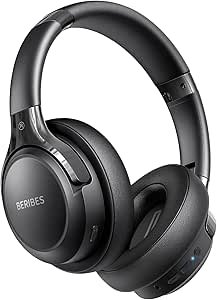 | Best for Battery Life | Model: WH202A | Connectivity: Bluetooth 6.0 | Playback time: Up to 120 hours | VIEW LATEST PRICE | See Our Full Breakdown |
| Soundcore P30i by Anker Noise-Cancelling Wireless Earbuds with Phone-Stand Case |  | Best Earbuds for Everyday Value | Model: P30i (A3959) | Connectivity: Bluetooth 5.4 | Noise cancellation: Adaptive ANC; reduces noise by up to 42 dB | VIEW LATEST PRICE | See Our Full Breakdown |
| Dell 15.6-Inch Laptop with AMD Ryzen 5 7520U, Radeon 610M, and Windows 11 Home |  | Best for Everyday Laptop Basics | Processor: AMD Ryzen 5 7520U | Graphics: AMD Radeon 610M, shared memory | Operating system: Windows 11 Home | VIEW LATEST PRICE | See Our Full Breakdown |
| Ganopterygon J20-WY Hybrid ANC Wireless Over-Ear Headphones |  | Best for Long Battery Life | Type: Wireless over-ear headphones | Noise cancellation: Hybrid ANC; stated reduction of up to 90% of ambient noise | Drivers: 40 mm dynamic | VIEW LATEST PRICE | See Our Full Breakdown |
| Samsung Galaxy Buds Core SM-R410 Wireless Earbuds, Bluetooth 5.4, Active Noise Cancellation, Black |  | Best Compact ANC Pick | Model: SM-R410 | Fit: In-ear | Connectivity: Bluetooth 5.4 | VIEW LATEST PRICE | See Our Full Breakdown |
| Lenovo V15 15.6-Inch FHD Laptop, Ryzen 5 5500U, 16GB RAM, 512GB SSD, Windows 11 Pro |  | Best Work-Focused Value | Processor: AMD Ryzen 5 5500U, 6 cores and 12 threads, up to 4.0 GHz | Memory: 16GB RAM | Storage: 512GB PCIe NVMe M.2 SSD | VIEW LATEST PRICE | See Our Full Breakdown |
| ASUS Vivobook Go 15.6-Inch FHD Laptop, AMD Ryzen 3 7320U, 8GB RAM, 256GB SSD, Windows 11 Home |  | Best for Everyday Basics | Processor: AMD Ryzen 3 7320U, 4 cores and 8 threads | Memory: 8GB LPDDR5, 4266 MHz | Storage: 256GB SSD | VIEW LATEST PRICE | See Our Full Breakdown |
| Dell Inspiron 15.6-Inch FHD Touchscreen Laptop with AMD Ryzen 7 7730U, 32GB RAM, 1TB SSD, and Windows 11 |  | Best for Heavy Multitasking | Processor: AMD Ryzen 7 7730U, 8 cores and 16 threads, up to 4.5 GHz | Memory: 32GB DDR4 SDRAM | Storage: 1TB PCIe NVMe SSD | VIEW LATEST PRICE | See Our Full Breakdown |
| Acer Aspire 16 AI Copilot+ PC, 16-Inch WUXGA 120Hz Touchscreen Laptop, Snapdragon X X1-26-100, 16GB LPDDR5X, 512GB SSD |  | Best for an AI-Ready Large Screen | Processor: Snapdragon X X1-26-100 | Memory: 16GB LPDDR5X | Storage: 512GB PCIe Gen 4 SSD | VIEW LATEST PRICE | See Our Full Breakdown |
| Sony WH-1000XM6 Wireless Noise-Canceling Headphones, Black |  | Best Premium Over-Ear Headphones | Model: WH-1000XM6 | Noise-canceling processor: HD Noise Canceling Processor QN3 | Microphones: 12 for noise cancellation; six-microphone AI beamforming system for calls | VIEW LATEST PRICE | See Our Full Breakdown |
| Anker Nano 45W USB-C Charger with Smart Display |  | Best Compact Charging Accessory | Model: A121D | Maximum output: 45 W | Connector and ports: USB Type-C; one port | VIEW LATEST PRICE | See Our Full Breakdown |
| TOZO NC9 Hybrid Active Noise Cancelling Wireless Earbuds with Charging Case |  | Best for Long-Lasting Everyday Earbuds | Type: In-ear wireless earbuds | Noise cancellation: Hybrid ANC; up to 45 dB noise reduction | Drivers: 10 mm; OrigX Acoustic 2.0 | VIEW LATEST PRICE | See Our Full Breakdown |
| early Black Friday tech deal | Model | Connectivity |
|---|---|---|
| Apple AirPods Pro 3 Wireless E | MFHP4LL/A | — |
| Raycon Everyday Noise Cancelli | RBE775-23E-BLA | Bluetooth |
| BERIBES WH202A Over-Ear Blueto | WH202A | Bluetooth 6.0 |
| Soundcore P30i by Anker Noise- | P30i (A3959) | Bluetooth 5.4 |
| Dell 15.6-Inch Laptop with AMD | — | — |
| Ganopterygon J20-WY Hybrid ANC | — | — |
| Samsung Galaxy Buds Core SM-R4 | SM-R410 | Bluetooth 5.4 |
| Lenovo V15 15.6-Inch FHD Lapto | — | — |
| ASUS Vivobook Go 15.6-Inch FHD | — | Wi-Fi 5, Bluetooth 5.1, and HDMI |
| Dell Inspiron 15.6-Inch FHD To | — | — |
| Acer Aspire 16 AI Copilot+ PC | — | — |
| Sony WH-1000XM6 Wireless Noise | WH-1000XM6 | Bluetooth and 3.5 mm audio cable |
| Anker Nano 45W USB-C Charger w | A121D | — |
| TOZO NC9 Hybrid Active Noise C | — | Bluetooth 5.3; listed wireless range up to 15 m |
More Details on Our Top Picks
Apple AirPods Pro 3 Wireless Earbuds with Active Noise Cancellation
For an early Black Friday tech roundup, the AirPods Pro 3 stand out for combining active noise cancellation with features that go beyond everyday listening. Five ear-tip sizes give buyers more ways to find a secure fit, while heart-rate sensing and hearing-health tools make these more useful for workouts and accessibility than the Soundcore P30i. Live Translation and some other features rely on Apple devices, so the advantages are less compelling outside that ecosystem. Battery life reaches up to 8 hours with ANC, but that still means more frequent charging than the Raycon Everyday headphones or the long-running BERIBES WH202A. I’d rank these ahead of the other earbuds here for Apple owners seeking a feature-rich compact option, but not for shoppers who prioritize long listening sessions or cross-platform flexibility.
Pros:- Active noise cancellation is stated to remove up to twice as much unwanted noise as AirPods Pro 2.
- Five ear-tip sizes allow a more personalized fit.
- Heart-rate sensing supports tracking across up to 50 workout types.
- Hearing test, Hearing Aid, and active Hearing Protection features add accessibility options.
Cons:- Listening time is up to 8 hours with ANC enabled.
- Some features require an iPhone or another Apple device.
Best for: iPhone owners who want noise-cancelling earbuds with workout tracking, hearing-health tools, and a choice of ear-tip sizes.
Not ideal for: Android-first listeners or frequent travelers seeking longer uninterrupted listening time without charging.
- Manufacturer:Apple
- Model:MFHP4LL/A
- Listening time:Up to 8 hours with ANC; up to 10 hours in Transparency using the Hearing Aid feature
- Ear-tip sizes:5
- Product dimensions:1.1 x 0.8 x 1.2 inches
- Item weight:0.32 ounces (9.07 g)
- Date first available:September 8, 2025
Our verdict“Choose these if you use Apple devices and value fit, noise cancellation, and health features more than maximum battery life.”
Raycon Everyday Noise Cancelling Headphones, Over Ear Wireless, Black
The Raycon Everyday headphones are the over-ear pick for shoppers who want long battery life and a foldable design without moving up to the Sony WH-1000XM6. Their stated runtime is up to 38 hours, with a separate 60-hour claim involving fast charge; that variation makes planning less straightforward than the BERIBES WH202A’s stated 120-hour playback. A lightweight adjustable headband, rotating earcups, and IPX3 sweat resistance suit travel and light gym use, while the built-in microphone covers calls and gaming. The tradeoffs are practical: there’s no wired backup, and IPX3 protection is not a license for heavy rain or submersion. I’d favor these over the smaller Soundcore P30i when an over-ear fit and extended battery life matter more than pocketability.
Pros:- Active noise cancellation is paired with 40 mm drivers.
- Foldable design and adjustable headband support travel and storage.
- IPX3 sweat resistance suits light workouts.
- Built-in microphone supports calls and gaming.
Cons:- Battery claims vary between up to 38 hours and a 60-hour claim with fast charge.
- IPX3 is not suitable for submersion or heavy rain.
- No wired connection is available for backup playback.
Best for: Commuters and travelers who prefer over-ear headphones, need long stretches between charges, and want light sweat resistance.
Not ideal for: Listeners who need a wired fallback, reliable use in heavy rain, or the longest stated runtime in this roundup.
- Model:RBE775-23E-BLA
- Drivers:40 mm
- Battery life:Up to 38 hours; 60-hour claim with fast charge
- Water resistance:IPX3
- Connectivity:Bluetooth
- Item weight:7.52 ounces
- Warranty:1-year limited
Our verdict“Pick the Raycon if you want foldable over-ear headphones for travel and can accept Bluetooth-only playback and less consistent battery claims.”
BERIBES WH202A Over-Ear Bluetooth Headphones with Microphone
Among the over-ear options here, the BERIBES WH202A puts playback time first: its stated maximum is up to 120 hours, well beyond the Raycon Everyday’s 38-hour figure and the 60-hour fast-charge claim. That makes it appealing for listeners who dislike frequent charging, while the 3.5 mm cable offers a fallback if the battery runs down. Six EQ modes let buyers adjust the sound profile, and Bluetooth 6.0 supports connections to two devices at once. Compared with the Raycon, this model offers more stated battery life and wired listening, but its range is limited to up to 33 feet, and wired playback depends on the included cable. It is a practical value-minded choice, though shoppers seeking noise cancellation should look at the Soundcore P30i or Raycon instead.
Pros:- Up to 120 hours of stated playback time.
- Six EQ modes offer sound-profile choices.
- Can connect to two devices simultaneously.
- Includes a 3.5 mm wired listening option.
Cons:- Bluetooth range is limited to up to 33 feet.
- Wired listening requires the included 3.5 mm cable.
- No active noise cancellation is listed.
Best for: Listeners who want infrequent charging, switch between two Bluetooth devices, and value a wired fallback.
Not ideal for: Buyers who need active noise cancellation, a longer Bluetooth range, or a wireless-only setup without keeping track of a cable.
- Model:WH202A
- Connectivity:Bluetooth 6.0
- Playback time:Up to 120 hours
- Battery capacity:1000 mAh
- Bluetooth range:Up to 33 feet
- EQ modes:6
- Wired connection:3.5 mm audio cable
- Weight:0.18 kg (0.38 lb)
Our verdict“Choose the WH202A if battery endurance and wired backup matter more than noise cancellation or extended wireless range.”
Soundcore P30i by Anker Noise-Cancelling Wireless Earbuds with Phone-Stand Case
The Soundcore P30i pair adaptive ANC with an unusually useful case feature: it doubles as a phone stand. That gives these earbuds a different kind of everyday convenience than the Apple AirPods Pro 3, which focus more on Apple-linked health and hearing features. Soundcore lists up to 45 hours with the case, though ANC reduces that figure to 25 hours and per-charge listening drops from 10 hours to 6. Four microphones with AI-enhanced call processing are a plus for calls, and IP54 protection adds more dust and water resistance than the Raycon’s IPX3 rating. The tradeoff is that this is a Bluetooth-only option with no headphone-jack connection. For shoppers who want flexible commuting earbuds and a case that props up a phone, the P30i is the more practical pick over AirPods Pro 3.
Pros:- Adaptive ANC includes a transparency mode.
- Charging case doubles as a phone stand.
- Four microphones use AI-enhanced call processing.
- IP54 water and dust resistance.
Cons:- Per-charge battery life falls to up to 6 hours with ANC enabled.
- Total battery life with the case is up to 25 hours with ANC.
- No headphone-jack connection is available.
Best for: Commuters and desk users who want ANC earbuds, call-focused microphones, and a case that can prop up a phone.
Not ideal for: Listeners who need a wired audio connection or expect long per-charge playback with ANC enabled.
- Model:P30i (A3959)
- Connectivity:Bluetooth 5.4
- Noise cancellation:Adaptive ANC; reduces noise by up to 42 dB
- Drivers:10 mm
- Microphones:4 with AI-enhanced call processing
- Battery life:Up to 10 hours per charge (6 with ANC); up to 45 hours with case (25 with ANC)
- Water resistance:IP54
- Warranty:24 months
Our verdict“Choose the P30i for versatile everyday earbuds and a useful phone-stand case, but not for wired listening or the longest ANC sessions.”
Dell 15.6-Inch Laptop with AMD Ryzen 5 7520U, Radeon 610M, and Windows 11 Home
This Dell makes sense for buyers who want a 15.6-inch Full HD screen, a 512 GB SSD, and a numeric keypad in a straightforward Windows 11 laptop. Its 120 Hz refresh rate can make scrolling and motion look smoother than on a standard-refresh display, while the matte, non-touch panel keeps the focus on traditional laptop use. The limits matter: Radeon 610M graphics use shared memory, so this is not the pick for demanding games or graphics-heavy work. The roundup’s Lenovo V15 lists a Ryzen 5 5500U, 16 GB of memory, and Windows 11 Pro, making it the stronger-seeming alternative for buyers who prioritize those listed details; this Dell’s product data does not specify memory capacity. At 4.2 pounds, it also suits desk-to-room use better than frequent carrying.
Pros:- 15.6-inch Full HD display has a 120 Hz refresh rate and matte finish.
- 512 GB SSD provides solid listed storage capacity.
- Numeric keypad supports spreadsheet and number entry.
- Includes one-year onsite service.
Cons:- Non-touch display does not support touchscreen input.
- Integrated Radeon 610M graphics use shared memory.
- At 4.2 pounds, it is less convenient for frequent travel.
Best for: Home and school users who want a large matte display, numeric keypad, and SSD storage for everyday tasks.
Not ideal for: Gamers, graphics-focused creators, touchscreen shoppers, or buyers who need a clearly specified memory capacity before choosing.
- Processor:AMD Ryzen 5 7520U
- Graphics:AMD Radeon 610M, shared memory
- Operating system:Windows 11 Home
- Display:15.6-inch LED, 1920 x 1080, 120 Hz, non-touch, matte
- Memory:LPDDR5
- Storage:512 GB SSD
- Wireless:Wi-Fi 5 (802.11ac), Bluetooth 5
- Weight:4.2 pounds
- Warranty:1-year onsite service
Our verdict“Choose this Dell for everyday desk-based work and a smoother-refresh Full HD screen, but compare the Lenovo V15 if you need specified memory and Windows 11 Pro.”
Ganopterygon J20-WY Hybrid ANC Wireless Over-Ear Headphones
For an early Black Friday tech roundup, I’d put the Ganopterygon J20-WY on the shortlist for commuters and travelers who want over-ear coverage without frequent charging. Its stated up to 100 hours of wireless playback is the standout advantage here, while the included AUX cable gives you a wired fallback. Hybrid ANC and Transparency mode offer more flexibility between noisy trips and situations where you need to hear your surroundings. Compared with the compact Samsung Galaxy Buds Core, the J20-WY is bulkier but gives you cushioned over-ear fit and longer stated playback; it is also a less premium-minded choice than the Sony WH-1000XM6. The tradeoff is that battery life varies by use, and the description gives no basis for judging ANC performance against higher-end models. The AUX connection also depends on the supplied cable.
Pros:- Up to 100 hours of stated wireless playback, plus wired listening through the included AUX cable.
- Hybrid ANC and Transparency mode provide options for noisy and sound-aware settings.
- Memory foam cushions and an adjustable headband are designed for longer listening sessions.
- Foldable build and included carrying pouch suit travel.
Cons:- The 100-hour figure is a maximum and may vary with listening mode and use.
- Wired listening requires the included 3.5 mm cable.
- Over-ear headphones take more room to carry than the Samsung Galaxy Buds Core.
Best for: Travelers and remote workers who want foldable over-ear headphones, long stated playback, and a wired backup option.
Not ideal for: Buyers seeking pocketable earbuds, proven premium noise cancellation, or cable-free wired listening.
- Type:Wireless over-ear headphones
- Noise cancellation:Hybrid ANC; stated reduction of up to 90% of ambient noise
- Drivers:40 mm dynamic
- Bluetooth:Version 6.0; 33-foot range
- Battery:750 mAh; up to 100 hours playback; 2-hour charge time
- Microphones:Five-microphone array with ENC
- Connections:Bluetooth and 3.5 mm audio jack
- Weight:0.54 lb
- Included accessories:USB charging cable, 3.5 mm audio cable, carrying pouch, and user manual
Our verdict“Choose the J20-WY if extended playback and over-ear comfort matter more than compact size or established premium ANC credentials.”
Samsung Galaxy Buds Core SM-R410 Wireless Earbuds, Bluetooth 5.4, Active Noise Cancellation, Black
The Samsung Galaxy Buds Core are the compact choice in this batch: they pair in-ear portability with active noise cancellation and a charging case, rather than the cushioned, larger fit of the Ganopterygon J20-WY. Bluetooth 5.4 supports wireless pairing, and the stated maximum of 35 hours of music playback gives these earbuds a useful case-inclusive endurance figure, though the listing does not break down single-charge runtime. I’d favor them for everyday carry and listening on commutes, especially when over-ear headphones feel cumbersome. Against the J20-WY, you give up its much longer stated playback and wired AUX option; against the Apple AirPods Pro 3, the product information here provides less detail for comparing advanced listening features. The listing also does not specify water resistance, which makes them harder to recommend for workouts or wet-weather use.
Pros:- Active noise cancellation helps reduce ambient sounds in a compact in-ear design.
- Bluetooth 5.4 supports wireless audio streaming and device pairing.
- Up to 35 hours of maximum music playback is listed.
- Charging case and eartips are included.
Cons:- The listing does not specify water resistance.
- Maximum playback is stated without a separate per-charge runtime.
- Unlike the Ganopterygon J20-WY, there is no listed wired listening option.
Best for: Commuters and Samsung users who want compact ANC earbuds with a charging case for everyday listening.
Not ideal for: Runners or gym users who need stated water resistance, and listeners who prefer an over-ear fit or a wired backup.
- Model:SM-R410
- Fit:In-ear
- Connectivity:Bluetooth 5.4
- Noise control:Active noise cancellation
- Maximum music playback:Up to 35 hours
- Driver:Dynamic
- Audio latency:120 ms
- Earbud weight:5.5 g
- Included items:Charging case, eartips, and user manual
Our verdict“Pick the Galaxy Buds Core for portable ANC and a charging case, but skip them if water resistance or a known single-charge runtime is a priority.”
Lenovo V15 15.6-Inch FHD Laptop, Ryzen 5 5500U, 16GB RAM, 512GB SSD, Windows 11 Pro
The Lenovo V15 earns its work-focused spot by pairing 16GB RAM and a 512GB NVMe SSD with Windows 11 Pro, a numeric keypad, and built-in Ethernet. That mix suits office workloads and multitasking better than the entry-level ASUS Vivobook Go, whose 8GB of memory and 256GB SSD leave less room for demanding day-to-day use. The Lenovo also gives you HDMI, USB-C, and an RJ45 port, so connecting to an external display or wired network is straightforward. Compared with the Dell Inspiron in this roundup, it has less memory and storage, but its specs still cover common business and study needs without stepping up to that model’s heavier configuration. Integrated Radeon graphics are the main limit: this is a practical work machine, not a laptop for graphics-heavy games. It also has no optical drive.
Pros:- 16GB RAM and a 512GB NVMe SSD support multitasking and responsive storage access.
- Windows 11 Pro suits buyers who need its business-oriented operating system.
- Ethernet, HDMI, and USB-C offer useful connection options for office setups.
- Numeric keypad benefits spreadsheet entry and other number-heavy work.
Cons:- Integrated AMD Radeon graphics are not suited to demanding graphics workloads.
- The laptop has no optical drive.
- The Dell Inspiron offers more memory and storage for buyers with heavier workloads.
Best for: Students and office workers who need Windows 11 Pro, a numeric keypad, wired networking, and enough memory for everyday multitasking.
Not ideal for: Gamers, creative professionals needing dedicated graphics, or buyers who require an optical disc drive.
- Processor:AMD Ryzen 5 5500U, 6 cores and 12 threads, up to 4.0 GHz
- Memory:16GB RAM
- Storage:512GB PCIe NVMe M.2 SSD
- Display:15.6-inch LCD, 1920 × 1080
- Operating system:Windows 11 Pro
- Graphics:Integrated AMD Radeon Graphics
- Wireless:Wi-Fi 6 (802.11ac) and Bluetooth 5.3
- Ports:USB 3.0 Type-A, USB 2.0 Type-A, USB Type-C, HDMI, RJ45 Ethernet, and headphone/microphone combo
- Weight:3.8 pounds
Our verdict“Choose the Lenovo V15 for practical business and study use with Pro software and wired connectivity, not for graphics-heavy work.”
ASUS Vivobook Go 15.6-Inch FHD Laptop, AMD Ryzen 3 7320U, 8GB RAM, 256GB SSD, Windows 11 Home
For browsing, documents, and video calls, the ASUS Vivobook Go is the simpler, lighter-spec alternative to the Lenovo V15 and Dell Inspiron. Its 15.6-inch Full HD screen, numeric keypad, and webcam privacy shutter cover the essentials, while the 180-degree hinge lets the display lie flat for sharing or flexible desk use. ASUS lists up to 11 hours of battery life, but actual runtime depends on use and configuration. The savings-minded configuration also means clear limits: 8GB of memory and a 256GB SSD give you less headroom than the Lenovo’s 16GB and 512GB, and the 250-nit screen with 45% NTSC color coverage is not aimed at bright environments or color-critical work. I’d choose it for routine tasks, not for sustained multitasking or creative workloads.
Pros:- Full HD resolution provides a clear workspace for everyday tasks.
- Webcam privacy shutter gives a physical way to cover the camera.
- 180-degree hinge lets the display lie flat for sharing.
- Numeric keypad is useful for budgets, spreadsheets, and data entry.
Cons:- 8GB RAM offers less multitasking headroom than the Lenovo V15 and Dell Inspiron.
- The 256GB SSD provides less listed capacity than those alternatives.
- The 250-nit display and 45% NTSC color gamut are limiting for bright rooms and color-sensitive work.
Best for: Students and home users focused on browsing, documents, streaming, and video calls who want a numeric keypad and webcam shutter.
Not ideal for: People who keep many demanding apps open, edit color-sensitive media, or need more than 256GB of listed storage.
- Processor:AMD Ryzen 3 7320U, 4 cores and 8 threads
- Memory:8GB LPDDR5, 4266 MHz
- Storage:256GB SSD
- Display:15.6-inch LED, 1920 × 1080, 60 Hz, 250 nits, 45% NTSC
- Operating system:Windows 11 Home
- Battery:42Wh; up to 11 hours listed
- Camera:720p HD with privacy shutter
- Connectivity:Wi-Fi 5, Bluetooth 5.1, and HDMI
- Durability:Passed five listed US MIL-STD 810H tests
Our verdict“Choose the Vivobook Go for everyday basics and its privacy shutter, but move to the Lenovo V15 if you need more memory and storage.”
Dell Inspiron 15.6-Inch FHD Touchscreen Laptop with AMD Ryzen 7 7730U, 32GB RAM, 1TB SSD, and Windows 11
The Dell Inspiron is the performance-and-capacity pick among these three laptops: its 32GB of RAM and 1TB NVMe SSD give frequent multitaskers more room than the Lenovo V15 or ASUS Vivobook Go. The eight-core Ryzen 7, Full HD IPS touchscreen, and numeric keypad make it a strong fit for office work, large projects, and users who like direct touch input. Its webcam privacy shutter and broad selection of ports add practical everyday value. The tradeoff is that this configuration still uses integrated Radeon graphics, so the extra memory and processor capacity do not make it a dedicated gaming or graphics workstation. Wireless connectivity is also Wi-Fi 5, while the Lenovo V15 lists Wi-Fi 6. I’d favor the Dell when workload headroom and storage matter more than newer wireless networking.
Pros:- 32GB RAM and a 1TB NVMe SSD provide more multitasking headroom and storage than the Lenovo V15 and ASUS Vivobook Go.
- Ryzen 7 7730U has 8 cores and 16 threads for demanding general productivity.
- Full HD IPS touchscreen adds direct touch input to a 15.6-inch display.
- Ports include USB-C, two USB-A, HDMI, and an SD card reader.
Cons:- Integrated Radeon graphics limit demanding gaming and graphics work.
- Wi-Fi 5 is an older listed wireless standard than the Lenovo V15’s Wi-Fi 6.
- The 720p webcam is modest for frequent video calls.
Best for: Professionals and power users who keep many applications open, store large files locally, and want a touchscreen with substantial memory.
Not ideal for: Gamers and creative workers who need dedicated graphics, or buyers prioritizing Wi-Fi 6 and a higher-resolution webcam.
- Processor:AMD Ryzen 7 7730U, 8 cores and 16 threads, up to 4.5 GHz
- Memory:32GB DDR4 SDRAM
- Storage:1TB PCIe NVMe SSD
- Display:15.6-inch Full HD IPS touchscreen, 1920 × 1080
- Operating system:Windows 11 Home
- Graphics:Integrated AMD Radeon Graphics
- Wireless:Wi-Fi 5 (802.11ac) and Bluetooth 5.0
- Ports:USB-C, two USB-A, HDMI, headphone/microphone combo jack, and SD card reader
- Weight:Approximately 3.66 pounds
Our verdict“Choose the Dell Inspiron when memory, storage, and touchscreen input are priorities; choose the Lenovo V15 if Wi-Fi 6 and Windows 11 Pro matter more.”
Acer Aspire 16 AI Copilot+ PC, 16-Inch WUXGA 120Hz Touchscreen Laptop, Snapdragon X X1-26-100, 16GB LPDDR5X, 512GB SSD
Among the laptops in this roundup, the Acer Aspire 16 AI stands out for combining a roomy touchscreen with a 45 TOPS NPU for supported AI workloads. Its 120Hz refresh rate makes scrolling and touch interactions look smoother than on the Dell 15.6-Inch Laptop, while 100% sRGB coverage suits buyers who care about color in photos and other creative work. The 16GB of memory and 512GB SSD make it a capable everyday productivity setup, and Wi-Fi 7 adds newer wireless connectivity.
The tradeoff is portability: at 3.4 pounds and 16 inches, it is less appealing for frequent travel than a compact laptop. Copilot+ experiences may also depend on updates and region, so I would not buy it solely for a particular AI feature. This is the strongest fit here for buyers who want a large, modern Windows screen, not those prioritizing a lighter carry.
Pros:- 16-inch 120Hz touchscreen with 100% sRGB coverage
- 45 TOPS NPU supports compatible AI workloads
- Backlit keyboard and numeric keypad suit extended desk work
- Wi-Fi 7 and four USB ports provide modern connectivity
Cons:- Its 3.4-pound weight and 16-inch footprint are less convenient for frequent travel
- Some Copilot+ features may require updates and vary by region
- No optical drive
Best for: Students and home-office users who want a large touchscreen, smooth scrolling, and an NPU for supported AI productivity tasks.
Not ideal for: Frequent travelers or buyers who need guaranteed access to specific Copilot+ features without depending on updates or regional availability.
- Processor:Snapdragon X X1-26-100
- Memory:16GB LPDDR5X
- Storage:512GB PCIe Gen 4 SSD
- Display:16-inch WUXGA LCD touchscreen, 1920 × 1200
- Refresh rate and color:120Hz; 100% sRGB
- NPU:45 TOPS
- Wireless:Wi-Fi 7; Bluetooth 5.3
- Ports:Four USB ports; one HDMI port
- Weight:3.4 pounds
Our verdict“Choose the Acer if you want a large, color-capable touchscreen and AI hardware in one laptop; skip it if portability or guaranteed access to specific AI features matters more.”
Sony WH-1000XM6 Wireless Noise-Canceling Headphones, Black
The Sony WH-1000XM6 is the premium over-ear choice in this group, with adaptive noise cancellation that adjusts to surroundings and wearing conditions. Compared with the TOZO NC9 earbuds, its over-ear design and wider headband make more sense for long listening sessions, while high-resolution audio and LDAC give compatible devices more listening options. Its six-microphone AI beamforming system is also designed to reduce background noise during calls, a useful distinction for people taking meetings away from a quiet room.
That higher-end feature set comes with practical limits: battery life is up to 30 hours, shorter than the NC9’s stated case-assisted total, and the fast-charge claim depends on an optional USB-PD adapter. The included cable is about 1.2 meters long. I’d choose Sony for over-ear comfort features, adaptive cancellation, and call support, but not for the smallest travel setup or maximum stated battery time.
Pros:- Adaptive noise cancellation responds to surroundings and wearing conditions
- LDAC and high-resolution audio support offer more options with compatible sources
- Six-microphone AI beamforming system is designed to improve calls in noisy settings
- Foldable design, carrying case, and up to 30 hours of battery life
Cons:- The optional USB-PD adapter is needed for the stated rapid-charge feature
- Up to 30 hours of battery life is less than the TOZO NC9’s stated case-assisted total
- The supplied 3.5 mm cable is approximately 1.2 meters long
Best for: Frequent commuters and remote workers who want adaptive over-ear noise cancellation, high-resolution wireless audio, and a strong call-focused feature set.
Not ideal for: Buyers who prefer pocketable earbuds, want longer stated total playback than 30 hours, or expect a USB-PD charger for fast charging to be included.
- Model:WH-1000XM6
- Noise-canceling processor:HD Noise Canceling Processor QN3
- Microphones:12 for noise cancellation; six-microphone AI beamforming system for calls
- Battery life:Up to 30 hours
- Connectivity:Bluetooth and 3.5 mm audio cable
- Audio support:High-Resolution Audio and High-Resolution Audio Wireless with LDAC
- Charging:USB Type-C; optional USB-PD adapter supports a 3-minute charge for up to 3 hours of playback
- Design:Foldable, with synthetic-leather cushioning and protective case
Our verdict“Pick the Sony for premium over-ear noise cancellation and call features, but choose the TOZO NC9 if compact earbuds and longer stated total playback matter more.”
Anker Nano 45W USB-C Charger with Smart Display
The Anker Nano 45W is the most purpose-built accessory in this batch: a compact single-port charger for compatible phones and tablets, with a display that shows charging status and allows mode switching. Its foldable prongs can be positioned at 90 or 180 degrees, which helps when wall outlets sit behind furniture or close to another plug. Compared with the larger laptop picks such as the Acer Aspire 16 AI, this is a small add-on rather than a replacement for a computer’s included power setup; its 45W output is aimed at compatible mobile devices.
Care Mode is designed to limit charging heat and battery aging, but the feature set has caveats: the display is not a touchscreen and cannot rotate 90 degrees, while iPhone 18 recognition and AVS support depend on an over-the-air update. It also has just one USB-C port, so it cannot charge multiple devices at once. This makes sense for a buyer who values status feedback and a travel-friendly plug, not for a multi-device charging station.
Pros:- Compact body with dual-position foldable prongs for tighter outlet spaces
- Smart display shows charging status and supports mode switching
- Care Mode is designed to reduce charging heat and battery aging
- 45W USB-C output suits compatible phones and select tablets
Cons:- Only one USB-C port, so it cannot charge multiple devices at once
- iPhone 18 recognition and AVS support require an over-the-air update
- Display is not touch-sensitive and rotates 180 degrees but not 90 degrees
Best for: iPhone 15–17 and select iPad Pro owners who want a compact 45W USB-C charger with visible charging status and foldable prongs.
Not ideal for: People who need to charge several devices at once, use an unsupported phone such as iPhone 17e, or require iPhone 18 recognition and AVS before an update.
- Model:A121D
- Maximum output:45 W
- Connector and ports:USB Type-C; one port
- Input voltage:120 V
- Output:20 V; 3 A
- Special features:Smart display, Care Mode, AVS support via OTA update
- Prongs:Dual foldable prongs with 90° and 180° positions
- Compatible devices:iPhone 15, 16, 17, and 18 series; select iPad Pro models
- Warranty:18 months
Our verdict“Choose the Anker for compact, status-visible charging of compatible mobile devices, but skip it if you need multiple ports or broad device compatibility.”
TOZO NC9 Hybrid Active Noise Cancelling Wireless Earbuds with Charging Case
The TOZO NC9 makes the strongest case for buyers who want a feature-rich earbud setup with long stated playback: up to 60 hours total with ANC off or 40 hours with it on, including the charging case. That exceeds the Sony WH-1000XM6’s stated 30-hour battery life, though these are different formats: the Sony is an over-ear option, while the TOZO is a small in-ear pair. Hybrid ANC, transparency mode, six microphones, and six ear-tip sizes give the NC9 flexibility for commuting, calls, and workouts.
IPX8 water resistance and app-based EQ with 32 options add useful control, but the longest battery figure requires ANC off; with ANC on, the total falls to 40 hours. The case also adds to what you carry, and the listed wireless range is 15 meters. I’d favor these over the Sony for a compact, active-use fit and case-assisted battery, but choose Sony for an over-ear design and its stated high-resolution audio and LDAC support.
Pros:- Hybrid ANC and transparency mode support both focused listening and awareness of surroundings
- Six microphones are designed to help reduce ambient noise during calls
- Up to 40 hours total playback with ANC on, or 60 hours with ANC off
- IPX8 water resistance, six ear-tip sizes, and 32 app EQ options
Cons:- The longest stated playback time requires ANC to be off
- The 15-meter listed wireless range may limit use farther from the connected device
- The Sony WH-1000XM6 offers over-ear fit and stated high-resolution audio and LDAC support
Best for: Active listeners who want in-ear ANC, water resistance, multiple ear-tip sizes, and long case-assisted playback for travel or workouts.
Not ideal for: Listeners who want over-ear headphones, high-resolution audio and LDAC support, or the maximum stated battery figure while ANC stays on.
- Type:In-ear wireless earbuds
- Noise cancellation:Hybrid ANC; up to 45 dB noise reduction
- Drivers:10 mm; OrigX Acoustic 2.0
- Microphones:Six
- Total playback:Up to 60 hours with ANC off; up to 40 hours with ANC on
- Single-use playback:Up to 14 hours with ANC off; up to 10 hours with ANC on
- Water resistance:IPX8
- Connectivity:Bluetooth 5.3; listed wireless range up to 15 m
- Fit and controls:Six ear-tip sizes; 32 EQ options through the TOZO app
Our verdict“Choose the TOZO NC9 for versatile, water-resistant earbuds and long case-assisted playback, but pick the Sony WH-1000XM6 if you prefer over-ear listening and LDAC support.”
How We Picked
I compared the 14 products across four practical groups—laptops, over-ear headphones, wireless earbuds, and charging accessories—rather than treating every item as a direct substitute. For laptops, I focused on processor class, memory, storage, display size and features, and the intended workload each configuration can support. For audio, I weighed form factor, noise cancellation, connectivity, and the everyday tradeoffs between a larger headset and compact earbuds. For the charger, I considered portability, output, and whether its smart display adds useful information.
The ranking logic favors breadth of usefulness and a clear fit for a common buyer need, then gives distinct roles to products that make more sense for a narrower use case. The Dell Inspiron 15 leads for its higher memory and storage configuration; the Acer Aspire 16 AI earns attention for its larger high-refresh touchscreen and Copilot+ positioning. Premium audio, entry-level laptops, and portable earbuds rank around their specific strengths, while buyers should compare the full device configuration and compatibility rather than choosing on a single headline feature.
| early Black Friday tech deal | Connectivity |
|---|---|
| Apple AirPods Pro 3 Wireless E | — |
| Raycon Everyday Noise Cancelli | Bluetooth |
| BERIBES WH202A Over-Ear Blueto | Bluetooth 6.0 |
| Soundcore P30i by Anker Noise- | Bluetooth 5.4 |
| Dell 15.6-Inch Laptop with AMD | — |
| Ganopterygon J20-WY Hybrid ANC | — |
| Samsung Galaxy Buds Core SM-R4 | Bluetooth 5.4 |
| Lenovo V15 15.6-Inch FHD Lapto | — |
| ASUS Vivobook Go 15.6-Inch FHD | Wi-Fi 5, Bluetooth 5.1, and HDMI |
| Dell Inspiron 15.6-Inch FHD To | — |
| Acer Aspire 16 AI Copilot+ PC | — |
| Sony WH-1000XM6 Wireless Noise | Bluetooth and 3.5 mm audio cable |
| Anker Nano 45W USB-C Charger w | — |
| TOZO NC9 Hybrid Active Noise C | Bluetooth 5.3; listed wireless range up to 15 m |
Factors to Consider When Choosing Best Early Black Friday Tech Deals
Early-season tech shopping works best when I start with the job a device needs to do, then compare configurations and compatibility. These broader checks can help separate a useful upgrade from a feature that sounds appealing but will not change daily use.
Match Laptop Specs to Your Actual Workload
For browsing, video calls, and document work, a basic processor and 8GB of memory may be enough, but many open tabs and heavier applications can make that setup feel restrictive. Memory matters most when several programs stay open at once, while storage determines how much software and local media fit without relying on external drives or cloud services. Buyers should check whether memory is upgradeable; soldered memory can limit future flexibility. A higher processor tier does not automatically make a laptop the better choice if the screen, keyboard, or configuration misses your needs. Avoid paying for capacity you will not use, but leave headroom if you expect your workload to grow. Compare the full model configuration, since product families often include versions with very different specifications.
Choose the Right Screen and Form Factor
A larger display can make split-screen work and long reading sessions more comfortable, but it also makes a laptop less convenient to carry. Touchscreens are useful for direct interaction, yet they do not replace a good keyboard or trackpad for long writing sessions. Higher refresh rates can make scrolling and motion look smoother, though they may matter less for office tasks than resolution, brightness, or viewing comfort. Check the screen size and resolution together rather than assuming that a bigger panel is automatically sharper. For a laptop you carry daily, weight, dimensions, and battery expectations deserve a place beside the display specs. Choose a screen for the way you work, not just the largest number on a listing.
Decide Whether ANC or Fit Matters More
Noise cancellation can reduce steady background sounds, but it cannot remove every nearby conversation or sudden noise. A comfortable seal and fit often have more effect on perceived isolation than a long list of audio features. Over-ear headphones offer larger earcups and a different feel from earbuds, while earbuds take up less space and can suit commuting or travel light. Buyers who wear audio gear for long stretches should pay attention to comfort, controls, and how easy it is to pause or adjust listening without reaching for a phone. If you move between quiet rooms and busy places, check whether the product offers listening modes that suit both. Do not choose ANC alone if the shape is uncomfortable or impractical for your routine.
Check Device and Accessory Compatibility
Before choosing wireless audio, confirm that its Bluetooth connection and controls work well with the phone or computer you use most. Some features may depend on a particular operating system or companion app, so buyers should check support rather than assume every function works on every device. Laptop shoppers should also verify the operating system edition and the ports they need for monitors, storage, and peripherals. A USB-C charger must match the device’s charging requirements; a higher wattage rating does not guarantee that every device will charge at that rate. Check whether a cable is included and whether one charger can realistically serve more than one device. These small compatibility checks can prevent a well-featured pick from becoming an inconvenient one.
Separate Useful Extras From Must-Haves
Features such as a phone-stand case, a smart charger display, or a touchscreen can be convenient, but they should not outweigh core performance and fit. Ask how often the extra would change what you do, rather than treating its presence as an automatic upgrade. For a laptop, reliable memory and storage can matter more to daily use than a novelty feature. For earbuds, a case accessory helps only if you regularly use it and still find the earbuds comfortable. Accessories also need to fit the devices you already own, so check dimensions, ports, and charging standards. A focused product with fewer extras can be the more sensible choice when it meets the main need well.
Compare the Full Purchase, Not Just the Headline
When several categories appear in one roundup, it is easy to compare unlike products or focus on the most eye-catching feature. First decide whether the purchase is a replacement, a backup, or an entirely new capability; each calls for a different level of performance. Then compare the exact configuration, included accessories, warranty terms, return window, and seller details before buying. Early Black Friday listings can change, and a product name may cover multiple versions, so verify that the specifications match the item in your cart. Consider whether a device will work with what you already own, including chargers, headphones, and software. A good choice is the one that fits the full setup, not merely the one with the longest feature list.
Frequently Asked Questions
Which laptop in this roundup makes the most sense for demanding everyday multitasking?
I’d start with the Dell Inspiron 15 because its listed 32GB of memory and 1TB SSD provide more room for simultaneous apps and local files than the 8GB ASUS Vivobook Go. The Lenovo V15 is another option if 16GB of memory and Windows 11 Pro fit your needs. Buyers who prioritize a larger touchscreen and a Snapdragon-based Copilot+ PC should compare the Acer Aspire 16 AI instead. None of these specifications alone confirms how a particular workload will perform, so match them to your software and check the exact configuration before buying.
Should I choose over-ear headphones or wireless earbuds for travel?
Choose based on what you will carry and how long you plan to wear your audio gear. Over-ear models such as the Sony WH-1000XM6 and Raycon Everyday are larger, while earbuds like the Soundcore P30i, Samsung Galaxy Buds Core, and TOZO NC9 are easier to pack. Comfort and fit vary by person, so consider whether you prefer earcups or an in-ear seal. Noise cancellation features are not interchangeable with physical isolation, and neither format removes every kind of sound. If possible, check the return policy in case the fit does not suit you.
Is a laptop with 8GB of RAM enough for school or office work?
An 8GB configuration, such as the ASUS Vivobook Go listed here, can suit lighter workloads like writing, browsing, and video calls. It leaves less room for heavy multitasking than the 16GB Lenovo V15 or Acer Aspire 16 AI, and much less than the 32GB Dell Inspiron 15. Before choosing, check the applications required for school or work and whether memory can be upgraded later. If the laptop will be used for several years or you routinely keep many tabs open, more memory can provide useful headroom. The right choice depends on workload, not just the laptop’s name.
What should I check before buying the Anker Nano 45W USB-C charger?
Confirm that your phone, tablet, or laptop charges over USB-C and check its supported charging requirements. A charger’s 45W output does not mean every connected device will draw that much power, since device and charging-protocol compatibility affect the result. Verify whether a suitable USB-C cable is included or whether you need to use one you already own. The smart display may be useful if you like seeing charging information, but it does not replace checking the charger’s compatibility. If you need to power multiple devices at once, check the port setup and whether this single-port-style format meets that need.
How can I tell whether an early Black Friday tech offer is a good match rather than just a tempting listing?
Start by confirming the exact model and configuration, since similar product names can refer to different memory, storage, or feature combinations. Compare the specifications with your current device and identify the limitation you want the new purchase to solve. Check compatibility, included accessories, warranty coverage, return terms, and seller information before placing an order. For a laptop, prioritize the display, memory, storage, and workload fit; for audio, focus on comfort, form factor, and device support. I would treat an offer as a good match only when the product solves a real need and its full setup makes sense for you.
Conclusion
For the best overall laptop fit, I’d point most multitasking buyers to the Dell Inspiron 15, with its listed 32GB of memory and 1TB SSD. The best premium audio pick is the Sony WH-1000XM6 for buyers prioritizing over-ear noise-canceling headphones, while the best focused accessory is the Anker Nano 45W for compact USB-C charging. New laptop buyers with basic school or office needs can look at the ASUS Vivobook Go, while the Lenovo V15 offers a different middle ground with 16GB RAM and Windows 11 Pro. For a larger touchscreen and Snapdragon Copilot+ positioning, consider the Acer Aspire 16 AI; for compact wireless listening, compare the Soundcore, Samsung, and TOZO earbuds by fit and compatibility. Choose the device that addresses your biggest everyday limitation, then verify the exact configuration before purchasing.