This guide helps commuters choose wireless earbuds, pair them with a phone, adjust their fit and controls, and prepare them for daily travel. It is for beginners who want reliable audio for walking, public transit, or a mix of travel modes. Allow about 20-40 minutes for selection and first-time setup; daily checks take a few minutes.

Get the latest gadgets delivered free with Prime
- Fast, free delivery on millions of items
- Prime Video, Amazon Music and more included
- Member-only deals all year

Soundcore P30i by Anker Noise Cancelling Earbuds, Hands-Free Viewing
- ✔ Bluetooth: 5.4
- ✔ Playback per charge: Up to 10 hours; 6 hours with ANC
- ✔ Playback with case: Up to 45 hours; 25 hours with ANC

Monster N-Lite 203 AirLinks Wireless Earbuds
- ✔ Bluetooth: 5.3
- ✔ Playback per charge: Up to 8 hours
- ✔ Playback with case: Up to 30 hours
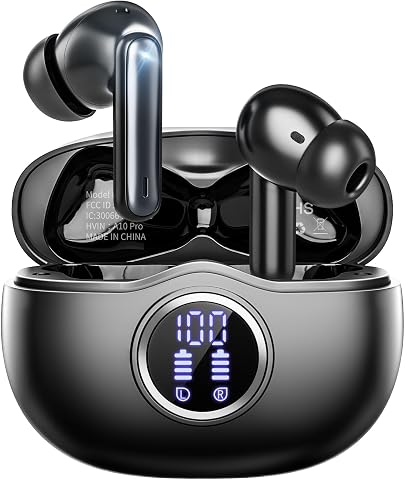
Fhumsh A10 Wireless Earbuds with LED Display, Bluetooth 5.3, ENC Noise Cancelling, IPX7 Waterproof, 50H Playback
- ✔ Bluetooth: 5.3
- ✔ Playback per charge: Up to 8 hours
- ✔ Playback with case: Up to 50 hours
Difficulty: Beginner | Time: 20-40 minutes for selection and setup; a few minutes before each commute
What You’ll Need
Tools & Materials:
- A smartphone or other Bluetooth audio device
- Wireless earbuds with a charged case
- The earbuds’ charging cable or compatible charger
- A clean, dry cloth
Knowledge:
- Basic phone settings, including how to open Bluetooth controls
- Awareness of local rules for audio devices while walking, cycling, or driving
Choose earbuds that fit your budget and travel routine. Check the product’s stated battery life, water resistance, microphone performance, controls, and return policy. Battery estimates vary with volume, calls, noise cancellation, and age of the battery. Do not wear earbuds while driving; follow local laws and keep enough awareness of traffic and transit announcements.
Soundcore P30i by Anker Noise Cancelling Earbuds, Hands-Free Viewing
On a commute with changing noise levels, the Soundcore P30i offers the most complete set of listening controls in this lineup. Its adaptive noise cancelling is rated up to 42dB, and transparency mode gives commuters a way to let in more ambient sound when the setting calls for it. Neither the Monster nor the Fhumsh lists those listening modes: Monster emphasizes a basic lightweight fit, while Fhumsh’s ENC is described as helping calls rather than reducing noise in what we hear.The battery figures are strong, though they depend on how you use the earbuds. Soundcore lists up to 10 hours per charge without ANC, falling to 6 hours with it; case totals similarly drop from 45 to 25 hours. That makes the P30i flexible for shorter commutes and charging between trips, while the difference matters to anyone expecting to use ANC for a full day. Its four-microphone AI call setup and Bluetooth 5.4 round out a travel-friendly feature set. The case also doubles as a phone stand, a bonus for hands-free viewing during a pause, though it contributes little while walking or transferring between trains.Compared with the Monster, Soundcore is the more capable option for noisy routes but asks users to rely on its app for full customization. Compared with Fhumsh, it provides more clearly specified listening noise control, but has IP54 water resistance rather than Fhumsh’s IPX7. We rank it first because noise control and transparency serve the widest range of commute conditions, with the caveat that ANC shortens runtime.
Pros:
- Adaptive noise cancelling and transparency mode support different commute environments.
- Up to 10 hours per charge without ANC and up to 45 hours with the case.
- Four microphones with AI processing are specified for calls.
- Case doubles as a phone stand for hands-free viewing during stops.
Cons:
- Per-charge playback falls to 6 hours with ANC enabled.
- Full customization requires the Soundcore app.
- No wireless charging is listed.
Best for: Commuters who move between noisy transit and quieter or more awareness-sensitive settings, and want ANC plus transparency mode.
Not ideal for: People who want the longest listed runtime with ANC, avoid companion apps, or prioritize a highly water-resistant workout-style fit.
Bottom line: For the broadest mix of noise control and commute flexibility, we rank the P30i first, provided its shorter ANC runtime fits your routine.
“For the broadest mix of noise control and commute flexibility, we rank the P30i first, provided its shorter ANC runtime fits your routine.”
Monster N-Lite 203 AirLinks Wireless Earbuds
The Monster N-Lite 203 AirLinks suits commuters who want a conventional in-ear option with a restrained feature set. Three sizes of soft rubber tips help accommodate different ears, and each earbud weighs 3.85 g according to the supplied specs. That lighter, uncomplicated setup contrasts with Fhumsh’s reinforced earhooks, which are designed to stay secure during more vigorous movement, and Soundcore’s added listening modes for managing transit noise.Monster lists up to 8 hours per charge and 30 hours with the case, enough to cover many daily trips if charging is part of the routine. The total trails Soundcore’s stated 45 hours without ANC, and Monster provides no ANC or transparency mode in the supplied details. Its aptX decoding may appeal to buyers who care about codec support, but it does not replace noise control when a train or bus is loud. Dual microphones are specified, fewer than Soundcore’s four, and the product description does not detail additional call processing.IPX6 water resistance is a practical advantage for sweat and drizzle, although the description explicitly distinguishes it from submersion. Compared with Fhumsh, Monster is the lighter-feeling, less secured option and has lower water resistance than Fhumsh’s IPX7; compared with Soundcore, it offers fewer commute-specific controls but a simpler package. We place it second for riders who value light weight and straightforward use over ANC and extended case capacity.
Pros:
- Lightweight earbuds with three included ear-tip sizes.
- Up to 8 hours per charge and 30 hours with the case.
- aptX audio decoding is specified.
- IPX6 water resistance is suited to sweat and drizzle.
Cons:
- No ANC or transparency mode is listed.
- The 30-hour case total is below Soundcore’s listed total.
- IPX6 is not intended for submersion.
Best for: Commuters who prefer lightweight in-ear earbuds, want aptX decoding, and do not need listed ANC or transparency controls.
Not ideal for: People on especially noisy routes who want active noise cancelling, or commuters seeking the longest case-supported playback in this group.
Bottom line: Choose Monster for a lighter, simpler commute setup if you can do without the noise controls Soundcore provides.
“Choose Monster for a lighter, simpler commute setup if you can do without the noise controls Soundcore provides.”
Fhumsh A10 Wireless Earbuds with LED Display, Bluetooth 5.3, ENC Noise Cancelling, IPX7 Waterproof, 50H Playback
For commuters who combine their journey with a brisk walk or outdoor exercise, the Fhumsh A10 takes a different approach from both Soundcore and Monster. Reinforced earhooks are intended to hold the earbuds in place, while IPX7 water resistance is the strongest rating listed here. That makes this the most movement- and weather-oriented pick in the group. The tradeoff is a more specialized fit: commuters who prefer small, conventional in-ear earbuds may find Soundcore or Monster a better match.Its charging case has an LED display showing battery levels for the case and individual earbuds. That visible readout can make it easier to plan charging than relying on an estimate, and the total playback claim reaches up to 50 hours. The supplied specs state 8 hours per charge, however, so long days still depend on access to the case. Soundcore offers up to 10 hours per charge without ANC and more listed call microphones, while Monster lists aptX decoding and a lighter-feeling design. Fhumsh instead prioritizes monitoring, fit, and resistance.One distinction matters for transit: the A10’s ENC is described as call noise cancellation, not ANC for listening. It may help keep calls clearer, but commuters seeking a quieter ride should look to Soundcore’s explicit adaptive ANC. The A10 also has a stated 90-day warranty, a shorter coverage period than many buyers may expect, and Bluetooth 5.3 is the specification provided despite conflicting Bluetooth wording in the product information. We rank it third because its strengths are real but more specialized for commuting than Soundcore’s noise controls or Monster’s simple lightweight format.
Pros:
- IPX7 water resistance and sweatproof mesh are suited to wet or active use.
- Earhooks and multiple ear-tip sizes support a more secure fit.
- LED case display shows battery levels for the case and earbuds.
- Up to 50 hours total playback is listed with the case.
Cons:
- ENC is specified for calls; active noise cancelling for listening is not listed.
- The warranty is listed as 90 days.
- Playback per charge is up to 8 hours, below Soundcore’s 10 hours without ANC.
Best for: Commuters who walk in rain or transition from transit to workouts and want earhooks, visible battery status, and strong water resistance.
Not ideal for: Riders looking for active noise cancelling during listening, a conventional compact fit, or longer stated warranty coverage.
Bottom line: The A10 is the specialist choice for secure fit and water resistance, but commuters who want quieter listening should choose Soundcore instead.
“The A10 is the specialist choice for secure fit and water resistance, but commuters who want quieter listening should choose Soundcore instead.”
As an Amazon Associate we earn from qualifying purchases.
Before You Start
Charge the case and earbuds before pairing. Read the quick-start instructions for the model’s pairing method and controls, since these differ between brands. If you commute through crowded streets or stations, plan to use transparency or ambient mode, or keep one ear free when that gives you better awareness. Do not assume noise cancellation blocks every sound, and do not raise volume to overpower traffic or machinery.
Step-by-Step Instructions
Step 1: Match the earbuds to your commute
List how you travel and what you need most: comfortable wear, clear calls, long battery life, compact storage, or awareness of your surroundings. Compare models using those needs. For a long trip, check the listed listening time per charge and whether the case adds charges. For calls, look for microphone reviews in noisy places. For sweaty walks or rainy stops, check the manufacturer’s water-resistance rating; the case may have a different rating from the earbuds.
Tip:Noise cancellation can make buses or trains more comfortable, but it can also reduce awareness. A transparency mode is useful when you need to hear announcements or nearby people.
Check: You can name the features you need and have confirmed the earbuds support them in the manufacturer’s specifications.
Step 2: Check fit and comfort
If the earbuds come with different ear tips, start with the size already attached, then try other sizes one at a time in a quiet place. Insert each earbud as its instructions show and gently twist or settle it into place. The fit should feel secure without pain or strong pressure. Walk around and speak for a minute to see whether the earbuds loosen or create an uncomfortable seal. Use the model’s fit test in its companion app if available.
Tip:Do not push an earbud deeper to compensate for a loose fit. Try another tip size or shape. Stop wearing it if you feel pain or irritation.
Check: Both earbuds stay in place during gentle movement, feel comfortable, and produce balanced sound without needing a high volume.
Step 3: Pair the earbuds with your device
Open the case or put the earbuds into pairing mode using the method in the quick-start instructions. On your phone, open Bluetooth settings, turn Bluetooth on, and select the earbuds’ name from the available devices. Accept the pairing prompt if one appears. Play audio at a low volume, then pause it and place the earbuds back in the case to confirm they disconnect or charge as expected. If prompted, install the manufacturer’s app from your device’s official app store.
Tip:If the earbuds connect to another device nearby, turn Bluetooth off on that device temporarily or use the earbuds’ documented reset procedure before trying again.
Check: The phone shows the earbuds as connected, audio plays through them, and the case responds as described in the product instructions.
Step 4: Set controls and awareness options
Open the audio or companion app settings and review the available controls. Set simple actions for play, pause, volume, calls, and switching between noise cancellation and ambient mode. Try each control while stationary. Choose an awareness setting that suits your route: use ambient mode near roads, platforms, and busy stations, and use noise cancellation only where it is safe and appropriate. Keep spoken announcements audible when you need them.
Tip:Some earbuds allow independent control of each side. Check both earbuds so you know how to pause audio if one is removed.
Check: You can pause audio, adjust volume, answer or end a call, and change awareness mode without searching through menus.
Step 5: Prepare the battery and case
Charge the earbuds and case using the supplied or manufacturer-approved charging method. Check the status light or app for charge level, then put the earbuds in the case and close it. Before each commute, check that the case has enough power for the trip and that both earbuds are seated correctly. Carry the case in a secure pocket or bag compartment so the earbuds can be stored when not in use.
Tip:Charging time and indicator meanings vary by model. Use the product manual rather than guessing from a blinking light.
Check: The earbuds and case show a usable charge, and the earbuds begin charging when seated in the case.
Step 6: Use the earbuds safely while traveling
Before leaving, start at a low volume and choose the awareness mode for your route. Keep audio low enough that you can notice important announcements and nearby hazards. Pause or remove the earbuds before crossing a road, speaking with transit staff, or handling a situation that needs your attention. Store them in the case when they are not in use. Never wear them while driving, and follow local rules for cycling and other activities.
Tip:On a train or bus, noise cancellation may reduce steady engine noise, but it can also make announcements harder to hear. Check displays and listen for announcements when needed.
Check: You can hear the audio comfortably while remaining able to respond to the cues your route requires.
Step 7: Clean and store them after the trip
Remove the earbuds and wipe their outer surfaces with a clean, dry cloth. If the manufacturer permits cleaning the ear tips separately, remove them and follow its directions. Keep moisture and debris out of charging contacts and openings. Let damp earbuds dry fully before placing them in the case, unless the product instructions specify another method. Return them to the case and store it in a dry place.
Tip:Do not use sharp objects, household cleaners, or compressed air on the earbuds unless the manufacturer specifically recommends them.
Check: The earbuds and contacts are clean and dry, and the case closes with both earbuds seated.
Common Mistakes to Avoid
- Choosing earbuds based only on advertised battery life. — Check both earbud and case capacity, and account for calls, noise cancellation, volume, and battery aging in real use.
- Using a poor fit that makes audio weak or causes the earbuds to fall out. — Try the supplied tip sizes, check the fit test if available, and walk briefly before relying on the fit during a commute.
- Turning volume up to mask traffic or transit noise. — Lower the volume, use suitable noise control in safe settings, and pause or remove the earbuds when you need full awareness.
- Putting wet or dirty earbuds straight into the case. — Wipe them clean and let them dry as directed before charging or storing them.
Troubleshooting
Problem: The phone cannot find the earbuds.
Solution:
Confirm that the earbuds are charged and in pairing mode as described in the manual. Move them close to the phone, disconnect them from a device already paired to them, and scan again. If they still do not appear, follow the documented reset steps and retry pairing.
Problem: Audio cuts out or plays from only one earbud.
Solution:
Keep the phone near you and away from obstructions, then check that both earbuds have charge. Put both in the case briefly, reseat them, and reconnect. Clean the charging contacts gently with a dry cloth. If the issue continues, check the manufacturer’s support instructions for your model.
Problem: Calls sound muffled or the other person cannot hear you.
Solution:
Check that the earbuds are selected as the call’s audio input and output. Move away from strong wind, wipe the microphone openings according to the manual, and try a short test call. Switch to the phone microphone if the environment remains too noisy.
Problem: The earbuds do not charge in the case.
Solution:
Confirm the case has power, then reseat each earbud and check that no tip or debris prevents contact. Wipe the contacts with a dry cloth and close the lid. Consult the charging indicator guide; if the case or earbuds remain unresponsive, use the maker’s support or warranty process.
What Success Looks Like
The earbuds fit comfortably, remain connected to your device, and have enough charge for the journey. You can control audio and calls, select an appropriate awareness mode, and store clean, dry earbuds in the case afterward. During travel, audio stays at a comfortable level and does not prevent you from responding to hazards or announcements.
Next Steps
Make a quick pre-trip routine: check charge, confirm both earbuds are in the case, and select the awareness mode that matches the route. Clean the earbuds regularly according to the manufacturer’s instructions, and replace worn tips if the fit changes. If discomfort, repeated connection failures, or charging problems continue after the documented fixes, contact the manufacturer or retailer.
Frequently Asked Questions
Should I use noise cancellation on my commute?
Use it only where reducing background noise is appropriate and safe. Near traffic, platforms, or other hazards, choose ambient mode or keep an ear free so you can hear important cues.
Can I wear wireless earbuds in the rain?
Check the earbuds’ water-resistance rating and the manufacturer’s guidance. The case may not share the earbuds’ rating. Dry the earbuds before charging or storing them as directed.
Why do my earbuds keep falling out?
Try the other supplied ear-tip sizes and follow the fit instructions. If none feels secure and comfortable, the earbud shape may not suit your ears; check the return or exchange policy.
How loud should I set them?
Use the lowest volume that lets you hear comfortably. Do not raise it to overpower traffic or machinery, and pause playback when you need to hear your surroundings.
Do I need the manufacturer’s app?
Basic Bluetooth playback usually works without an app. An app may provide fit checks, battery information, control settings, or firmware updates; use it only if those features are useful for your setup.