
TL;DR
A Nov. 19 guide maps AI workloads to Mac minis, Mac Studios, Nvidia GPU PCs or cloud APIs using published specifications and tool documentation. Memory capacity and software support shape the choices; the guide does not provide independent speed tests or a universal winner.
The guide says a Mac mini can be enough for an agent that calls a cloud model: the computer runs the agent loop, files and tools, while the model runs remotely. Apple lists the base Mac mini at 4 watts at idle. For a private assistant running a small open model, the guide suggests a Mac mini with 16 to 32 GB of memory, while warning that responses may be slower than those from large cloud services.

Get the latest gadgets delivered free with Prime
- Fast, free delivery on millions of items
- Prime Video, Amazon Music and more included
- Member-only deals all year
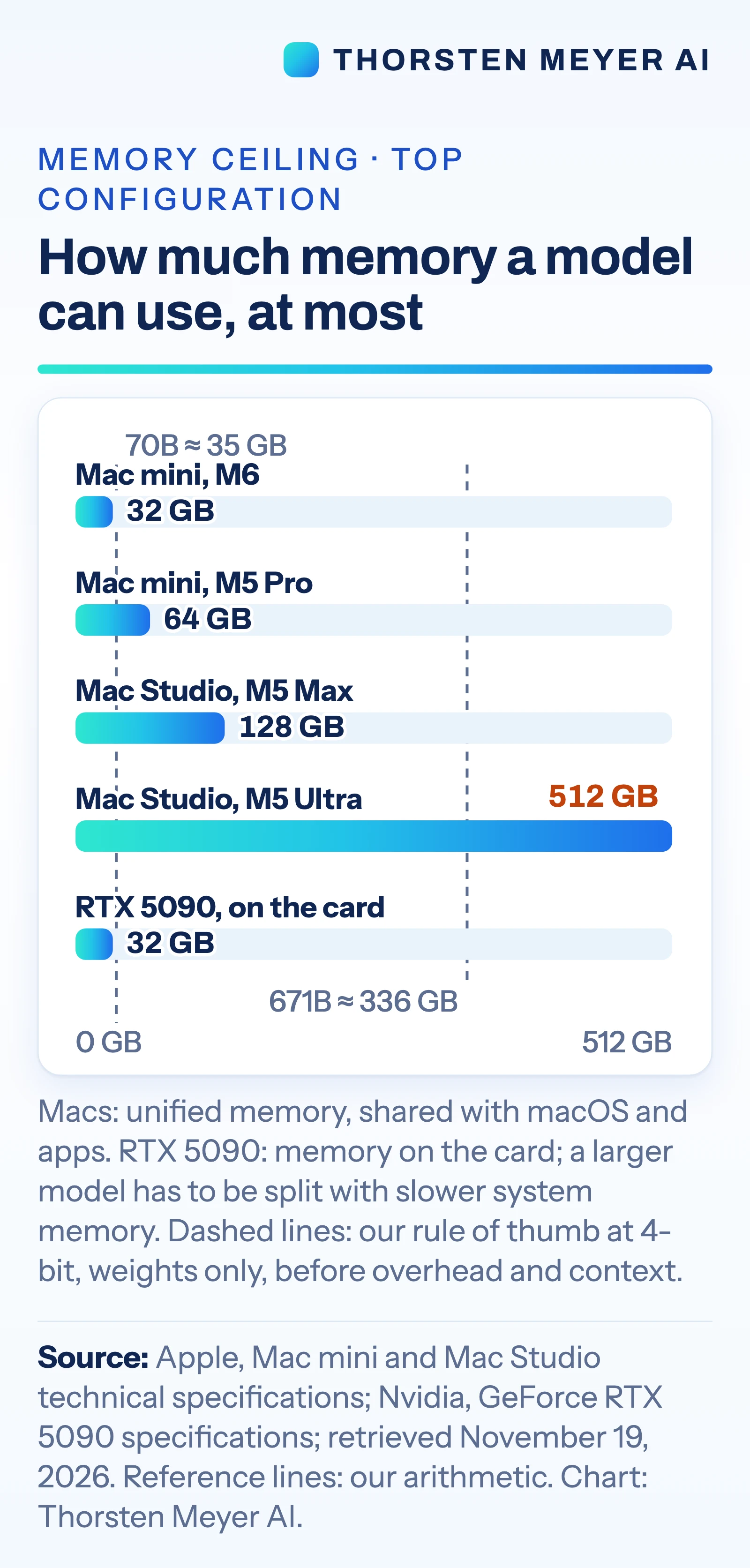
For local models, the report puts memory capacity at the center of the decision. It lists Mac mini configurations up to 64 GB, Mac Studio options up to 128 GB with M5 Max and 512 GB with M5 Ultra, and 32 GB of onboard memory for Nvidia’s GeForce RTX 5090. The guide estimates that model weights at four-bit precision require about 0.5 GB per billion parameters, before room for overhead and conversation context. Those estimates are a rule of thumb, not a measured performance result.
The report points to Nvidia GPUs for workloads tied to CUDA software, including serving tools such as vLLM, which ships CUDA binaries. Its documentation points Apple silicon users to a community-maintained plugin. Apple’s MLX tools support LoRA and QLoRA fine-tuning, and PyTorch supports GPU training on Mac, but the guide cautions that fine-tuning requires more memory than running the same model.
Choosing Hardware by AI Workload
The distinctions affect both upfront cost and operating demands. A small Mac may suit an always-on agent using a cloud model, while a large local model may require far more memory than a consumer desktop provides. The guide lists the Mac Studio M5 Ultra at up to 385 watts for the whole system; Nvidia rates the RTX 5090 card at 575 watts and recommends a 1,000-watt system power supply.
For teams, the choice also shapes setup and data handling. A local model can keep prompts and documents on a machine, while a cloud API sends requests to an external service and charges by usage. The guide says leading closed models are available only through cloud services, so a local setup cannot run those models. It offers a workload-based comparison, not independent benchmark results or a buying recommendation.
Products Worth Considering

Jackery Explorer 2000 v2 Portable Power Station, 2042Wh

Anker SOLIX S2000 Portable Power Station, 2,010Wh, 1,500W

DJI Mic 2 Wireless Microphone System (2 Transmitters, 1 Receiver, Charging Case)
As an affiliate, we earn on qualifying purchases.
From Mac Mini to Cloud Models
The article follows an earlier Thorsten Meyer AI piece about what models fit within a Mac mini’s 16 to 64 GB of memory. It broadens the comparison to include Mac Studio systems, Nvidia PCs and cloud APIs. The publication says its specifications and tool documentation were checked on November 19, 2026, citing Apple, Nvidia and software documentation.
It also notes that linking Macs into a cluster is possible but requires Thunderbolt 5 connections between each pair and a macOS Recovery setting change. The base M6 Mac mini has Thunderbolt 4, according to the guide. Clustering is presented as a project with setup requirements, rather than a simple extension of a single desktop.
Performance and Costs Still Vary
The guide does not provide independent speed tests for the hardware or workloads it compares. It says there are no independent tests at the very large model sizes discussed, so actual response speed and throughput for a given configuration remain unclear. Results will depend on the model, software, context length and workload.
Costs also vary beyond the figures provided. The article lists a US starting price of $5,499 for the Mac Studio M5 Ultra on Apple’s site as of November 19, 2026, and notes that cloud APIs charge per token, but it does not compare total ownership costs or API bills across usage patterns. Data handling and privacy depend on the cloud service and its terms; the guide does not assess individual providers.
Match the Setup to the Job
Readers can use the guide’s matrix to narrow the options, then check that a specific model fits the available memory with room for context and overhead. For teams considering CUDA-dependent software, the next step is to confirm compatibility with the intended GPU and serving stack. Anyone relying on cloud APIs will need to compare provider pricing and data policies for their workload.
The publication does not announce a follow-up test or benchmark. Its comparison is based on specifications and documentation current on November 19, 2026; hardware, software support and model availability may change.
Key Questions
Which machine does the guide suggest for an AI agent that uses cloud models?
It suggests a Mac mini or a Mac already on hand, because the computer runs the agent and its tools while the model runs in the cloud.
How much memory does the guide associate with a 70-billion-parameter model?
Using its four-bit rule of thumb, the guide estimates about 35 GB for weights alone. Additional memory is needed for overhead and conversation context.
When does the guide favor an Nvidia GPU PC?
It favors an Nvidia GPU PC when a workload depends on CUDA-first tools, or when fast inference is needed for models that fit in the card’s memory. The RTX 5090 is listed with 32 GB of memory.
Can a Mac run large-model training?
The guide says Macs support small fine-tuning methods such as LoRA and QLoRA, but describes large-model training as a cluster-scale job rather than a desktop task.
Why might someone still need a cloud API?
The guide says the leading closed models cannot be downloaded and run locally. Cloud APIs provide access to those models, with per-token charges and prompts sent outside the user’s machine.
Source: Thorsten Meyer AI