
The best PS5 Pro accessories depend on what you want to improve: the Tokluck PS5 Cooling Station with Automatic Fan and Dual Controller Charger is my best overall pick for combining cooling and charging, while the PowerA Twin Charging Station is a simpler choice for controller power and the DualSense Edge suits players seeking deeper control customization. Multi-feature stands can tidy a setup, but they take more space and may add features you do not need; separate accessories offer more flexibility but use more ports and cables. Cooling fans and dust covers also vary in how much they add to your setup, so I would not buy one just for appearance. Read on for how the 15 options compare and which tradeoffs matter most.

Get the latest gadgets delivered free with Prime
- Fast, free delivery on millions of items
- Prime Video, Amazon Music and more included
- Member-only deals all year
Complete the kit



Key Takeaways
- Combined stands lead on convenience: Tokluck’s automatic-fan station brings cooling and two-controller charging together, while the PowerA charger keeps the job focused on controller power.
- Cooling add-ons are not interchangeable: standalone fans such as KEPLUG and JUSPRO use console USB connections, while stand-style picks bundle cooling with charging or extra ports.
- Setup compatibility matters more than a feature list: several stands and mounts are designed for multiple PS5 versions, but buyers still need to check the console’s position, dimensions, cable access, and included support.
- The most useful accessory may solve a non-cooling problem: UGREEN targets Bluetooth audio, AQIDAP adds USB connections, and KontrolFreek rings change controller-stick feel.
- Specialized picks trade versatility for focus: the DualSense Edge offers controller customization, while the KUSTOMAZING decals personalize the console without adding charging or cooling functions.
| Tokluck PS5 Wall Mount Kit with Cooling Fans and Dual Controller Charging Station | 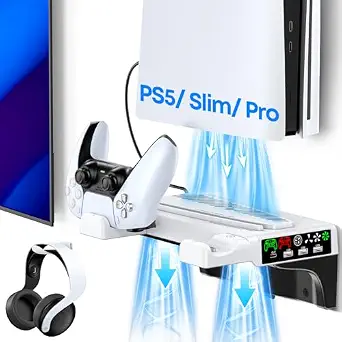 | Best All-in-One Wall-Mount Setup | Brand: Tokluck | Console compatibility: PlayStation 5, PS5 Slim, and PS5 Pro; disc and digital | Controller compatibility: PS5 and PS5 Edge controllers | VIEW LATEST PRICE | See Our Full Breakdown |
| Tokluck Horizontal Stand for PS5, Slim, and Pro with Cooling Fan and Dual Controller Charger |  | Best Multi-Function Tabletop Stand | Brand: Tokluck | Console compatibility: PS5, PS5 Slim, and PS5 Pro | Controller compatibility: Original PS5 and Edge controllers | VIEW LATEST PRICE | See Our Full Breakdown |
| OIVO Adjustable Horizontal Stand for PS5, PS5 Slim, and PS5 Pro |  | Best Simple, Stable Console Stand | Console compatibility: PS5, PS5 Slim, and PS5 Pro | Console editions: Disc and digital | Orientation: Horizontal | VIEW LATEST PRICE | See Our Full Breakdown |
| KontrolFreek Precision Rings for Gaming Controllers, 6-Pack |  | Best Aim-Tuning Accessory | Brand: KontrolFreek | Quantity: Six rings | Resistance levels: Soft, medium, and hard | VIEW LATEST PRICE | See Our Full Breakdown |
| GRAUGEAR Cooling and Dust Protection Kit for PS5 Pro and PS5 Slim |  | Best Dust-Protection Kit | Brand: GRAUGEAR | Model: G-PS5M2F-DF+ | Compatibility: PS5 Pro and PS5 Slim | VIEW LATEST PRICE | See Our Full Breakdown |
| UGREEN USB-C Bluetooth Audio Adapter for PS5, Switch, and PC |  | Best for Wireless Audio | Brand: UGREEN | Model number: 45008 | Connector: USB Type-C | VIEW LATEST PRICE | See Our Full Breakdown |
| Rysker PS5, PS5 Slim, and PS5 Pro Cooling and Charging Stand |  | Best All-in-One Stand | Brand: Rysker | Model number: VG-P5328 | Compatibility: PS5, PS5 Slim, PS5 Pro | VIEW LATEST PRICE | See Our Full Breakdown |
| AQIDAP 5-Port USB Hub for PS5 Pro |  | Best for Port Expansion | Brand: AQIDAP | Compatibility: PS5 Pro console | USB 2.0 ports: 3 | VIEW LATEST PRICE | See Our Full Breakdown |
| Kammkonb PS5 Cooling Stand with Dual Controller Charging, Fan, and 3 USB Ports |  | Best for Disc Storage | Brand: Kammkonb | Compatibility: PS5 Standard, Slim, and Pro; disc and digital versions | Fan settings: Three speeds: high, medium, and low | VIEW LATEST PRICE | See Our Full Breakdown |
| PlayStation DualSense Edge Wireless Controller | 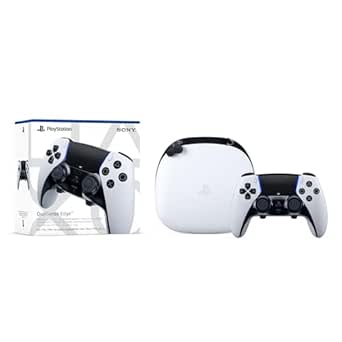 | Best Premium Controller Upgrade | Compatible device: PlayStation 5 | Controller type: Gamepad | Connectivity: USB and wireless | VIEW LATEST PRICE | See Our Full Breakdown |
| KEPLUG Cooling Fan for PlayStation 5 Pro with Four Fans and USB 3.0 |  | Best for Adjustable PS5 Pro Cooling | Compatibility: PS5 Pro Disc and Digital Editions | Number of fans: 4 | Cooling method: Forced air | VIEW LATEST PRICE | See Our Full Breakdown |
| PowerA Twin Charging Station for PlayStation 5 DualSense Controllers |  | Best Dedicated DualSense Charger | Compatibility: PlayStation 5 DualSense wireless controllers | Controller capacity: 2 | Mounting type: Tabletop | VIEW LATEST PRICE | See Our Full Breakdown |
| JUSPRO Cooling Fan for PS5 Pro |  | Best for Flexible Console Placement | Compatibility: PS5 Pro Digital and Disc Editions | Number of fans: 4 | Speed settings: 2, with automatic temperature-based control | VIEW LATEST PRICE | See Our Full Breakdown |
| KUSTOMAZING PS5 Slim and PS5 Pro Console Underlay Stickers with DualSense Controller Decal |  | Best for Personalizing Your Setup | Compatibility: PS5 Slim Disc and Digital Editions, PS5 Pro, and DualSense controller | Set contents: 2 console stickers and 1 controller decal | Materials: Resin and vinyl | VIEW LATEST PRICE | See Our Full Breakdown |
| Tokluck PS5 Cooling Station with Automatic Fan and Dual Controller Charger |  | Best All-in-One Charging and Cooling Station | Compatibility: PS5, PS5 Slim, PS5 Pro, PS5 Edge Controller, and PS5 Original Controller | Fan modes: Automatic temperature control and five manual settings | Controller charging: Dual controller charging; approximately 2.5 hours | VIEW LATEST PRICE | See Our Full Breakdown |
| PS5 Pro accessorie | Compatibility | Brand |
|---|---|---|
| Tokluck PS5 Wall Mount Kit wit | — | Tokluck |
| Tokluck Horizontal Stand for P | — | Tokluck |
| OIVO Adjustable Horizontal Sta | — | — |
| KontrolFreek Precision Rings f | — | KontrolFreek |
| GRAUGEAR Cooling and Dust Prot | PS5 Pro and PS5 Slim | GRAUGEAR |
| UGREEN USB-C Bluetooth Audio A | — | UGREEN |
| Rysker PS5 | PS5, PS5 Slim, PS5 Pro | Rysker |
| AQIDAP 5-Port USB Hub for PS5 | PS5 Pro console | AQIDAP |
| Kammkonb PS5 Cooling Stand wit | PS5 Standard, Slim, and Pro; disc and digital versions | Kammkonb |
| PlayStation DualSense Edge Wir | — | — |
| KEPLUG Cooling Fan for PlaySta | PS5 Pro Disc and Digital Editions | — |
| PowerA Twin Charging Station f | PlayStation 5 DualSense wireless controllers | — |
| JUSPRO Cooling Fan for PS5 Pro | PS5 Pro Digital and Disc Editions | — |
| KUSTOMAZING PS5 Slim and PS5 P | PS5 Slim Disc and Digital Editions, PS5 Pro, and DualSense controller | — |
| Tokluck PS5 Cooling Station wi | PS5, PS5 Slim, PS5 Pro, PS5 Edge Controller, and PS5 Original Controller | — |
More Details on Our Top Picks
Tokluck PS5 Wall Mount Kit with Cooling Fans and Dual Controller Charging Station
For a PS5 Pro setup that needs to free desk or media-console space, the Tokluck Wall Mount Kit combines a wall mount with two adjustable-speed fans and charging for two controllers. Its broad compatibility with original, Slim, and Pro disc and digital consoles makes it more flexible across PS5 generations than the OIVO Adjustable Horizontal Stand, which only supports tabletop horizontal placement. The included headset holder and extra USB charging port also gather several accessories around the console rather than leaving them loose.
The tradeoff is that this pick needs a suitable wall and installation, while the OIVO is easier to reposition. The fans offer three speed settings, but the listed details do not quantify their cooling effect. Dual-controller charging is specified at about 2.5 hours, so buyers prioritizing a wall-organized setup should weigh that charging time against dedicated charging options.
Pros:- Fits original PS5, Slim, and Pro disc and digital consoles
- Combines wall mounting, two adjustable fans, and dual-controller charging
- Adds a headset holder and an extra USB charging port
- Three fan settings and charging status lights provide control and at-a-glance feedback
Cons:- Wall installation limits easy repositioning and may not suit every room
- The listed controller charging time is approximately 2.5 hours
- No measured cooling performance is provided
Best for: PS5 Pro owners who want to reclaim tabletop space and keep a headset and two controllers organized near a wall-mounted console.
Not ideal for: Renters or anyone unwilling to drill or mount hardware, and buyers who need measured cooling results or faster controller charging.
- Brand:Tokluck
- Console compatibility:PlayStation 5, PS5 Slim, and PS5 Pro; disc and digital
- Controller compatibility:PS5 and PS5 Edge controllers
- Mounting type:Wall mount
- Cooling:Two fans with three speed settings
- Charging:Two controllers; approximately 2.5 hours
- Additional features:Headset holder and extra USB charging port
- Material and color:Stainless steel; black and white
- Dimensions and weight:8.86 × 7.28 × 3.35 inches; 0.75 kg
Our verdict“Choose this kit if freeing shelf space and consolidating PS5 Pro accessories matter more than a quick, tool-free setup.”
Tokluck Horizontal Stand for PS5, Slim, and Pro with Cooling Fan and Dual Controller Charger
This Tokluck stand suits a PS5 Pro owner who wants more than a basic support base but does not want to mount the console on a wall. It combines a horizontal stand, three-speed fan, and charging dock for two original or Edge controllers. Compared with the OIVO Adjustable Horizontal Stand, which focuses on stabilizing the console, this model adds charging and fan controls, making it the more consolidated choice for a busy gaming station.
That convenience comes with limits: it needs a connection to the PS5 for power, and the stated 3–3.5-hour charging time is slower than the wall-mount Tokluck kit’s listed estimate. There are no measured cooling results, either, so I would treat the fan as an added feature rather than a proven temperature fix. EVA foam is included for the Digital Edition, but the product details do not report the stand’s dimensions or weight.
Pros:- Compatible with PS5, PS5 Slim, and PS5 Pro
- Combines horizontal support, three-speed cooling fan, and two-controller charging
- LED indicators show controller charging status
- EVA foam is included for the Digital Edition
Cons:- Draws power from the PS5 rather than operating as a standalone accessory
- Two-controller charging takes approximately 3–3.5 hours
- No measured cooling performance is provided
Best for: PS5 Pro players who keep the console horizontal and want controller charging and adjustable fan settings in the same tabletop accessory.
Not ideal for: Players seeking a standalone-powered charger, verified cooling performance, or a simple support base without extra functions.
- Brand:Tokluck
- Console compatibility:PS5, PS5 Slim, and PS5 Pro
- Controller compatibility:Original PS5 and Edge controllers
- Mounting type:Tabletop desk stand
- Cooling:Fan with three adjustable speeds
- Charging capacity:Two controllers
- Charging time:Approximately 3–3.5 hours
- Power and indicators:Powered by the PS5; LED charging indicators
- Color:White
Our verdict“Pick this if a powered, feature-packed horizontal stand is more useful to you than the OIVO’s simpler console support.”
OIVO Adjustable Horizontal Stand for PS5, PS5 Slim, and PS5 Pro
The OIVO is the straightforward choice for PS5 Pro owners who want a stable horizontal position without adding fans, charging electronics, or cables. Its adjustable side pieces, support rods, nonslip pads, and securing screw help accommodate different PS5 versions and limit unwanted movement. That focused design makes it less feature-heavy than the Tokluck Horizontal Stand, but also avoids relying on the console for a fan-and-charger setup.
The tradeoff is a little hands-on assembly: buyers need to fit the supports and fasten the screw. It is also horizontal-only, so it will not suit a vertical setup. The included supports allow airflow around the console, but this is not an active cooling product and does not charge controllers. For a PS5 Pro station already equipped with separate cooling and charging, that simplicity can be an advantage; for a one-accessory setup, Tokluck covers more needs.
Pros:- Adjusts to PS5, PS5 Slim, and PS5 Pro disc and digital consoles
- Support rods, nonslip pads, and a screw help steady the console
- Compact support design leaves room for airflow
- Does not add a fan or controller charger that needs power
Cons:- Requires assembly and screw fastening
- Supports horizontal placement only
- Provides no active cooling or controller charging
Best for: PS5 Pro owners who want adjustable, secured horizontal support and already have separate cooling and controller-charging accessories.
Not ideal for: Players who need a vertical stand or want an accessory that also cools the console or charges controllers.
- Console compatibility:PS5, PS5 Slim, and PS5 Pro
- Console editions:Disc and digital
- Orientation:Horizontal
- Material:ABS plastic
- Mounting type:Tabletop
- Fastening:Securing screw
- Included supports:Two stands and three support rods
- Included pads:Two EVA foam pads
Our verdict“Choose the OIVO if reliable horizontal support is your priority and you do not need the extra electronics in the Tokluck stand.”
KontrolFreek Precision Rings for Gaming Controllers, 6-Pack
Unlike the stands and cooling kits in this roundup, KontrolFreek’s Precision Rings target how a PS5 Pro player controls aim. The rings add resistance to a compatible thumbstick, which may help players make smaller adjustments and reduce overshooting. With soft, medium, and hard options in one pack, this set gives players room to find a feel that suits them, rather than committing to one resistance level. It is a different kind of upgrade from the Tokluck Horizontal Stand: the stand organizes hardware, while these rings change controller input feel.
That added resistance is also the main drawback. Players who rely on quick stick movement or prefer a light, unrestricted feel may find the rings slow them down. Compatibility can vary by controller, so they are not as universal a PS5 Pro accessory as a console stand. The moisture-wicking rubber is designed to resist hand oils and recover its shape, but buyers should check their controller’s thumbstick fit before choosing this set.
Pros:- Six rings offer soft, medium, and hard resistance choices
- Added stick resistance is designed to help reduce overshooting
- Moisture-wicking material resists hand and finger oils
- Flexible rubber is designed to return to shape after use
Cons:- Added resistance may feel too restrictive for some play styles
- Compatibility varies by controller and thumbstick
- Does not add console cooling, charging, or storage
Best for: PS5 Pro players with compatible thumbsticks who want to experiment with added resistance for more controlled aiming.
Not ideal for: Players who prefer unmodified thumbsticks, need unrestricted quick movement, or cannot confirm compatibility with their controller.
- Brand:KontrolFreek
- Quantity:Six rings
- Resistance levels:Soft, medium, and hard
- Material:Rubber
- Color:Black, purple, and green
- Compatible devices:Gaming consoles and compatible performance thumbsticks
- Model number:4005-MIX
- UPC:850007079963
Our verdict“Choose these rings if you want to tune thumbstick resistance for aim control, and skip them if you prefer the stock stick feel.”
GRAUGEAR Cooling and Dust Protection Kit for PS5 Pro and PS5 Slim
For a PS5 Pro owner focused on dust and port protection rather than extra charging features, the GRAUGEAR kit offers a targeted set of add-ons: four breathable fan filters, silicone port plugs, and an M.2 SSD heatsink cover. Its included brush, cloth, and screwdriver make it a more maintenance-oriented choice than the OIVO Adjustable Horizontal Stand, which stabilizes the console but does not cover vents or unused ports. The filters are designed to allow airflow while reducing dust buildup, and the plugs give unused connections another layer of protection.
This is not a cooling fan kit, so it should not be compared with the active-fan options from Tokluck as a way to boost airflow. It is also limited to PS5 Pro and PS5 Slim, leaving owners of the original PS5 out. Filters and plugs require attention and cleaning, and the product details do not quantify airflow or dust reduction. It makes the most sense for owners who want upkeep accessories and accept that maintenance tradeoff.
Pros:- Includes four breathable filters for fan openings and silicone plugs for unused ports
- Adds an M.2 SSD heatsink cover
- Cleaning and installation tools are included
- Filters are designed to allow airflow and can be cleaned
Cons:- Compatible only with PS5 Pro and PS5 Slim
- Does not include an active cooling fan
- No measured airflow or dust-reduction results are provided
Best for: PS5 Pro or Slim owners who want vent and port dust protection, an SSD heatsink cover, and basic cleaning tools in one kit.
Not ideal for: Original PS5 owners, or anyone seeking an active cooling fan or measured cooling improvements.
- Brand:GRAUGEAR
- Model:G-PS5M2F-DF+
- Compatibility:PS5 Pro and PS5 Slim
- Included components:M.2 SSD heatsink cover, four fan dust filters, silicone port plugs, brush, screwdriver, and cloth
- Material:Metal
- Dimensions:3.9 × 0.9 × 0.4 inches
- Weight:70 g
- Warranty:12 months
- Part number:18146
Our verdict“Choose this kit for dust and port protection on a PS5 Pro or Slim, not as a substitute for the active cooling in Tokluck’s stands.”
UGREEN USB-C Bluetooth Audio Adapter for PS5, Switch, and PC
The UGREEN USB-C Bluetooth Audio Adapter is the most focused pick here: it adds wireless audio to compatible PS5 Pro setups without expanding the console’s storage or charging options. Its support for aptX Adaptive, aptX Low Latency, aptX HD, and SBC gives compatible headphones more ways to balance sound quality and delay; aptX Adaptive can bring latency below 100 ms when both devices support it. Unlike the AQIDAP 5-Port USB Hub, this adapter solves a specific audio problem rather than adding general-purpose connections. It is also driver-free and compact, but codec support depends on the headphones, and the listed incompatibility with AirPods Pro 2 rules out a common pairing choice. Skip it if you want to charge accessories or need a solution for PS5 Portal.
Pros:- Supports several Bluetooth codecs, including aptX Low Latency and aptX Adaptive
- No drivers or software installation required
- Works with compatible USB-C PS5, Switch, Windows, and macOS devices
- Compact single-port design includes a status indicator
Cons:- Headphones must support the selected codec to access its benefits
- Not compatible with PS5 Portal, PS4, Linux, or AirPods Pro 2
- Bluetooth calling mode can reduce audio quality
Best for: PS5 Pro players with compatible Bluetooth headphones who want wireless audio and can match the adapter’s codecs to their headset.
Not ideal for: Players using AirPods Pro 2, PS5 Portal, Linux, or headphones without compatible codec support, and anyone seeking extra charging ports.
- Brand:UGREEN
- Model number:45008
- Connector:USB Type-C
- Ports:1
- Supported codecs:aptX, aptX Adaptive Low Latency, aptX Adaptive High Quality, aptX HD, SBC
- Latency:Under 100 ms with aptX Adaptive when the receiving headphones support it
- Operating systems:Windows and macOS
Our verdict“Choose this adapter if your headphones support its codecs and wireless audio matters more than adding ports or charging features.”
Rysker PS5, PS5 Slim, and PS5 Pro Cooling and Charging Stand
The Rysker Cooling and Charging Stand earns its place by combining console support, an adjustable fan, controller charging, and three USB hubs in one accessory. That makes it a broader setup organizer than the Kammkonb PS5 Cooling Stand, which adds disc storage and a headset holder but does not list DualSense Edge compatibility. Rysker supports charging both an original PS5 controller and the Edge, with approximate charge times of 3.5 and 2.5 hours respectively. Built-in protections against overcharging, overcurrent, and overheating add reassurance when controllers stay docked. The tradeoff is a more involved installation: cables and security screws need to be fitted, and the adjustable fan may introduce noise. Choose another option if disc storage or a simpler stand matters more than the Edge charging support.
Pros:- Compatible with PS5, PS5 Slim, and PS5 Pro
- Charges original PS5 and Edge controllers
- Three USB hubs support accessories and data transfer
- Includes adjustable cooling and overcharge, overcurrent, and overheating protections
Cons:- Setup requires cables and security screws
- The fan may add noise during play
- Controller charging takes about 3.5 hours for an original controller
Best for: PS5 Pro owners who want one stand for console cooling, charging an original DualSense and Edge controller, and connecting accessories.
Not ideal for: Players who prioritize game-disc storage, want a quick cable-free setup, or prefer not to add a fan to their console area.
- Brand:Rysker
- Model number:VG-P5328
- Compatibility:PS5, PS5 Slim, PS5 Pro
- Fans:1 adjustable fan
- USB hubs:3
- Original PS5 controller charge time:About 3.5 hours
- PS5 Edge controller charge time:About 2.5 hours
- Warranty:2 years
Our verdict“Pick Rysker if you want a multi-function PS5 Pro stand that supports Edge charging and USB expansion, and can accommodate a more involved setup.”
AQIDAP 5-Port USB Hub for PS5 Pro
The AQIDAP 5-Port USB Hub is the straightforward choice when the PS5 Pro’s available connections are the main issue. It adds three USB 2.0 ports and two Type-C ports without external power or driver installation, so it is simpler and more focused than the Rysker or Kammkonb stands, both of which combine ports with cooling and controller charging. Its stated transfer rate of up to 480 Mbps suits basic accessory connections, but it is a limitation for faster data tasks. This hub is also listed for PS5 Pro specifically, unlike stands that cover multiple console versions. Because no external power supply is required, it keeps the setup compact, though the provided current ratings mean buyers should check device power needs rather than assume every accessory is suitable.
Pros:- Adds five connections, including two Type-C ports
- Plug-and-play operation requires no drivers
- Does not require an external power supply
- Compact alternative to a cooling and charging stand
Cons:- Listed as compatible with PS5 Pro only
- USB 2.0 transfer speeds are limited to up to 480 Mbps
- Port current ratings may not suit every power-hungry accessory
Best for: PS5 Pro owners who need a compact way to connect several low-demand USB accessories without adding a powered hub.
Not ideal for: Owners of other PS5 models or players who need faster transfers, high-power accessory charging, cooling, or controller docks.
- Brand:AQIDAP
- Compatibility:PS5 Pro console
- USB 2.0 ports:3
- Type-C ports:2
- Maximum data transfer rate:480 Mbps
- USB 2.0 port current:500 mA × 3
- Type-C port current:1000 mA
- External power:Not required
Our verdict“Choose the AQIDAP hub if your PS5 Pro needs extra basic USB connections and you do not need the cooling or charging features of a stand.”
Kammkonb PS5 Cooling Stand with Dual Controller Charging, Fan, and 3 USB Ports
For a PS5 Pro setup built around physical games, the Kammkonb Cooling Stand has a distinct advantage over the Rysker Cooling and Charging Stand: it stores up to 13 game discs and includes a headset holder. Its three-speed fan, dual controller docks, and three USB ports also bundle several setup tasks into one unit. That capacity makes it a better fit for a busy entertainment area than the simpler AQIDAP 5-Port USB Hub, which only expands connections. The main compatibility catch is significant: Kammkonb does not support the DualSense Edge, while Rysker does. Slim digital and disc versions also require removing the panel adapter, adding a setup step. Pick this stand for storage and standard DualSense charging, not for Edge users or players who want a minimal accessory footprint.
Pros:- Stores up to 13 game discs and includes a headset holder
- Charges two controllers at once in about 3 hours
- Offers three fan speeds and LED charging indicators
- Includes three USB ports
Cons:- Not compatible with the DualSense Edge controller
- Slim digital and disc models require removing the panel adapter
- Console, controllers, headset, remote, and games are not included
Best for: PS5 Pro disc-game collectors using two standard DualSense controllers who want cooling, charging, and headset organization in one stand.
Not ideal for: DualSense Edge owners, players who do not need disc storage, or anyone who wants a particularly simple stand installation.
- Brand:Kammkonb
- Compatibility:PS5 Standard, Slim, and Pro; disc and digital versions
- Fan settings:Three speeds: high, medium, and low
- Controller charging:Two controllers; approximately 3 hours to fully charge
- USB ports:3
- Disc storage:Up to 13 game discs
- Included accessories:Headset holder, console panel adapter, and screw
- DualSense Edge compatibility:Not compatible
Our verdict“Choose Kammkonb if disc storage and standard DualSense charging matter more than DualSense Edge support or a simple installation.”
PlayStation DualSense Edge Wireless Controller
The PlayStation DualSense Edge is the only product in this group that changes how you control games rather than organizing or cooling the PS5 Pro setup. Remappable inputs, swappable back buttons, adjustable trigger travel, and saved profiles let players tailor controls for different games or play styles. That makes it a more meaningful upgrade for customization than either charging stand, including Rysker’s stand, which supports Edge charging but does not change gameplay inputs. The controller retains haptic feedback and adaptive triggers, so customization does not mean giving up those PS5 features. Its main tradeoff is that replacement stick modules are sold separately, and buyers interested only in extra ports or console cooling will get more direct value from the AQIDAP hub or a stand. Choose it for control flexibility, not setup convenience.
Pros:- Remappable buttons and saved control profiles support tailored layouts
- Swappable back buttons add configurable inputs
- Adjustable trigger travel can suit different game styles
- Retains haptic feedback and adaptive triggers
Cons:- Replacement stick modules are sold separately
- Customization may be unnecessary for players satisfied with a standard DualSense
- Does not add console cooling, USB expansion, or accessory storage
Best for: PS5 Pro players who want custom button layouts, back-button inputs, adjustable triggers, and saved controls for different games.
Not ideal for: Players satisfied with the standard DualSense layout or those mainly looking for console cooling, charging organization, or more USB ports.
- Compatible device:PlayStation 5
- Controller type:Gamepad
- Connectivity:USB and wireless
- Power source:Battery powered
- Color:White
- Weight:2.6 pounds
- Dimensions:8 × 8 × 4.5 inches
- Package quantity:1
Our verdict“Choose the DualSense Edge if you will use its remapping, back buttons, and trigger adjustments; otherwise, a PS5 Pro stand or hub is a more direct setup upgrade.”
KEPLUG Cooling Fan for PlayStation 5 Pro with Four Fans and USB 3.0
The KEPLUG cooling fan is a focused add-on for PS5 Pro owners who want airflow without replacing their stand or adding a full charging station. Its four fans offer adjustable speeds and automatic temperature-based operation, so the fan can respond to heat instead of running at one fixed setting. The USB 3.0 passthrough also gives a peripheral a connection point while the fan occupies a console port. Compared with the JUSPRO Cooling Fan for PS5 Pro, KEPLUG lists a noise level and maximum fan speed, which gives buyers more concrete operating details; JUSPRO, by contrast, explicitly supports both vertical and horizontal orientations. KEPLUG’s tool-free clip-on setup is straightforward, but it only fits PS5 Pro models, and the product information conflicts on whether the warranty lasts two or three years. I’d choose it for cooling control, not for charging or broader console compatibility.
Pros:- Four fans support adjustable and automatic temperature-based speeds
- USB 3.0 passthrough can keep a peripheral connected
- Tool-free clip-on installation
- Product specs list a 28 dB noise level and 4500 RPM maximum speed
Cons:- Compatible only with PS5 Pro Disc and Digital Editions
- Warranty duration is inconsistent across the product information
- Adds cooling but does not charge controllers or function as a stand
Best for: PS5 Pro owners who want adjustable, temperature-responsive airflow and a USB passthrough without buying a combined charging stand
Not ideal for: Owners of the 2020 PS5 or PS5 Slim, or anyone seeking a stand that also charges controllers
- Compatibility:PS5 Pro Disc and Digital Editions
- Number of fans:4
- Cooling method:Forced air
- Fan speed:Up to 4500 RPM
- Noise level:28 dB
- Power connector:USB
- Passthrough port:USB 3.0
- Installation:Tool-free clip-on
- Warranty:Listed as 2 years; description also claims 3 years
Our verdict“Choose KEPLUG if you want a clip-on PS5 Pro cooler with automatic speed control and a USB passthrough, and skip it if you need charging or broader compatibility.”
PowerA Twin Charging Station for PlayStation 5 DualSense Controllers
The PowerA Twin Charging Station earns its place by doing one job cleanly: charging and displaying two DualSense controllers. Its tabletop layout keeps controllers together rather than scattered beside the PS5 Pro, and the controllers’ LED indicators provide a visible charging-status check. Unlike the Tokluck PS5 Cooling Station, this is not a combined console stand with a fan, USB expansion, and lighting; that narrower purpose makes it a simpler pick for buyers who already have their preferred console support. It is also officially licensed and includes a two-year limited warranty. The tradeoff is equally clear: it is designed specifically for DualSense controllers, so it does not cover an Edge controller, and it adds no cooling or extra accessory ports beyond its single listed USB port. I’d pick it for tidy charging, not all-in-one desk organization.
Pros:- Charges two DualSense controllers at once
- Keeps controllers displayed and easy to reach
- Officially licensed for PlayStation 5
- Includes a two-year limited warranty
Cons:- Designed specifically for DualSense controllers
- Does not include a cooling fan or console stand
- Provides only one listed USB port
Best for: PS5 Pro owners with two standard DualSense controllers who want a dedicated tabletop charging and display station
Not ideal for: Players who use a DualSense Edge, need console cooling, or want a multi-port accessory hub in the same unit
- Compatibility:PlayStation 5 DualSense wireless controllers
- Controller capacity:2
- Mounting type:Tabletop
- Power source:Corded electric AC adapter
- Input voltage:240 V
- Output current:1.5 A
- Wattage:10 W
- USB ports:1
- Warranty:Two-year limited warranty
Our verdict“Choose the PowerA station for straightforward charging of two standard DualSense controllers, but select a combined stand such as Tokluck if you also need cooling and accessory ports.”
JUSPRO Cooling Fan for PS5 Pro
JUSPRO stands out among the PS5 Pro-only coolers for buyers who may switch between vertical and horizontal placement. Its four-fan unit supports both orientations and offers automatic temperature sensing alongside two manual speed settings, giving owners a choice between hands-off operation and a fixed airflow level. Like the KEPLUG Cooling Fan, it clips into the cooling-accessory category rather than serving as a controller charger; unlike KEPLUG, JUSPRO spells out its orientation support and power draw. The included USB 3.0 port adds a connection point, though powering the fan uses a console USB port, which may matter if your ports are already occupied. A blue LED provides a visible accent but may not suit a setup where subdued lighting is preferred. This is a practical fit for Pro owners prioritizing placement flexibility over an all-in-one stand.
Pros:- Supports both vertical and horizontal PS5 Pro orientations
- Automatic temperature sensing plus two speed settings
- Includes a USB 3.0 port
- Uses a stated 5 V DC, 5 W power input
Cons:- Compatible only with PS5 Pro Disc and Digital Editions
- Uses a console USB port for power
- Blue LED may be unwanted in a low-light setup
Best for: PS5 Pro owners who alternate between vertical and horizontal placement and want automatic cooling with manual speed options
Not ideal for: Owners of other PS5 generations, or players who need every console USB port free and want controller charging built in
- Compatibility:PS5 Pro Digital and Disc Editions
- Number of fans:4
- Speed settings:2, with automatic temperature-based control
- Supported orientations:Vertical and horizontal
- Power connector:USB
- Power:5 V DC, 5 W
- USB port:USB 3.0
- Dimensions:13.47 × 3.5 × 1.65 in
- Lighting:Blue LED
Our verdict“Choose JUSPRO if flexible PS5 Pro placement and two cooling modes matter more than controller charging or a multi-function stand.”
KUSTOMAZING PS5 Slim and PS5 Pro Console Underlay Stickers with DualSense Controller Decal
This KUSTOMAZING set is the lineup’s personalization pick, rather than a performance accessory: two retro-look console stickers and a matching DualSense decal add a coordinated accent to a PS5 Pro setup. Its compatibility also covers PS5 Slim, giving it broader console fit than the PS5 Pro-only KEPLUG and JUSPRO fan accessories. The domed resin-and-vinyl construction is intended to add a raised feel, while the removable design is described as coming away without sticky residue. That makes it better suited to owners who want a visual change without a permanent console modification. Application takes care, however, and the stickers are single use, so repositioning or replacing them is not part of the deal. I’d choose this for style and skip it if your accessory budget is aimed at cooling, charging, or extra ports.
Pros:- Fits PS5 Slim Disc and Digital Editions and PS5 Pro
- Includes two console stickers and a matching DualSense decal
- Designed for removal without sticky residue
- Raised, domed resin-and-vinyl finish adds tactile detail
Cons:- Stickers are single use
- Application requires careful following of instructions
- Provides a cosmetic change rather than a functional PS5 Pro upgrade
Best for: PS5 Pro or PS5 Slim owners who want a coordinated retro-style accent for the console and a DualSense controller
Not ideal for: Buyers seeking functional upgrades such as cooling, controller charging, or USB expansion, or anyone who dislikes applying single-use decals
- Compatibility:PS5 Slim Disc and Digital Editions, PS5 Pro, and DualSense controller
- Set contents:2 console stickers and 1 controller decal
- Materials:Resin and vinyl
- Surface recommendation:Plastic and metal
- Reusability:Single use
- Finish:Powder coated
- Recommended use:Console and controller
Our verdict“Choose this set for coordinated retro styling on a PS5 Pro and DualSense, but look elsewhere if you want a practical upgrade like JUSPRO’s cooling fan.”
Tokluck PS5 Cooling Station with Automatic Fan and Dual Controller Charger
For buyers who want several desk-side functions in one unit, the Tokluck station combines temperature-responsive cooling, dual-controller charging, and three USB ports. That makes it a broader accessory than either the dedicated PowerA Twin Charging Station or the clip-on KEPLUG fan: Tokluck reduces the need to buy separate charging and cooling gear. It also fits a wider set of consoles, including PS5 Pro, PS5, and PS5 Slim, and offers automatic operation or five manual fan settings. Adjustable RGB lighting adds another layer of customization, though it may be unnecessary for a restrained setup. The main caution is the product information: compatibility and controller-charging details are described inconsistently, and charging depends on a stable connection at the controller port. I’d favor it for consolidation, while buyers seeking a simpler, dedicated DualSense charger may prefer PowerA.
Pros:- Automatic temperature-based fan control with five manual modes
- Charges two PS5 or Edge controllers
- Includes three USB ports for accessories
- RGB lighting offers nine effects with adjustable brightness
Cons:- Controller charging depends on a stable connection at the charging port
- Compatibility and charging details are inconsistent in the listing
- Combines more functions and lighting than buyers seeking a basic charger may need
Best for: PS5 Pro owners who want cooling, charging for two controllers, and extra USB connections in one tabletop accessory
Not ideal for: Players who prefer a simple charger, do not want RGB lighting, or need clearly documented controller compatibility before buying
- Compatibility:PS5, PS5 Slim, PS5 Pro, PS5 Edge Controller, and PS5 Original Controller
- Fan modes:Automatic temperature control and five manual settings
- Controller charging:Dual controller charging; approximately 2.5 hours
- USB ports:3
- RGB lighting:9 effects with adjustable brightness
- Mounting type:Tabletop
- Weight:0.83 kg
- Color:Black and white
Our verdict“Choose Tokluck to combine PS5 Pro cooling, dual-controller charging, and USB expansion, but pick the PowerA station if you want a simpler dedicated DualSense charger.”
How We Picked
I ranked these 15 accessories by how directly they improve a PS5 Pro setup, weighing practical usefulness, compatibility claims, ease of installation, build and maintenance considerations, and how many needs each product addresses. A multi-function stand can rank ahead of a single-purpose add-on when its combination of cooling, charging, or ports makes the setup simpler, but extra features only count when they have a clear use. I also separated accessories that solve different problems rather than treating cooling, charging, audio, and controller feel as interchangeable.
The ranking favors useful combinations without ignoring tradeoffs. Standalone accessories remain strong choices when buyers want a simpler setup or already own other gear; they rank lower as all-around picks when they address only one need. I gave specialized products a distinct place for the readers who want that specific function, while accounting for desk space, USB use, compatibility, and the possibility that a bundle’s extra hardware may not suit every setup.
Factors to Consider When Choosing Best PS5 Pro Accessories
Before choosing an accessory, start with the problem you want to solve rather than the number of features on the box. These broader checks can help you avoid adding clutter, using ports you need elsewhere, or buying gear that does not fit the way your PS5 Pro is arranged.
Choose Cooling Gear for a Clear Need
Start by checking where the console sits and whether its vents have open space around them. A fan attachment cannot fix a cramped cabinet or blocked airflow, so changing the console’s placement may be the better first step. Also distinguish a cooling stand from a clip-on fan: stands can combine support and charging, while standalone fans usually add less functionality. Extra fans mean more parts and another connection, so avoid buying one on appearance alone. If you do choose cooling gear, check that it explicitly fits the PS5 Pro and leaves required vents and ports unobstructed. Dust protection is a separate concern; a cover or dust kit should be easy to remove before play rather than left in place during operation unless its instructions say otherwise.
Check Stand Fit, Stability, and Orientation
Multi-console compatibility labels do not tell the whole story: verify that the stand supports your PS5 Pro’s orientation and that its attachment points match your console. A horizontal stand may suit a low shelf, while a wall mount can free desk space but calls for secure installation and careful cable routing. Think about where the power and USB cables exit before committing to a mount or charging dock. Stands with fans and chargers can make a setup tidier, but they also occupy more space than a basic support. Avoid assuming that a stand’s accessory slots or charging contacts will work with every controller cover or add-on. For a tight setup, measure the available area and check access to the console’s buttons and ports.
Count USB Ports Before Adding Accessories
A hub or accessory that draws power from a console USB port can compete with headsets, external drives, charging cables, and other devices. Write down what stays connected during play, then check which ports are available and whether the accessory needs a particular connection type. A hub can expand access, but it does not automatically add bandwidth or power beyond what the console and hub support. Cooling fans, audio adapters, and charging stands may also occupy ports or use pass-through connections. Avoid choosing a product solely because its port count looks high; placement and cable reach matter just as much. If you need one extra connection, a large multi-port setup may add clutter without solving a real problem.
Match Charging to Your Controller Routine
Decide whether you want a dedicated dock or charging built into a larger stand. A twin charger such as PowerA keeps controller charging simple, while an all-in-one stand can reduce the number of separate accessories on a shelf. Consider how many controllers you keep ready and whether you prefer drop-in contacts or charging by cable. Check that any charging dock accommodates the controller as you use it, including any fitted cover or accessories. A dock may be unnecessary if you already have a reliable charging routine, and a bundled charger can be wasted space if you play with only one controller. Prioritize easy alignment and accessible placement over adding charging features you will rarely use.
Prioritize the Upgrade That Changes Your Play
Not every useful PS5 Pro accessory belongs around the console itself. A DualSense Edge targets players who want controller customization, KontrolFreek precision rings alter the feel of stick movement, and the UGREEN adapter addresses Bluetooth audio needs. These solve distinct problems, so compare them by the change you expect during play rather than treating them as competing upgrades. Controller accessories can take adjustment, and a different stick feel may not suit every game or player. Audio adapters also call for a compatibility check with the headset and device you plan to use. If the main goal is a cleaner-looking setup, decals can personalize the console, but they do not replace functional upgrades.
Pay for Convenience Only When You Will Use It
All-in-one accessories can reduce cable and device clutter, but each added function brings another connection, component, or maintenance task. Compare a combined stand with separate accessories by listing the features you will actually use every week. A single-purpose product can be the better buy when you need only a charger, hub, or audio adapter and want to keep the rest of the setup unchanged. Check how fan controls work, whether dust protection needs regular cleaning, and whether a mount can be removed without rearranging the whole area. Beginners often benefit from fewer pieces and clear installation steps, while experienced players may prefer specialized gear that fits an existing setup. Choose the smallest combination that solves your real problems.
Frequently Asked Questions
Do I need an extra cooling fan for my PS5 Pro?
Not every setup needs an added fan. First check that the console has open space around its vents and is not enclosed in a tight cabinet; placement can matter more than an accessory. If you are considering a fan, check its PS5 Pro fit, connection method, and whether it blocks any vents or ports. A stand with cooling may make sense if you also want controller charging, while a standalone fan adds fewer functions. If cooling is your only concern, avoid assuming that more fans automatically mean a better setup.
Should I choose a cooling stand or a separate controller charging station?
Choose based on whether you need a combined setup or a focused charger. A cooling stand can consolidate support, charging, and sometimes USB connections, but it takes up space and ties several functions to one accessory. A dedicated charger such as the PowerA station keeps charging separate, which can suit a setup that already has a stand or cooling solution. Check the space available and how many controllers you actually charge. If you do not need the extra stand features, a simpler charger avoids unused hardware.
Can I use these accessories with a PS5 Slim as well as a PS5 Pro?
Some products in this roundup state support for both PS5 Slim and PS5 Pro, but that does not mean every accessory fits every console revision. Check the manufacturer’s compatibility details for the exact model and orientation before buying. Pay special attention to wall mounts, horizontal stands, cooling attachments, and dust kits, since their fit depends more directly on console shape and placement. Also confirm that attached accessories do not block vents, buttons, or cables. When compatibility information is unclear, do not rely on a general PS5 label alone.
Will a USB hub solve every port shortage on my PS5 Pro?
A hub adds connection points, but it does not guarantee that every device will work as intended from the same connection. Check whether your devices need a particular port type, power level, or data capability, and confirm those needs against the hub’s specifications. Leave room for accessories that must connect directly to the console. Cable reach and hub placement can also affect whether the setup stays tidy. If only one device needs a port, a multi-port hub may be more hardware than you need.
Which accessory should I buy first if I am new to PS5 Pro add-ons?
Start with the issue you notice most often: controller downtime, limited USB access, audio compatibility, or the need to organize the console. A charging station is a straightforward first addition if you regularly run short on controller power; a hub makes more sense when you have a specific port shortage. Choose cooling gear only after checking the console’s placement and ventilation. Avoid buying several accessories at once, since a simple change may solve the problem without adding clutter. Once you know what is still missing, add a specialized product for that need.
Conclusion
For most setups, I would start with the Tokluck PS5 Cooling Station with Automatic Fan and Dual Controller Charger as the best overall option because it combines several common needs. The PowerA Twin Charging Station is my best value-style pick for buyers who mainly want straightforward controller charging, while the DualSense Edge is the best premium choice for players who want more controller customization. For beginners, I would favor a focused accessory that solves one clear issue—such as charging—before adding fans, hubs, or mounts. Choose UGREEN for Bluetooth audio, AQIDAP for added USB connections, and a wall mount or horizontal stand when placement is the main problem. If you want personalization rather than a functional upgrade, KUSTOMAZING’s decals serve that narrower purpose.