

The best Logitech computer accessories balance comfort, connection options, and useful features for the way you work. I’d name the MX Keys S Combo my best overall pick for a coordinated, productivity-focused setup, while the MK235 stands out as a simple wireless value choice and the MX Master 3S suits demanding mouse users. The main tradeoffs are wired simplicity versus wireless flexibility, compact size versus full-size comfort, and basic controls versus premium features. Ergonomic mice and creative controls can also solve specific problems, but they are not the right fit for every desk. Read on for how all 14 options compare and which one fits your setup.

Get the latest gadgets delivered free with Prime
- Fast, free delivery on millions of items
- Prime Video, Amazon Music and more included
- Member-only deals all year
Complete the kit



Key Takeaways
- The MX Keys S Combo is the strongest all-around productivity pairing: it brings a premium keyboard and mouse together, while simpler MK combos focus on straightforward everyday input.
- Logitech’s mouse choices solve different problems: the MX Master models prioritize advanced control, the MX Vertical and ERGO M575S offer different ergonomic approaches, and the M185 and M196 favor compact simplicity.
- Wireless does not mean one kind of convenience: the MK235 and MK270 use a shared keyboard-and-mouse setup, while Bluetooth options such as the M196 can suit users who want to avoid a receiver.
- Accessories beyond standard input have narrower audiences: the MX Keys Premium Palm Rest supports a compatible keyboard setup, the G840 XL provides broad mouse space, and the MX Creative Console targets customizable creative workflows.
- The simplest options may be the best fit for shared or basic computers: the wired MK120 avoids battery and wireless setup, while the M185 and M196 keep a portable mouse kit compact.
| Logitech M185 Compact Ambidextrous Wireless Mouse, Swift Grey |  | Best Compact Wireless Mouse | Connectivity: 2.4 GHz wireless via USB nano receiver | Tracking: Optical, up to 1000 DPI | Hand orientation: Ambidextrous | VIEW LATEST PRICE | See Our Full Breakdown |
| Logitech MX Vertical Wireless Ergonomic Mouse |  | Best for a Vertical Grip | Connectivity: Bluetooth Low Energy and USB | Design: 57° vertical, right-handed | Sensor: Optical, up to 4000 DPI | VIEW LATEST PRICE | See Our Full Breakdown |
| Logitech MK235 Full-Size Wireless Keyboard and Mouse Combo |  | Best Value Keyboard-and-Mouse Set | Connectivity: 2.4 GHz wireless via one USB receiver | Wireless range: Up to 33 ft / 10 m | Keyboard layout: QWERTY, 104 keys | VIEW LATEST PRICE | See Our Full Breakdown |
| Logitech MK270 Full Size Wireless Keyboard and Mouse Combo – Black |  | Best for Long Battery Life | Connection: 2.4 GHz wireless via USB nano receiver | Wireless range: Up to 33 ft / 10 m | Keyboard: Full-size, 104 keys | VIEW LATEST PRICE | See Our Full Breakdown |
| Logitech MX Master 3S Bluetooth Wireless Mouse, Graphite |  | Best Premium Productivity Mouse | Connectivity: Bluetooth | Sensor: Darkfield high-precision optical, up to 8000 DPI | Buttons: 7 | VIEW LATEST PRICE | See Our Full Breakdown |
| Logitech MX Keys Premium Palm Rest, Black |  | Best for MX Keys Comfort | Brand: Logitech | Model: MX Palm Rest | Model number: 956-000001 | VIEW LATEST PRICE | See Our Full Breakdown |
| Logitech M720 Triathlon Full-Size Multi-Device Wireless Mouse | 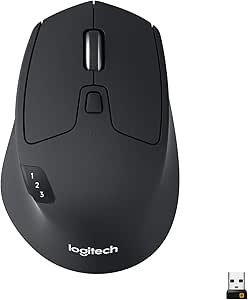 | Best for Multi-Computer Setups | Connectivity: Bluetooth and USB Unifying receiver | Movement detection: Optical | Buttons: 6 customizable buttons | VIEW LATEST PRICE | See Our Full Breakdown |
| Logitech MX Master 4 Ergonomic Wireless Mouse with Haptic Feedback, Graphite |  | Best Premium Productivity Mouse | Connectivity: Bluetooth, radio frequency, USB-C dongle | Sensor: Optical, up to 8,000 DPI | Buttons: 7 programmable buttons | VIEW LATEST PRICE | See Our Full Breakdown |
| Logitech M196 Compact Ambidextrous Bluetooth Wireless Mouse, Rose |  | Best Compact Everyday Mouse | Connectivity: Bluetooth | Tracking: Optical | Maximum sensitivity: 1000 DPI | VIEW LATEST PRICE | See Our Full Breakdown |
| Logitech G840 XL Cloth Gaming Mouse Pad, 900 × 400 × 3 mm, Black |  | Best Extra-Large Desk Pad | Brand: Logitech G | Material: Cloth | Dimensions: 900 × 400 × 3 mm | VIEW LATEST PRICE | See Our Full Breakdown |
| Logitech MX Keys S Combo Wireless Keyboard and Mouse – Graphite |  | Best Premium Keyboard-and-Mouse Set | Keyboard dimensions: 20.5 × 430.2 × 131.63 mm | Keyboard weight: 810 g | Keyboard battery: Rechargeable Li-Po, 1500 mAh | VIEW LATEST PRICE | See Our Full Breakdown |
| Logitech MK120 Full-Size Wired Keyboard and Mouse Combo – Black | 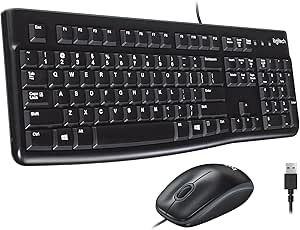 | Best Simple Wired Combo | Connectivity: USB | Power source: Corded electric | Keyboard layout: QWERTY | VIEW LATEST PRICE | See Our Full Breakdown |
| Logitech MX Creative Console with 9 Customizable Keys, Graphite | 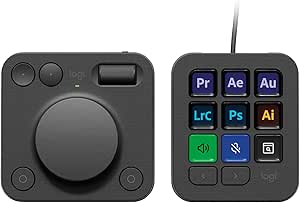 | Best for Creative Workflow Control | Customizable keys: 9 LCD keys | Controls: Low-friction dial, roller, and programmable keypad | Customizable pages: Up to 15 per profile | VIEW LATEST PRICE | See Our Full Breakdown |
| Logitech ERGO M575S Wireless Trackball Mouse |  | Best Compact Ergonomic Mouse | Movement detection: Trackball | Hand orientation: Right-handed | Buttons: 2 | VIEW LATEST PRICE | See Our Full Breakdown |
| Logitech computer accessorie | Connectivity | Battery life |
|---|---|---|
| Logitech M185 Compact Ambidext | 2.4 GHz wireless via USB nano receiver | Up to 12 months |
| Logitech MX Vertical Wireless | Bluetooth Low Energy and USB | Up to 4 months |
| Logitech MK235 Full-Size Wirel | 2.4 GHz wireless via one USB receiver | Up to 3 years for keyboard; up to 1 year for mouse |
| Logitech MK270 Full Size Wirel | — | — |
| Logitech MX Master 3S Bluetoot | Bluetooth | Up to 70 days |
| Logitech MX Keys Premium Palm | — | — |
| Logitech M720 Triathlon Full-S | Bluetooth and USB Unifying receiver | Up to 24 months |
| Logitech MX Master 4 Ergonomic | Bluetooth, radio frequency, USB-C dongle | Up to 70 days |
| Logitech M196 Compact Ambidext | Bluetooth | Up to 12 months |
| Logitech G840 XL Cloth Gaming | — | — |
| Logitech MX Keys S Combo Wirel | Bluetooth Low Energy and Logi Bolt USB receiver | — |
| Logitech MK120 Full-Size Wired | USB | — |
| Logitech MX Creative Console w | USB-C | — |
| Logitech ERGO M575S Wireless T | Bluetooth and USB | Up to 18 months |
More Details on Our Top Picks
Logitech M185 Compact Ambidextrous Wireless Mouse, Swift Grey
The M185 is the straightforward pick for a compact, no-frills Logitech mouse: its USB nano receiver gives you plug-and-play wireless connection without Bluetooth setup, and the ambidextrous shape suits either hand. Compared with the MX Master 3S, it gives up multi-device controls, glass tracking, and a rechargeable battery, but it is smaller and simpler for basic everyday navigation. Its stated 12-month battery life also means fewer battery changes than many compact peripherals. The tradeoff is fit: the short body may feel cramped during long work sessions, and the receiver occupies a USB port. I’d choose it for a travel bag or a shared computer, not as an ergonomic upgrade or a feature-rich desktop mouse.
Pros:- Compact, contoured shape works for left- and right-handed users
- USB nano receiver enables simple plug-and-play setup
- Battery life is rated for up to 12 months
- Compatible with Windows, Mac, Chrome OS, and Linux
Cons:- Requires a USB port for its receiver
- Small body may be uncomfortable for larger hands or extended sessions
Best for: Laptop users who want a small, ambidextrous mouse for everyday tasks and have an available USB-A port
Not ideal for: People who prefer a full-size grip, need Bluetooth, or want advanced controls and multi-device switching
- Connectivity:2.4 GHz wireless via USB nano receiver
- Tracking:Optical, up to 1000 DPI
- Hand orientation:Ambidextrous
- Battery:1 AA battery, included
- Battery life:Up to 12 months
- Wireless range:Up to 33 ft / 10 m
- Compatibility:Windows, Mac, Chrome OS, Linux
- Color:Swift Grey
Our verdict“Choose the M185 for simple, portable wireless control; pick the MX Master 3S for richer features and a larger ergonomic shape.”
Logitech MX Vertical Wireless Ergonomic Mouse
The MX Vertical makes the most sense for right-handed buyers who want a different hand position, not simply a faster sensor. Its 57-degree handshake-style design is intended to support a more natural wrist posture, while adjustable sensitivity up to 4000 DPI lets users tailor cursor movement. Unlike the compact M185, it offers both Bluetooth and USB connectivity and a rechargeable battery, making it better suited to a dedicated work setup. The shape is a substantial commitment, though: left-handed users cannot use it as designed, and anyone accustomed to a conventional mouse may need time to adapt. It also has fewer listed buttons than the MX Master 3S, so buyers seeking extensive controls and multi-device workflows should look there instead.
Pros:- 57-degree vertical design supports a handshake-style grip
- Adjustable optical sensor sensitivity up to 4000 DPI
- Offers Bluetooth Low Energy and USB connectivity
- Rechargeable battery is rated for up to four months
Cons:- Designed for right-handed use only
- Vertical shape may take time to adapt to
- Listed operating-system compatibility can vary by version
Best for: Right-handed desk workers seeking a vertical mouse shape and adjustable cursor sensitivity
Not ideal for: Left-handed users, people who want a conventional mouse grip, or buyers seeking many programmable controls
- Connectivity:Bluetooth Low Energy and USB
- Design:57° vertical, right-handed
- Sensor:Optical, up to 4000 DPI
- Buttons:4
- Wireless range:10 m
- Battery:Rechargeable lithium polymer
- Battery life:Up to 4 months
- Color:Graphite
Our verdict“Pick the MX Vertical if a right-handed vertical grip is your priority; choose the MX Master 3S for more controls and a conventional ergonomic shape.”
Logitech MK235 Full-Size Wireless Keyboard and Mouse Combo
The MK235 is the practical choice when one purchase needs to cover both typing and pointing. Its full-size keyboard includes a number pad and 15 shortcut keys, while a single receiver connects the keyboard and ambidextrous mouse—less setup and fewer occupied USB ports than using separate receivers. Compared with the MK270, the MK235 lists a longer keyboard layout feature set through its shortcuts, but its keyboard battery rating is up to three years rather than the MK270’s 36 months, and the MK270 includes multimedia hotkeys. The MK235’s spill-resistant design adds some everyday protection, not permission to soak it: the stated limit is 60 ml. It needs three AAA batteries, so it is best for a fixed workspace rather than buyers seeking rechargeable peripherals.
Pros:- Full-size 104-key keyboard includes a number pad and 15 shortcut keys
- One USB receiver connects both keyboard and mouse
- Ambidextrous compact mouse accommodates either hand
- Keyboard has spill-resistant construction and anti-fading keys
Cons:- Requires three AAA batteries
- Spill resistance is limited to small spills and does not allow immersion
- Keyboard battery life is rated below the MK270’s stated 36 months
Best for: Home and office users who need a complete, full-size wireless keyboard-and-mouse setup with a number pad
Not ideal for: People who want rechargeable devices, backlit keys, or a compact keyboard for a crowded desk
- Connectivity:2.4 GHz wireless via one USB receiver
- Wireless range:Up to 33 ft / 10 m
- Keyboard layout:QWERTY, 104 keys
- Keyboard shortcuts:15 shortcut keys
- Mouse:Compact optical, ambidextrous
- Battery life:Up to 3 years for keyboard; up to 1 year for mouse
- Batteries:3 AAA batteries included
- Compatibility:Windows 10, Windows 11 or later, Chrome OS
- Keyboard features:Spill-resistant, anti-fading keys, tilt legs
Our verdict“Choose the MK235 for a simple, full-size wireless set with useful shortcuts; choose the MK270 if longer stated keyboard battery life and multimedia hotkeys matter more.”
Logitech MK270 Full Size Wireless Keyboard and Mouse Combo – Black
If fewer battery changes are high on your list, the MK270 is the stronger keyboard-and-mouse combo here: Logitech rates its keyboard for up to 36 months and its mouse for up to 12 months. The full-size, spill-resistant keyboard adds multimedia hotkeys, while the compact ambidextrous mouse keeps the set usable for either hand. Compared with the MK235, this combo stands out for its longer stated keyboard battery life and dedicated media controls; the MK235, by contrast, specifies 15 shortcut keys and a three-year keyboard rating. The MK270 remains a basic setup: its keys are not backlit, and there is no ergonomic palm rest. I’d pick it for routine typing where long service between battery changes matters more than comfort upgrades or low-light visibility.
Pros:- Keyboard battery life is rated for up to 36 months
- Mouse battery life is rated for up to 12 months
- Full-size spill-resistant keyboard includes multimedia hotkeys
- Ambidextrous compact mouse suits left- and right-handed users
Cons:- Keyboard has no backlighting for dim work areas
- No ergonomic palm rest is included
- Wireless connection requires the included USB nano receiver
Best for: Households and office users who want a full-size wireless set with long stated battery life and quick multimedia controls
Not ideal for: People who type in dim rooms, need an ergonomic palm rest, or want rechargeable devices
- Connection:2.4 GHz wireless via USB nano receiver
- Wireless range:Up to 33 ft / 10 m
- Keyboard:Full-size, 104 keys
- Keyboard battery life:Up to 36 months
- Mouse battery life:Up to 12 months
- Mouse orientation:Ambidextrous
- Spill resistance:Yes
- Materials:Plastic; 49% recycled mouse and 54% recycled keyboard
- Color:Black
Our verdict“Choose the MK270 for a dependable everyday combo with long stated battery life; choose the MK235 if its 15 listed shortcut keys are a better fit.”
Logitech MX Master 3S Bluetooth Wireless Mouse, Graphite
The MX Master 3S is the most capable productivity mouse in this group, built for users who benefit from precise tracking, fast scrolling, and switching between computers. Its 8000 DPI sensor works on a range of surfaces, including glass, and the MagSpeed wheel is designed to move through long documents quickly while retaining precise control. Quiet clicks and connections to up to three Bluetooth devices make it more desk-focused than the compact M185; the tradeoff is a larger, right-handed shape and a more involved feature set. It also arrives without a USB receiver, adapter, or charging cable, and some customization depends on Logi Options+ software. Compared with the MX Vertical, it offers more buttons and multi-device connections, but not a vertical grip.
Pros:- 8000 DPI sensor tracks on many surfaces, including glass
- MagSpeed scroll wheel supports fast and precise document navigation
- Can connect to up to three devices over Bluetooth
- Quiet clicks and rechargeable battery rated for up to 70 days
Cons:- USB receiver, adapter, and charging cable are not included
- Some customization features require Logi Options+ software
- Right-handed 141 g design may not suit users seeking a light or ambidextrous mouse
Best for: Right-handed professionals who work across multiple computers and want precise tracking, quiet clicks, and fast scrolling
Not ideal for: Left-handed users, people who prefer a small lightweight mouse, or buyers who need an included USB receiver and charging cable
- Connectivity:Bluetooth
- Sensor:Darkfield high-precision optical, up to 8000 DPI
- Buttons:7
- Device connections:Up to 3 via Bluetooth
- Battery:Rechargeable 500 mAh Li-Po
- Battery life:Up to 70 days
- Weight:141 g / 4.97 oz
- Dimensions:51 × 84.3 × 124.9 mm
- Included accessories:No USB receiver, adapter, or charging cable
Our verdict“Choose the MX Master 3S for a feature-rich, multi-device work mouse; choose the M185 for a smaller, simpler option with an included receiver.”
Logitech MX Keys Premium Palm Rest, Black
This is a focused comfort upgrade for people who already type on a Logitech MX Keys or Craft and want a firmer resting surface between keystrokes. Its memory foam and leatherette covering add cushioning without the soft, shifting feel of a loose fabric pad, while the stain-resistant surface is straightforward to wipe clean. Compared with the larger, more versatile desk accessories in this roundup, this palm rest has a narrow job: it supports the wrists at a thin keyboard rather than changing how a mouse or whole workstation feels. That specificity is also its main limitation. It is designed for thin keyboards, and the product details include inconsistent keyboard specifications, so I would check the fit against your exact setup before buying. It is not a substitute for adjusting keyboard height or desk posture.
Pros:- Memory foam provides firm support during long typing sessions
- Leatherette covering is stain-resistant and easy to clean
- Designed to stay in place beside compatible keyboards
- Sized for Logitech MX Keys and Craft
Cons:- Compatibility is aimed at thin keyboards rather than a broad range of layouts
- Product details contain inconsistent keyboard specifications
Best for: MX Keys or Craft owners who want a firm, easy-clean wrist rest sized for a thin keyboard.
Not ideal for: People using thick or differently sized keyboards, or shoppers seeking a universal wrist rest with clearly consistent compatibility information.
- Brand:Logitech
- Model:MX Palm Rest
- Model number:956-000001
- Material:Memory foam with leatherette covering
- Dimensions:16.93 x 0.3 x 2.63 inches
- Weight:8.64 ounces
- Compatible keyboards:Logitech MX Keys and Craft
- Warranty:1-year limited hardware warranty
Our verdict“Choose this if you use an MX Keys or Craft and want a low-profile, easy-clean wrist rest; skip it if your keyboard fit is uncertain.”
Logitech M720 Triathlon Full-Size Multi-Device Wireless Mouse
The M720 suits a desk where one mouse needs to serve up to three computers. Bluetooth and the included Unifying receiver give it flexible connection options, and its sculpted rubber grip makes it a more substantial everyday mouse than the compact Logitech M196. The hyper-fast scroll wheel with instant stop is useful for moving through long documents, then settling on a specific line without changing mice. Its stated battery life of up to 24 months also reduces how often an AA swap interrupts work. The tradeoff is a distinctly right-handed shape: left-handed users should look at the ambidextrous M196 instead. The M720 is also less focused on advanced customization and high sensor sensitivity than the MX Master 4, so it makes more sense for practical multi-device control than specialized, shortcut-heavy workflows.
Pros:- Connects over Bluetooth or the included Unifying receiver
- Switches between up to three computers
- Hyper-fast scrolling includes an instant-stop feature
- Stated battery life reaches up to 24 months on one AA battery
Cons:- Right-handed shape does not suit left-handed use
- Requires an AA battery rather than charging by cable
- Maximum sensitivity is 1000 dpi
Best for: Right-handed professionals who regularly move between up to three computers and want one mouse for documents and daily work.
Not ideal for: Left-handed users, people who want a compact travel mouse, or those seeking the MX Master 4’s high-DPI tracking and advanced shortcuts.
- Connectivity:Bluetooth and USB Unifying receiver
- Movement detection:Optical
- Buttons:6 customizable buttons
- Hand orientation:Right-handed
- Multi-device support:Up to 3 computers
- Maximum sensitivity:1000 dpi
- Battery:1 AA battery, included
- Battery life:Up to 24 months
- Wireless range:5 meters
Our verdict“Pick the M720 for a right-handed multi-computer desk and long-document scrolling, but choose the M196 for ambidextrous portability or the MX Master 4 for deeper customization.”
Logitech MX Master 4 Ergonomic Wireless Mouse with Haptic Feedback, Graphite
The MX Master 4 is the most feature-rich productivity mouse in this group, built for people who want shortcuts and scrolling tools close at hand. Its Actions Ring and customizable haptic feedback can put app controls within reach, while the MagSpeed wheel handles both rapid movement through long pages and more deliberate scrolling. Compared with the M720, it offers a far higher stated sensor resolution, glass tracking, and more extensive customization; those extras suit creative and demanding desktop workflows better than basic multi-computer navigation. The right-handed ergonomic shape and quiet clicks favor long sessions, but this is not the simple choice for everyone. Getting value from the advanced controls requires the Logi Options+ app, and the charging cable is not included. Buyers who need straightforward pointing may find the M196 easier to justify.
Pros:- Actions Ring and customizable haptic feedback add configurable app controls
- MagSpeed wheel supports fast and precise scrolling
- Optical sensor tracks on glass at up to 8000 DPI
- Quiet clicks and stated battery life of up to 70 days
Cons:- Advanced customization requires the Logi Options+ app
- Charging cable is not included
- Right-handed ergonomic shape is not suited to left-handed users
Best for: Right-handed power users who work across creative or productivity apps and will customize shortcuts, haptics, and scrolling.
Not ideal for: Buyers seeking a simple, ambidextrous mouse, those who do not want companion software, or anyone who needs a charging cable included.
- Connectivity:Bluetooth, radio frequency, USB-C dongle
- Sensor:Optical, up to 8,000 DPI
- Buttons:7 programmable buttons
- Hand orientation:Right-handed
- Battery life:Up to 70 days
- Compatible operating systems:Android, Chrome OS, Linux, Windows, iPadOS, macOS
- Color:Graphite
- Materials:Plastic enclosure; plastic parts include recycled plastic
Our verdict“Choose the MX Master 4 for customizable, feature-rich productivity controls; choose the M720 or M196 if you want a simpler mouse.”
Logitech M196 Compact Ambidextrous Bluetooth Wireless Mouse, Rose
The M196 keeps the essentials simple: a compact, ambidextrous shape, Bluetooth pairing, optical tracking, and two buttons. Since it connects without a USB receiver, it works well for compatible laptops where ports are scarce or reserved for other devices. At 2.65 ounces, it is easier to carry than the full-size M720, though it gives up that model’s multi-computer switching, customizable buttons, and hyper-fast scrolling. The M196 is better treated as a basic pointer for travel, school, or everyday laptop use than as a productivity control center. Its stated battery life of up to 12 months is convenient, but it still relies on an included AA battery. With no customizable buttons, buyers who build app shortcuts into their mouse should step up to the MX Master 4 instead.
Pros:- Bluetooth connection works without a USB receiver
- Ambidextrous shape supports left- and right-handed use
- Lightweight design is easy to carry
- Stated battery life is up to 12 months with an included AA battery
Cons:- Two buttons are not customizable
- Requires an AA battery
- Lacks the multi-device switching and advanced scroll wheel of the M720
Best for: Students and laptop owners who want a lightweight Bluetooth mouse that works for either hand and does not need a USB receiver.
Not ideal for: Power users who need programmable buttons, multi-computer switching, advanced scrolling, or a rechargeable battery.
- Connectivity:Bluetooth
- Tracking:Optical
- Maximum sensitivity:1000 DPI
- Buttons:2
- Hand orientation:Ambidextrous
- Battery life:Up to 12 months
- Battery:1 AA battery, included
- Weight:2.65 ounces
- Dimensions:3.9 x 2.36 inches
Our verdict“Choose the M196 for uncomplicated, portable Bluetooth pointing; pick the M720 or MX Master 4 if your work depends on shortcuts or advanced scrolling.”
Logitech G840 XL Cloth Gaming Mouse Pad, 900 × 400 × 3 mm, Black
The G840 is for buyers who want their keyboard and mouse to share one continuous surface. Its 900 × 400 mm footprint gives a mouse room to travel while leaving space for a keyboard, and the cloth surface is designed for consistent sensor tracking and controlled movement. A nonslip rubber base helps keep the pad steady during use, while the flexible construction can be rolled up for transport. Compared with the MX Keys palm rest, this is a much broader desk accessory: it supports mouse movement and keyboard placement rather than wrist comfort. That size is its clearest advantage and its main drawback. It can crowd a small desk, and buyers who only need a mouse surface may find the extra coverage unnecessary. It adds no cushioning features or keyboard-specific wrist support.
Pros:- Large surface accommodates both a mouse and keyboard
- Cloth surface is designed for consistent sensor tracking and controlled movement
- Nonslip rubber base helps hold the pad in place
- Flexible construction can be rolled for transport
Cons:- 900 × 400 mm footprint takes up substantial desk space
- Offers no dedicated wrist support like the MX Keys palm rest
Best for: PC gamers and desk users with enough surface area who want a shared keyboard-and-mouse pad for broad mouse movement.
Not ideal for: People with small desks, users seeking a compact mouse-only mat, or anyone specifically looking for wrist cushioning.
- Brand:Logitech G
- Material:Cloth
- Dimensions:900 × 400 × 3 mm
- Color:Black
- Base:Nonslip rubber
- Model number:943-000776
- Warranty:1-year limited hardware warranty
Our verdict“Choose the G840 if you have room for a broad, shared keyboard-and-mouse surface; skip it if your desk is compact or you only need wrist support.”
Logitech MX Keys S Combo Wireless Keyboard and Mouse – Graphite
I’d choose the MX Keys S Combo when a matched keyboard and mouse matter more than keeping the setup simple. Its low-profile, backlit keys and the MX Master 3S’s MagSpeed scroll wheel suit long work sessions that alternate between typing and moving through large documents. Unlike the wired MK120, this set connects wirelessly and can pair with up to three devices, making it a better fit for switching between computers or a tablet. That added flexibility comes with more setup: Logi Options+ is needed for Smart Actions and customization, and the included Logi Bolt receiver does not work with other Logitech receivers. The mouse is also heavier than a basic travel mouse, and battery life varies with use. I’d pick this for a feature-rich desk, not a minimal plug-and-play setup.
Pros:- Backlit, low-profile keyboard supports comfortable typing in changing light.
- MX Master 3S MagSpeed wheel supports fast scrolling and precise control.
- Keyboard and mouse can pair with up to three devices.
- Rechargeable batteries and post-consumer recycled plastic construction.
Cons:- Smart Actions and other customization require the Logi Options+ app.
- Logi Bolt receiver is not compatible with other Logitech receivers.
- Battery life varies with usage conditions.
Best for: People who spend long hours typing and scrolling, and switch between multiple computers or compatible devices.
Not ideal for: Buyers who want a basic, no-software setup, or a light travel mouse and keyboard.
- Keyboard dimensions:20.5 × 430.2 × 131.63 mm
- Keyboard weight:810 g
- Keyboard battery:Rechargeable Li-Po, 1500 mAh
- Mouse dimensions:51 × 84.3 × 124.9 mm
- Mouse weight:141 g
- Mouse sensor:Darkfield high precision, up to 8K DPI
- Connectivity:Bluetooth Low Energy and Logi Bolt USB receiver
- Compatible operating systems:Windows, macOS, Linux, Chrome OS, iPadOS, Android
Our verdict“Choose this wireless set for a versatile multi-device desk with premium typing and scrolling; choose the MK120 for straightforward wired operation.”
Logitech MK120 Full-Size Wired Keyboard and Mouse Combo – Black
The MK120 is the straightforward pick for a desk where reliability and simple setup matter more than wireless features. Its keyboard and optical mouse connect by USB, so there’s no pairing process or battery charging to manage. Compared with the wireless MX Keys S Combo, it gives up backlighting, multi-device switching, and the MX Master 3S’s advanced scrolling, but its spill-resistant keyboard and keys rated for 10 million keystrokes suit shared workspaces and everyday typing. Adjustable tilt legs let users change the keyboard angle, while the ambidextrous mouse works for either hand. Its tradeoffs are clear: cables restrict placement, the supplied information lists Windows compatibility only, and there’s no illumination for dim rooms. I’d favor it for a dependable desktop station, not a mobile or feature-rich setup.
Pros:- USB plug-and-play connection avoids pairing and battery management.
- Spill-resistant keyboard with keys rated for 10 million keystrokes.
- Adjustable tilt legs and low-profile, quiet keys.
- Ambidextrous optical mouse with smooth tracking.
Cons:- Wired connection limits placement and portability.
- No keyboard backlighting for dim work areas.
- Product information lists compatibility with Windows operating systems only.
Best for: Office teams, shared workstations, and desktop users who want a durable full-size keyboard and mouse without wireless setup.
Not ideal for: People who need a wireless or multi-device setup, backlit keys, or compatibility beyond the listed Windows operating systems.
- Connectivity:USB
- Power source:Corded electric
- Keyboard layout:QWERTY
- Number of keys:104
- Mouse orientation:Ambidextrous
- Switch type:Linear
- Color:Black
- Compatible device listed:Laptop
Our verdict“Choose the MK120 for a durable, uncomplicated wired desk, but pick the MX Keys S Combo for wireless use and richer controls.”
Logitech MX Creative Console with 9 Customizable Keys, Graphite
The MX Creative Console is a specialist accessory for people who want app commands and adjustments within quick reach, rather than another general-purpose keyboard. Nine customizable LCD keys show assigned actions, while the dial and roller give creative controls a tactile alternative to repeated clicks or keyboard shortcuts. Profiles can hold up to 15 keypad pages, and integrations include Adobe Creative Cloud, Final Cut Pro, Figma, DaVinci Resolve, Spotify, and Zoom. Compared with the general-use MX Keys S Combo, this console is far more focused on workflow shortcuts; it does not replace a keyboard and mouse. Its nine physical keys mean frequent users may need to switch pages, and setup depends on Logi Options+. The USB-C connection and Windows/macOS compatibility also make it a less flexible choice for other devices. I’d choose it for app-heavy work, not basic computing.
Pros:- LCD keys display assigned actions and icons for easier recognition.
- Dial and roller provide tactile controls for precise adjustments.
- Supports profiles with up to 15 customizable keypad pages.
- Integrates with named creative and productivity applications.
Cons:- Logi Options+ is required for customization and app integrations.
- Only nine physical keypad keys may require page switching.
- Compatibility is limited to Windows and macOS computers.
Best for: Video editors, designers, and other Windows or macOS users who repeatedly use supported creative and productivity apps.
Not ideal for: People seeking a standalone keyboard, a general-purpose desktop accessory, or a setup that avoids companion software.
- Customizable keys:9 LCD keys
- Controls:Low-friction dial, roller, and programmable keypad
- Customizable pages:Up to 15 per profile
- Connectivity:USB-C
- Compatible devices:Laptop, PC
- Compatible operating systems:Windows, macOS
- Enclosure material:Plastic
- Included membership:3 months of Adobe Creative Cloud All Apps
Our verdict“Choose the MX Creative Console to speed up repeat actions in supported apps; choose the MX Keys S Combo for everyday typing and pointing.”
Logitech ERGO M575S Wireless Trackball Mouse
The ERGO M575S suits right-handed users who want mouse control without repeatedly moving their arm across a desk. Its thumb-operated trackball keeps the mouse body in place, so it takes little surface area and can work where a conventional mouse has limited room. Compared with the MX Master 3S included in the MX Keys S Combo, the M575S trades advanced scrolling and multiple programmable buttons for a stationary design, simple wireless connectivity, and a stated battery life of up to 18 months on one AA battery. Bluetooth and the included Logi Bolt receiver offer two connection routes. The main compromise is fit: this shape is right-handed, and the specifications list only two buttons, limiting shortcut options. I’d pick it for a compact desk and thumb-driven control, not for users who rely on a full set of mouse buttons.
Pros:- Stationary trackball needs little desk space and works on any surface.
- Ergonomic shape supports the hand and a more natural forearm posture.
- Connects by Bluetooth or included Logi Bolt USB receiver.
- Up to 18 months of battery life from one included AA battery.
Cons:- Right-handed shape excludes left-handed users.
- Specifications list only two buttons, limiting shortcut customization.
- Maximum sensitivity is 2000 DPI, below the MX Master 3S’s listed 8K DPI.
Best for: Right-handed laptop and desktop users with limited desk space who want to control the cursor while keeping their hand and arm largely still.
Not ideal for: Left-handed users or people who need a conventional moving mouse with multiple programmable buttons and advanced scrolling.
- Movement detection:Trackball
- Hand orientation:Right-handed
- Buttons:2
- Maximum sensitivity:2000 DPI
- Connectivity:Bluetooth and USB
- Battery:1 AA battery, included
- Battery life:Up to 18 months
- Compatibility:PC and tablet; Windows, macOS
Our verdict“Choose the M575S for stationary, space-saving control with a right hand; choose the MX Master 3S for more buttons and higher listed sensor sensitivity.”

How We Picked
I ranked these products by how well they address distinct needs in a Logitech computer setup: daily comfort, connection style, control, space requirements, and the usefulness of their feature set. I gave stronger placement to options that can serve a broad range of buyers without demanding a specialized workflow, while products aimed at a narrower use case rank by how clearly they serve that audience.
I also compared products within their actual categories rather than treating a mouse, keyboard combo, palm rest, mouse pad, and creative controller as interchangeable. A low-complexity combo can be a better choice than a premium mouse for a shared family computer, while an ergonomic device may suit someone managing long sessions better than a compact travel mouse. Build and maintenance factors—such as wired versus wireless setup, battery dependence, device switching, and desk footprint—help distinguish close alternatives. No single feature makes a product right for everyone, so the ranking reflects a balance of versatility and fit.
| Logitech computer accessorie | Battery life |
|---|---|
| Logitech M185 Compact Ambidext | Up to 12 months |
| Logitech MX Vertical Wireless | Up to 4 months |
| Logitech MK235 Full-Size Wirel | Up to 3 years for keyboard; up to 1 year for mouse |
| Logitech MK270 Full Size Wirel | — |
| Logitech MX Master 3S Bluetoot | Up to 70 days |
| Logitech MX Keys Premium Palm | — |
| Logitech M720 Triathlon Full-S | Up to 24 months |
| Logitech MX Master 4 Ergonomic | Up to 70 days |
| Logitech M196 Compact Ambidext | Up to 12 months |
| Logitech G840 XL Cloth Gaming | — |
| Logitech MX Keys S Combo Wirel | — |
| Logitech MK120 Full-Size Wired | — |
| Logitech MX Creative Console w | — |
| Logitech ERGO M575S Wireless T | Up to 18 months |
Factors to Consider When Choosing Best Logitech Computer Accessories
Choosing Logitech accessories is easier when you start with how your computer is used, rather than with a feature list. I’d match the device to your work pattern, available desk space, and tolerance for setup and upkeep before paying for extras.
Match the connection to how you move between devices
Wireless models can reduce cable clutter, but their connection methods affect setup and everyday use. A receiver-based combo can be practical for a desktop that stays in one place, while Bluetooth can be a better fit for laptops or devices with few open ports. If you switch between computers, check whether the specific device supports convenient multi-device use rather than assuming every wireless Logitech accessory does. Wired gear, such as the MK120, avoids battery changes and wireless pairing, at the cost of a cable across the desk. A common mistake is choosing by the word “wireless” alone without checking what connection the computer supports and whether a receiver can stay plugged in.
Choose ergonomics around your movement, not a label
Ergonomic designs differ in how they change hand position and cursor movement. A vertical mouse changes the angle of the hand, while a trackball keeps the device stationary and shifts cursor control to the thumb. Neither style is automatically comfortable for every person, and both may require an adjustment period. If possible, think about which movement currently feels uncomfortable: wrist rotation, repeated arm movement, or lack of desk space. A standard mouse may remain the easier choice for users who prefer familiar movement or frequently use a mouse on different surfaces. Don’t assume an “ergonomic” label alone guarantees a better fit.
Decide whether premium controls will earn their desk space
Premium mice and creative controls are most useful when their extra functions match tasks you repeat. Programmable controls or device switching can reduce repeated steps for people who work across apps and computers, but they add setup and may go unused in routine browsing. Before paying for advanced features, identify one or two actions you would assign to them and how often you perform those actions. The MX Creative Console is aimed at workflows that benefit from customizable inputs, not general typing or pointing. A simpler mouse or keyboard combo can be the more satisfying choice when reliability and low setup effort matter more than customization.
Treat desk size and portability as functional requirements
Compact accessories are easier to pack and can free up a crowded surface, but a smaller device may feel less natural during long sessions. Full-size combos give more room for familiar keyboard layouts and mouse grip, yet take up more space in a bag or on a small desk. Large pads such as the G840 XL need a substantial clear area, so measure the usable desk surface rather than the desk’s outside dimensions. Consider where the accessory will live when it is not in use, including whether it must share space with a laptop, notebook, or drawing equipment. Buying for portability when the device will stay at home—or for a large desk footprint that does not fit—can undermine the choice.
Account for batteries, cleaning, and long-term upkeep
Wireless mice and keyboards depend on batteries or charging, so think about how often you want to manage power and whether you keep spares nearby. A wired keyboard-and-mouse set removes that task but ties the devices to cable reach and available ports. Mouse pads and palm rests also need room and occasional cleaning, and a soft surface can collect dust more readily than a bare desk. On a shared computer, simple controls and easy-to-clean surfaces may matter more than specialized customization. Check the care guidance and power arrangement for the specific model before buying; accessory names alone do not tell you how much maintenance it needs.
Buy a combo only when both devices fit your needs
A keyboard-and-mouse bundle can simplify setup, but the two included devices may not be equally suited to you. If your main priority is a more capable mouse, a premium standalone model may pair better with a keyboard you already own. If you need a basic workstation for occasional use, a combo can provide a consistent, uncomplicated starting point. Check the layout, mouse size, and connection approach together instead of comparing bundles only by how many pieces they include. You can also add accessories later: a palm rest or larger pad is most useful when a real comfort or workspace issue has become clear.
Frequently Asked Questions
Should I choose the MX Keys S Combo or a basic Logitech keyboard-and-mouse combo?
I’d choose the MX Keys S Combo if you type and use the mouse throughout the day and want a more productivity-focused pairing. A basic combo such as the MK235 or MK270 is a more direct fit for general home or office use when simple input matters more than premium controls. The wired MK120 is worth considering if you want to avoid wireless setup and battery management. Compare the keyboard layout and mouse feel as a set, since a bundle is only convenient when both pieces suit you. If you already own a good keyboard or mouse, a standalone replacement may make more sense than buying a full combo.
Is the MX Vertical or ERGO M575S a better ergonomic mouse choice?
They address different movement preferences, so I wouldn’t choose between them by ergonomic branding alone. The MX Vertical changes the hand’s orientation, while the ERGO M575S uses a stationary trackball controlled with the thumb. The vertical design may appeal if you want to change how you hold a conventional mouse; the trackball may fit a desk where moving the mouse is awkward. Both can feel unfamiliar at first, and neither is a guaranteed solution for discomfort. If possible, try the relevant style before committing, especially if you rely on precise cursor control for long sessions.
When is a Bluetooth mouse a better choice than a receiver-based wireless mouse?
Bluetooth can suit laptops and compact setups where you want to keep USB ports free or avoid carrying a receiver. A receiver-based model may be more convenient for a desktop where the receiver can remain plugged in, especially when you want a straightforward connection routine. Check your computer’s Bluetooth support and how many devices you plan to pair before choosing. Also confirm whether the mouse supports switching between devices if that is part of your workflow; Bluetooth by itself does not promise easy device switching. For a computer that rarely moves and has open USB ports, either connection type can work well.
Do I need a large mouse pad like the Logitech G840 XL?
A large pad is useful when you want room for broad mouse movement or a continuous surface beneath both keyboard and mouse. It can be excessive on a small desk, where it may crowd other work materials or be difficult to store. Measure the usable surface and account for the space your keyboard occupies before choosing an extended pad. If your mouse already tracks reliably on your desk and you rarely run out of movement space, a large mat may add little practical value. The G840 XL is best viewed as a workspace choice, not a required companion to a Logitech mouse.
Can I use the MX Keys Premium Palm Rest with any Logitech keyboard?
I would check the palm rest’s stated compatibility and dimensions against your exact keyboard before ordering. A palm rest that does not align with the keyboard can take up desk space without supporting your hands in the intended position. It is most useful when your typing posture and desk height leave your wrists or palms without comfortable support, rather than as an automatic keyboard add-on. A mismatched rest can encourage an awkward angle, so placement matters as much as the accessory itself. If you are unsure, first assess your typing position and the available space in front of the keyboard.
Conclusion
For most productivity-focused buyers, I’d start with the MX Keys S Combo as the best overall pairing. The MK235 is my best value-style choice for straightforward wireless input, while the MX Master 4 is the best premium pick for buyers who want advanced mouse controls and haptic feedback; the MX Master 3S is another strong fit for those prioritizing a feature-rich mouse. Beginners and shared-computer users should look first at the uncomplicated MK120 or MK270, depending on whether they prefer wired or wireless. For specific needs, choose the MX Vertical or ERGO M575S for distinct ergonomic approaches, the M185 or M196 for compact mouse use, the G840 XL for a broad desk surface, or the MX Creative Console for customizable creative controls. My final rule: buy for the task and fit you can name, not for features you may never use.
Halloween Picks
halloween
As an affiliate, we earn on qualifying purchases.