
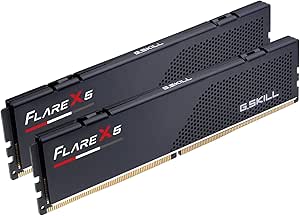
The best PC RAM kit for most current builds in this roundup is the G.SKILL Flare X5 32GB DDR5-6000 kit, which pairs a practical capacity with a widely useful speed tier. For heavier workloads, the 64GB G.SKILL Flare X5 DDR5-6000 CL30 offers more room and tighter timings, while the Corsair Vengeance LPX 32GB DDR4-3200 kit suits compatible DDR4 systems. The biggest tradeoffs are platform compatibility, capacity, memory generation, and whether faster timings justify choosing one kit over another. Older DDR3 options serve specific upgrade needs but are not interchangeable with DDR4 or DDR5. Read on for the full breakdown and guidance on matching a kit to your motherboard and workload.

Get the latest gadgets delivered free with Prime
- Fast, free delivery on millions of items
- Prime Video, Amazon Music and more included
- Member-only deals all year
Complete the kit



Key Takeaways
DDR5-6000 is the strongest current-platform theme: three G.SKILL options offer this speed, with the 32GB Flare X5 aimed at mainstream capacity and the 64GB CL30 kit combining more capacity with tighter timings.
Capacity separates the most useful modern picks: 32GB is the roundup’s versatile middle ground, while 64GB options better suit demanding multitasking and larger creative projects.
DDR4 remains a practical upgrade path: the Corsair Vengeance LPX and G.SKILL Ripjaws V 32GB kits serve DDR4 systems without requiring a platform change.
The DDR3 kits are legacy upgrades, not modern alternatives: their 16GB and 32GB configurations make sense only for compatible older desktops.
Matching the kit to the motherboard matters more than the headline speed: a fast DDR5 kit cannot be used in a DDR4 or DDR3 slot, and advertised memory profiles may require BIOS setup.



| PC RAM kit | Capacity | Memory type | Form factor | Voltage |
|---|---|---|---|---|
| Timetec 16GB | 16GB (2 x 8GB) | DDR3/DDR3L | 240-pin UDIMM | 1.35V or 1.5V |
| Timetec 32GB | 32GB (4 x 8GB) | DDR3/DDR3L | 240-pin UDIMM | 1.35V or 1.5V |
| Lexar THOR Z RGB DDR5 32GB Kit | 32GB (2 x 16GB) | DDR5 | 288-pin UDIMM | 1.35V |
| Timetec 16GB | 16GB (2 x 8GB) | DDR3/DDR3L | 240-pin UDIMM | 1.35V or 1.5V |
| G.SKILL Ripjaws S5 64GB | 64GB (2 x 32GB) | DDR5 SDRAM | 288-pin U-DIMM | 1.35V |
| G.SKILL Flare X5 Series 32GB | 32GB (2 x 16GB) | DDR5 | 288-pin DIMM / U-DIMM | 1.35V |
| G.SKILL Ripjaws V 32GB | 32GB (2 x 16GB) | DDR4 | 288-pin U-DIMM | 1.35V |
| G.SKILL Ripjaws V 16GB | 16GB (2 x 8GB) | DDR4 | 288-pin UDIMM | 1.35V |
| Corsair Vengeance LPX 32GB | 32GB (2 x 16GB) | DDR4 | 288-pin DIMM | 1.35V |
| Gigastone Game PRO 32GB | 32GB (2 x 16GB) | DDR4 | 288-pin UDIMM | 1.35V |
| G.SKILL Flare X5 Series 64GB | 64GB (2 x 32GB) | DDR5 | 288-pin U-DIMM | 1.40 V |
| TEAMGROUP T-Force Vulcan Z 16G | 16GB (2 x 8GB) | DDR4 | 288-pin DIMM | 1.35 V |
More Details on Our Top Picks
Timetec 16GB (2 x 8GB) DDR3/DDR3L 1600MHz Desktop Memory Kit
This kit suits owners of older desktop systems who need a straightforward move to 16GB without replacing a DDR3-compatible motherboard. Its two 8GB modules can use dual-channel operation when the system supports it, while support for 1.35V and 1.5V gives it flexibility across DDR3 and DDR3L desktops. Compared with the Timetec 32GB DDR3 kit, this is the more sensible fit for everyday use on a system that does not need extra capacity; it also leaves more room for open slots. It cannot compete with the Lexar THOR Z RGB DDR5 kit for newer-platform bandwidth, though those kits are not interchangeable. Check your motherboard’s memory type and supported capacity before buying. This is desktop-only, non-ECC memory, and the PCB color may vary.
Pros:- Two 8GB modules provide 16GB total capacity
- Supports both 1.35V and 1.5V operation
- Non-ECC unbuffered desktop memory compatible with Intel and AMD systems
- Lifetime warranty
Cons:- Limited to older DDR3/DDR3L platforms and 1600MHz
- Not compatible with laptops
- PCB color may vary by production batch
Best for: Owners of Intel or AMD DDR3 desktops who want a 16GB, two-module upgrade for everyday computing.
Not ideal for: Laptop owners and builders with DDR4- or DDR5-only motherboards; this 240-pin DDR3/DDR3L UDIMM will not fit or work in those systems.
- Capacity:16GB (2 x 8GB)
- Memory type:DDR3/DDR3L
- Speed:1600MHz
- Form factor:240-pin UDIMM
- Voltage:1.35V or 1.5V
- Latency:CL11
- Configuration:Dual rank (2Rx8), non-ECC, unbuffered
- Warranty:Lifetime
Our verdict“Choose this kit for a basic 16GB upgrade in a compatible DDR3 desktop, not for a new build or laptop.”
Timetec 32GB (4x8GB) DDR3/DDR3L 1600MHz Desktop Memory Kit
For a compatible older desktop that needs more memory, this kit supplies 32GB across four 8GB modules rather than the 16GB offered by the two-module Timetec kit. That added capacity can help with heavier multitasking on systems that support it, but filling four slots leaves less room for later expansion and makes motherboard compatibility especially important. Its DDR3/DDR3L 1600MHz specification is a practical match for legacy platforms, not a route to modern DDR5 performance like the G.SKILL Ripjaws S5. The two Timetec kits share dual-voltage operation and desktop-only compatibility; the key choice is whether your workload needs 32GB and your board accepts four modules. Confirm the system’s maximum memory and slot configuration before purchasing.
Pros:- Provides 32GB using four 8GB modules
- Supports 1.35V and 1.5V operation
- CL11 specification suits compatible DDR3 desktop platforms
- Lifetime warranty and free technical support
Cons:- Uses four memory slots, limiting room for later upgrades
- Not compatible with laptops or newer DDR4/DDR5 platforms
- PCB color may vary by production batch
Best for: Users with a DDR3 desktop that supports four 8GB modules and needs 32GB for multitasking or memory-heavy legacy workloads.
Not ideal for: Owners of systems with fewer than four compatible slots, limited maximum memory, or DDR4/DDR5-only support; laptop users should also skip it.
- Capacity:32GB (4 x 8GB)
- Memory type:DDR3/DDR3L
- Speed:1600MHz
- Form factor:240-pin UDIMM
- Voltage:1.35V or 1.5V
- Latency:CL11
- Configuration:4 x 8GB, dual rank (2Rx8)
- Memory type details:Non-ECC, unbuffered
- Warranty:Lifetime
Our verdict“Pick this over the 16GB Timetec kit when a compatible DDR3 desktop needs 32GB and already has four usable slots.”
Lexar THOR Z RGB DDR5 32GB Kit (2 x 16GB), 6000MHz, CL38
The Lexar THOR Z pairs 32GB of DDR5-6000 with customizable RGB lighting, making it the style-focused choice among these picks for a current desktop build. Its two-module layout is less demanding on memory slots than the four-stick Timetec 32GB DDR3 kit, while the aluminum heatsink and onboard PMIC suit a modern DDR5 setup. Compared with the G.SKILL Ripjaws S5 64GB kit, Lexar gives up capacity but adds visible lighting and offers both Intel XMP 3.0 and AMD EXPO profiles. The main catch is platform setup: 6000 MT/s depends on compatible hardware and BIOS profile configuration, so the rated speed is not automatic on every system. It is also DDR5-only, making it unsuitable for older DDR3 or DDR4 machines.
Pros:- 32GB capacity in a two-module DDR5 kit
- Supports Intel XMP 3.0 and AMD EXPO
- Customizable RGB lighting with an aluminum heatsink
- On-die ECC and onboard PMIC
Cons:- Rated 6000 MT/s speed requires compatible hardware and BIOS configuration
- Not compatible with DDR3 or DDR4 motherboards
- CL38 latency is looser than the G.SKILL Ripjaws S5 kit’s CL36
Best for: Builders with a DDR5 desktop who want 32GB, a 6000 MT/s rated profile, and customizable RGB lighting.
Not ideal for: Owners of DDR3 or DDR4 systems, buyers who need 64GB, or users who prefer memory without lighting and BIOS profile setup.
- Capacity:32GB (2 x 16GB)
- Memory type:DDR5
- Latency:CL38
- Form factor:288-pin UDIMM
- Voltage:1.35V
- Profiles:Intel XMP 3.0 and AMD EXPO
- Features:RGB lighting, aluminum heatsink, on-die ECC, onboard PMIC
Our verdict“Choose the Lexar kit for a compatible DDR5 build where RGB matters more than maximum capacity or tighter listed latency.”
Timetec 16GB (2x8GB) DDR3/DDR3L 1600MHz 240-Pin UDIMM Desktop Memory Kit
This Timetec kit targets the same basic upgrade as the newer-listed B0FZ9RCSDV 16GB kit: two 8GB DDR3/DDR3L modules for a compatible desktop. Its strongest distinction in the supplied product details is the inclusion of free technical support alongside a lifetime warranty, which may help buyers who are less certain about an older system’s memory fit. The underlying specification remains firmly legacy: 1600MHz, CL11, and 240-pin UDIMMs. That makes it a practical replacement option, but it is not comparable in platform generation to the Lexar THOR Z DDR5 kit or G.SKILL Ripjaws S5. Verify your motherboard accepts DDR3/DDR3L and supports 8GB modules. It will not fit a laptop, and the PCB color can vary.
Pros:- Two 8GB modules provide 16GB total
- Supports both 1.35V and 1.5V operation
- Non-ECC, unbuffered dual-rank configuration for compatible desktops
- Lifetime warranty and free technical support
Cons:- Limited to DDR3/DDR3L systems and 1600MHz operation
- Not compatible with laptops
- PCB color may vary by production batch
Best for: Desktop owners upgrading a compatible Intel or AMD DDR3 system who value access to technical support when checking fit.
Not ideal for: New PC builders, laptop owners, and anyone whose motherboard requires DDR4 or DDR5 memory.
- Capacity:16GB (2 x 8GB)
- Memory type:DDR3/DDR3L
- Speed:1600MHz
- Form factor:240-pin UDIMM
- Voltage:1.35V or 1.5V
- Latency:CL11
- Configuration:Dual rank (2Rx8), non-ECC, unbuffered
- Warranty and support:Lifetime warranty and free technical support
Our verdict“Choose this 16GB kit for a supported legacy desktop if technical support is a useful extra while confirming compatibility.”
G.SKILL Ripjaws S5 64GB (2×32GB) DDR5-6000 Desktop Memory Kit
When workload capacity matters more than lighting, the Ripjaws S5 is the strongest fit here: 64GB in just two DDR5 modules leaves slots available for future expansion and offers twice the capacity of the 32GB Lexar THOR Z. It also lists CL36 timings of 36-36-36-96, compared with the Lexar kit’s CL38, though the more important distinction for many buyers is capacity. XMP 3.0 and EXPO support makes the kit adaptable across compatible Intel and AMD platforms. The tradeoff is setup and system matching: it runs at JEDEC default speed unless compatible hardware and BIOS settings enable its rated profile, and mixing it with other kits can cause instability. Its matte-black, non-RGB look favors function over lighting.
Pros:- 64GB capacity from two matched 32GB modules
- 6000 MT/s rated speed with CL36 timings
- Supports Intel XMP 3.0 and AMD EXPO
- Two-module layout leaves slots available for expansion
Cons:- Rated speed may require compatible components and BIOS adjustments
- Mixing with other memory kits can cause instability or system failure
- No RGB lighting
Best for: Creators, developers, and heavy multitaskers building a compatible DDR5 desktop who want 64GB in two slots.
Not ideal for: Users who only need 32GB, want RGB lighting, or cannot confirm DDR5 motherboard and CPU compatibility.
- Capacity:64GB (2 x 32GB)
- Memory type:DDR5 SDRAM
- Form factor:288-pin U-DIMM
- CAS latency:CL36
- Timings:36-36-36-96
- Voltage:1.35V
- Profiles:Intel XMP 3.0 and AMD EXPO
- ECC:Non-ECC
Our verdict“Choose the Ripjaws S5 when a compatible DDR5 system needs 64GB in two slots rather than the Lexar kit’s 32GB and RGB.”
G.SKILL Flare X5 Series 32GB (2 x 16GB) DDR5-6000 Desktop Memory Kit, CL36, Matte Black
The Flare X5 32GB kit makes sense for a new DDR5 desktop where two 16GB modules provide a practical starting capacity and 6000 MT/s is the rated target. Support for both AMD EXPO and Intel XMP 3.0 gives it broader platform flexibility than the XMP-only DDR4 G.SKILL Ripjaws V kits in this roundup. Its JEDEC default profile also offers a fallback if you do not enable the faster memory profile. The tradeoff is that its CL36 timings are less tight than the CL30 Flare X5 64GB option elsewhere in the roundup, and the full rated speed may require compatible hardware and BIOS changes. This is a DDR5-only choice, so it cannot upgrade a DDR4 system; avoid mixing it with another kit.
Pros:- Matched 2 x 16GB configuration provides 32GB of DDR5 capacity.
- AMD EXPO and Intel XMP 3.0 support offers profile options across compatible platforms.
- Rated for 6000 MT/s.
- JEDEC default profile provides a fallback without enabling the rated profile.
Cons:- Reaching 6000 MT/s may require compatible components and BIOS adjustments.
- CL36 timings are looser than the CL30 Flare X5 64GB kit in this roundup.
- Cannot be used in DDR4 systems, and mixing kits can cause instability.
Best for: Builders assembling a DDR5 desktop with an AMD or Intel platform who want 32GB in a matched two-module kit.
Not ideal for: DDR4 system owners, or buyers who want the tighter CL30 timings of the G.SKILL Flare X5 64GB kit.
- Capacity:32GB (2 x 16GB)
- Memory type:DDR5
- Form factor:288-pin DIMM / U-DIMM
- Maximum speed:6000 MT/s
- CAS latency:CL36
- Timings:36-36-36-96
- Voltage:1.35V
- Profiles:AMD EXPO and Intel XMP 3.0
- Color:Matte black
Our verdict“Choose this kit for a compatible DDR5 build that needs 32GB and cross-platform profile support, but not for a DDR4 upgrade or a tighter-timing priority.”
G.SKILL Ripjaws V 32GB (2 x 16GB) DDR4-3200 CL16 Desktop Memory Kit
For an existing DDR4 desktop, the Ripjaws V 32GB kit offers a matched 2 x 16GB layout and CL16 timings without requiring a move to a new memory generation. It is rated for 3200 MT/s with Intel XMP 2.0, while its stated Intel and AMD desktop compatibility broadens its appeal beyond one processor platform. Compared with the 16GB Ripjaws V DDR4-3600 kit, this one prioritizes twice the capacity over a higher rated speed, making it the more sensible fit for workloads that benefit from extra memory. It is not the pick for a new DDR5 build, and reaching its rated profile may require BIOS setup and compatible hardware. Keep it as a matched kit rather than combining it with existing modules.
Pros:- 32GB capacity comes as two matched 16GB modules.
- CL16 timings at the rated 3200 MT/s profile.
- Intel XMP 2.0 support simplifies applying the rated profile on compatible systems.
- Listed for Intel and AMD desktop platforms.
Cons:- Rated speed may require compatible components and BIOS adjustments.
- DDR4-only design is not compatible with DDR5 motherboards.
- Manufacturer warns against mixing it with other memory kits.
Best for: DDR4 desktop owners who want to move to 32GB with a matched two-module kit for multitasking, gaming, or general productivity.
Not ideal for: Builders choosing a DDR5 motherboard, or buyers who prioritize the higher rated speed of the Ripjaws V 16GB DDR4-3600 kit.
- Capacity:32GB (2 x 16GB)
- Memory type:DDR4
- Form factor:288-pin U-DIMM
- Timings:CL16-18-18-38
- Voltage:1.35V
- Profile support:Intel XMP 2.0
- Memory type features:Non-ECC
- Color:Black
Our verdict“Pick this for a 32GB upgrade in a compatible DDR4 desktop, especially if capacity matters more than the 16GB Ripjaws V kit’s higher rated speed.”
G.SKILL Ripjaws V 16GB (2 x 8GB) DDR4-3600 CL16 Desktop Memory Kit
The Ripjaws V 16GB kit is the capacity-conscious choice here: its two 8GB modules provide a matched dual-module setup, while DDR4-3600 and CL16 give it a higher rated speed than the 32GB Ripjaws V DDR4-3200 kit. That makes it a fit for a compatible DDR4 desktop where 16GB is sufficient and the faster profile matters more than room for heavier multitasking. Compared with the Corsair Vengeance LPX 32GB, this G.SKILL kit gives up half the capacity and the Corsair’s stated low-profile design, so it is less suitable for demanding workloads or tight cooler clearance. Its 3600 MT/s rating may require BIOS changes, and the kit should not be mixed with other memory.
Pros:- Two matched 8GB modules provide a 16GB kit.
- Rated for up to 3600 MT/s.
- CL16 latency with listed 16-19-19-39 timings.
- Intel XMP 2.0 support.
Cons:- 16GB may limit memory-heavy workloads compared with the roundup’s 32GB kits.
- Rated speed may require compatible hardware and BIOS adjustments.
- Mixing this kit with other memory can cause instability or system failure.
Best for: Builders putting together a compatible DDR4 system for everyday use or gaming who want a matched 16GB kit with a 3600 MT/s rating.
Not ideal for: Heavy multitaskers, creators, or buyers who want 32GB capacity like the Ripjaws V DDR4-3200 or Corsair Vengeance LPX kits.
- Capacity:16GB (2 x 8GB)
- Memory type:DDR4
- Form factor:288-pin UDIMM
- Maximum speed:3600 MT/s
- CAS latency:CL16
- Timings:16-19-19-39
- Voltage:1.35V
- Profile support:Intel XMP 2.0
- Color:Black
Our verdict“Choose this for a compatible DDR4 build where 16GB and a 3600 MT/s rating take priority over the extra capacity offered by the 32GB kits.”
Corsair Vengeance LPX 32GB (2 x 16GB) DDR4 3200MHz CL16 Desktop Memory, Black
The Vengeance LPX 32GB kit stands apart from the G.SKILL Ripjaws V 32GB DDR4-3200 option through its 34mm profile height, a useful fit advantage when a large air cooler or a compact case makes clearance a concern. It still delivers two 16GB DDR4 modules at 3200MHz with CL16 timings, so buyers do not have to sacrifice capacity for the low-profile design. The aluminum heat spreaders and XMP 2.0 support add practical cooling and configuration features, though the rated speed can depend on BIOS settings and compatible components. Unlike the Gigastone Game PRO, this listing does not specify a white finish or an AMD Ryzen compatibility claim, so choose it for fit and low-profile clearance rather than color matching.
Pros:- 32GB capacity in a matched 2 x 16GB configuration.
- 34mm profile height can suit builds with tighter memory clearance.
- Aluminum heat spreaders are designed to help dissipate heat.
- XMP 2.0 support offers a profile for the rated speed.
Cons:- Rated 3200MHz speed may require BIOS adjustments and compatible components.
- DDR4-only design is incompatible with DDR5 motherboards.
Best for: DDR4 desktop builders who need 32GB and have limited clearance under a CPU cooler or inside a compact case.
Not ideal for: DDR5 system builders, or buyers whose main priority is a white memory kit such as the Gigastone Game PRO.
- Capacity:32GB (2 x 16GB)
- Memory type:DDR4
- Form factor:288-pin DIMM
- CAS latency:CL16
- Timings:16-20-20-38
- Voltage:1.35V
- Profile support:XMP 2.0
- Profile height:34mm
Our verdict“Choose the Vengeance LPX when a 32GB DDR4 kit must fit beneath a cooler or in a compact build without giving up CL16 timings.”
Gigastone Game PRO 32GB (2×16GB) DDR4 3200MHz Desktop Memory, White
The Gigastone Game PRO is the distinct style-led pick in this group: it pairs a white finish with 32GB across two 16GB DDR4 modules. Its 3200MHz rating and CL16-18-18-40 timings place it in similar territory to the black Corsair Vengeance LPX and G.SKILL Ripjaws V 32GB kits, while Intel XMP 2.0 and stated AMD Ryzen support make it relevant to a range of compatible desktop builds. The tradeoff is that its compatibility is specified for select desktop PCs, rather than framed as broadly as some alternatives, so checking the motherboard’s memory support is especially important. Unlike the Corsair kit, it has no listed 34mm profile height or aluminum heat-spreader detail, making its white appearance and stated platform support its clearest differentiators.
Pros:- 32GB capacity in two matched 16GB modules.
- White color suits light-colored PC builds.
- Supports Intel XMP 2.0 and is listed for AMD Ryzen systems.
- Five-year warranty is specified.
Cons:- Compatibility is limited to supported desktop systems, so motherboard validation matters.
- DDR4-only design cannot be installed in a DDR5 motherboard.
Best for: Desktop builders planning a white-themed DDR4 system who want 32GB in a matched two-module kit and have confirmed motherboard support.
Not ideal for: Buyers who need a specifically documented low-profile fit, broad system compatibility, or a DDR5 kit.
- Capacity:32GB (2 x 16GB)
- Memory type:DDR4
- Speed:3200MHz (PC4-25600)
- Latency:CL16-18-18-40
- Voltage:1.35V
- Form factor:288-pin UDIMM
- Memory configuration:Non-ECC, unbuffered
- Profile support:Intel XMP 2.0
- Color:White
Our verdict“Pick the Game PRO for a white 32GB DDR4 build after checking compatibility; choose the Corsair Vengeance LPX instead if low-profile clearance is the priority.”
G.SKILL Flare X5 Series 64GB (2 x 32GB) DDR5-6000 CL30 Desktop Memory
For a DDR5 system that needs both substantial capacity and low latency, this 64GB matched kit pairs two 32GB modules with a rated 6000 MT/s speed and CL30 timings. Its AMD EXPO profile offers a straightforward route to the rated memory settings on a compatible system, while the JEDEC profile provides a standard fallback. Compared with the G.SKILL Flare X5 32GB DDR5-6000 CL36, this kit doubles capacity and has tighter listed timings, making it a better fit for demanding multitasking and memory-heavy workloads. The tradeoff is that its rated speed may need a BIOS setting change and depends on the CPU and motherboard. I would also keep it as a matched pair: combining it with another kit can cause instability.
Pros:- 64GB capacity in a matched 2 x 32GB kit
- AMD EXPO profile supports setup of its rated memory settings on compatible systems
- CL30 timings are tighter than the 32GB Flare X5 kit’s listed CL36 timings
- JEDEC profile provides a standard default option
Cons:- Rated 6000 MT/s speed may require BIOS adjustments and compatible system components
- Mixing it with other memory kits can cause instability or system failure
Best for: AMD desktop builders running memory-heavy workloads who want 64GB in a matched two-module kit and are comfortable enabling EXPO in BIOS.
Not ideal for: Budget-conscious or everyday-use builders who do not need more than 32GB, and anyone seeking a guaranteed rated speed without checking motherboard and CPU compatibility.
- Capacity:64GB (2 x 32GB)
- Memory type:DDR5
- Timings:CL30-40-40-96
- Voltage:1.40 V
- Profiles:AMD EXPO and JEDEC
- Form factor:288-pin U-DIMM
- ECC:Non-ECC
- Warranty:Limited lifetime manufacturer warranty
Our verdict“Choose this kit for an AMD-focused DDR5 build that needs 64GB and values CL30 latency; skip it if 32GB is enough or compatibility checks are a concern.”
TEAMGROUP T-Force Vulcan Z 16GB DDR4 3200MHz CL16 Desktop Memory Kit (2 x 8GB, Gray)
This 16GB DDR4 kit is a practical pick for refreshing a compatible desktop that still uses DDR4: its two 8GB modules support dual-channel operation, and 3200MHz CL16 is a familiar mainstream configuration. XMP 2.0 provides a way to apply the rated profile when the motherboard supports it, though actual speed still depends on the board, processor, and BIOS. Compared with the G.SKILL Ripjaws V 32GB DDR4-3200 CL16, the Vulcan Z costs less in capacity, not necessarily cash: it offers half the memory, so it is better suited to basic use than heavier multitasking. It also cannot serve as an upgrade for a DDR5-only platform. Check the motherboard’s supported memory and settings before choosing it.
Pros:- Two matched 8GB modules support dual-channel operation
- 3200MHz speed and CL16 timings suit a mainstream DDR4 configuration
- XMP 2.0 support offers a profile for setting rated speed on compatible boards
- Listed compatibility includes Intel and AMD desktop motherboards
Cons:- 16GB capacity is less suited to memory-heavy workloads than the 32GB Ripjaws V kit
- Actual operating speed depends on motherboard compatibility, CPU memory controller, and BIOS settings
Best for: Owners of compatible DDR4 desktops who need a straightforward 16GB dual-module replacement or upgrade for everyday computing.
Not ideal for: New DDR5-system builders or users who run memory-intensive applications and would benefit from 32GB or more.
- Capacity:16GB (2 x 8GB)
- Memory type:DDR4
- Speed:3200MHz
- Data transfer rate:25600 MB/s
- Latency:CL16
- Voltage:1.35 V
- Form factor:288-pin DIMM
- Compatibility:Intel and AMD desktop motherboards
- Memory profile:XMP 2.0
Our verdict“Pick the Vulcan Z for a compatible DDR4 desktop that needs a basic 16GB dual-channel upgrade, but choose a 32GB kit for heavier multitasking.”
How We Picked
I ranked these kits by how well their generation, capacity, speed, and configuration suit distinct desktop upgrade needs. Compatibility comes first: DDR3, DDR4, and DDR5 are separate standards, so each kit is relevant only to a motherboard built for that generation. For current systems, I favored capacities and speeds that offer a useful balance for everyday gaming and multitasking, then gave additional credit to higher capacity or tighter stated timings when those traits serve heavier workloads.
The order also reflects usability and fit, including two-stick versus four-stick configurations, low-profile designs, and whether a product has a clear role beyond its headline specifications. The DDR5 kits rank ahead for newer platforms, while the DDR4 models remain strong choices for existing systems; DDR3 appears lower because it addresses a narrower legacy-upgrade need. These rankings do not imply hands-on testing, and buyers should confirm motherboard and processor support before choosing a kit.
| PC RAM kit | Memory type | Latency |
|---|---|---|
| Timetec 16GB | DDR3/DDR3L | CL11 |
| Timetec 32GB | DDR3/DDR3L | CL11 |
| Lexar THOR Z RGB DDR5 32GB Kit | DDR5 | CL38 |
| Timetec 16GB | DDR3/DDR3L | CL11 |
| G.SKILL Ripjaws S5 64GB | DDR5 SDRAM | — |
| G.SKILL Flare X5 Series 32GB | DDR5 | — |
| G.SKILL Ripjaws V 32GB | DDR4 | — |
| G.SKILL Ripjaws V 16GB | DDR4 | — |
| Corsair Vengeance LPX 32GB | DDR4 | — |
| Gigastone Game PRO 32GB | DDR4 | CL16-18-18-40 |
| G.SKILL Flare X5 Series 64GB | DDR5 | — |
| TEAMGROUP T-Force Vulcan Z 16G | DDR4 | CL16 |
Factors to Consider When Choosing Best PC RAM Kits
Choosing among these kits starts with the system you already own, not with the highest speed on the label. I use the factors below to help separate a straightforward capacity upgrade from a platform mismatch or a specification that brings little benefit to a particular build.
Match the Memory Generation to Your Motherboard
DDR3, DDR4, and DDR5 modules have different physical layouts and electrical requirements, so they cannot be swapped across generations. Check the motherboard model or system documentation before shopping; the processor alone does not tell the whole story. Some motherboard families were sold in multiple versions, so relying on a product’s name or appearance can lead to a wrong-generation purchase. If you are replacing memory in an older computer, confirm whether it uses desktop UDIMMs rather than a different form factor. A generation mismatch is not solved by choosing a slower speed or a different capacity. For a new build, select the motherboard and platform first, then shop within the memory generation it supports.
Choose Capacity Around Your Workload
Capacity affects how many demanding tasks a computer can keep active without relying heavily on storage-backed memory. A 32GB kit is a flexible target for many gaming and general-use desktops, while 64GB can be a better fit for large creative projects, virtual machines, or sustained heavy multitasking. A 16GB kit may still suit a basic or older system, but it leaves less room for newer games and multiple applications running together. More capacity does not automatically make every task faster if the workload never uses it. Check current usage during your busiest sessions before deciding whether to add capacity or replace an existing kit. Also verify the board’s supported maximum and preferred slot arrangement.
Read Speed and Timings Together
Memory speed and latency work together, so a higher MHz figure alone does not establish that one kit will be faster in every task. Compare the rated speed and timings as a pair, then check what your processor and motherboard can run reliably. Many kits advertise an overclocked profile that must be enabled in the BIOS; at default settings, the system may use a lower speed. A speed-focused purchase can bring limited benefit if the platform caps memory performance or the workload is not memory-sensitive. Avoid assuming that different kits will run together at their separate advertised profiles. For a stable upgrade, a matched kit is generally simpler than mixing modules with different specifications.
Plan for Slots, Upgrade Paths, and Stability
Two-module kits often leave open slots on a four-slot motherboard, giving you a possible path to add memory later. That path is not guaranteed to be trouble-free: adding a second kit can create compatibility or stability issues, even when its specifications appear similar. Four-module kits can fill the board immediately and may put more strain on the memory controller than a two-module setup. Check the motherboard’s supported configurations and memory compatibility list when reliability matters. For a new purchase, choosing the capacity you expect to need in a matched kit can be less complicated than planning an uncertain mix-and-match upgrade. Leave room for CPU cooler clearance and other components when selecting a tall heat spreader or RGB model.
Pay for Features That Fit the Build
Lighting, color, and heat-spreader styling are useful mainly when they match the look and physical layout of the PC. RGB adds visual customization but can require software and may conflict with a large air cooler or a compact case. Low-profile memory can make installation easier around oversized coolers, though it may offer fewer styling options. Premium capacity and tighter timings are more relevant when an application benefits from extra memory or the platform can make use of the specifications. If your system is a basic upgrade, compatibility and enough capacity usually matter more than appearance. Spend on a feature only when it solves a real build or workload need.
Frequently Asked Questions
Can I install a DDR5 kit in a motherboard that currently uses DDR4?
No. DDR4 and DDR5 use different module designs and electrical specifications, so the modules are not interchangeable. A motherboard supports one generation, and the slot is designed for that standard. Check the exact motherboard model before ordering rather than assuming a processor generation guarantees DDR5 support. If you want to move from DDR4 to DDR5, that may require a compatible motherboard and, depending on the platform, a processor change as well. Treat this compatibility check as the first step in comparing kits.
Is 32GB enough, or should I choose one of the 64GB kits?
For many gaming and everyday desktop builds, 32GB is a useful balance of capacity and flexibility. A 64GB kit is more appropriate when your work regularly involves large media files, virtual machines, demanding production software, or many memory-heavy applications at once. The extra capacity may have little effect if your usual workload stays well below 32GB. Check memory use during the tasks you actually run, including the busiest moments rather than only idle use. If your motherboard has free slots, adding memory later may be possible, but matching and stability are not guaranteed across separate kits.
Will a DDR5-6000 kit automatically run at 6000MHz?
Not always. The system may start at a lower default memory speed until you enable the kit’s supported memory profile in the BIOS. Whether the advertised speed works depends on the motherboard, processor memory controller, BIOS version, and configuration. Check the platform’s supported speeds and update guidance before relying on a particular profile. If stability problems appear after enabling it, returning to a supported setting may be necessary. The speed printed on the kit is a capability, not a guarantee for every system.
Should I replace my DDR4 system just to move to DDR5?
Not necessarily. If your current DDR4 system meets your needs, a compatible 32GB DDR4 kit such as the Corsair Vengeance LPX or G.SKILL Ripjaws V can upgrade capacity without changing the platform. DDR5 becomes relevant when you are building or replacing components on a platform designed for it, not as a drop-in memory swap. A platform change can involve a new motherboard and may also call for a different processor. Compare the cost and effort of that wider upgrade with the specific performance or capacity limit you are trying to solve. A newer memory generation alone does not guarantee a worthwhile improvement for every workload.
Can I mix a new kit with the memory already installed in my PC?
You can sometimes combine modules, but a mixed setup may run at a lower speed or prove unstable. Differences in capacity, timings, voltage, and memory generation all matter, and DDR generations cannot be mixed on the same board. Even two kits with matching labels may use different components or behave differently together. For the most predictable result, use one matched kit in the motherboard’s recommended slots. If you decide to add modules, check the system’s supported configuration and test stability after installation. Replacing the existing kit may be a cleaner choice when reliability matters.
Conclusion
For most buyers building on a compatible current platform, I’d choose the G.SKILL Flare X5 32GB DDR5-6000 as the best overall balance of capacity and speed. The G.SKILL Ripjaws V 32GB DDR4-3200 is my best value-style pick for keeping a working DDR4 system, while the G.SKILL Flare X5 64GB DDR5-6000 CL30 is the premium choice for workloads that can use its capacity and tighter timings. Beginners should favor a matched kit that the motherboard supports and confirm the BIOS profile before changing settings; the Corsair Vengeance LPX is a straightforward DDR4 option. For specific needs, choose the Timetec DDR3 kits only for compatible legacy desktops, or the RGB Lexar THOR Z when lighting is part of the build. Your motherboard’s memory generation and your actual workload should make the final call.
Columbus Day / Indigenous Peoples' Day Picks
long weekend sales
As an affiliate, we earn on qualifying purchases.