
If your system stutters, lags in new games, or your visuals seem faded or choppy, it’s a sign your GPU is outdated. High CPU or RAM usage with a struggling GPU also points to a bottleneck. When your graphics card can’t keep up with modern features like ray tracing or high resolutions, it’s time for an upgrade. Keep an eye out for these clues to guarantee your system stays current—there’s more to discover ahead.
Key Takeaways
- You experience lag, stuttering, or low frame rates in modern, demanding games or applications.
- Your GPU is over 3-4 years old and struggles with current game titles and features.
- Benchmarking reveals your GPU at 100% utilization while other components are underused.
- You want to play at higher resolutions like 4K or enable advanced features like ray tracing.
- Visual artifacts, dropped frames, or system bottlenecks hinder your immersive gaming experience.
Deciding when to upgrade your graphics card can substantially impact your gaming experience and overall system performance. If you’re noticing lag, stuttering, or lower frame rates, it’s a clear sign your current GPU might be holding you back. Modern gaming, especially titles that support VR gaming or 4K rendering, demands a lot from your graphics hardware. When your setup struggles to keep up with these demands, it’s time to contemplate an upgrade. If you’re aiming for smooth VR experiences or crisp 4K visuals, your graphics card needs to deliver high frame rates and consistent performance. When it can’t handle the latest titles at your preferred settings, you’ll experience input lag, visual artifacts, or dropped frames, all of which diminish immersion and enjoyment.
Lag, stuttering, or low frame rates signal it’s time for a GPU upgrade.
Another key indicator is the age of your GPU. Technology evolves rapidly, and what was top-of-the-line a few years ago may now be outdated. Even if your current card handles older games well, new releases are increasingly optimized for more powerful hardware. If your graphics card is more than three or four years old, chances are it’s no longer capable of delivering ideal performance for demanding tasks like VR gaming or 4K rendering. Developers design modern games with the latest hardware in mind, so if your GPU struggles to keep up, you’ll need an upgrade to enjoy the latest features and visual fidelity.
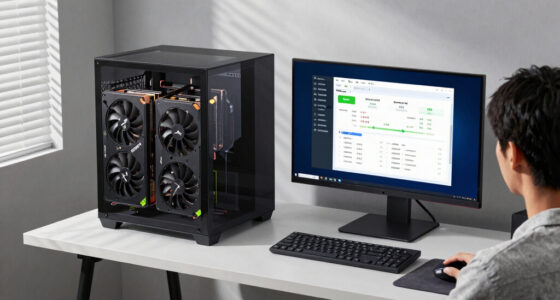
You should also pay attention to system bottlenecks. If your CPU or RAM are maxed out while your GPU remains underutilized, then upgrading your graphics card might be the solution. Conversely, if your CPU is the limiting factor, upgrading your GPU alone won’t improve performance much. Use benchmarking tools or in-game performance overlays to identify which component is bottlenecking your system. If your GPU is consistently running at 100% utilization during demanding tasks, that’s a clear sign it’s time to upgrade. Additionally, the presence of high-quality home cinema projectors in your setup can influence your GPU choices, especially if you’re aiming for seamless streaming or gaming on a large screen.
Finally, consider your future gaming goals. If you’re planning to switch to more graphically intensive titles or want to push your system to run at higher resolutions like 4K, your current GPU might not suffice anymore. Investing in a newer card will ensure you’re prepared for upcoming game releases that leverage advanced graphics technologies, including ray tracing and high-quality VR gaming experiences. Ultimately, recognizing these signs—lag in demanding titles, age, bottleneck issues, or aspirations for better visuals—will help you determine the right moment to upgrade your graphics card and keep your gaming experience smooth and immersive.
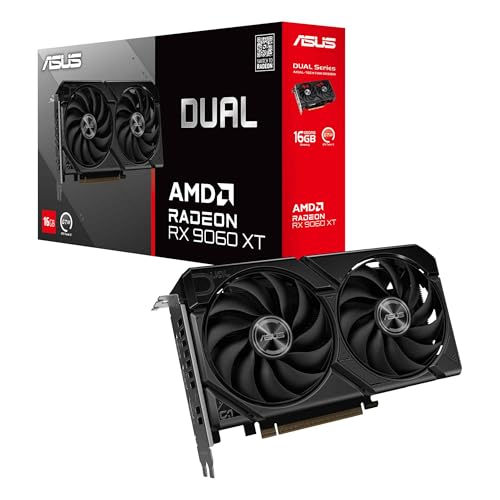
ASUS Dual Radeon RX 9060 XT 16GB GDDR6 Graphics Card, AMD, for Desktop (PCIe 5.0, HDMI 2.1b, DisplayPort 2.1a, 2.5-Slot, Axial-tech Fan, 0dB Technology, and More)
- Fan Design: Axial-tech fans with longer blades
- Air Pressure: Barrier ring increases downward pressure
- Build Compatibility: 2.5-slot design for flexibility
As an affiliate, we earn on qualifying purchases.
As an affiliate, we earn on qualifying purchases.
Frequently Asked Questions
Can I Upgrade My GPU Without Changing Other Components?
Yes, you can upgrade your GPU without changing other components, but you need to check compatibility issues first. Make sure your power supply meets the new GPU’s power requirements, and verify that it fits in your case. Also, confirm your motherboard supports the new graphics card’s interface (like PCIe). If these factors align, upgrading your GPU is straightforward, and you can enjoy better performance without a full system overhaul.
How Does GPU Bottlenecking Affect Upgrade Decisions?
GPU bottlenecking limits your system’s performance because your CPU can’t keep up with your GPU, causing lag or low frame rates. When upgrading, you need to verify driver compatibility so your new GPU works smoothly. Also, check your power supply to make sure it can handle the new GPU’s power demands. If either component isn’t up to par, upgrading your GPU might not give you the performance boost you expect.
Is It Worth Upgrading for VR Gaming Improvements?
If you crave a truly immersive VR experience, upgrading your GPU is definitely worth it. A new graphics card can boost frame rates, reduce latency, and improve image quality, making virtual worlds feel more real. Just check that your hardware is compatible with the latest VR headsets. Upgrading guarantees smooth gameplay and prevents frustration, so if you’re serious about VR, a new GPU will markedly enhance your adventure.
How Do I Determine My Current Gpu’s Performance?
To determine your current GPU’s performance, check GPU benchmarks online to see how your card compares in gaming and demanding tasks. Also, consider system compatibility—make sure your power supply and case can support a new GPU if you decide to upgrade. Running performance tests, like stress tests or benchmarks, helps you see real-world performance. These steps give you a clear picture of your GPU’s strengths and limitations.
What Is the Typical Lifespan of a Graphics Card?
A typical lifespan for a graphics card is about 3 to 5 years, depending on usage and maintenance. During this time, you might notice overheating signs like increased GPU temperatures, which can be managed with proper GPU cooling. Also, make sure your power supply is compatible and provides enough wattage to support newer GPUs. If performance drops and cooling or power issues arise, it’s a good time to contemplate an upgrade.

ASUS Dual NVIDIA GeForce RTX 5060 8GB GDDR7 OC Edition (PCIe 5.0, 8GB GDDR7, DLSS 4, HDMI 2.1b, DisplayPort 2.1b, 2.5-Slot Design, Axial-tech Fan Design, 0dB Technology), 3 Year Warranty
- AI Performance: 623 AI TOPS
- Overclocked Speed: 2565 MHz OC / 2535 MHz Default
- Architecture & Technology: NVIDIA Blackwell & DLSS 4
As an affiliate, we earn on qualifying purchases.
As an affiliate, we earn on qualifying purchases.
Conclusion
If your GPU is struggling to keep up, it’s time to upgrade. Don’t let outdated graphics card hold your gaming or creative projects hostage—imagine fighting an uphill battle against a relentless storm that never subsides. Upgrading now guarantees your system stays powerful and responsive, letting you conquer the digital world with ease. Remember, staying current with your GPU maintains your experience smooth as silk and prevents your setup from becoming a relic in a rapidly evolving tech landscape.

ASUS The SFF-Ready Prime GeForce RTX 4070 OC Edition 12GB GDDR6X Graphics Card (PCIe 4.0, 12GB GDDR6X, DLSS 3, HDMI 2.1a, DisplayPort 1.4a), 3 Year Warranty
- Graphics Card Model: ASUS Prime GeForce RTX 4070 OC
- Memory: 12GB GDDR6X
- Architecture: Ada Lovelace with DLSS3
As an affiliate, we earn on qualifying purchases.
As an affiliate, we earn on qualifying purchases.
ASUS Dual NVIDIA GeForce RTX 5060 8GB GDDR7 OC Edition (PCIe 5.0, 8GB GDDR7, DLSS 4, HDMI 2.1b, DisplayPort 2.1b, 2.5-Slot Design, Axial-tech Fan Design, 0dB Technology), 3 Year Warranty
- AI Performance: 623 AI TOPS
- Overclocked Speed: 2565 MHz OC / 2535 MHz Default
- Architecture & Technology: NVIDIA Blackwell & DLSS 4
As an affiliate, we earn on qualifying purchases.
As an affiliate, we earn on qualifying purchases.