This checklist is for people who want practical gear to support everyday account, device, and travel privacy. Each pick has a different role, so start with the risks and routines you actually have: signing in to accounts, working on a laptop, charging from unfamiliar ports, storing files, or carrying travel documents. Choose for your routine, rather than treating every item as essential.

Get the latest gadgets delivered free with Prime
- Fast, free delivery on millions of items
- Prime Video, Amazon Music and more included
- Member-only deals all year
The sections are organized by gear type, from account access and laptop privacy to USB use, file storage, webcam coverage, and travel documents. Each one explains why the slot may matter, what to check before buying, and where the named pick may fit. Check compatibility first, especially for connectors, screen dimensions, and device-specific covers.
Use the “Look for” points as a quick comparison checklist, then read the verdict and fit notes before deciding. Confirm the product’s current specifications and compatibility with your own devices, since names alone do not establish every technical detail. Match the gear to your setup and prioritize the items that address a real part of your day.
Hardware Security Key
A hardware security key can add a physical step to account sign-in, making it a useful checklist item for people who want an option beyond passwords alone. The Yubico YubiKey Bio C (FIDO Edition) is identified as a USB-C biometric security key, so the first question is whether the accounts and services you use support the key’s sign-in method. A key that does not work with your services or devices will be inconvenient, even if its form factor seems right. Check service support before choosing a model.
Common buying mistakes include assuming every account accepts every security key, overlooking how you will use it across computers, or buying a connector that does not fit your devices. Confirm that your device has an accessible USB-C port, and consider whether you regularly sign in on devices that lack one. The word “Bio” in the product name indicates a biometric feature, but check the maker’s specifications for supported use and setup details rather than assuming how it behaves. Think through recovery too: keep account recovery options current and know how you would sign in if the key is unavailable. Plan for recovery as part of setup.
What to look for:
- Confirm your key services support the key’s sign-in standard.
- Check for an accessible USB-C port on the devices you use.
- Review biometric setup and use requirements in the product specifications.
- Consider how you will sign in on devices without USB-C.
- Keep a separate account recovery method available.
Yubico YubiKey Bio C (FIDO Edition) – USB-C Biometric Security Key

The YubiKey Bio C offers passwordless multi-factor authentication using biometric fingerprint verification and PIN fallback. Compatible with multiple operating systems and major online services, it is durable, tamper-resistant, water-resistant, and requires no batteries or network connectivity.
Pros:
- Biometric fingerprint authentication for enhanced security
- Compatible with major OS and online services like Google and Microsoft
- Durable, water-resistant, and tamper-resistant design
- No batteries or network required for operation
Cons:
- Limited to FIDO protocols, no OTP generation
- Requires USB-C port, may not be compatible with older devices
- Higher price point compared to non-biometric security keys
Best for: People whose devices and accounts support this key’s sign-in method.
Not ideal for: People who need a key for devices without USB-C access.
Bottom line: Confirm account support and device fit before making this the center of your sign-in routine.
Privacy Screen Protector
A privacy screen filter is meant to help limit what people beside you can see on a laptop display, which can be useful when working in shared spaces. The named 3M Gold Frameless Privacy Filter is for a 14-inch widescreen laptop, so screen size and shape are the first compatibility checks. “14-inch” alone may not identify the exact display dimensions or aspect ratio; verify the laptop model and the filter’s fit guidance before ordering. Match the screen precisely to avoid a poor fit.
A frequent mistake is choosing by diagonal measurement alone or assuming a frameless filter will attach the way you prefer. Check the product details for its attachment method and whether that approach suits your screen, bezel, and how often you open or close the laptop. Consider your actual working setup: a privacy filter can be less useful if you often share the display with a colleague or need a wide viewing angle. Also check whether the filter’s appearance and viewing characteristics suit your normal tasks. Clean the screen before installation and follow the maker’s instructions to reduce alignment issues. Review installation details before purchase.
What to look for:
- Verify the exact laptop model, screen dimensions, and aspect ratio.
- Confirm the attachment method works with your display and bezel.
- Check the maker’s guidance for installation and removal.
- Consider whether you need to share the screen with nearby people.
- Review the filter’s viewing characteristics for your typical work.
3M Gold Frameless Privacy Filter for 14-Inch Widescreen Laptop

This privacy filter keeps your personal information secure from prying eyes while maintaining clear visibility for the user. It features a reversible design with a vivid gold or black side and uses an optically clear adhesive for easy application.
Pros:
- Provides high-level privacy protection
- Reversible design offers two color options
- Clear visibility for the user
Cons:
- May slightly reduce screen brightness
- Requires careful application to avoid bubbles
Best for: People using a compatible 14-inch widescreen laptop in shared spaces.
Not ideal for: People who frequently show their display to others from varied angles.
Bottom line: Verify the laptop’s exact display fit and attachment method before choosing this filter.
USB Data Blocker
A USB data blocker is a consideration for people who charge devices from USB ports they do not control. The PortaPow USB-A Data Blocker is named as a USB-A product in a five-pack, so confirm that the charging cable and port you plan to use match that connector. A blocker is only useful when it fits the connection in your charging setup; connector mismatch can leave it unused. Check every connector between your device and the power source.
One common mistake is expecting a blocker to solve every charging or data-transfer concern. Review the product details for supported devices and charging behavior, and remember that a data blocker is not a substitute for using a trusted power source when one is available. Also consider whether your device uses USB-C or another connection, and whether an appropriate cable or adapter is part of your setup. The five-pack may be convenient if you want blockers in several places, but check that each location uses USB-A before distributing them. Keep track of which accessories you have, and test your normal charging arrangement at home so you can identify compatibility issues before traveling. Test your setup ahead of relying on it away from home.
What to look for:
- Confirm the port and cable use USB-A.
- Check the product’s device and charging compatibility details.
- Account for USB-C devices and any required cable or adapter.
- Consider where each of the five blockers will be used.
- Try the complete charging setup before relying on it elsewhere.
PortaPow USB-A Data Blocker, Black, 5-Pack

Blocks USB data transfer and syncing while allowing mobile devices to charge, helping reduce the risk of juice jacking in places such as cars and airports. Its SmartCharge chip supports Apple, Universal, and Samsung charging standards, with charging up to 2.4A.
Pros:
- Physically blocks data transfer and syncing
- Supports charging up to 2.4A
- SmartCharge chip supports Apple, Universal, and Samsung standards
- Pack includes five blockers
Cons:
- USB-A connector version; USB-C devices may require a different version or adapter
Best for: People who regularly charge compatible devices through USB-A connections.
Not ideal for: People whose charging setup uses only USB-C connections.
Bottom line: Match the blocker to the full cable and port path, then test it with your device.
Encrypted USB Drive
An encrypted USB drive can be useful for people who need to carry files on removable storage and want to consider access protection. The Apricorn Aegis Secure Key 3 NX is named as a 128GB encrypted USB 3.0 flash drive, but verify its full specifications and compatibility before relying on it for important files. The supplied product name ends with “(AS,” so confirm the complete model name and listing details. Verify the exact model before purchase.
Common mistakes include assuming a drive works with every operating system, overlooking the connector your computer requires, or treating encryption as a backup. Check the maker’s instructions for setup, supported systems, access steps, and what happens if you forget the credential. Make sure the listed capacity suits the files you plan to carry, while keeping another copy of important data somewhere appropriate. If you intend to move files between work and personal devices, confirm that both allow use of removable storage. Consider how you will keep the drive secure when it is not plugged in and how you will handle recovery. Plan access and backups before storing anything important.
What to look for:
- Confirm the complete model name and current product specifications.
- Check operating system and device compatibility.
- Verify connector fit or any adapter you would need.
- Review setup, credential, and recovery instructions.
- Keep a separate backup of important files.
Apricorn Aegis Secure Key 3 NX 128GB Encrypted USB 3.0 Flash Drive (ASK3-NX-128G
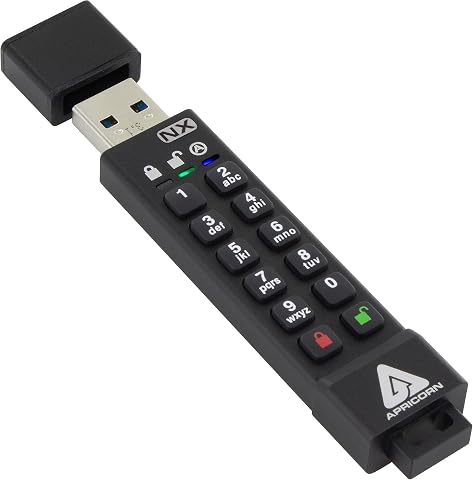
A hardware-encrypted USB 3.0 flash drive with 256-bit AES encryption and FIPS 140-2 Level 3 validation. It features separate Admin and User modes, two Read-Only modes, data recovery PINs, and compatibility with the Aegis Configurator.
Pros:
- FIPS 140-2 Level 3 validated hardware encryption for strong security
- Onboard keypad PIN entry protects against keyloggers
- Separate Admin and User modes allow managed access
- Read-Only modes help prevent malware infections
Cons:
- Premium price compared to standard flash drives
- FIPS validation was still pending as of early 2019
Best for: People who need compatible removable storage for files on the go.
Not ideal for: People who need a shared backup or cannot manage a separate access credential.
Bottom line: Confirm the complete model and recovery process, and keep another copy of important files.
Webcam Privacy Cover
A sliding webcam cover offers a simple physical way to cover a compatible camera when it is not in use. The named Webcam Privacy Cover Slide Shutter lists Logitech C920, C920x, and C930e among its compatible models, so this pick is especially dependent on checking the exact webcam. Match the camera model before buying; a cover designed for one camera may not suit another webcam or a laptop’s built-in camera.
A common mistake is focusing on the shutter while overlooking how it attaches and whether it interferes with the camera’s view or surrounding controls. Check the listing for the full compatibility list, dimensions, attachment method, and any care or removal guidance. If you use the webcam for frequent calls, consider whether opening and closing the cover will be convenient in your routine. For a laptop, check the display thickness and closure guidance from the device maker before adding anything over the screen area. Do not assume a cover replaces the camera’s software controls or other privacy settings. Check fit and closure on the actual device.
What to look for:
- Confirm the exact webcam model against the full compatibility list.
- Check the cover’s dimensions and attachment method.
- Make sure the shutter does not obstruct the camera view when open.
- For laptop use, review device guidance before adding anything to the display.
- Consider how easily you can open and close it during calls.
Webcam Privacy Cover Slide Shutter for Logitech C920, C920x, C930e, and C922 Pro

A sliding privacy shutter that fits Logitech C920, C920x, C930e, and C922 Pro Stream webcams, as well as other popular models. The cover slides closed to block the camera lens and protect your privacy when not in use.
Pros:
- Compatible with a wide range of Logitech webcam models
- Simple sliding design for quick privacy control
- Cost-effective alternative to OEM covers
Cons:
- Third-party product not endorsed by Logitech
Best for: People using a compatible Logitech C920, C920x, or C930e webcam.
Not ideal for: People who need a cover for an unlisted or built-in camera.
Bottom line: Check the full model compatibility list and physical fit before attaching the shutter.
RFID Blocking Wallet
A travel folio can organize travel documents, while the product name also identifies this Bellroy Travel Folio as a leather passport wallet. It may suit someone looking for a dedicated place to carry a passport, but the name alone does not establish its compartments, dimensions, or RFID performance. Check the interior layout and current product details against the documents and items you carry.
A common buying mistake is assuming a travel wallet will hold every passport, card, or document you bring, or assuming the “RFID” label means every contactless item is covered. Review the maker’s specifications for capacity, closure, and any stated RFID functionality, and confirm the folio’s dimensions suit how you travel. “Navy” identifies the listed color, while leather describes the listed material; check care guidance if that matters to your routine. Think about whether you prefer a folio that stays in a bag or one you carry in hand, and avoid filling it beyond what closes comfortably. Confirm contents and fit before making it your travel organizer.
What to look for:
- Check the listed dimensions and passport compatibility.
- Review the interior layout for the cards and documents you carry.
- Confirm what the maker states about RFID functionality.
- Consider the closure and how you plan to carry the folio.
- Review material care guidance for the leather exterior.
Bellroy Travel Folio Leather Passport Wallet – Navy

This zip-around leather travel folio organizes up to two passports, cards, cash, boarding passes, receipts, a spare SIM, and the included Micro Pen. It features RFID shielding, multiple pockets, and a back slip pocket for quick access to travel documents; the eco-tanned leather develops a patina with use.
Pros:
- Organizes passports, cards, cash, and travel documents in multiple pockets
- RFID shielding helps protect personal data
- Includes a Micro Pen and storage for a spare SIM
- Compact design with a quick-access back slip pocket
Cons:
- Larger-format passports may not fit in the designated sleeve
- Leather requires dry-cloth cleaning
Best for: Travelers who want a dedicated leather passport folio.
Not ideal for: People who need verified RFID details or capacity beyond the listed specifications.
Bottom line: Check the layout, dimensions, and stated RFID features against your travel routine.
Build your checklist in a budget-first order by starting with the gap that matters most: account sign-in, screen privacy, charging connections, file storage, webcam coverage, or travel organization. Compare compatibility and stated features before adding another item, and prioritize the gear you will use consistently. Start with your biggest gap and expand the kit as your needs become clearer.
These picks cover different situations, so a thoughtful fit check can be more useful than carrying everything at once. Confirm product details with the maker, set up any security features before you need them, and keep recovery and backup plans in mind for the tools that protect access or files. A practical kit fits your routine and is easy to use when it counts.