
Looking for the best USB-C monitors of 2025 that blend style and high performance? I’ve checked out models like Dell’s 4K and ultrawide options, Samsung’s sleek ultra-wide screens, and Lenovo’s budget-friendly choices. These monitors offer vibrant visuals, fast refresh rates, and versatile connectivity, perfect for work, gaming, or creative projects. If you want to discover the top picks that combine modern design with excellent specs, keep going—I’ll share all the details.
Key Takeaways
- Monitors with 4K and UltraWide resolutions offer stunning visuals, vibrant colors, and immersive curved designs for professional and entertainment use.
- USB-C with high power delivery (up to 90W) ensures single-cable connectivity for charging, data, and video transfer, reducing desk clutter.
- High refresh rates (120Hz, 100Hz) and fast response times (0.03ms) deliver smooth, tear-free visuals ideal for gaming and multimedia.
- Sleek, modern designs with slim bezels, ergonomic adjustments, and stylish aesthetics enhance workspace elegance and user comfort.
- Features like HDR support, wide color coverage, built-in speakers, and multi-port options combine performance with stylish, versatile setups.
Dell 27 Plus 4K USB-C Monitor (S2725QC)

If you’re looking for a high-quality monitor that balances stunning visuals with smooth performance, the Dell 27 Plus 4K USB-C Monitor (S2725QC) is an excellent choice. Its 27-inch 4K display delivers crisp, vibrant images thanks to in-plane switching technology and 99% sRGB coverage. The HDR readiness enhances depth and detail, while the 1500:1 contrast ratio ensures deep blacks and bright whites. With a 120Hz refresh rate and 0.03ms response time, it provides fluid, tear-free visuals perfect for fast-paced tasks. The USB-C port offers easy connectivity and 65W power delivery, making it a sleek, reliable addition to any workspace.
Best For: professionals and creatives seeking a high-resolution monitor with vibrant colors, fast performance, and versatile connectivity for work and multimedia tasks.
Pros:
- Crisp 4K resolution with vibrant color accuracy thanks to in-plane switching and 99% sRGB coverage
- Smooth visuals with 120Hz refresh rate and ultra-low 0.03ms response time, ideal for fast-paced activities
- Convenient single USB-C port with 65W power delivery reduces desk clutter and simplifies connectivity
Cons:
- Limited to a single USB-C port, which may require additional adapters for multiple devices
- No built-in stand height adjustability, potentially affecting ergonomic setup
- Premium features like HDR readiness and high contrast may require compatible content to fully utilize
Dell 34 Plus USB-C Curved Monitor (S3425DW)
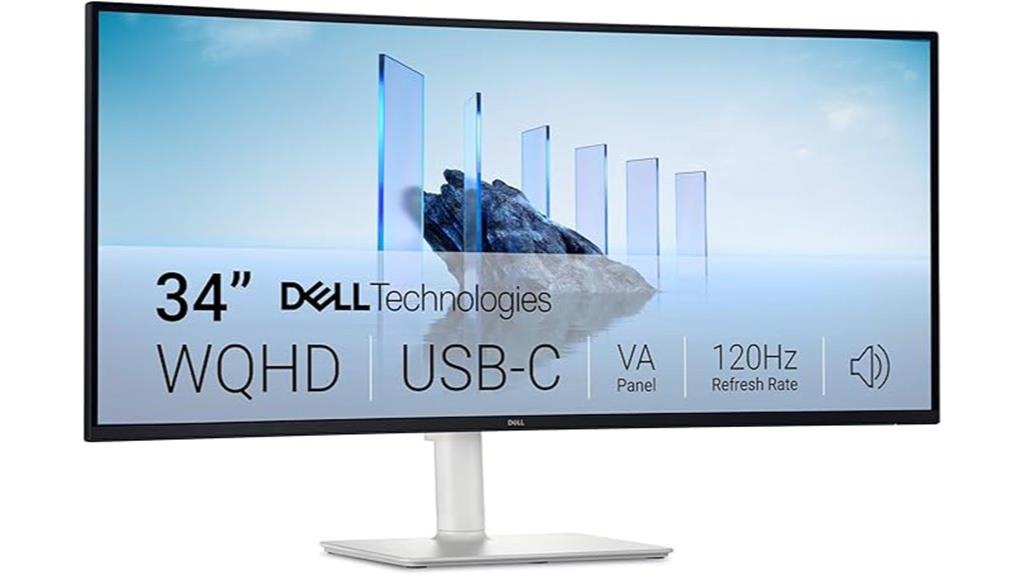
The Dell 34 Plus USB-C Curved Monitor (S3425DW) stands out as an excellent choice for professionals and multimedia enthusiasts seeking immersive visuals and seamless connectivity. Its 34-inch curved display with a 3440 x 1440 resolution and 21:9 aspect ratio offers vibrant, true-to-life colors, thanks to 99% sRGB and 95% DCI-P3 coverage. With a 120Hz refresh rate, AMD FreeSync Premium, and a lightning-fast 0.03ms response time, it delivers smooth visuals for work and gaming. The monitor’s BlueLight Shield reduces eye strain, while a single USB-C cable provides power and data, keeping your desk clean and organized.
Best For: professionals and multimedia enthusiasts seeking immersive visuals, smooth performance, and clutter-free connectivity in a sleek, curved monitor.
Pros:
- Stunning 34-inch curved display with vibrant, true-to-life colors thanks to high sRGB and DCI-P3 coverage
- Fast 120Hz refresh rate with AMD FreeSync Premium and ultra-low 0.03ms response time for smooth visuals in work and gaming
- Convenient single USB-C cable support with 65W power delivery simplifies setup and reduces desk clutter
Cons:
- Limited to 65W power delivery, which may not support high-power laptops or multiple devices simultaneously
- VA panel, while offering excellent contrast, might have narrower viewing angles compared to IPS panels
- No built-in USB hub or additional ports beyond USB-C, possibly requiring extra accessories for extensive connectivity
Dell S2722DC Monitor – 27-inch WQHD Display

For professionals seeking a sleek, versatile monitor that combines sharp visuals with convenient connectivity, the Dell S2722DC stands out. Its 27-inch WQHD display offers vibrant, accurate colors thanks to IPS technology with 99% sRGB coverage. The modern platinum silver design features ultrathin bezels, making it ideal for multi-monitor setups. With USB-C support for single-cable charging and data transfer up to 65W, plus quick-access USB 3.2 ports, it’s highly functional. Adjustable height, tilt, swivel, and pivot ensure comfort during long work sessions. With a 75Hz refresh rate, AMD FreeSync, built-in speakers, and a 1-year warranty, it balances style and performance perfectly.
Best For: professionals and multimedia enthusiasts seeking a sleek, high-quality monitor with versatile connectivity and accurate color reproduction.
Pros:
- Vibrant, accurate colors with 99% sRGB coverage and IPS technology
- Flexible adjustments including height, tilt, swivel, and pivot for ergonomic comfort
- Convenient USB-C with 65W power delivery and quick-access USB 3.2 ports
Cons:
- Limited to 75Hz refresh rate, which may not satisfy high-end gaming needs
- Slightly heavier at approximately 11.91 pounds, potentially less ideal for frequent repositioning
- No built-in USB-C power indicator or specific ergonomic lock features
Samsung 49” Ultrawide Curved Computer Monitor (LS49C954UANXZA)

Designed for professionals who need expansive, immersive displays, the Samsung 49” Ultrawide Curved Monitor (LS49C954UANXZA) combines a massive 32:9 aspect ratio with cutting-edge features, making it perfect for multitasking, creative work, and entertainment. Its 1000R curved display enhances immersion, while VESA DisplayHDR 400 delivers rich, vibrant visuals. The monitor doubles as a docking station, supporting DisplayPort, HDMI, USB, and USB-C with 90W charging. With a 120Hz refresh rate, dual QHD resolution, built-in speakers, and adjustable height, it offers smooth performance, comfort, and space efficiency, making it an all-in-one solution for demanding users.
Best For: professionals and creative users who require an expansive, immersive display for multitasking, video editing, and gaming in a space-efficient setup.
Pros:
- Ultra-wide 49-inch curved display enhances immersion and productivity.
- Combines monitor with a docking station, supporting multiple device connections and high-speed charging.
- High-quality visuals with VESA DisplayHDR 400, 120Hz refresh rate, and Dual QHD resolution for detailed, vibrant images.
Cons:
- Large size may require significant desk space and adjustment for smaller work areas.
- Premium features and specifications might come with a higher price point.
- Limited stand adjustment options beyond height, potentially affecting ergonomic customization for some users.
Lenovo L27m-30-2022 27-Inch FHD Monitor
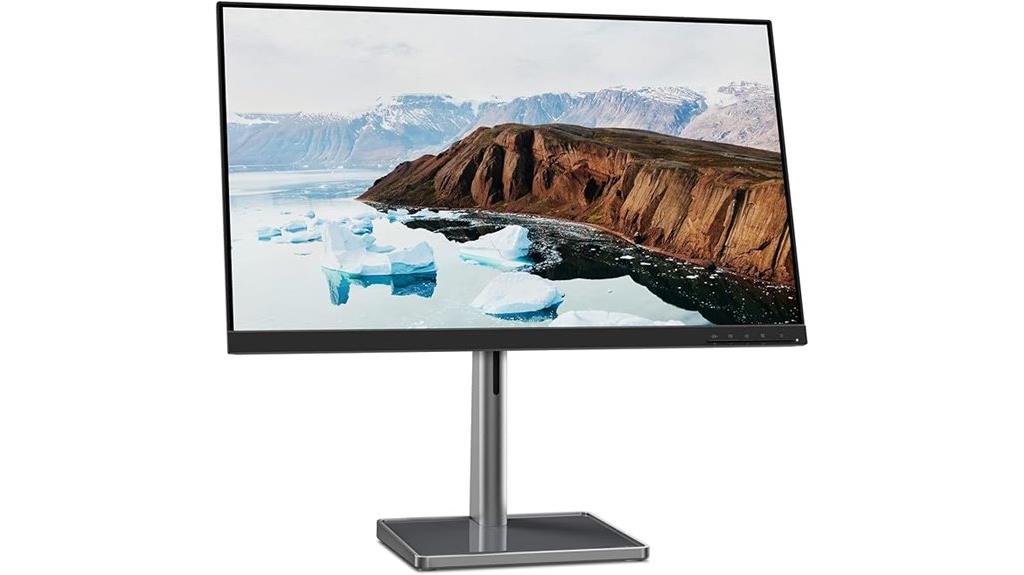
If you’re looking for a versatile monitor that balances affordability with solid performance, the Lenovo L27m-30-2022 27-Inch FHD Monitor is an excellent choice. It features a 27-inch IPS panel with vibrant colors and wide 178° viewing angles, delivering clear, distortion-free images. The 75 Hz refresh rate ensures smooth visuals for casual gaming and video calls, while Low Blue Light certification reduces eye strain during long use. Connectivity is flexible with HDMI, USB-C, and four USB 3.2 ports, plus integrated dual speakers. Its ergonomic stand offers adjustable tilt, lift, pivot, and swivel, making it perfect for a comfortable, stylish workspace.
Best For: casual users, remote workers, and gamers seeking an affordable, versatile monitor with good visual quality and flexible connectivity.
Pros:
- Vibrant 27-inch IPS display with wide viewing angles and Full HD resolution for clear, distortion-free images
- Multiple connectivity options including HDMI, USB-C, and four USB 3.2 ports for versatile device connections
- Adjustable ergonomic stand with tilt, lift, pivot, and swivel for personalized comfort
Cons:
- 75 Hz refresh rate may not satisfy serious gamers requiring higher refresh rates
- Built-in dual speakers provide basic audio, which may not meet audiophile or professional needs
- Limited to Full HD resolution, which may be less suitable for high-resolution creative work
SAMSUNG Viewfinity S65UA Ultrawide Curved Monitor

The SAMSUNG Viewfinity S65UA Ultrawide Curved Monitor stands out as an excellent choice for professionals and gamers who demand immersive visuals and seamless multitasking. Its 34-inch ultrawide curved display with a 21:9 aspect ratio and Ultra WQHD resolution offers sharp, vibrant images across a broad workspace. With 1 billion colors, HDR10, and a 100Hz refresh rate, it delivers stunning visuals and smooth motion. The 1000R curvature matches the eye’s natural shape, reducing fatigue. Plus, the USB-C port with 90W charging simplifies connectivity, keeping your setup clean and efficient. It’s a versatile monitor that’s perfect for work, gaming, or entertainment.
Best For: professionals and gamers seeking an immersive, high-resolution ultrawide monitor that enhances multitasking, gaming, and entertainment experiences.
Pros:
- Stunning 34-inch ultrawide curved display with Ultra WQHD resolution for sharp visuals
- 100Hz refresh rate and AMD FreeSync technology ensure smooth motion and reduced stuttering
- Versatile connectivity with USB-C port supporting 90W charging simplifies setup
Cons:
- Higher price point may be a barrier for budget-conscious users
- Large size might require significant desk space for optimal placement
- Limited to ultrawide aspect ratio, which may not be compatible with all software or workflows
Dell 27 Inch 4K Monitor (S2725QS)
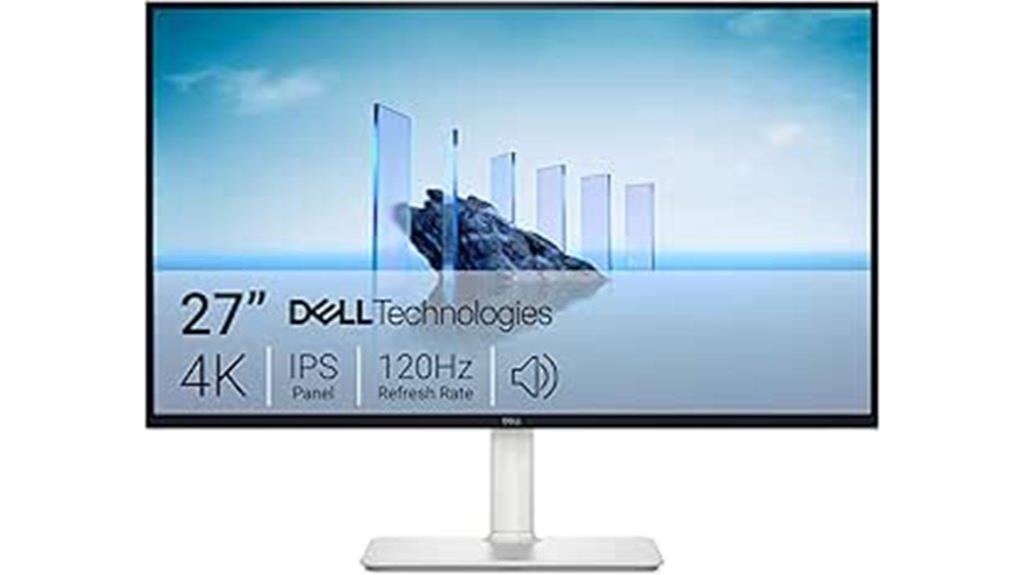
For professionals seeking sharp visuals and precise color accuracy, the Dell 27 Inch 4K Monitor (S2725QS) stands out with its stunning 3840 x 2160 resolution and IPS panel. It delivers wide viewing angles and 99% sRGB coverage, ensuring vibrant, true-to-life colors. HDR readiness enhances contrast and detail, while the 1500:1 contrast ratio produces deep blacks and vivid hues. The 120Hz refresh rate and 0.03ms response time provide smooth, responsive visuals, ideal for fast-paced tasks. Its sleek, ultra-thin bezel and ash white finish add modern elegance, complemented by integrated speakers and eye care features like Blue Light Reduction for all-day comfort.
Best For: professionals and creatives who require sharp visuals, accurate color reproduction, and smooth performance for work and multimedia applications.
Pros:
- 4K resolution with IPS panel for crisp, vibrant images and wide viewing angles
- 120Hz refresh rate and 0.03ms response time for smooth motion and responsiveness
- HDR readiness and 99% sRGB coverage for accurate colors and enhanced contrast
Cons:
- May be more expensive compared to lower-resolution monitors with similar features
- Limited ergonomic adjustability details provided, which could impact long-term comfort
- Integrated speakers might not match the audio quality of dedicated external sound systems
Dell S2425HS Monitor (23.8 Inch, FHD, 100Hz, Eye Comfort, Built-in Speakers)

Looking for a reliable monitor that combines sleek design with eye comfort? The Dell S2425HS offers a modern, ultrathin bezel style that minimizes distractions and enhances your viewing experience. Its 23.8-inch FHD display with wide-angle In-plane Switching technology delivers vibrant, consistent colors, covering 99% sRGB. The adjustable tilt, swivel, pivot, and height features make it easy to customize for ergonomic comfort during long sessions. Certified with TÜV Rheinland’s 4-star eye comfort rating, it reduces eye fatigue with ComfortView Plus, lowering blue light emissions. Plus, built-in 5W speakers and multiple HDMI ports make this monitor a versatile, stylish addition to any workspace.
Best For: individuals seeking a sleek, eye-friendly monitor with vibrant display quality and versatile connectivity for work, entertainment, and casual gaming.
Pros:
- Modern ultrathin bezel design minimizes distractions and enhances viewing immersion
- Certified with TÜV Rheinland 4-star eye comfort rating, reducing eye fatigue
- Wide-angle In-plane Switching technology with 99% sRGB coverage delivers vibrant, consistent colors
Cons:
- Limited to 23.8-inch size, which may not suit users needing larger screens
- Built-in speakers, while functional, may not satisfy audiophiles or those seeking high-quality sound
- Lacks advanced gaming features such as high refresh rates above 100Hz or adaptive sync technology
ASUS 23.8” 1080P Docking Monitor (VA24ECPSN)

If you’re seeking a versatile monitor that combines sharp visuals with seamless connectivity, the ASUS 23.8” VA24ECPSN is an excellent choice. This Full HD IPS display offers wide-angle viewing, vivid colors, and a frameless design for an immersive experience. It features extensive ports, including HDMI, USB-C, DisplayPort, and a USB hub, making it perfect for docking laptops and connecting peripherals. With a 75Hz refresh rate, Adaptive-Sync, and ergonomic adjustments, it ensures smooth visuals and comfortable use. Certified for eye care with Flicker-free and Low Blue Light, it’s ideal for long work or gaming sessions. Plus, its VESA mountability adds flexible installation options.
Best For: professionals and students seeking a versatile, high-quality monitor with seamless connectivity and ergonomic features for work, gaming, or multimedia use.
Pros:
- Extensive connectivity options including HDMI, USB-C, DisplayPort, and USB hub for versatile device connections
- Eye care technologies like Flicker-free and Low Blue Light certification reduce eye strain during long use
- Adjustable ergonomic stand with tilt, swivel, pivot, and height adjustments for comfortable viewing
Cons:
- Weighs nearly 12 pounds, which may impact portability and wall-mounting convenience for some users
- Limited to a 75Hz refresh rate, which might be less ideal for competitive gaming compared to higher refresh rate monitors
- Premium features and connectivity options come at a higher price point compared to basic monitors
Samsung 32” 4K UHD Smart Monitor M7 (M70F)

The Samsung 32” 4K UHD Smart Monitor M7 (M70F) stands out as an ideal choice for users seeking a versatile, all-in-one display that combines stunning visuals with smart functionality. Its 32-inch 4K UHD resolution delivers sharp, detailed images, while HDR support enhances color accuracy and contrast. Built-in speakers provide high-quality audio, complementing the vibrant visuals. With smart TV apps, Samsung TV Plus, and Gaming Hub, you can stream content, watch live channels, or play games without external devices. Connectivity options like HDMI, USB-C, and USB-A make it easy to connect your devices, and smart features like AI Picture Optimizer and SmartThings elevate your experience.
Best For: users seeking a versatile 32-inch 4K UHD monitor that combines high-quality visuals, smart streaming features, and seamless connectivity for work, entertainment, and gaming.
Pros:
- Vivid 4K UHD resolution with HDR support for sharp, lifelike images
- Built-in smart TV apps, Samsung TV Plus, and Gaming Hub for versatile entertainment options
- Multiple connectivity options including HDMI, USB-C, and USB-A for easy device integration
Cons:
- Requires internet connection for full smart features and app access
- Limited regional availability of some streaming services like Samsung TV Plus
- Stand height adjustment may not include other ergonomic features
SANSUI 27-inch Curved Monitor with Speakers and USB-C

Gamers and professionals seeking an immersive viewing experience will appreciate the SANSUI 27-inch curved monitor, which combines a 1500R curvature with high-quality visuals. It offers HDR support, a 110% sRGB color gamut, and a 4000:1 contrast ratio, delivering vivid, detailed images. The 1080p resolution, 120Hz refresh rate, and 1ms response time ensure smooth, responsive performance. Plus, it features built-in 2W speakers, multiple connectivity options including USB-C and HDMI, and ergonomic tilt with a wide viewing angle. Its anti-glare, anti-flicker, and low blue light tech make long sessions comfortable. VESA compatibility adds flexibility for mounting, making it a versatile choice.
Best For: gamers and professionals seeking an immersive, high-performance curved monitor with versatile connectivity and comfortable viewing features.
Pros:
- Stunning 1500R curvature and HDR support for an immersive visual experience
- Fast 120Hz refresh rate and 1ms response time ensure smooth gameplay and responsiveness
- Built-in speakers and multiple ports including USB-C and HDMI for versatile connectivity
Cons:
- 27-inch size may be too large for users preferring smaller displays
- Limited built-in speaker power (2W) might not satisfy audiophiles or those requiring loud sound
- Tilt adjustment range (-5° to 15°) may not suit all ergonomic preferences
Philips 34″ Curved UltraWide QHD Monitor

Designed for professionals and multimedia enthusiasts, the Philips 34″ Curved UltraWide QHD Monitor delivers an immersive viewing experience with its expansive 34-inch curved VA panel. Its 3440×1440 resolution provides 34% more pixels than standard Quad HD, enhancing detail and clarity. The ultrawide 21:9 aspect ratio boosts multitasking, media, gaming, and cinematic immersion. With Ultra Wide-Color technology, it achieves vivid, accurate colors, covering 121.3% sRGB and 99.5% NTSC. The frameless design, ergonomic stand, and multiple connectivity options—including USB-C—make it both stylish and practical. It’s a versatile monitor perfect for demanding workflows and entertainment.
Best For: professionals and multimedia enthusiasts seeking an immersive, high-resolution ultrawide monitor for multitasking, gaming, media editing, and color-accurate work.
Pros:
- UltraWide Quad HD resolution with vibrant color accuracy covering 121.3% sRGB and 99.5% NTSC.
- Curved 34-inch VA panel with 1500R curvature for immersive viewing and reduced eye strain.
- Versatile connectivity options including USB-C with power delivery, HDMI, DisplayPort, and multiple USB ports.
Cons:
- Relatively heavy at 27.8 pounds, which may require a sturdy setup for placement.
- Limited to a 100Hz refresh rate, which may be less ideal for competitive fast-paced gaming.
- Higher price point compared to standard monitors with similar resolution but fewer features.
LG 27UP850K-W 27-inch 4K UHD IPS Computer Monitor
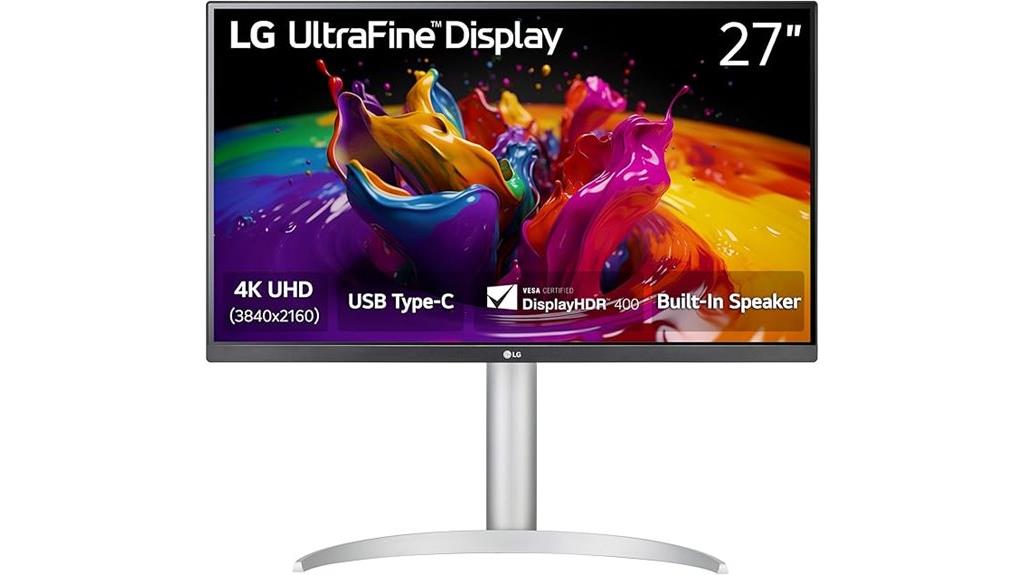
If you’re seeking a versatile monitor that combines stunning 4K visuals with seamless connectivity, the LG 27UP850K-W is an excellent choice. This 27-inch IPS display offers crisp 3840 x 2160 resolution, supporting HDR 400 and 95% DCI-P3 for vibrant, accurate colors. Its ergonomic stand adjusts for comfort during long sessions, while built-in speakers with Waves MaxxAudio enhance multimedia experience. Connectivity is straightforward with USB-C, offering 90W power delivery, plus HDMI, DisplayPort, and USB 3.0 ports. Perfect for content creation, gaming, or streaming, this monitor balances style and performance effortlessly.
Best For: professionals, content creators, and gamers seeking a high-resolution monitor with versatile connectivity and vibrant visuals.
Pros:
- UltraSharp 4K UHD IPS display with accurate, vibrant colors supporting HDR 400 and 95% DCI-P3
- Multiple connectivity options including USB-C with 90W power delivery, HDMI, DisplayPort, and USB 3.0 ports
- Adjustable ergonomic stand for personalized comfort during long use
Cons:
- 60Hz refresh rate may not satisfy high-end gamers requiring higher refresh rates
- Slightly heavy at approximately 12.98 pounds, which may impact portability
- Limited to a 5ms response time, which might be less ideal for competitive gaming
Samsung 27-Inch ViewFinity S7 4K UHD Monitor (LS27D702EANXGO)

The Samsung 27-Inch ViewFinity S7 4K UHD Monitor (LS27D702EANXGO) stands out as an excellent choice for creative professionals and power users who demand stunning visuals and precise color accuracy. Its 3840×2160 resolution delivers sharp detail and vibrant colors, while HDR10 support adds true-to-life contrast and depth. The monitor’s near-limitless color gamut guarantees accurate, vivid visuals, perfect for complex designs or videos. Multiple connectivity options—HDMI, DisplayPort, USB-A, and USB-B—make setup seamless. Its tool-free Easy Setup Stand offers flexible adjustments, and built-in eye care features reduce strain during extended work sessions. This monitor combines style and performance effortlessly.
Best For: creative professionals and power users seeking stunning visuals, precise color accuracy, and versatile connectivity for demanding workflows.
Pros:
- 4K UHD resolution with vibrant, true-to-life colors and HDR10 support for enhanced contrast and depth
- Multiple connectivity options including HDMI, DisplayPort, USB-A, and USB-B for seamless device integration
- Easy setup with a tool-free, adjustable stand and built-in eye care features for extended comfortable use
Cons:
- Higher price point compared to standard monitors with lower resolutions
- Limited ergonomic adjustments beyond basic tilting and height options
- May require compatible hardware to fully exploit 4K and HDR features
Samsung 24″ ViewFinity S6 (S60UD) Series QHD Computer Monitor

For professionals seeking a versatile, high-performance monitor, the Samsung 24″ ViewFinity S6 (S60UD) Series stands out with its impressive USB-C connectivity that supports both 90W charging and data transfer simultaneously. It offers seamless Ethernet via a built-in LAN port and easy expansion with Daisy Chain support. The built-in KVM switch simplifies multitasking by controlling two sources with one keyboard and mouse. Its QHD resolution delivers crisp images, complemented by HDR10 for vibrant colors. The adjustable stand provides ergonomic comfort, while features like split screen and Picture-in-Picture enhance productivity. Overall, this monitor combines style, flexibility, and advanced features for demanding work environments.
Best For: professionals and power users who need a versatile, high-quality monitor with advanced connectivity, ergonomic features, and superior display performance for multitasking and detailed work.
Pros:
- Supports 90W charging and data transfer via USB-C, reducing cable clutter and enhancing convenience
- Built-in LAN port and Daisy Chain support facilitate easy connectivity and expansion in multi-monitor setups
- Ergonomic stand with height, tilt, swivel, and pivot adjustments ensures comfortable and flexible viewing angles
Cons:
- Premium features may come with a higher price point compared to basic monitors
- Limited screen size at 24 inches might be less suitable for users requiring a larger display area
- Some advanced features, like the KVM switch, may require additional setup or compatibility considerations
Factors to Consider When Choosing Usb C Monitors
When selecting a USB-C monitor, I focus on key factors like display resolution, connectivity options, and color accuracy to guarantee it meets my needs. Ergonomic adjustments and power delivery capacity also play a big role in providing comfort and convenience during long work sessions. Considering these points helps me choose a monitor that balances performance, compatibility, and usability.
Display Resolution Options
Choosing the right display resolution for a USB-C monitor depends on your specific needs and the tasks you’ll perform. Higher resolutions like 4K (2160p) deliver sharper images, making them perfect for photo editing, video production, and detailed design work. They offer better clarity and more screen real estate but demand more from your GPU and can impact battery life on portable devices. If you want a good balance, 1440p (QHD) provides noticeable improvements over Full HD (1080p) without requiring as much power. For basic tasks, casual browsing, or office work, Full HD might suffice. Ultimately, consider what you’ll be doing most often and choose a resolution that aligns with both your performance needs and hardware capabilities.
Connectivity Versatility
Connectivity versatility is a crucial factor to contemplate because it determines how easily you can connect your monitor to various devices and peripherals. I look for a USB-C port supporting USB 3.1 or higher to ensure fast data transfer and a stable connection. Power delivery is equally important; I prefer monitors that offer at least 60W of charging power to keep my laptop charged without needing an extra charger. Multiple USB-C ports or a combination of USB-C with HDMI or DisplayPort provide flexibility for connecting multiple devices simultaneously. I also check if the USB-C supports advanced video protocols like DisplayHDR or Thunderbolt for enhanced performance. Features like built-in hubs, daisy chaining, or KVM switches can further expand connectivity options, making my workspace more efficient.
Color Accuracy Standards
Color accuracy standards are key to guaranteeing that your USB-C monitor displays images and visuals as intended. Standards like sRGB, Adobe RGB, and DCI-P3 measure a monitor’s ability to reproduce consistent and true-to-life colors. The higher the percentage of coverage, the more vibrant and accurate the colors appear. For most digital content and general use, monitors with at least 99% sRGB coverage suffice. However, professionals involved in photo editing and graphic design should look for monitors offering 99% or higher Adobe RGB coverage for precise color matching. Additionally, HDR support and wider gamuts like DCI-P3 enhance the display’s ability to show a broader color range and contrast, delivering more realistic images. Choosing a monitor with strong color accuracy standards guarantees your visuals look their best.
Ergonomic Adjustments
Ergonomic adjustments play a crucial role in ensuring that your USB-C monitor fits comfortably into your workspace, reducing physical strain during long hours of use. Features like tilt, swivel, pivot, and height adjustment allow you to customize the monitor’s position for maximum comfort. Proper height adjustment helps keep your eyes at the right level, minimizing neck and shoulder fatigue. The ability to pivot from landscape to portrait orientation supports different tasks like coding, reading, or graphic design. These flexible ergonomic options are especially important during extended work sessions or in shared workspaces, where personalized comfort boosts productivity and well-being. Choosing a monitor with versatile adjustments helps create a healthier, more comfortable workspace tailored to your needs.
Power Delivery Capacity
When choosing a USB-C monitor, it is important to take into account its power delivery capacity because it directly affects how well your devices charge and operate. I recommend guaranteeing the monitor’s USB-C port supports at least 60W to adequately charge most laptops and peripherals. If you want faster charging, look for models with 90W or 100W support, which can reduce your reliance on external chargers. It’s also essential to verify that the monitor’s power delivery matches your device’s charging standards, preventing insufficient power transfer. For versatility, consider monitors with adjustable or multiple power delivery options, so they can support a range of devices with different power needs. Proper power capacity ensures efficient charging and seamless operation, making your workspace more streamlined.
Price and Brand Reputation
Choosing a USB-C monitor isn’t just about features and price; selecting a reputable brand can make all the difference in quality and long-term reliability. Established brands with strong reputations usually offer better durability, reliable customer support, and longer warranties, which are vital for a long-term investment. While premium brands often charge more, they typically provide advanced features and proven performance that justify the cost. Consumer reviews and brand scores are helpful tools to gauge overall satisfaction and reliability before buying. Opting for reputable brands also reduces the risk of encountering counterfeit or substandard products, ensuring compatibility and safety with your devices. In the end, paying a bit more for a trusted brand can save you time, money, and frustration down the road.
Frequently Asked Questions
How Does USB-C Compatibility Impact Monitor Setup and Device Connectivity?
USB-C compatibility simplifies my monitor setup and device connectivity considerably. I can connect my laptop, smartphone, or tablet with just one cable, which handles power, data, and video transfer seamlessly. This eliminates the clutter of multiple cables and guarantees a quick, clean setup. Plus, I don’t have to worry about compatibility issues, making my workspace more efficient and tidy. Overall, USB-C makes connecting devices effortless and reliable.
What Are the Advantages of Curved Versus Flat USB-C Monitors?
Curved USB-C monitors offer a more immersive experience, wrapping around your field of view and reducing glare, which is great for gaming or detailed work. Flat monitors, on the other hand, provide a more traditional, versatile setup, ideal for multitasking and professional environments. I prefer curved for entertainment and creative tasks, while flat screens suit my productivity needs. It really depends on how you plan to use your monitor.
How Do Color Accuracy and Calibration Vary Across These Models?
Color accuracy and calibration can vary quite a bit across different USB-C monitor models. Some high-end options offer factory calibration with ±2 dE, guaranteeing precise colors right out of the box, while others may need manual adjustments for best accuracy. I recommend checking reviews that mention factory calibration and color coverage like AdobeRGB or DCI-P3, as these details help make sure you’ll get vibrant, true-to-life visuals with minimal fuss.
Are These Monitors Suitable for Gaming or Professional Creative Work?
These monitors are like Swiss Army knives—versatile enough for gaming and professional creative work. I find them perfect for fast-paced games, thanks to their low response times, and equally ideal for detailed editing, thanks to their color accuracy. While some models lean more toward gaming with high refresh rates, others excel for creative tasks with precise calibration. Overall, they’re suited for both, depending on your specific needs.
What Maintenance or Lifespan Considerations Exist for High-End USB-C Monitors?
High-end USB-C monitors require regular cleaning with a soft, lint-free cloth to keep the screen clear and prevent dust buildup. I also recommend avoiding harsh chemicals to protect the display’s coating. To prolong lifespan, I guarantee proper ventilation and avoid prolonged static images to prevent burn-in. With careful handling and maintenance, these monitors can easily last five to seven years or more, maintaining their performance and style.
Conclusion
Choosing the right USB-C monitor is a balance between style and performance, clarity and comfort, speed and stability. Whether you prefer a sleek 4K display or an expansive ultrawide, each option offers unique benefits. It’s about finding that perfect harmony, where elegance meets efficiency. So, weigh your needs carefully—because in the end, the best monitor isn’t just about looks, but how seamlessly it elevates your entire workspace.