

The best iPad tablets balance screen size, performance, and storage with what you actually plan to do. I’d start with the iPad Air 11-inch (M4) as the best overall fit for many people: it offers a capable middle ground between basic iPads and the Pro line. For demanding creative work, the iPad Pro 13-inch (M5) brings a larger display and more headroom, while the iPad mini (A17 Pro) is easier to carry. The main tradeoffs are paying for performance you may not use, choosing a screen that feels too small or large, and deciding whether a renewed model’s condition and remaining support suit you. Read on for how these 15 options compare and which one fits your needs.

Get the latest gadgets delivered free — and shop member deals
- Fast, free delivery on millions of items
- Access to Prime Big Deal Days deals on October 6–7
- Prime Video, Amazon Music and more included
Complete the kit



Key Takeaways
- The Air 11-inch M4 is the strongest middle ground: it sits between entry iPads and Pro models for buyers who want more capability without a pro-sized tablet.
- Screen size changes the job an iPad does: the mini favors portability, 11-inch models suit mixed use, and 13-inch models give creative and multitasking work more room.
- Pro power only pays off for demanding workflows: the M5 Pro models and the M2 11-inch Pro are aimed at heavier creative or multitasking use, while everyday browsing and schoolwork may not call for that tier.
- Renewed listings span very different generations: a renewed 2025 iPad is a different proposition from a 7th-generation model, so check chip, storage, condition terms, and software support rather than relying on the renewed label.
- Storage can separate otherwise similar picks: the listed 64GB and 32GB configurations leave less room for offline media, large projects, and apps than the 128GB and 256GB choices.
| 2022 Apple iPad 10.9-inch Wi-Fi 64GB – Silver (Renewed) |  | Best Renewed Everyday iPad | Model: 10th-generation iPad (2022) | Display: 10.9-inch Liquid Retina with True Tone | Chip: A14 Bionic | VIEW LATEST PRICE | See Our Full Breakdown |
| Apple iPad 2021 10.2-inch Wi-Fi 64GB – Space Gray (Renewed) |  | Best for Basic iPad Tasks | Model: 9th-generation iPad (2021) | Display: 10.2-inch Retina | Storage: 64GB | VIEW LATEST PRICE | See Our Full Breakdown |
| Apple iPad Pro 13-inch (M4), 512GB, Wi-Fi, Space Black | 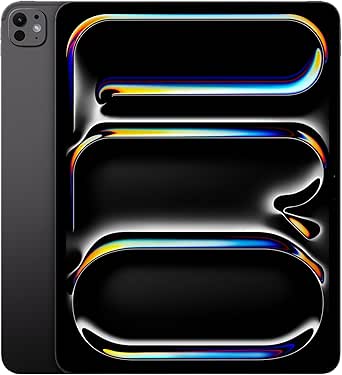 | Best for Creative Work | Display: 13-inch Ultra Retina XDR | Chip: Apple M4 | Storage: 512GB | VIEW LATEST PRICE | See Our Full Breakdown |
| Apple iPad Air 11-inch (M4), 128GB, Wi-Fi 7, Space Gray |  | Best Performance in a Mid-Size iPad | Model: iPad Air | Display: 11-inch Liquid Retina with P3 wide color, True Tone, and ultralow reflectivity | Chip: Apple M4 | VIEW LATEST PRICE | See Our Full Breakdown |
| Apple iPad (11-inch, Wi-Fi, 128GB, Silver, Renewed Premium) |  | Best Renewed Premium Pick | Model year: 2025 | Display size: 11 inches | Storage: 128GB | VIEW LATEST PRICE | See Our Full Breakdown |
| Apple iPad Pro 11-inch (M5), 256GB, Wi-Fi 7, Space Black |  | Best Compact Pro | Display: 11-inch Ultra Retina XDR | Chip: Apple M5 | Storage: 256GB | VIEW LATEST PRICE | See Our Full Breakdown |
| Apple iPad 11-inch (A16 chip, 128GB, Wi-Fi, Silver) |  | Best Everyday iPad | Display: 11-inch Liquid Retina with True Tone | Chip: Apple A16 | Storage: 128GB; configurable up to 512GB | VIEW LATEST PRICE | See Our Full Breakdown |
| Apple iPad Pro 12.9-inch Wi-Fi 256GB – Space Gray (Renewed) |  | Best Large-Screen Renewed Pick | Display: 12.9-inch Liquid Retina with ProMotion, True Tone, and wide color | Processor: A12X Bionic with Neural Engine | Storage: 256GB | VIEW LATEST PRICE | See Our Full Breakdown |
| Apple iPad Air 13-inch (M4), 128GB, Wi-Fi, Starlight |  | Best Large-Screen Air | Display: 13-inch Liquid Retina, P3 wide color, True Tone, ultralow reflectivity | Chip: Apple M4 | Storage: 128GB | VIEW LATEST PRICE | See Our Full Breakdown |
| Apple iPad (10th Generation) 64GB Wi-Fi – Silver |  | Best for Budget-Conscious Beginners | Display: 10.9-inch Liquid Retina | Chip: A14 Bionic | Storage: 64GB | VIEW LATEST PRICE | See Our Full Breakdown |
| Apple 2025 iPad 11-inch (Wi-Fi, 128GB) – Silver (Renewed) |  | Best Renewed Everyday iPad | Display: 11-inch Liquid Retina with True Tone | Chip: A16 | Storage: 128GB | VIEW LATEST PRICE | See Our Full Breakdown |
| Apple iPad Pro 13-inch (M5) — 256GB, Wi-Fi 7, Space Black |  | Best for Large-Screen Pro Work | Display: 13-inch Ultra Retina XDR with ProMotion, P3 wide color, and True Tone | Chip: Apple M5 | Memory: Up to 16GB | VIEW LATEST PRICE | See Our Full Breakdown |
| Apple iPad mini (A17 Pro), 8.3-inch Liquid Retina Display, 256GB, Wi-Fi 6E, Space Gray |  | Best Compact iPad | Display: 8.3-inch Liquid Retina with True Tone and P3 wide color | Chip: A17 Pro | Storage: 256GB | VIEW LATEST PRICE | See Our Full Breakdown |
| Apple iPad 10.2-Inch Wi-Fi 32GB Space Gray (7th Generation, Renewed) |  | Best for Basic, Low-Storage Needs | Generation: 7th Generation | Model year: 2019 | Display: 10.2-inch Retina | VIEW LATEST PRICE | See Our Full Breakdown |
| Apple iPad Pro 11-inch (4th Generation) with M2 Chip, 256GB, Wi-Fi 6E, and Liquid Retina Display, Space Gray |  | Best Previous-Generation Pro | Display: 11-inch Liquid Retina with ProMotion, True Tone, and P3 wide color | Chip: Apple M2, 8-core CPU and 10-core GPU | Storage: 256GB | VIEW LATEST PRICE | See Our Full Breakdown |
| iPad tablet | Storage | Connectivity | Display | Chip |
|---|---|---|---|---|
| 2022 Apple iPad 10.9-inch Wi-F | 64GB | Wi-Fi 6 | 10.9-inch Liquid Retina with True Tone | A14 Bionic |
| Apple iPad 2021 10.2-inch Wi-F | 64GB | Wi-Fi | 10.2-inch Retina | — |
| Apple iPad Pro 13-inch | 512GB | Wi-Fi 6E | 13-inch Ultra Retina XDR | Apple M4 |
| Apple iPad Air 11-inch | 128GB | Wi-Fi 7 with Apple N1 | 11-inch Liquid Retina with P3 wide color, True Tone, and ultralow reflectivity | Apple M4 |
| Apple iPad | 128GB | Wi-Fi | — | — |
| Apple iPad Pro 11-inch | 256GB | Wi-Fi 7 with Apple N1 | 11-inch Ultra Retina XDR | Apple M5 |
| Apple iPad 11-inch | 128GB; configurable up to 512GB | Wi-Fi 6, USB-C | 11-inch Liquid Retina with True Tone | Apple A16 |
| Apple iPad Pro 12.9-inch Wi-Fi | 256GB | Wi-Fi | 12.9-inch Liquid Retina with ProMotion, True Tone, and wide color | — |
| Apple iPad Air 13-inch | 128GB | Wi-Fi 7 with Apple N1 | 13-inch Liquid Retina, P3 wide color, True Tone, ultralow reflectivity | Apple M4 |
| Apple iPad | 64GB | Wi-Fi 6 | 10.9-inch Liquid Retina | A14 Bionic |
| Apple 2025 iPad 11-inch | 128GB | Wi-Fi 6 | 11-inch Liquid Retina with True Tone | A16 |
| Apple iPad Pro 13-inch | 256GB | Wi-Fi 7 with Apple N1 | 13-inch Ultra Retina XDR with ProMotion, P3 wide color, and True Tone | Apple M5 |
| Apple iPad mini | 256GB | Wi-Fi 6E | 8.3-inch Liquid Retina with True Tone and P3 wide color | A17 Pro |
| Apple iPad 10.2-Inch Wi-Fi 32G | 32GB | Wi-Fi | 10.2-inch Retina | — |
| Apple iPad Pro 11-inch | 256GB | Wi-Fi 6E | 11-inch Liquid Retina with ProMotion, True Tone, and P3 wide color | Apple M2, 8-core CPU and 10-core GPU |
More Details on Our Top Picks
2022 Apple iPad 10.9-inch Wi-Fi 64GB – Silver (Renewed)
The 10th-generation iPad is a practical middle ground for everyday browsing, video calls, and streaming. Its 10.9-inch Liquid Retina display gives apps and video more room than the 2021 iPad’s 10.2-inch screen, while the A14 Bionic chip and Wi-Fi 6 make it a more capable fit for multitasking. USB-C also gives it a newer charging connection than older entry models. The tradeoff is its renewed condition and 90-day limited warranty, so buyers who want a new device or longer coverage should look at the standard iPad options in this roundup. Its 64GB capacity can fill up quickly with downloaded video and large apps, too. This pick makes most sense for someone who wants the larger, newer-feeling design and accepts the limits of a refurbished unit.
Pros:- 10.9-inch Liquid Retina display with True Tone
- A14 Bionic chip supports everyday multitasking
- USB-C charging and Wi-Fi 6 connectivity
- Works with Apple Pencil (1st generation) and Magic Keyboard Folio
Cons:- Renewed condition may not suit buyers who want a new device
- 90-day limited warranty is relatively short
- 64GB storage can be restrictive for large app or media libraries
Best for: Everyday iPad users who want a larger display, USB-C, and a familiar iPadOS experience in a renewed device
Not ideal for: Buyers who need generous local storage, a new device, or longer warranty coverage
- Model:10th-generation iPad (2022)
- Display:10.9-inch Liquid Retina with True Tone
- Chip:A14 Bionic
- Storage:64GB
- Connectivity:Wi-Fi 6
- Cameras:12MP Ultra Wide front and rear; Center Stage on front camera
- Port:USB-C
- Condition and warranty:Renewed; 90-day limited warranty
Our verdict“Choose this renewed iPad if you want a roomy everyday screen and USB-C, and can live with limited storage and shorter warranty coverage.”
Apple iPad 2021 10.2-inch Wi-Fi 64GB – Space Gray (Renewed)
This renewed 2021 iPad suits buyers whose main tasks are reading, browsing, video calls, and watching shows. Its 10.2-inch Retina display keeps the familiar iPad experience in a compact form, while iPadOS provides access to Apple’s tablet apps and services. Compared with the 2022 10th-generation iPad, it has a smaller screen and older design, so it is less appealing for split-screen work or buyers who want USB-C. In return, its straightforward feature set can be enough for a household device or a first iPad. The 64GB storage is not expandable, and this unit is renewed, so cosmetic wear is possible. I’d choose it for light use, but step up to the 10th-generation model for a more spacious display and newer connectivity.
Pros:- 10.2-inch Retina display for everyday reading and video
- Compact, lightweight design
- Access to the iPadOS app ecosystem
Cons:- Renewed condition may include minor cosmetic wear
- 64GB storage cannot be expanded
- Smaller display and older design than the 10th-generation iPad
Best for: First-time iPad owners and households seeking a compact tablet for browsing, reading, and streaming
Not ideal for: Multitaskers, frequent travelers who store lots of media, and buyers who want USB-C or a newer design
- Model:9th-generation iPad (2021)
- Display:10.2-inch Retina
- Storage:64GB
- Connectivity:Wi-Fi
- Color:Space Gray
- Condition:Renewed
Our verdict“Pick this renewed 2021 iPad for basic tablet tasks, but choose the 10th-generation iPad if you want a larger screen and newer connectivity.”
Apple iPad Pro 13-inch (M4), 512GB, Wi-Fi, Space Black
The 13-inch iPad Pro is the specialist choice for people who want a large, high-end screen and room to keep demanding creative projects on the device. Its Ultra Retina XDR display and M4 chip are a substantial step up from the 11-inch iPad Air, especially for visual work and intensive multitasking. The 512GB storage also gives video and design files far more breathing room than the Air’s 128GB configuration. Face ID, LiDAR, and Thunderbolt/USB 4 add useful capabilities for compatible workflows. That headroom comes with a large 13-inch footprint, and the Apple Pencil Pro and Magic Keyboard are separate purchases. For email, streaming, and school notes, the iPad Air is a more proportionate fit; this Pro earns its place when display quality, processing capacity, and storage are central to the work.
Pros:- 13-inch Ultra Retina XDR display with ProMotion
- M4 chip for demanding creative apps and multitasking
- 512GB storage for large projects and media
- Face ID, LiDAR, and Thunderbolt/USB 4 support
Cons:- Large size is less convenient for one-handed use and travel
- Apple Pencil Pro and Magic Keyboard are sold separately
- Its capabilities exceed what many basic iPad tasks require
Best for: Digital artists, video editors, and professionals who need a large, high-end display and substantial on-device storage
Not ideal for: Casual users who mostly browse and stream, or anyone seeking a compact tablet with fewer accessory costs
- Display:13-inch Ultra Retina XDR
- Chip:Apple M4
- Storage:512GB
- Connectivity:Wi-Fi 6E
- Port:USB-C with Thunderbolt / USB 4
- Cameras:12MP Ultra Wide front with Center Stage; 12MP Wide rear
- Security and scanning:Face ID and LiDAR Scanner
- Weight:1.27 pounds
Our verdict“Choose the 13-inch Pro for demanding creative work that benefits from its large XDR display, M4 chip, and 512GB capacity.”
Apple iPad Air 11-inch (M4), 128GB, Wi-Fi 7, Space Gray
The 11-inch iPad Air pairs a powerful M4 chip with a more manageable size than the 13-inch iPad Pro. That makes it a strong fit for people who move between demanding apps, video calls, and creative work but do not need the Pro’s larger XDR screen or 512GB configuration. Its Liquid Retina display includes P3 wide color and True Tone, and Wi-Fi 7 offers newer wireless connectivity. Touch ID keeps unlocking simple, while the front Center Stage camera is suited to calls. The key compromise is its 128GB capacity, which leaves less room for large projects than the 13-inch Pro. Apple Pencil and Magic Keyboard accessories are separate, too. Compared with the basic iPad models, this Air has much more performance headroom; it makes sense when that capability will be used.
Pros:- M4 chip provides substantial performance headroom
- 11-inch Liquid Retina display with P3 wide color and True Tone
- Wi-Fi 7 connectivity
- 12MP Center Stage front camera and 4K-capable rear camera
Cons:- 128GB may be limiting for large creative projects or offline media
- Apple Pencil and Magic Keyboard are separate accessories
- Display lacks the 13-inch iPad Pro’s Ultra Retina XDR feature set
Best for: Students and mobile professionals who want strong performance in an 11-inch tablet for multitasking and creative apps
Not ideal for: People who need 512GB of built-in storage or the largest, highest-end display for visual work
- Model:iPad Air
- Display:11-inch Liquid Retina with P3 wide color, True Tone, and ultralow reflectivity
- Chip:Apple M4
- Storage:128GB
- Connectivity:Wi-Fi 7 with Apple N1
- Cameras:12MP Center Stage front; 12MP Wide rear with 4K video
- Authentication:Touch ID
- Battery life:All-day
Our verdict“Choose the 11-inch Air if you want M4 performance in a portable size and can work within 128GB of storage.”
Apple iPad (11-inch, Wi-Fi, 128GB, Silver, Renewed Premium)
This 2025 renewed-premium iPad is aimed at buyers who want a recent, everyday 11-inch model with more storage than the 64GB renewed iPads in this roundup. Its 128GB capacity gives apps, photos, and downloads more room before housekeeping becomes necessary. The condition terms are also specific: the device is professionally inspected and cleaned, has no visible cosmetic imperfections at arm’s length, and its battery retains more than 80% of original capacity. Compared with the renewed 10th-generation iPad, this is a newer model year with double the listed storage. The tradeoff is that it is pre-owned, accessories may be non-original, and packaging may be generic. Buyers seeking Apple-certified refurbished status or original accessories may prefer a new iPad configuration instead.
Pros:- 128GB storage offers more room than the 64GB renewed iPads listed here
- Professionally inspected, tested, and cleaned
- Battery capacity is stated as more than 80% of original
- Eligible for replacement or refund within 365 days of receipt
Cons:- Pre-owned and not Apple certified
- Compatible accessories may be non-original
- May arrive in generic packaging
Best for: Buyers who want a recent 11-inch everyday iPad with 128GB storage and clearly stated renewed-premium condition terms
Not ideal for: Shoppers who require a new or Apple-certified device, original accessories, or a guaranteed retail box
- Model year:2025
- Display size:11 inches
- Storage:128GB
- Connectivity:Wi-Fi
- Color:Silver
- Condition:Renewed Premium
- Battery capacity:More than 80% of original capacity
- Return coverage:Replacement or refund eligibility within 365 days of receipt
Our verdict“Choose this renewed-premium model if you want a recent 128GB iPad and are comfortable with pre-owned status and possible third-party accessories.”
Apple iPad Pro 11-inch (M5), 256GB, Wi-Fi 7, Space Black
The 11-inch iPad Pro with M5 pairs a fast chip with an Ultra Retina XDR display and ProMotion, making it the strongest fit here for demanding creative work in a more portable size. Compared with the 13-inch iPad Air (M4), it offers a more advanced display and Face ID, while the Air gives you more screen space for layouts and split-screen work. Its Wi-Fi 7 and landscape Center Stage camera suit fast file transfers and frequent video calls. The tradeoff is that a compact screen can feel cramped for detailed editing, and 256GB may limit large project libraries. Apple Pencil and Magic Keyboard are separate purchases, and this 256GB version does not offer the nano-texture glass option.
Pros:- M5 chip with Neural Accelerators for demanding creative and AI tasks
- Ultra Retina XDR display with ProMotion, P3 wide color, and True Tone
- Wi-Fi 7 connectivity
- Landscape 12MP Center Stage front camera
Cons:- Apple Pencil and Magic Keyboard are sold separately
- 256GB may be limiting for large creative projects
- Nano-texture display glass is unavailable on this storage configuration
Best for: Creative professionals who want a high-end iPad for editing, drawing, and video calls while keeping the device easy to carry
Not ideal for: People who need the largest possible canvas or extensive built-in storage for large media libraries
- Display:11-inch Ultra Retina XDR
- Chip:Apple M5
- Storage:256GB
- Connectivity:Wi-Fi 7 with Apple N1
- Front camera:12MP Center Stage
- Rear camera:12MP Wide with adaptive True Tone flash
- Biometrics:Face ID
- Audio:Four speakers and four microphones
Our verdict“Choose this Pro for high-end performance and display quality in a portable size, provided you can work comfortably on an 11-inch screen.”
Apple iPad 11-inch (A16 chip, 128GB, Wi-Fi, Silver)
The 11-inch iPad with A16 is the straightforward all-rounder in this group: its 128GB starting storage gives everyday apps, school files, and downloads more room than the 10th-generation iPad with 64GB, while its Liquid Retina display and A16 chip suit browsing, streaming, and light creative work. It also supports Apple Pencil and Magic Keyboard Folio, so it can shift from note-taking to a compact work setup. Compared with the 11-inch iPad Pro (M5), it gives up the Pro display and higher-end performance, but most casual users may not need those extras. The accessories are sold separately, and this listing is Wi-Fi only, so buyers who need a mobile connection should look elsewhere.
Pros:- A16 chip suited to everyday and light creative tasks
- 128GB starting storage
- 11-inch Liquid Retina display with True Tone
- Supports Apple Pencil and Magic Keyboard Folio
Cons:- Apple Pencil and Magic Keyboard Folio are sold separately
- Wi-Fi-only connectivity in the listed configuration
- Lacks the Pro display features of the iPad Pro models
Best for: Students and households who want a current-feeling tablet for classes, streaming, video calls, and everyday apps
Not ideal for: Frequent travelers who need cellular data or professionals who rely on a ProMotion display for demanding visual work
- Display:11-inch Liquid Retina with True Tone
- Chip:Apple A16
- Storage:128GB; configurable up to 512GB
- Connectivity:Wi-Fi 6, USB-C
- Front camera:12MP Center Stage
- Back camera:12MP Wide with True Tone flash, 4K video
- Security:Touch ID
- Battery:All-day battery life
Our verdict“Pick this iPad for versatile everyday use and accessory support without stepping up to the Pro lineup.”
Apple iPad Pro 12.9-inch Wi-Fi 256GB – Space Gray (Renewed)
This renewed 12.9-inch iPad Pro centers its appeal on screen size: the large Liquid Retina display, ProMotion, and four-speaker audio make it well suited to watching films, reading sheet music, or keeping several work areas visible. Compared with the newer 11-inch iPad Pro (M5), it gives you a larger canvas but uses the older A12X Bionic chip and a 7MP front camera. That age matters for buyers seeking the latest performance and camera features, even though the A12X with Neural Engine remains the listed processor. The renewed condition may show prior use, so appearance and wear can vary. Its Wi-Fi-only setup also means no cellular connection when a network is unavailable.
Pros:- Large 12.9-inch edge-to-edge Liquid Retina display
- ProMotion, True Tone, and wide color support
- Four-speaker audio with wider stereo sound
- Face ID authentication and Apple Pay support
Cons:- Renewed condition may show signs of prior use
- Older A12X Bionic generation than current iPad Pro models
- Wi-Fi-only connectivity
Best for: Buyers who prioritize a large screen for media, reading, or multitasking and are comfortable choosing a renewed older-generation iPad
Not ideal for: People who want current-generation performance, a newer front camera, cellular connectivity, or a predictable like-new finish
- Display:12.9-inch Liquid Retina with ProMotion, True Tone, and wide color
- Processor:A12X Bionic with Neural Engine
- Storage:256GB
- Connectivity:Wi-Fi
- Authentication:Face ID
- Rear camera:12MP
- Front camera:7MP TrueDepth
- Condition:Renewed
Our verdict“Choose this renewed Pro if screen size matters more to you than newer hardware and a pristine-condition guarantee.”
Apple iPad Air 13-inch (M4), 128GB, Wi-Fi, Starlight
The 13-inch iPad Air with M4 brings a generous workspace to the Air line, making split-screen reading, drawing, and document work less cramped than on the 11-inch iPad Air (M4). Its M4 chip, Wi-Fi 7, and Apple Pencil Pro support give it plenty of scope for multitasking and creative apps. The Liquid Retina display offers P3 color and True Tone, while the listed 128GB storage keeps the entry configuration more suited to streamed media and active projects than a large offline library. Compared with the 13-inch iPad Pro (M4), this Air has the bigger-screen format but sits below the Pro tier. The keyboard and Pencil Pro are sold separately, adding to the setup a buyer may need for work.
Pros:- M4 chip for multitasking and AI tasks
- 13-inch Liquid Retina display with P3 wide color and True Tone
- Wi-Fi 7 with Apple N1
- Supports Apple Pencil Pro and Magic Keyboard
Cons:- 128GB may fill quickly with large apps and offline media
- Apple Pencil Pro and Magic Keyboard are sold separately
- Large display is less convenient for one-handed use
Best for: Students, illustrators, and mobile professionals who want a large canvas for notes and multitasking without choosing a Pro model
Not ideal for: People who need more than 128GB for local media and projects or expect to use the tablet mostly one-handed
- Display:13-inch Liquid Retina, P3 wide color, True Tone, ultralow reflectivity
- Chip:Apple M4
- Storage:128GB
- Connectivity:Wi-Fi 7 with Apple N1
- Front camera:12MP Center Stage
- Back camera:12MP Wide with 4K video
- Security:Touch ID and Apple Pay
- Accessory support:Apple Pencil Pro, Apple Pencil (USB-C), Magic Keyboard
Our verdict“Choose the 13-inch Air if you want a spacious work and drawing surface with M4 performance and can manage its storage limits.”
Apple iPad (10th Generation) 64GB Wi-Fi – Silver
The 10th-generation iPad is a sensible entry point for web browsing, video calls, and schoolwork, with a 10.9-inch Liquid Retina screen and Center Stage camera that keep everyday use comfortable. Its A14 Bionic chip is an older generation than the A16 in the newer 11-inch iPad, and its 64GB storage leaves less room for apps, downloads, and games. That makes it a better fit for light use and cloud-based files than for a growing offline library. It supports the first-generation Apple Pencil and Magic Keyboard Folio, though both are separate purchases. Compared with the newer 11-inch iPad, this model is the more constrained choice for storage and processing headroom, so buyers planning to keep a tablet for heavier tasks may prefer that newer option.
Pros:- 10.9-inch Liquid Retina display with True Tone
- A14 Bionic chip and all-day battery life
- 12MP Center Stage front camera and 4K-capable rear camera
- Wi-Fi 6 connectivity
Cons:- 64GB storage can fill quickly with apps and downloads
- Apple Pencil and Magic Keyboard Folio are sold separately
- A14 chip is an older generation than the A16 in the newer 11-inch iPad
Best for: First-time iPad buyers and families who need a tablet for browsing, video calls, streaming, and basic school tasks
Not ideal for: People who keep large game or video libraries on-device or want more room for demanding apps over time
- Display:10.9-inch Liquid Retina
- Chip:A14 Bionic
- Storage:64GB
- Connectivity:Wi-Fi 6
- Front camera:12MP Ultra Wide with Center Stage
- Back camera:12MP Wide with 4K video
- Biometrics:Touch ID
- Weight:1.05 pounds
Our verdict“Pick this model for light everyday use if 64GB is enough for your apps and you do not need the newer 11-inch iPad’s extra headroom.”
Apple 2025 iPad 11-inch (Wi-Fi, 128GB) – Silver (Renewed)
The 2025 iPad’s A16 chip and 11-inch Liquid Retina display make this a more capable everyday tablet than the older iPad 7th Generation, while its renewed condition is the main compromise. True Tone adjusts the display to the room, which can make reading and video more comfortable, and 128GB of storage leaves more space for apps and downloads than the older model’s 32GB. Wi-Fi 6 and USB-C also give it a more current setup for home use and accessories. I’d choose it for general browsing, schoolwork, and streaming, but buyers who want a new device should compare it with the new 11-inch iPad. The 128GB capacity may also feel limiting if you keep large video or game libraries.
Pros:- A16 chip is suited to everyday multitasking and apps
- 11-inch Liquid Retina display includes True Tone
- 128GB provides more room than the 7th Generation iPad’s 32GB
- USB-C and Wi-Fi 6 offer current connectivity
Cons:- Renewed condition may show wear and is not the same as buying new
- 128GB may constrain large offline libraries
- No cellular connectivity
Best for: Readers, students, and families who want a current 11-inch iPad for everyday apps and are comfortable buying renewed.
Not ideal for: Buyers who require a new device or need substantial local space for large media and game libraries.
- Display:11-inch Liquid Retina with True Tone
- Chip:A16
- Storage:128GB
- Connectivity:Wi-Fi 6
- Port:USB-C
- Battery:All-day
- Condition:Renewed
- Color:Silver
Our verdict“Choose this renewed 2025 iPad for a current, versatile everyday tablet if you accept refurbished condition and 128GB is enough.”
Apple iPad Pro 13-inch (M5) — 256GB, Wi-Fi 7, Space Black
For demanding creative and productivity work, the 13-inch Ultra Retina XDR display gives this iPad Pro more room than the 11-inch M5 iPad Pro, while ProMotion and P3 wide color suit detailed visual work. Its M5 chip, Neural Accelerators, and up to 16GB of memory are aimed at heavy workloads and on-device AI; that headroom is excessive for someone mainly watching shows or browsing. Wi-Fi 7 with Apple N1 supports fast wireless transfers, and Face ID makes unlocking convenient when the tablet is set up as a workstation. At 1.28 pounds, it remains relatively light for its size, but the large panel is less handy to carry and hold than the iPad mini. Pencil and keyboard accessories are separate, so the full work setup requires additional purchases.
Pros:- 13-inch Ultra Retina XDR display with ProMotion and P3 wide color
- M5 chip and Neural Accelerators target demanding work and on-device AI
- Wi-Fi 7 with Apple N1 supports fast wireless connectivity
- Face ID and landscape Center Stage camera suit desk-based work
Cons:- Large screen is less convenient to hold and carry than the iPad mini
- Apple Pencil and Magic Keyboard are sold separately
- 256GB may be restrictive for extensive local video projects
Best for: Digital artists, video editors, and professionals who need a large, color-rich iPad display and substantial processing headroom.
Not ideal for: Casual users and frequent commuters who prioritize a compact tablet or have no use for Pro-level display and processing capabilities.
- Display:13-inch Ultra Retina XDR with ProMotion, P3 wide color, and True Tone
- Chip:Apple M5
- Memory:Up to 16GB
- Storage:256GB
- Connectivity:Wi-Fi 7 with Apple N1
- Front camera:12MP landscape Center Stage
- Biometrics:Face ID
- Weight:1.28 pounds
Our verdict“Pick the 13-inch M5 iPad Pro if your work benefits from its expansive display and performance headroom enough to justify its size and separate accessories.”
Apple iPad mini (A17 Pro), 8.3-inch Liquid Retina Display, 256GB, Wi-Fi 6E, Space Gray
The 8.3-inch iPad mini is the easiest pick here to carry everywhere: it gives up the roomy workspace of the 11-inch A16 iPad for a small tablet that fits more naturally in one hand or a small bag. Its A17 Pro chip and 256GB storage keep performance and capacity strong for a compact model, while Wi-Fi 6E, USB-C, and support for Apple Pencil Pro add flexibility for notes and sketching. Center Stage can keep you in frame on calls, and the rear camera records 4K video. The tradeoff is screen area: split-screen work and long document editing feel more constrained than on either iPad Pro. Pencil Pro and Smart Folio are also separate accessories, so this is best when portability matters more than a laptop-like setup.
Pros:- Compact 8.3-inch design is easy to carry and hold
- A17 Pro chip supports demanding apps and graphics
- 256GB storage gives a generous local library for a compact tablet
- Center Stage front camera and 4K rear video add camera versatility
Cons:- Smaller display limits comfortable multitasking and extended document work
- Apple Pencil Pro and Smart Folio are sold separately
- No ProMotion display listed
Best for: Commuters, travelers, and students who want a powerful tablet for reading, notes, and calls in a genuinely portable size.
Not ideal for: People who often use split-screen apps, edit long documents, or want a large canvas for drawing.
- Display:8.3-inch Liquid Retina with True Tone and P3 wide color
- Chip:A17 Pro
- Storage:256GB
- Connectivity:Wi-Fi 6E
- Port:USB-C
- Front camera:12MP Ultra Wide with Center Stage
- Rear camera:12MP Wide with True Tone flash and 4K video
- Security:Touch ID
Our verdict“Choose the iPad mini if portability is your priority and its smaller display still suits the way you work.”
Apple iPad 10.2-Inch Wi-Fi 32GB Space Gray (7th Generation, Renewed)
The renewed 7th-generation iPad offers a 10.2-inch Retina screen and support for the 1st-generation Apple Pencil and Smart Keyboard, but its A10 Fusion chip and 32GB storage make it the most limited option in this group. Compared with the renewed 2025 11-inch iPad, it has less than a third of the stated storage and an older processor, so it is better suited to simple browsing, reading, or a child’s basic tablet than demanding apps or long-term multitasking. It still has Touch ID and a larger screen than the iPad mini, which helps with basic video and school content. Its Lightning charging and iPadOS 18 ceiling make it feel dated beside newer USB-C models. Renewed condition adds another reason to check the unit’s details carefully.
Pros:- 10.2-inch Retina display provides a broad viewing area
- Supports 1st-generation Apple Pencil and Smart Keyboard
- Touch ID offers fingerprint unlocking
- Listed compatibility extends through iPadOS 18
Cons:- 32GB storage fills quickly with apps and downloads
- A10 Fusion is an older chip that may struggle with demanding apps
- Lightning charging and renewed condition are dated compromises
Best for: Families seeking a basic renewed iPad for reading, web browsing, and simple school apps, with modest storage needs.
Not ideal for: People who need modern app performance, USB-C, extensive downloads, or a tablet to keep current over many years.
- Generation:7th Generation
- Model year:2019
- Display:10.2-inch Retina
- Processor:A10 Fusion
- Storage:32GB
- Connectivity:Wi-Fi
- Charging:Lightning
- Max iPadOS:iPadOS 18
- Warranty:90 days limited
Our verdict“Consider this renewed 7th-generation iPad only for basic tasks if its 32GB capacity and older hardware fit your needs.”
Apple iPad Pro 11-inch (4th Generation) with M2 Chip, 256GB, Wi-Fi 6E, and Liquid Retina Display, Space Gray
The 11-inch iPad Pro with M2 brings a ProMotion display, Face ID, and a LiDAR scanner to a more compact body than the 13-inch M5 Pro. Its M2 chip and 256GB storage give it a strong base for creative apps, while the 11-inch size is easier to manage for travel or handheld use. Compared with the renewed 2025 A16 iPad, it adds a smoother display, Face ID, and more advanced camera features, including 4K ProRes support. The tradeoff is that this is a fourth-generation model with Wi-Fi 6E rather than the Wi-Fi 7 listed for the newer M5 Pro, and the Pencil and Magic Keyboard are sold separately. It suits buyers who want Pro features in a smaller format, but the 13-inch M5 is the stronger fit for large-screen work.
Pros:- 11-inch Liquid Retina display includes ProMotion, True Tone, and P3 wide color
- M2 chip with 8-core CPU and 10-core GPU
- Face ID and LiDAR add capabilities beyond the renewed A16 iPad
- 4K ProRes recording and Center Stage support creative and video workflows
Cons:- Older generation than the M5 iPad Pro models in this roundup
- Wi-Fi 6E is a generation behind the 13-inch M5 Pro’s Wi-Fi 7
- Apple Pencil and Magic Keyboard are sold separately
Best for: Creative professionals and students who want an 11-inch ProMotion iPad with Face ID and advanced camera tools.
Not ideal for: Buyers who want the newest Pro generation, Wi-Fi 7, or a large canvas for detailed creative work.
- Display:11-inch Liquid Retina with ProMotion, True Tone, and P3 wide color
- Chip:Apple M2, 8-core CPU and 10-core GPU
- Storage:256GB
- Connectivity:Wi-Fi 6E
- Front camera:12MP Ultra Wide with Center Stage
- Rear cameras:12MP Wide and 10MP Ultra Wide with True Tone flash
- Video:4K recording with ProRes support
- Biometrics:Face ID
- Additional sensor:LiDAR Scanner
Our verdict“Choose this 11-inch M2 iPad Pro if you want a compact ProMotion tablet with pro-level features and do not need the latest Pro generation.”

How We Picked
I compared these iPads on the factors that change daily use: chip capability, screen size, listed storage, wireless generation, and how well each model’s tier fits common tasks. I also treated generation and condition as meaningful differences: new and renewed listings are not interchangeable, and older renewed models may have less remaining software support or headroom than newer options.
The ranking favors broad usefulness first, then gives specialist models clear roles. The Air models place ahead of the Pro line for most buyers because they offer a capable middle tier; the iPad 11-inch options compete on straightforward everyday use, while Pro models rank higher for demanding work and larger displays. The mini earns its place through portability, and renewed older iPads rank lower when their age or limited storage makes them a narrower fit. I weighed the listed configurations rather than assuming unlisted accessory bundles or condition guarantees.
| iPad tablet | Connectivity |
|---|---|
| 2022 Apple iPad 10.9-inch Wi-F | Wi-Fi 6 |
| Apple iPad 2021 10.2-inch Wi-F | Wi-Fi |
| Apple iPad Pro 13-inch | Wi-Fi 6E |
| Apple iPad Air 11-inch | Wi-Fi 7 with Apple N1 |
| Apple iPad | Wi-Fi |
| Apple iPad Pro 11-inch | Wi-Fi 7 with Apple N1 |
| Apple iPad 11-inch | Wi-Fi 6, USB-C |
| Apple iPad Pro 12.9-inch Wi-Fi | Wi-Fi |
| Apple iPad Air 13-inch | Wi-Fi 7 with Apple N1 |
| Apple iPad | Wi-Fi 6 |
| Apple 2025 iPad 11-inch | Wi-Fi 6 |
| Apple iPad Pro 13-inch | Wi-Fi 7 with Apple N1 |
| Apple iPad mini | Wi-Fi 6E |
| Apple iPad 10.2-Inch Wi-Fi 32G | Wi-Fi |
| Apple iPad Pro 11-inch | Wi-Fi 6E |
Factors to Consider When Choosing Best IPad Tablets
I’d make the choice by starting with the work the tablet needs to handle, then checking whether the configuration will still fit a few years from now. These broader tradeoffs can prevent paying for unused power or choosing a model that feels constrained after setup.
Match the chip tier to your workload
Everyday browsing, streaming, reading, and school tasks usually place more emphasis on comfortable handling than on the most powerful chip. Creative apps, large files, complex games, and frequent multitasking can make the extra headroom in Air and Pro models more useful. Think about the most demanding task you repeat, rather than the most demanding task you might try once. A common mistake is choosing a Pro because it sounds more future-proof, then carrying extra capability that does not change daily use. The reverse mistake is buying a basic model for work that regularly involves demanding apps or large projects. If your workload may change, compare the price and size of the next tier with the cost of replacing a constrained tablet later.
Choose a screen size you will enjoy holding
A larger screen gives documents, art canvases, and split-screen apps more room, but it also makes an iPad less convenient to hold for long reading sessions or travel. The mini is the portability choice, while 11-inch models split the difference between usable workspace and easy handling. A 13-inch iPad can make sense as a laptop companion or main drawing surface, yet it may be awkward for casual one-handed use. Before choosing by diagonal measurement alone, consider whether the tablet will spend more time on a desk, in a bag, or in your hands. Buyers sometimes overvalue screen area without checking how they plan to carry the device. When possible, compare the physical dimensions and weight of the exact generation, since similarly named models can differ.
Plan storage around what stays on the device
Storage needs depend less on the number of apps than on whether you keep media and work offline. Downloaded video, large games, photo libraries, and creative project files can fill a 64GB model sooner than expected. Cloud storage can help with documents and photos, but it does not replace local space for travel downloads or active projects. The common trap is choosing the smallest capacity because current usage looks light, without accounting for years of app updates and saved files. If you routinely work with media or want to keep content available without a connection, consider a 128GB or 256GB configuration. Also check the exact listing: models from different generations may offer different storage choices.
Compare renewed listings by generation and terms
Renewed status describes a sales condition, not a performance tier. A renewed 2025 iPad and a renewed 7th-generation iPad differ substantially in age, capability, storage, and likely remaining software support. Read the listing for the exact generation, chip, storage, included accessories, return window, and battery or cosmetic condition details. Avoid assuming that “renewed” means the same inspection or warranty terms across sellers. A newer renewed model can be a sensible way to get a current design, while an older one may suit simple tasks if its limits are clear. For a device you expect to keep for years, weigh the lower upfront commitment against the shorter useful life that an older generation may have.
Decide whether Pro features solve a real problem
The Pro tier makes most sense when its performance, display, or larger workspace directly supports work you do often. Artists, video editors, and people who use demanding apps may gain from that extra capability; casual users may notice the form factor more than the performance difference. Consider whether the tablet will replace a laptop, complement one, or mainly handle entertainment and communication. Accessories can shape the total setup, so check compatibility and the cost of a keyboard or stylus before settling on a model. Do not choose a large Pro solely because it can do more: it may be harder to carry than the 11-inch option. Choose the least expensive tier that comfortably handles your real workload.
Frequently Asked Questions
Is a renewed iPad a good choice for a first tablet?
It can be, especially if the listing is for a relatively recent generation and the seller clearly explains condition, returns, and warranty coverage. Check the chip and storage before comparing it with a new entry iPad; the renewed label alone says little about age or capability. Older generations may still work for reading and video but can have less remaining software support and less room for demanding apps. I’d avoid choosing an older, low-storage model if you expect to keep it for several years. A recent renewed option is usually easier to recommend than one several generations behind.
Should I get an 11-inch iPad or a 13-inch model?
Choose 11 inches if you expect to carry the tablet often, read while holding it, or use it for a mix of everyday tasks. The 13-inch size is more appealing when you need a broad workspace for drawing, documents, or multitasking and can use a desk or stand. The larger display does not automatically make an iPad a better laptop replacement; keyboard and app needs matter too. Consider where you will use it most, not just how much screen you want at home. If portability is a close call, the smaller model is often easier to live with day to day.
Do I need an iPad Pro for drawing or photo editing?
Not necessarily: the Air models may suit many drawing and editing workflows, depending on the apps, project size, and accessories you use. A Pro becomes more compelling when you regularly work with demanding projects, need its particular display or performance capabilities, or want a larger canvas. Check which Apple Pencil and keyboard models are compatible with the exact iPad before buying accessories. For occasional sketches and edits, paying for a Pro may not change the result enough to justify the larger commitment. Match the model to the complexity and frequency of your work.
Is 64GB enough storage for an iPad?
It can be enough for light browsing, reading, streaming, and a modest set of apps, particularly if you rely on cloud services. It becomes restrictive sooner if you download shows, install large games, keep photos locally, or work with creative files. Cloud storage helps with backups and syncing but does not free space for every offline task. Think about travel and whether you need media available without Wi-Fi, as well as how long you plan to keep the device. If you are unsure, a larger listed capacity gives more room to grow.
Which iPad should I choose if I want one tablet for work and travel?
Start with an 11-inch model if you need a blend of bag-friendly size and enough screen space for documents, meetings, and entertainment. The Air is the stronger fit when work includes more demanding apps, while the standard iPad can cover lighter tasks. If travel means reading and compact packing above all else, the mini is easier to carry but gives you less workspace. Also consider storage for downloaded files and whether your work apps function well on iPadOS. A tablet used for work may still need a laptop for software or workflows that an iPad cannot handle comfortably.
Conclusion
I’d choose the iPad Air 11-inch (M4) as the best overall option for buyers who want a flexible tablet without stepping straight to Pro. The iPad 11-inch with A16 is the best value fit for everyday use, while the iPad Pro 13-inch (M5) is the premium choice for demanding work and a spacious canvas. For beginners, I’d look first at the standard 11-inch iPad with 128GB, or a recent renewed version with clear seller terms. The iPad mini suits readers and travelers who put compact size first; choose an Air or Pro instead if screen workspace matters more. If you are considering a renewed older generation, check its storage, software support outlook, and condition terms before deciding.
Fall Picks
fall essentials
As an affiliate, we earn on qualifying purchases.