

Get the latest gadgets delivered free — and shop member deals
- Fast, free delivery on millions of items
- Access to Prime Big Deal Days deals on October 6–7
- Prime Video, Amazon Music and more included
Complete the kit



Key Takeaways
- Unified memory architecture in AMD Ryzen AI Max systems allows for loading larger LLMs than traditional discrete GPU setups with similar price points.
- NPU performance is currently secondary to raw RAM bandwidth and capacity for most local large language model inference tasks.
- Mini PCs with 128GB+ RAM are becoming the standard for serious local AI enthusiasts, replacing older 64GB configurations as the baseline.
- Thermal management is a critical differentiator in compact AI workstations, with active cooling solutions significantly outperforming passive or low-profile designs under sustained load.
- Connectivity limitations, particularly Thunderbolt 5 support, impact the ability to expand external GPU capabilities on smaller form-factor devices.
| GMKtec K13 AI Mini PC |  | Best Compact Efficiency | Processor: Intel Core Ultra 7 256V | Graphics: Intel Arc 140V | Memory: 16GB LPDDR5X (Soldered) | VIEW LATEST PRICE | See Our Full Breakdown |
| MINISFORUM MS-S1 Max Mini Workstation PC |  | Best Balanced Workstation | Processor: AMD Ryzen AI Max+ 395 (16C/32T) | Graphics: AMD Radeon 8060S | Memory: 64GB LPDDR5-8000 | VIEW LATEST PRICE | See Our Full Breakdown |
| NVIDIA DGX Spark Personal AI Desktop Supercomputer |  | Best for Specialized AI Development | Processor: NVIDIA GB10 Grace Blackwell Superchip | AI Performance: 1 PFLOPS FP4 | Memory: 128GB Unified DDR5 | VIEW LATEST PRICE | See Our Full Breakdown |
| GEEKOM A9 Max Mini PC |  | Best User-Friendly Upgrade Path | Processor: AMD Ryzen AI 9 HX 470 | Graphics: AMD Radeon 890M | AI Performance: Up to 86 TOPS | VIEW LATEST PRICE | See Our Full Breakdown |
| MINISFORUM MS-S1 MAX Mini AI Workstation PC (128GB) |  | Best for High-Memory AI Clustering | Processor: AMD Ryzen AI Max+ 395 | Memory: 128GB LPDDR5x | AI Performance: 126 TOPS Total | VIEW LATEST PRICE | See Our Full Breakdown |
| AMD Ryzen AI Halo Personal AI Desktop Computer (Linux Edition) |  | Best for Linux-Native Developers | Processor: AMD Ryzen AI Max+ 395, 16 cores, 32 threads | Memory: 128 GB LPDDR5x unified memory | Graphics: AMD Radeon 8060S integrated, 40 RDNA 3.5 CUs | VIEW LATEST PRICE | See Our Full Breakdown |
| GMKtec EVO-X3 Mini PC |  | Best for Expandability and Gaming Hybrid Use | Processor: AMD Ryzen AI Max+ 395, 16 cores, 32 threads | Memory: 128GB LPDDR5X, 8000MT/s | Graphics: Integrated AMD Radeon 8060S, 40 RDNA 3.5 CUs | VIEW LATEST PRICE | See Our Full Breakdown |
| ACEMAGIC FOCUX Series AI Mini PC |  | Best Value Entry-Level AI Workstation | Processor: Intel Core Ultra X7 358H, 16 cores/16 threads | Memory: 32GB LPDDR5X | Graphics: Intel Arc B390 Xe3 | VIEW LATEST PRICE | See Our Full Breakdown |
| AMD Ryzen AI Halo Personal AI Desktop Computer (Windows Edition) | | Best for Windows-Based AI Enthusiasts | Processor: AMD Ryzen AI Max+ 395, 16 cores, 32 threads | Memory: 128 GB LPDDR5x unified memory | Graphics: AMD Radeon 8060S integrated, 40 RDNA 3.5 CUs | VIEW LATEST PRICE | See Our Full Breakdown |
| BOSGAME M5 AI Mini PC |  | Best for Multi-Monitor Productivity | Processor: AMD Ryzen AI Max+ 395, 16 cores, 32 threads | Memory: 128GB LPDDR5X 8000MT/s | Graphics: Integrated AMD Radeon 8060S | VIEW LATEST PRICE | See Our Full Breakdown |
| MINISFORUM AI X1 Pro-370 Mini PC | 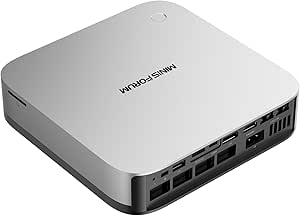 | Best for Expandability | Processor: AMD Ryzen AI 9 HX 370 (12C/24T) | Graphics: AMD Radeon 890M | Memory: 32GB DDR5 (Expandable to 128GB) | VIEW LATEST PRICE | See Our Full Breakdown |
| GEEKOM GT13 MAX Mini PC |  | Best for Warranty and Reliability | Processor: Intel Core Ultra 9 185H (16C) | Graphics: Intel Arc Graphics (8 Xe cores) | AI NPU: Up to 11 TOPS | VIEW LATEST PRICE | See Our Full Breakdown |
| ASUS NUC 14 Pro AI Mini PC |  | Best for Ultra-Compact Workspaces | Processor: Intel Core Ultra 7 258V | NPU: Up to 48 TOPS | Memory: 32GB LPDDR5x (Non-upgradable) | VIEW LATEST PRICE | See Our Full Breakdown |
| GMKtec EVO-X3 Mini PC |  | Best for Heavy Local AI Workloads | Processor: AMD Ryzen AI Max+ 395 (16C/32T) | Graphics: AMD Radeon 8060S | Memory: 128GB LPDDR5X (On-board) | VIEW LATEST PRICE | See Our Full Breakdown |
| personal AI computer | Processor | Memory | Storage | Graphics |
|---|---|---|---|---|
| GMKtec K13 AI Mini PC | Intel Core Ultra 7 256V | 16GB LPDDR5X (Soldered) | 1TB SSD + 2x NVMe Slots | Intel Arc 140V |
| MINISFORUM MS-S1 Max Mini Work | AMD Ryzen AI Max+ 395 (16C/32T) | 64GB LPDDR5-8000 | 2TB PCIe 4.0 SSD | AMD Radeon 8060S |
| NVIDIA DGX Spark Personal AI D | NVIDIA GB10 Grace Blackwell Superchip | 128GB Unified DDR5 | 4TB NVMe M.2 SSD | — |
| GEEKOM A9 Max Mini PC | AMD Ryzen AI 9 HX 470 | 32GB DDR5 (Expandable to 128GB) | 2TB SSD (Dual NVMe Slots) | AMD Radeon 890M |
| MINISFORUM MS-S1 MAX Mini AI W | AMD Ryzen AI Max+ 395 | 128GB LPDDR5x | — | — |
| AMD Ryzen AI Halo Personal AI | AMD Ryzen AI Max+ 395, 16 cores, 32 threads | 128 GB LPDDR5x unified memory | 2 TB M.2 SSD | AMD Radeon 8060S integrated, 40 RDNA 3.5 CUs |
| GMKtec EVO-X3 Mini PC | AMD Ryzen AI Max+ 395, 16 cores, 32 threads | 128GB LPDDR5X, 8000MT/s | 2TB PCIe 4.0 SSD | Integrated AMD Radeon 8060S, 40 RDNA 3.5 CUs |
| ACEMAGIC FOCUX Series AI Mini | Intel Core Ultra X7 358H, 16 cores/16 threads | 32GB LPDDR5X | 1TB PCIe 4.0 SSD | Intel Arc B390 Xe3 |
| AMD Ryzen AI Halo Personal AI | AMD Ryzen AI Max+ 395, 16 cores, 32 threads | 128 GB LPDDR5x unified memory | 2 TB M.2 SSD | AMD Radeon 8060S integrated, 40 RDNA 3.5 CUs |
| BOSGAME M5 AI Mini PC | AMD Ryzen AI Max+ 395, 16 cores, 32 threads | 128GB LPDDR5X 8000MT/s | — | Integrated AMD Radeon 8060S |
| MINISFORUM AI X1 Pro-370 Mini | AMD Ryzen AI 9 HX 370 (12C/24T) | 32GB DDR5 (Expandable to 128GB) | 1TB PCIe 4.0 SSD (Supports up to 3 drives) | AMD Radeon 890M |
| GEEKOM GT13 MAX Mini PC | Intel Core Ultra 9 185H (16C) | 16GB DDR5 (Expandable to 96GB) | 1TB SSD (Expandable to 6TB) | Intel Arc Graphics (8 Xe cores) |
| ASUS NUC 14 Pro AI Mini PC | Intel Core Ultra 7 258V | 32GB LPDDR5x (Non-upgradable) | 1TB PCIe Gen 4 NVMe SSD | — |
| GMKtec EVO-X3 Mini PC | AMD Ryzen AI Max+ 395 (16C/32T) | 128GB LPDDR5X (On-board) | 2TB PCIe 4.0 SSD | AMD Radeon 8060S |
More Details on Our Top Picks
GMKtec K13 AI Mini PC
This model stands out for its exceptional power efficiency relative to its footprint, making it ideal for users who prioritize silence and small form factors over raw computational brute force. Compared with the MINISFORUM MS-S1 Max, which demands significant power and cooling infrastructure, the GMKtec K13 operates quietly and fits easily into tight spaces. The Intel Core Ultra 7 256V handles light AI inference and local LLM tasks capably, though it lacks the heavy lifting capacity of dedicated GPU workstations. Its dual USB4 ports and 5GbE LAN offer modern connectivity, but the 16GB fixed LPDDR5X memory limits multitasking depth. This pick makes the most sense for those who need a sleek desktop companion that can run background AI assistants without dominating the desk space.
Pros:- Compact 18.5 oz chassis fits anywhere
- Dual USB4 ports enable fast external storage
- 5GbE LAN supports high-speed local networking
- VESA mount ready for monitor back attachment
Cons:- 16GB RAM is soldered and non-upgradeable
- Integrated graphics struggle with heavy 3D rendering
Best for: Professionals needing a silent, space-saving desktop for light AI assistance and multitasking.
Not ideal for: Heavy AI developers or video editors who need more than 16GB RAM for large model loading.
- Processor:Intel Core Ultra 7 256V
- Graphics:Intel Arc 140V
- Memory:16GB LPDDR5X (Soldered)
- Storage:1TB SSD + 2x NVMe Slots
- Connectivity:2x USB4, 5GbE LAN
- Dimensions:7.2 x 3.5 x 1.3 inches
Our verdict“Choose this if you value a minimalist, silent desktop that handles light AI tasks without the bulk of a tower.”
MINISFORUM MS-S1 Max Mini Workstation PC
This workstation strikes a compelling balance between desktop-class performance and mini-PC convenience, powered by the AMD Ryzen AI Max+ 395. Unlike the NVIDIA DGX Spark, which is specialized for deep learning frameworks, the MS-S1 Max offers versatile general-purpose computing alongside its 126 TOPS AI throughput. The 64GB LPDDR5 memory provides ample headroom for running medium-sized local LLMs and complex creative applications simultaneously. While it lacks the PCIe x16 expansion slot found in the 128GB variant, its integrated Radeon 8060S graphics handle 4K video editing and gaming surprisingly well. This option stands out for creators who want a single box that handles AI inference, video rendering, and daily productivity without the complexity of cluster setups.
Pros:- 126 TOPS total AI processing power
- Five 8K-capable video outputs
- Dual 10GbE Ethernet for fast file transfers
- Quiet dual-turbine cooling system
Cons:- 64GB RAM cap limits very large model inference
- 160W peak power draw requires robust power supply
Best for: Content creators and AI hobbyists needing strong multi-core performance for editing and inference.
Not ideal for: Users requiring discrete GPU upgrades or more than 64GB of unified memory.
- Processor:AMD Ryzen AI Max+ 395 (16C/32T)
- Graphics:AMD Radeon 8060S
- Memory:64GB LPDDR5-8000
- Storage:2TB PCIe 4.0 SSD
- Network:2x 10GbE, WiFi 7
- Video Outputs:HDMI + 4x USB4
Our verdict“This is the smart choice for creators who need serious AI power and 8K output in a manageable form factor.”
NVIDIA DGX Spark Personal AI Desktop Supercomputer
This device is not a general-purpose computer but a dedicated AI development platform built on the NVIDIA Grace Blackwell architecture. Compared to the MINISFORUM MS-S1 Max, which balances CPU and GPU tasks, the DGX Spark prioritizes 1 petaFLOP of FP4 AI performance and 128GB unified memory for loading massive language models locally. It includes the full NVIDIA AI software stack, simplifying the deployment of complex frameworks that require specific driver optimizations. This option makes the most sense for developers and researchers who need to prototype and fine-tune large models without relying on cloud services. However, its specialized nature means it is not suitable for gaming or standard office work, as its value lies entirely in its accelerated compute capabilities.
Pros:- 1 PFLOPS FP4 AI performance
- 128GB unified memory for massive models
- Integrated NVIDIA AI software stack
- Compact desktop form factor for server-class power
Cons:- Specialized OS limits general application compatibility
- No discrete GPU upgrade path for non-AI tasks
Best for: AI engineers and researchers developing local large language models and custom neural networks.
Not ideal for: General users seeking a daily driver for browsing, office apps, or gaming.
- Processor:NVIDIA GB10 Grace Blackwell Superchip
- AI Performance:1 PFLOPS FP4
- Memory:128GB Unified DDR5
- Storage:4TB NVMe M.2 SSD
- OS:NVIDIA DGX OS
- Dimensions:9.5 x 9.5 x 6 inches
Our verdict“Buy this only if you are actively developing AI models and require NVIDIA’s specific ecosystem and unified memory architecture.”
GEEKOM A9 Max Mini PC
The GEEKOM A9 Max distinguishes itself with expandable architecture, offering a clear upgrade path that many compact AI PCs lack. Unlike the GMKtec K13, which locks users into 16GB of soldered memory, this model supports DDR5 expansion up to 128GB, allowing users to scale their capabilities as AI models grow. The AMD Ryzen AI 9 HX 470 delivers 86 TOPS of AI acceleration, sufficient for most local inference tasks and productivity workflows. While it doesn’t match the raw core count of the MINISFORUM MS-S1 Max, its IceBlast 3.0 cooling and three-year warranty provide peace of mind for long-term ownership. This pick makes the most sense for users who want a future-proof mini PC that can evolve with their software needs.
Pros:- Memory expandable up to 128GB DDR5
- Dual NVMe slots for up to 8TB storage
- Supports four displays with 8K output
- Includes a comprehensive 3-year warranty
Cons:- Integrated graphics performance trails dedicated GPUs
- Larger chassis than some ultra-compact competitors
Best for: Tech-savvy users who want to upgrade RAM and storage themselves over time.
Not ideal for: Those needing maximum out-of-the-box AI throughput or discrete GPU power.
- Processor:AMD Ryzen AI 9 HX 470
- Graphics:AMD Radeon 890M
- AI Performance:Up to 86 TOPS
- Memory:32GB DDR5 (Expandable to 128GB)
- Storage:2TB SSD (Dual NVMe Slots)
- Warranty:3-Year Limited
Our verdict“Choose this if you prioritize long-term upgradability and warranty support over absolute peak performance.”
MINISFORUM MS-S1 MAX Mini AI Workstation PC (128GB)
This variant of the MS-S1 Max is engineered for users who have outgrown standard consumer limits, featuring 128GB of unified LPDDR5x memory. Compared to the 64GB version, this model allows for the simultaneous operation of multiple large language models or complex simulation environments without memory swapping. The inclusion of a PCIe x16 expansion slot offers a degree of flexibility missing in other mini workstations, though the integrated RDNA 3.5 graphics remain the primary visual engine. Its ability to support rack deployment and multi-unit clustering sets it apart from the NVIDIA DGX Spark, which is a standalone unit. This option stands out for small-scale AI clusters or heavy multitaskers who require massive unified memory and networking speed in a compact chassis.
Pros:- 128GB unified memory for massive AI workloads
- PCIe x16 expansion slot for future flexibility
- Supports 2U rack deployment and clustering
- Dual 10GbE LAN for high-speed data transfer
Cons:- Overkill for standard single-user productivity
- Complex configuration required for cluster setups
Best for: Small business owners or researchers building local AI clusters or running massive models.
Not ideal for: Single-user desktops that do not require 128GB RAM or rack-mount capabilities.
- Processor:AMD Ryzen AI Max+ 395
- Memory:128GB LPDDR5x
- AI Performance:126 TOPS Total
- Expansion:PCIe x16 Slot
- Network:Dual 10GbE, WiFi 7
- Deployment:Rack/Cluster Ready
Our verdict“This is the definitive choice for building local AI clusters that demand massive unified memory and high-speed networking.”
AMD Ryzen AI Halo Personal AI Desktop Computer (Linux Edition)
This compact desktop stands out for its Linux-first architecture, making it a powerful choice for developers who prefer open-source workflows over Windows. With 128 GB of unified memory, it handles large language models locally without the friction of driver compatibility often found in mixed OS environments. Compared to the GMKtec EVO-X3, this unit prioritizes stability and native ROCm support over gaming versatility or external GPU expansion. The 10GbE networking is a significant advantage for data-heavy tasks, allowing faster transfer speeds than the standard 2.5GbE found in most competitors. However, the limited upgrade path beyond 192 GB means this is a long-term commitment rather than a modular build.
Pros:- Native Linux support simplifies AI framework deployment
- 10GbE Ethernet enables rapid data transfer for large datasets
- 128 GB unified memory supports massive local models
- Compact 6×6 inch footprint saves desk space
Cons:- No external GPU expansion options
- Memory upgrades are limited to a specific 192 GB cap
- Linux-only focus may exclude Windows-dependent software
Best for: AI researchers and developers who rely on Linux environments for model training and inference.
Not ideal for: Gamers or users needing external GPU support, as it lacks OCuLink and prioritizes integrated efficiency.
- Processor:AMD Ryzen AI Max+ 395, 16 cores, 32 threads
- Memory:128 GB LPDDR5x unified memory
- Graphics:AMD Radeon 8060S integrated, 40 RDNA 3.5 CUs
- NPU:AMD XDNA 2, up to 50 TOPS
- Storage:2 TB M.2 SSD
- Networking:10GbE, Wi-Fi 7, Bluetooth 5.4
- Operating System:Linux
Our verdict“This is the definitive choice for Linux-native AI developers who value network speed and integrated stability over expandability.”
GMKtec EVO-X3 Mini PC
The OCuLink port is the defining feature here, allowing this mini PC to connect to external graphics cards, a capability missing from the AMD Ryzen AI Halo. This makes it a versatile hybrid for users who want local AI inference now but desire gaming or rendering power later. The 126 TOPS claimed AI performance is competitive, though the 2.5GbE networking is a step down from the 10GbE found in higher-end units. While the 128 GB LPDDR5X memory matches its rivals, the inability to upgrade onboard RAM means you must buy the capacity you need upfront. It strikes a balance between a workstation and a gaming rig, but the inconsistent graphics naming in listings requires careful verification before purchase.
Pros:- OCuLink interface allows for external GPU expansion
- High core count supports multitasking and AI compilation
- Dual M.2 slots offer substantial storage flexibility
- Compact form factor fits easily in tight spaces
Cons:- Onboard memory is not upgradeable
- Networking is limited to 2.5GbE Ethernet
- Product listings contain inconsistent graphics specifications
Best for: Hybrid users who need local AI power now but plan to attach an external GPU for gaming or heavy rendering later.
Not ideal for: Users requiring high-speed wired networking for massive datasets, as it is limited to 2.5GbE.
- Processor:AMD Ryzen AI Max+ 395, 16 cores, 32 threads
- Memory:128GB LPDDR5X, 8000MT/s
- Graphics:Integrated AMD Radeon 8060S, 40 RDNA 3.5 CUs
- AI Performance:Up to 126 TOPS
- Storage:2TB PCIe 4.0 SSD
- Expansion:OCuLink for eGPU, Two M.2 2280 slots
- Networking:2.5GbE Ethernet, Wi-Fi 7, Bluetooth 5.4
Our verdict“Choose this if you value the option to upgrade graphics performance later via OCuLink more than native high-speed networking.”
ACEMAGIC FOCUX Series AI Mini PC
This unit offers a compelling entry point into local AI with 180 TOPS of combined performance, leveraging the Intel Core Ultra X7 358H and Arc B390 graphics. It is significantly more affordable than the 128GB memory competitors like the GMKtec EVO-X3, making it accessible for beginners. However, the 32GB memory limit is a hard ceiling; you cannot run large language models that require 64GB or more VRAM/RAM. The Windows 11 Pro inclusion simplifies setup for most users, and the support for four displays is excellent for productivity. It is a capable machine for smaller models and creative tasks, but it lacks the headroom for serious AI development that its 128GB rivals provide.
Pros:- High combined AI performance for its class
- Supports up to four displays for productivity
- Expandable storage with two M.2 slots
- Includes Windows 11 Pro for immediate usability
Cons:- Memory is capped at 32GB and is not upgradeable
- Integrated graphics are weaker than dedicated GPUs
- No external GPU expansion interface
Best for: Beginners and creative professionals who need moderate AI acceleration for smaller models and multitasking.
Not ideal for: Developers working with large LLMs, as the fixed 32GB memory prevents running larger models.
- Processor:Intel Core Ultra X7 358H, 16 cores/16 threads
- Memory:32GB LPDDR5X
- Graphics:Intel Arc B390 Xe3
- AI Performance:Up to 180 TOPS combined
- Storage:1TB PCIe 4.0 SSD
- Display Support:Up to four displays
- Operating System:Windows 11 Pro
Our verdict“This is the smart pick for those entering the AI space who need solid performance for smaller models without the high cost of massive memory configurations.”
AMD Ryzen AI Halo Personal AI Desktop Computer (Windows Edition)
Essentially a software-variant sibling to the Linux model, this unit delivers the same 128 GB unified memory and 10GbE networking but runs Windows 11 Pro. This makes it superior for users who rely on Windows-specific AI tools or gaming libraries that are not yet fully optimized for Linux. Compared to the ACEMAGIC FOCUX, it offers vastly more memory headroom for larger models, though it shares the same lack of external GPU ports. The 2 TB SSD is a generous inclusion for local model storage. Be cautious of the specification inconsistencies regarding the processor model, but the core architecture remains a powerful option for Windows-centric AI workloads.
Pros:- Windows 11 Pro offers broad software compatibility
- 10GbE Ethernet supports high-speed data transfers
- 128 GB unified memory handles large local models
- Includes a large 2 TB SSD for model storage
Cons:- No external GPU expansion capabilities
- Memory upgrade path is limited to 192 GB
- Spec sheets contain conflicting processor model names
Best for: AI enthusiasts and developers who require Windows compatibility for their tools and workflows.
Not ideal for: Linux-native developers, as the Windows OS adds overhead and lacks the streamlined ROCm setup of the Linux variant.
- Processor:AMD Ryzen AI Max+ 395, 16 cores, 32 threads
- Memory:128 GB LPDDR5x unified memory
- Graphics:AMD Radeon 8060S integrated, 40 RDNA 3.5 CUs
- NPU:AMD XDNA 2, up to 50 TOPS
- Storage:2 TB M.2 SSD
- Networking:10GbE LAN, Wi-Fi 7, Bluetooth 5.4
- Operating System:Windows 11 Pro
Our verdict“Select this model if you need the raw power of the Halo hardware but operate exclusively within a Windows ecosystem.”
BOSGAME M5 AI Mini PC
The BOSGAME M5 distinguishes itself with robust display connectivity, supporting up to four 8K displays via USB4 and HDMI 2.1. This makes it ideal for data scientists or traders who need extensive screen real estate alongside AI processing. Like the GMKtec EVO-X3, it uses the Ryzen AI Max+ 395, but it lacks OCuLink, focusing instead on integrated efficiency. The 96 GB allocatable VRAM is a standout feature, allowing for larger model inference than typical integrated graphics setups. However, the unspecified SSD capacity is a notable drawback, requiring users to verify storage before purchase. It is a polished, white-design unit that balances aesthetics with functional multi-monitor support.
Pros:- Supports up to four 8K displays
- Up to 96GB VRAM allocation for AI models
- Dual USB4 ports for high-speed peripherals
- Includes SD 4.0 card reader for content creators
Cons:- SSD capacity is not explicitly stated
- No external GPU expansion interface
- Integrated graphics may bottleneck heavy 3D rendering
Best for: Professionals who need extensive multi-monitor setups for data visualization and AI monitoring.
Not ideal for: Users who require guaranteed large storage out of the box, as the SSD capacity is not clearly specified.
- Processor:AMD Ryzen AI Max+ 395, 16 cores, 32 threads
- Memory:128GB LPDDR5X 8000MT/s
- Graphics:Integrated AMD Radeon 8060S
- VRAM Allocation:Up to 96GB
- Display Output:4x 8K@60Hz via HDMI, DP, USB4
- Connectivity:Wi-Fi 7, 2.5Gb Ethernet, Bluetooth 5.4
- Operating System:Windows 11 Pro
Our verdict“This is the best choice for multi-monitor power users who need significant VRAM allocation for local AI tasks.”
MINISFORUM AI X1 Pro-370 Mini PC
This model stands out for its OCuLink support, a feature rarely found in compact units of this size. Unlike the GEEKOM GT13 MAX, which relies solely on integrated graphics, the X1 Pro-370 allows users to attach an external GPU for heavy rendering or AI training tasks. The Radeon 890M graphics provide a solid baseline for casual gaming and video editing, while the 12-core processor handles multitasking with ease. However, the 65W power limit means sustained performance under heavy load may throttle sooner than larger workstations. It is a versatile middle ground for those who want mini PC convenience but anticipate needing more graphical power later.Pros:- OCuLink port enables external GPU expansion
- Strong integrated Radeon 890M graphics
- Highly expandable storage and memory slots
- Dual 2.5G Ethernet ports for network redundancy
Cons:- 32GB RAM may require immediate upgrade for heavy AI models
- Thermal constraints can limit sustained peak performance
- Gaming claims lack specific benchmark data
Best for: Users who want a compact desktop now but plan to add an external GPU for future AI or gaming upgrades.
Not ideal for: Those who need maximum sustained CPU performance without the hassle of managing external peripherals.
- Processor:AMD Ryzen AI 9 HX 370 (12C/24T)
- Graphics:AMD Radeon 890M
- Memory:32GB DDR5 (Expandable to 128GB)
- Storage:1TB PCIe 4.0 SSD (Supports up to 3 drives)
- Expansion:OCuLink for eGPU
- Networking:Wi-Fi 7, Dual 2.5GbE
- Power:Max 65W
Our verdict“Choose this if you value the flexibility to boost graphical performance later via an eGPU.”
GEEKOM GT13 MAX Mini PC
This unit appeals to risk-averse buyers with its three-year limited warranty, offering peace of mind that the MINISFORUM AI X1 Pro-370 does not explicitly match. The Intel Core Ultra 9 185H provides robust multi-threaded performance for productivity, though its Intel Arc graphics are less capable than AMD’s Radeon alternatives for gaming. The 16GB RAM is a notable bottleneck for local AI workloads compared to the 32GB found in the ASUS NUC, requiring an upgrade for serious tasks. Its IceBlast 2.0 cooling keeps noise low, making it suitable for office environments where silence matters more than raw graphical throughput.Pros:- Includes a generous three-year warranty
- Quiet IceBlast 2.0 cooling system
- Strong multi-core productivity performance
- Compact footprint fits easily on desks
Cons:- 16GB base memory is insufficient for many AI tasks
- Integrated Intel Arc graphics lag behind AMD options
- Limited local AI capability compared to higher-TOPS rivals
Best for: Professional users who prioritize long-term support and quiet operation over peak gaming performance.
Not ideal for: Gamers or AI developers who need more than 16GB of RAM out of the box.
- Processor:Intel Core Ultra 9 185H (16C)
- Graphics:Intel Arc Graphics (8 Xe cores)
- AI NPU:Up to 11 TOPS
- Memory:16GB DDR5 (Expandable to 96GB)
- Storage:1TB SSD (Expandable to 6TB)
- Warranty:3-Year Limited
- Cooling:IceBlast 2.0 Air Cooling
Our verdict“This is the sensible choice for professionals who want reliable daily performance and extended coverage.”
ASUS NUC 14 Pro AI Mini PC
At just 1.2 pounds and 5.12 inches square, this is the smallest option here, easily mounting behind a monitor with the included VESA mount. The Intel Core Ultra 7 258V delivers impressive efficiency, and the 48 TOPS NPU outperforms the GEEKOM GT13 MAX in dedicated AI tasks. However, the LPDDR5x memory is soldered, meaning the 32GB limit is permanent—a significant constraint compared to the upgradable slots in the MINISFORUM. It is designed for seamless integration into existing setups rather than heavy computational lifting, offering a balance of portability and sufficient power for business AI tools.Pros:- Extremely compact and lightweight design
- High-efficiency NPU with up to 48 TOPS
- Includes VESA mount for hidden installation
- Thunderbolt 4 support for fast peripherals
Cons:- Memory is soldered and cannot be upgraded
- 32GB cap limits larger AI model support
- Integrated graphics only, no eGPU support
Best for: Business professionals needing a tiny, mountable PC with strong NPU performance for office AI applications.
Not ideal for: Users who require more than 32GB of RAM or plan to upgrade memory in the future.
- Processor:Intel Core Ultra 7 258V
- NPU:Up to 48 TOPS
- Memory:32GB LPDDR5x (Non-upgradable)
- Storage:1TB PCIe Gen 4 NVMe SSD
- Dimensions:5.12 x 5.12 x 1.34 inches
- Weight:1.2 pounds
- Ports:Thunderbolt 4, HDMI
Our verdict“Ideal for those who need a hidden, efficient AI-capable machine that never takes up desk space.”
GMKtec EVO-X3 Mini PC
This powerhouse dominates the memory landscape with 128GB LPDDR5X, allowing it to run large language models locally that would crash the ASUS NUC or GEEKOM GT13. The AMD Ryzen AI Max+ 395 and Radeon 8060S graphics provide substantial compute power, reaching 126 TOPS of AI performance. While the 140W power draw is high for a mini PC, the triple-fan cooling manages heat effectively. The main tradeoff is the on-board memory, which prevents future upgrades, and the OCuLink port requires powering down to swap devices, unlike hot-swappable alternatives.Pros:- 128GB LPDDR5X memory supports large AI models
- High AI performance at up to 126 TOPS
- Powerful Radeon 8060S integrated graphics
- OCuLink support for external GPU expansion
Cons:- Memory is soldered and non-upgradable
- OCuLink requires power-off to connect/disconnect
- Higher power consumption and heat output
Best for: Developers and enthusiasts who need massive RAM and high TOPS for running large local AI models.
Not ideal for: Users who want the ability to upgrade RAM later or prefer hot-swappable external GPU connections.
- Processor:AMD Ryzen AI Max+ 395 (16C/32T)
- Graphics:AMD Radeon 8060S
- Memory:128GB LPDDR5X (On-board)
- AI Performance:Up to 126 TOPS
- Storage:2TB PCIe 4.0 SSD
- Cooling:Triple-fan system
- Power:Peak 140W
Our verdict“The definitive choice for running demanding local AI applications that require vast memory bandwidth and capacity.”
How We Picked
I evaluated these systems based on their ability to handle local AI workloads, prioritizing memory bandwidth, unified memory capacity, and NPU/GPU tensor performance over traditional gaming or office productivity metrics. The ranking logic favors machines that offer the highest model parameter capacity per dollar, as this is the primary bottleneck for most personal AI users. I also weighed thermal sustainability, ensuring that recommended devices do not throttle severely during extended inference sessions. Products were compared not just on paper specs, but on architectural advantages, such as the efficiency of AMD’s unified memory versus NVIDIA’s discrete GPU overhead. This approach highlights which machines truly serve the AI-first user versus those merely marketing a chip.Factors to Consider When Choosing Best Personal AI Computers
Selecting a personal AI computer is distinct from buying a standard gaming or productivity PC. The metrics that drive AI performance differ greatly from those that drive frame rates or spreadsheet speed.Memory Capacity and Bandwidth
The most limiting factor for local AI is not the processor speed, but how much data you can fit into fast-access memory simultaneously. Large language models require substantial RAM to hold their weights, and if your system runs out of memory, it falls back to disk swapping, which renders the process unusably slow. Unified memory architectures, found in newer AMD and Apple silicon devices, allow the CPU and GPU to share the same pool of high-speed RAM, eliminating the need to transfer data between separate system and video memory. This architecture means a system with 128GB of unified memory can potentially run larger models than a traditional PC with 32GB system RAM and 12GB VRAM. When comparing options, prioritize total accessible memory over clock speeds. A machine with more bandwidth will generate tokens faster, directly impacting your productivity. If you plan to run models with 70 billion parameters or more, 64GB is often the bare minimum, making 128GB configurations a safer long-term investment.
NPU vs. GPU: Understanding the Roles
Modern AI PCs feature Neural Processing Units (NPUs), but it is important to understand their current role in the ecosystem. NPUs are designed for efficiency and background tasks, such as Windows Studio effects or lightweight on-device AI features, rather than heavy-duty large language model inference. For serious local LLM work, the GPU remains the primary engine due to its superior parallel processing capabilities and widespread software support via CUDA or ROCm. While NPUs are improving, they currently lack the raw throughput and software maturity of dedicated graphics cards or powerful integrated graphics like the Radeon 8060S. Buyers should not be misled by marketing that overemphasizes NPU TOPS (trillions of operations per second) without considering the software stack. If your goal is to run tools like Ollama, LM Studio, or ComfyUI, prioritize devices with strong GPU performance, whether integrated or discrete, as these have the most robust support networks today.
Form Factor and Thermal Constraints
Many personal AI computers are compact mini PCs, which introduces significant thermal challenges. AI workloads are sustained and intensive, causing components to run at high utilization for extended periods. In small chassis, heat builds up quickly, leading to thermal throttling where the processor slows down to protect itself from damage. This results in inconsistent performance and longer generation times. Active cooling solutions with larger heatsinks and multiple fans are generally superior to passive or low-profile designs for AI tasks. I recommend checking if the manufacturer provides thermal performance data or user reports on noise levels. A slightly larger device with better airflow will often outperform a smaller, more powerful chip that cannot sustain its boost clocks. If silence is a priority, be prepared to accept lower sustained performance or invest in external cooling solutions.
Software Ecosystem and Compatibility
Hardware is only half the equation; software compatibility determines how easily you can use your new machine. The NVIDIA ecosystem, powered by CUDA, has long been the industry standard for AI development, offering seamless integration with most popular libraries and frameworks. AMD and Intel have made strides with ROCm and OpenVINO, respectively, but users may still encounter friction when setting up certain tools or encountering driver issues. Linux support is often better for AI workloads than Windows, though many mini PCs ship with Windows 11. Before purchasing, verify that the specific GPU and NPU combination has active community support for the software you intend to use. Check forums and GitHub repositories for known issues with specific drivers. A machine that requires extensive troubleshooting to get running defeats the purpose of a ‘personal’ AI assistant, so look for platforms with mature, well-documented software stacks.
Expandability and Future-Proofing
AI technology evolves rapidly, and the models you run today may be obsolete in a year. While you cannot upgrade the memory in most modern mini PCs due to soldered LPDDR5X, other forms of expandability matter. Thunderbolt 5 support is becoming a key feature, allowing for high-bandwidth connections to external GPUs or storage arrays. This can extend the life of a compact device by letting you add more compute power later. Additionally, consider the number and type of USB ports, as AI workflows often involve multiple peripherals, microphones, or external drives. Devices with upgradeable SSDs offer more flexibility than those with proprietary or soldered storage. Choosing a platform with a clear upgrade path, even if limited, protects your investment against rapid technological shifts.
Frequently Asked Questions
Do I really need 128GB of RAM for a personal AI computer?
For most casual users running small 7B or 13B parameter models, 32GB to 64GB is sufficient. However, if you intend to run larger models like Llama 3 70B or mixtral 8x22B locally, 128GB becomes the practical minimum to avoid heavy quantization or disk swapping. The unified memory architecture in devices like the MINISFORUM MS-S1 Max makes high-capacity RAM more accessible and affordable than traditional discrete GPU setups. If you are a developer or researcher, investing in higher capacity now prevents the need for an immediate upgrade as model sizes continue to grow.Is an NPU necessary for running local LLMs?
No, an NPU is not currently necessary for running most large language models locally. The primary workhorse for LLM inference is still the GPU, whether integrated or discrete. NPUs are better suited for specific, optimized tasks like background blur in video calls or lightweight assistant features. While software support for NPUs is improving, the vast majority of AI tools and community guides are optimized for CUDA (NVIDIA) or ROCm (AMD). Focus on GPU performance and memory bandwidth rather than NPU specifications when evaluating these machines for AI workloads.Can a mini PC handle heavy AI workloads without overheating?
It depends on the specific design and cooling solution. High-end mini PCs with advanced vapor chambers and dual-fan setups can handle sustained loads, but they will inevitably run louder and hotter than larger desktops. Compact devices often throttle after 15-30 minutes of intense inference if the chassis cannot dissipate heat efficiently. I recommend looking for models with proven thermal management, such as those using liquid metal thermal paste or larger heatsinks. If silence is a priority, consider a larger form factor or a device with a dedicated quiet mode that sacrifices some performance.What is the difference between AMD Ryzen AI and Intel Core Ultra for AI?
AMD’s Ryzen AI Max series focuses on unified memory bandwidth, allowing the integrated Radeon graphics to access system RAM directly, which is excellent for large model capacity. Intel’s Core Ultra series relies on a hybrid architecture with a dedicated NPU, but its integrated graphics generally have lower memory bandwidth compared to AMD’s unified approach. For local LLMs, AMD often provides better performance-per-dollar for larger models due to this memory advantage. Intel systems may offer better single-threaded performance for general productivity, but AMD currently holds the edge in raw AI inference capability for compact systems.Is the NVIDIA DGX Spark worth the premium over mini PCs?
The NVIDIA DGX Spark is designed for developers and researchers who need access to the CUDA ecosystem and higher tensor performance in a compact form factor. It offers a level of software compatibility and driver stability that AMD and Intel systems are still catching up to. However, for hobbyists or users running standard open-source LLMs, high-end AMD mini PCs offer significantly more memory capacity for the price. The DGX Spark is best for those who rely on specific NVIDIA-optimized tools or frameworks that do not yet have robust support on AMD hardware.Conclusion
Selecting the right personal AI computer depends entirely on your specific workload and budget constraints. The NVIDIA DGX Spark is the Best Overall for professionals who need uncompromising CUDA compatibility and tensor performance, despite its higher cost. For those seeking the Best Value with massive memory capacity, the MINISFORUM MS-S1 Max with 64GB or 128GB unified memory offers an incredible price-to-performance ratio for running large models. Beginners might find the GEEKOM A9 Max easier to manage due to its balanced specs and established brand support, though it lacks the raw power of the AMD Max+ variants. If you need a Compact Solution for a desk setup, the GMKtec K13 provides a solid entry point for smaller models, while the AMD Ryzen AI Halo serves those looking for a dedicated, optimized AI desktop experience. Evaluate your need for RAM capacity versus GPU speed, and choose the machine that aligns with the models you intend to run most frequently.Halloween Picks
halloween
As an affiliate, we earn on qualifying purchases.