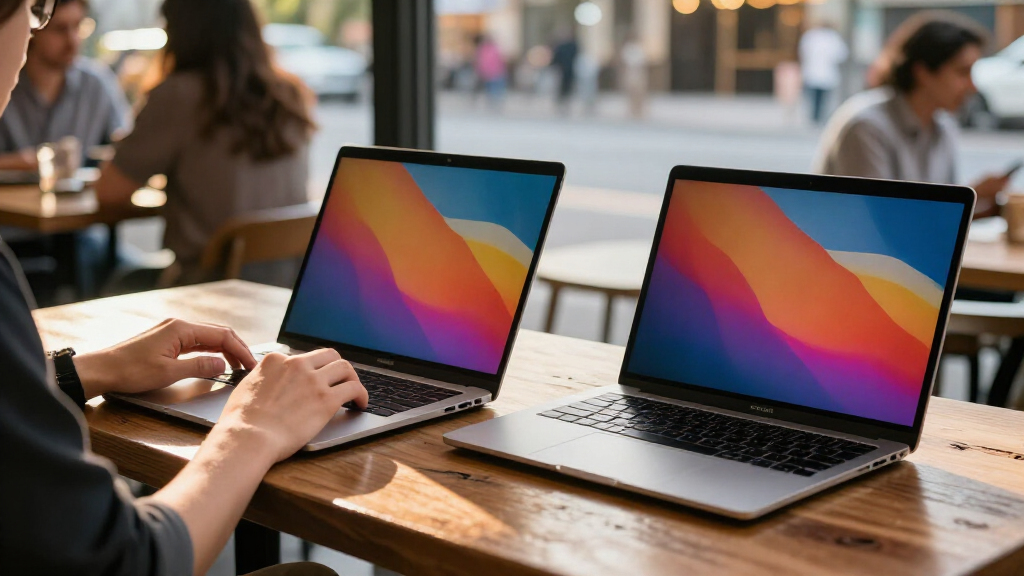

The ASUS Zenbook Duo is my best overall OLED MacBook Pro alternative for buyers who want a premium screen and more room for multitasking. The Lenovo IdeaPad Pro 5 stands out for graphics-heavy work, while the ASUS Zenbook A14 is a lighter choice for everyday portability. These Windows laptops trade macOS and the MacBook Pro’s tightly integrated experience for OLED displays, flexible designs, touchscreens, or different hardware mixes. The right pick depends on whether you value sustained creative performance, low carry weight, pen input, or extra screen space most. Read on for the full breakdown and the tradeoffs behind each recommendation.

Get the latest gadgets delivered free with Prime
- Fast, free delivery on millions of items
- Prime Video, Amazon Music and more included
- Member-only deals all year
Complete the kit



Key Takeaways
- The ASUS Zenbook Duo leads for multitasking because its two OLED displays offer a different kind of workspace than a conventional MacBook-style laptop.
- The Lenovo IdeaPad Pro 5 is the graphics-focused pick in this lineup, with discrete NVIDIA graphics that make it a stronger candidate for GPU-accelerated work than the lightweight models.
- Portability and screen quality do not always come together in the same way: the Zenbook A14 prioritizes a light 14-inch design, while 16-inch models give more room for work but take up more space.
- Convertible designs suit hands-on work, but the Surface Pro, Samsung Galaxy Book5 Pro 360, ASUS Vivobook Flip, and HP OmniBook X Flip bring different keyboard, pen, and laptop-versus-tablet compromises.
- OLED is only one part of the decision: resolution, refresh rate, memory, graphics, battery needs, and software compatibility distinguish these alternatives as much as their display technology.



| OLED MacBook Pro alternatife | Processor | Memory | Display | Graphics |
|---|---|---|---|---|
| GEEKOM GeekBook X14 Pro Laptop | Intel Core Ultra 5 125U, 12 cores, up to 4.3 GHz | Not specified | 14-inch 2.8K OLED, 120Hz, 100% DCI-P3 | Intel Arc with XeSS, ray tracing, and AV1 encoding |
| Microsoft Surface Pro 2-in-1 L | 12-core Qualcomm Snapdragon X Elite | 16GB | 13-inch OLED touchscreen | — |
| ASUS Zenbook Duo Laptop | Intel Core Ultra 9 285H | 32GB LPDDR5x | — | Intel Arc |
| ASUS Vivobook 16" OLED Touchsc | Intel Core Ultra 7 258V | 32GB LPDDR5X | 16-inch OLED touchscreen, 2880 x 1800, 120Hz | Intel Arc |
| ASUS Zenbook A14 Laptop 14" WU | Qualcomm Snapdragon 8-core X Plus | 16GB DDR5 | 14-inch WUXGA OLED, 1920 x 1200, 600 nits HDR, VESA HDR True Black 600, 100% DCI-P3 | Qualcomm Adreno GPU |
| Lenovo IdeaPad Pro 5 16" OLED | AMD Ryzen AI Series | 16GB LPDDR5x | 16-inch OLED, 2880 x 1800, 120Hz | NVIDIA GeForce RTX 5050 |
| Samsung Galaxy Book5 Pro 360 1 | Intel Core Ultra 7 Series | 8GB | 16-inch AMOLED, 3K, 120Hz | Intel Arc 140V GPU with 8GB VRAM |
| Acer Swift 16 AI Laptop | Intel 6-core Ultra 5 322, up to 4.4GHz | 16GB DDR SDRAM | 16-inch OLED touchscreen, 1920 x 1200 | Integrated Intel Graphics |
| Acer Swift Go 16 AI Copilot+ L | Intel Core Ultra 7 355 | 32GB DDR5 | 16-inch WUXGA OLED touchscreen | Intel integrated graphics with 2 Xe cores |
| Asus Zenbook 14X OLED Business | 13th Gen Intel Core i7-13700H, 14-core | 16GB DDR SDRAM | 14.5-inch OLED touchscreen, 2880 x 1800, 120Hz | Intel Iris Xe |
| Samsung Galaxy Book3 Pro 16-In | Intel Core i7-1360P | 16GB RAM | 16-inch 3K AMOLED, 2880 x 1800, 120Hz | Integrated Intel Graphics |
| HP OmniBook X Flip 2-in-1 Lapt | AMD Ryzen AI 5 430 | 16GB LPDDR5X | 16-inch OLED touchscreen, 1920 x 1200 | AMD Radeon 840M |
More Details on Our Top Picks
GEEKOM GeekBook X14 Pro Laptop, 14-inch 2.8K OLED, Ultra Thin & Light
The GeekBook X14 Pro is the clearest fit here for buyers who want an OLED screen without carrying a larger workstation-style laptop. At 2.2 pounds, it is lighter than the 3.64-pound ASUS Zenbook Duo and the 3.92-pound ASUS Vivobook 16 Flip, while its 14-inch, 120Hz display offers a sharper 2.8K canvas for editing and everyday work. Its Core Ultra 5 is a more modest performance choice than the Duo’s Core Ultra 9, so I would favor the GEEKOM for travel and routine creative tasks rather than demanding graphics workloads. The listed 72Wh battery is paired with an up-to-16-hour claim, though actual runtime will depend on use. USB4 and HDMI 2.1 also make connecting displays straightforward. The tradeoff is limited detail about keyboard quality and sustained performance.
Pros:- Very light 2.2-pound magnesium-alloy chassis
- 14-inch 2.8K OLED display with 120Hz refresh and 100% DCI-P3 coverage
- USB4, HDMI 2.1, and USB-A provide flexible display and accessory connections
- 72Wh battery with a stated runtime of up to 16 hours
Cons:- Core Ultra 5 and integrated Intel Arc graphics are less suited to demanding graphics work than a dedicated GPU
- Keyboard quality and detailed build testing are not specified
- Claimed battery runtime can vary with workload and display settings
Best for: Frequent travelers and mobile creators who prioritize a very light 14-inch OLED laptop, useful ports, and a high-refresh display.
Not ideal for: Buyers doing intensive 3D work or gaming who need a dedicated GPU, or shoppers who want verified keyboard and build-quality details before choosing.
- Display:14-inch 2.8K OLED, 120Hz, 100% DCI-P3
- Processor:Intel Core Ultra 5 125U, 12 cores, up to 4.3 GHz
- Graphics:Intel Arc with XeSS, ray tracing, and AV1 encoding
- Memory:Not specified
- Battery:72Wh; up to 16 hours stated
- Weight and thickness:2.2 lbs; 0.23 inches
- Ports:2x USB4 with Power Delivery and DisplayPort 2.1, HDMI 2.1, USB 3.2 Type-A, 3.5mm audio
- Charging:65W GaN charger; stated 80% charge in 1 hour
Our verdict“Choose the GeekBook X14 Pro if keeping weight low matters more than the higher performance and multitasking headroom of the Zenbook Duo.”
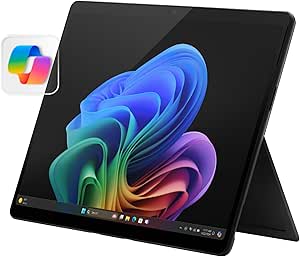
Microsoft Surface Pro 2-in-1 Laptop/Tablet (2024), Windows 11 Copilot+ PC, 13″ Touchscreen OLED Display, Snapdragon X Elite, 16GB RAM, 256GB Storage, Black
The Surface Pro is the most tablet-like choice in this group: its 13-inch OLED touchscreen, kickstand, and detachable-keyboard format suit people who switch between typing, reading, and touch-based work. Compared with the conventional clamshell GEEKOM GeekBook X14 Pro, it offers more flexible positioning and a smaller screen footprint, but the keyboard is a separate part of the setup rather than a fixed laptop deck. The 12-core Snapdragon X Elite and 16GB of RAM are positioned for responsive productivity and creative tasks; its 256GB storage is much tighter than the 1TB in the ASUS Zenbook Duo or Vivobook 16 Flip. I would pick it for portability and convertible use, not for maximum screen area or built-in storage. Battery life is listed at 14 hours, while some features may depend on updates or model availability.
Pros:- Detachable keyboard and kickstand support tablet, presentation, and laptop-style use
- 13-inch OLED touchscreen in a compact form
- 12-core Snapdragon X Elite and 16GB RAM for multitasking
- Stated battery life of up to 14 hours
Cons:- 256GB storage is substantially less than the 1TB offered by the Zenbook Duo and Vivobook 16 Flip
- Detachable keyboard makes the typing setup less integrated than a standard laptop
- Some advertised features may depend on updates, accessories, or specific configurations
Best for: Students, consultants, and mobile note-takers who want an OLED Windows device that can work as a tablet and a laptop with a detachable keyboard.
Not ideal for: Buyers who want a larger built-in workspace, substantial local storage, or a conventional laptop design with an always-attached keyboard.
- Display:13-inch OLED touchscreen
- Processor:12-core Qualcomm Snapdragon X Elite
- Memory:16GB
- Storage:256GB
- Battery life:Up to 14 hours stated
- Operating system:Windows 11 Copilot+ PC
- Color:Black
Our verdict“Pick the Surface Pro if tablet flexibility matters more than built-in storage and the larger work surface of a traditional OLED laptop.”
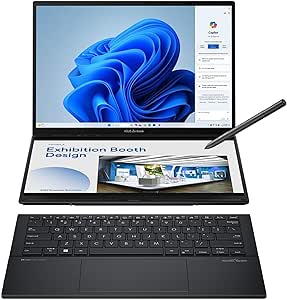
ASUS Zenbook Duo Laptop, 14″ OLED Touch Display, Intel Core Ultra 9, 32GB RAM, 1TB SSD, Windows 11
The ASUS Zenbook Duo makes the strongest case for replacing a single laptop display with more working space: its two 14-inch OLED touchscreens can keep reference material, messages, or creative controls visible alongside a main task. That setup is more adaptable for multitasking than the single-screen GEEKOM GeekBook X14 Pro or ASUS Vivobook 16 Flip, and the Core Ultra 9, 32GB RAM, and 1TB SSD give it the most generous listed memory and storage in this batch. The cost of that flexibility is physical complexity: at 3.64 pounds, it is heavier than the GEEKOM, and using both screens can draw more battery. A detachable keyboard, kickstand, and included pen support different work modes, but buyers seeking a simple, light travel laptop may prefer the Surface Pro or GEEKOM. It is a specialized productivity pick, not the most straightforward one.
Pros:- Two 14-inch 2880 x 1800 OLED touchscreens support flexible multitasking
- Core Ultra 9 processor with 32GB RAM and 1TB SSD
- Detachable keyboard, built-in kickstand, and included ASUS Pen 2.0
- Thunderbolt 4, HDMI 2.1, and Wi-Fi 7 connectivity
Cons:- At 3.64 pounds, it is much heavier than the 2.2-pound GEEKOM GeekBook X14 Pro
- Dual-screen use can reduce battery runtime from the stated maximum
- Compact design limits upgrade options
Best for: Multitaskers, researchers, and creative professionals who regularly keep several apps or references visible and can make use of two touchscreens.
Not ideal for: Travelers prioritizing the lightest carry, buyers who prefer a simple single-screen laptop, or users who need predictable battery life during extended dual-screen sessions.
- Displays:Two 14-inch OLED touchscreens, 2880 x 1800, 120Hz, 500 nits
- Processor:Intel Core Ultra 9 285H
- Graphics:Intel Arc
- Memory:32GB LPDDR5x
- Storage:1TB SSD
- Battery:75Wh; up to 16 hours stated
- Weight:3.64 lbs
- Connectivity:Wi-Fi 7, Bluetooth 5.4, Thunderbolt 4, HDMI 2.1, USB 3.2
- Included accessories:ASUS Sleeve, ASUS Pen 2.0, 65W USB-C charger
Our verdict“Choose the Zenbook Duo if a second OLED workspace will improve your daily workflow enough to justify extra weight and a more involved setup.”
ASUS Vivobook 16″ OLED Touchscreen Flip Laptop – Intel EVO Core Ultra 7 258V, 32GB RAM, 1TB SSD, Wi-Fi 7, Windows 11 Pro
The Vivobook 16 OLED Flip is the pick for buyers who want a big canvas and a hinge that can turn the laptop into a touchscreen presentation or viewing device. Its 16-inch, 120Hz OLED panel provides more room than the 14-inch displays on the Zenbook Duo and GEEKOM GeekBook X14 Pro, while 32GB RAM and a 1TB SSD give it ample listed capacity for demanding multitasking. Unlike the Duo, it keeps to one display, which makes the workflow simpler; unlike the Surface Pro, its keyboard remains attached through the 360-degree hinge. That convenience comes with a portability penalty: at 3.92 pounds, it is the heaviest option in this batch. The 75Wh battery is specified, but no runtime estimate is provided, so I would not choose it based on an all-day battery promise. Thunderbolt 4, HDMI 2.1, and a microSD reader add useful ways to connect and transfer files.
Pros:- Large 16-inch 2880 x 1800 OLED touchscreen with 120Hz refresh
- 32GB LPDDR5X RAM and 1TB PCIe Gen 4 SSD
- 360-degree hinge supports laptop, tent, and tablet-style modes
- Thunderbolt 4, HDMI 2.1, USB-A, and microSD card reader
Cons:- At 3.92 pounds, it is heavier than every other product in this batch
- Battery capacity is listed, but no runtime estimate is provided
- Single display offers less simultaneous workspace than the dual-screen Zenbook Duo
Best for: Professionals and students who want a spacious OLED touchscreen for split-screen work, media, and occasional tablet-style use without a detachable keyboard.
Not ideal for: Frequent travelers who prioritize low carry weight, or buyers who need a stated battery runtime to plan long unplugged workdays.
- Display:16-inch OLED touchscreen, 2880 x 1800, 120Hz
- Processor:Intel Core Ultra 7 258V
- Graphics:Intel Arc
- Memory:32GB LPDDR5X
- Storage:1TB PCIe Gen 4 SSD
- Battery:75Wh
- Weight:3.92 lbs
- Operating system:Windows 11 Pro
- Ports:USB 3.2 Gen 1 Type-A, USB 3.2 Gen 2 Type-C, Thunderbolt 4, HDMI 2.1, audio jack, microSD reader
Our verdict“Choose the Vivobook 16 Flip if screen size and an attached convertible design matter more than easy carrying or a second display.”
ASUS Zenbook A14 Laptop 14″ WUXGA OLED with Qualcomm Snapdragon 8-core, 16GB RAM, 512GB SSD, Windows 11
The ASUS Zenbook A14 is a sensible fit for buyers who want a portable OLED laptop with more than entry-level storage but do not need the high-end multitasking setup of the Zenbook Duo. At 2.4 pounds, it comes close to the GEEKOM GeekBook X14 Pro for travel, and its 14-inch OLED panel adds HDR support and 100% DCI-P3 color coverage. The tradeoff is resolution: the A14’s WUXGA 1920 x 1200 screen is less detailed than the GEEKOM’s 2.8K display. Its 8-core Snapdragon X Plus, 16GB RAM, and 512GB SSD suit everyday productivity and lighter creative work, but the integrated Adreno GPU is not a match for a laptop with dedicated graphics. Battery capacity is listed at 70Wh, though no runtime estimate is supplied.
Pros:- Light 2.4-pound design suited to commuting and travel
- 14-inch OLED with 100% DCI-P3 coverage and HDR support
- 16GB RAM and 512GB SSD provide a balanced everyday configuration
- Two Thunderbolt 4 ports plus USB-A and HDMI 2.1
Cons:- WUXGA resolution is lower than the GEEKOM GeekBook X14 Pro’s 2.8K panel
- Integrated Adreno graphics are not suited to demanding gaming or GPU-heavy creative work
- Battery runtime is not stated despite the 70Wh capacity
Best for: Mobile professionals and students who want a lightweight 14-inch OLED laptop for office work, streaming, and moderate photo or design tasks.
Not ideal for: Buyers who need a high-resolution screen for detailed visual work, a dedicated GPU for intensive graphics, or a stated battery-life estimate.
- Display:14-inch WUXGA OLED, 1920 x 1200, 600 nits HDR, VESA HDR True Black 600, 100% DCI-P3
- Processor:Qualcomm Snapdragon 8-core X Plus
- Graphics:Qualcomm Adreno GPU
- Memory:16GB DDR5
- Storage:512GB SSD
- Battery:70Wh
- Weight:2.4 lbs
- Operating system:Windows 11 Home
- Ports:2x Thunderbolt 4, USB-A 3.2, HDMI 2.1
Our verdict“Choose the Zenbook A14 for a light OLED travel laptop with balanced everyday specs, but pick the GEEKOM if sharper display resolution is a priority.”
Lenovo IdeaPad Pro 5 16″ OLED Laptop with Ryzen AI and NVIDIA GeForce RTX 5050
For buyers who want a MacBook Pro alternative with more graphics headroom, the IdeaPad Pro 5 pairs a 120Hz OLED screen with an RTX 5050. That dedicated GPU makes it better suited than the Acer Swift Go 16 AI, which uses integrated graphics, for GPU-assisted creative apps and demanding visual workloads. Its 16-inch, 2.8K display also gives editors room to work while keeping the high-contrast OLED look central to the experience. Lenovo adds useful ports, including HDMI and an SD card reader, plus a webcam shutter and stated MIL-STD-810H durability. The tradeoff is portability: its performance-focused hardware makes it heavier than the three-pound Acer laptops here, and the supplied information does not specify battery life. I’d choose it for graphics capability, not all-day unplugged travel.
Pros:- 16-inch 2.8K OLED display with a 120Hz refresh rate
- Dedicated NVIDIA GeForce RTX 5050 for graphics workloads
- USB-C, USB-A, HDMI, and SD card reader provide flexible connections
- Webcam privacy shutter and stated MIL-STD-810H durability
Cons:- Heavier than the three-pound Acer Swift 16 AI and Swift Go 16 AI
- Battery life is not specified in the supplied product information
- 16GB memory may constrain some demanding professional workflows
Best for: Creators who need a large OLED screen, a dedicated NVIDIA GPU, and built-in ports for a desk-to-studio workflow.
Not ideal for: Frequent travelers prioritizing low weight or buyers who need confirmed battery-life figures before choosing.
- Display:16-inch OLED, 2880 x 1800, 120Hz
- Processor:AMD Ryzen AI Series
- Graphics:NVIDIA GeForce RTX 5050
- Memory:16GB LPDDR5x
- Storage:1TB NVMe SSD
- Operating system:Windows 11 Home
- Video output:HDMI, DisplayPort
Our verdict“Choose the IdeaPad Pro 5 if dedicated graphics and a large high-refresh OLED matter more than minimum carry weight.”
Samsung Galaxy Book5 Pro 360 16” Laptop with S Pen, Intel Core Ultra Processor, 3K AMOLED Touchscreen, 120Hz, Dolby Atmos, Lightweight, All-Day Battery
The Galaxy Book5 Pro 360 earns its place by adding a flexible hinge and included S Pen to a 16-inch, 3K, 120Hz AMOLED screen. That makes it a stronger fit than the Lenovo IdeaPad Pro 5 for handwritten notes, sketching, and presentations where tablet mode is useful; Lenovo is the more compelling choice for dedicated graphics, while this Samsung uses Intel Arc 140V graphics. Two Thunderbolt 4 ports, HDMI, USB-A, and microSD offer a broad connection mix, and the listing states up to 25 hours of battery life. There is a significant specification caveat: the supplied data lists just 8GB of RAM, which can limit heavier creative multitasking despite the Core Ultra 7 processor. Choose it for pen-based versatility, not maximum memory capacity.
Pros:- Included S Pen supports handwriting and direct drawing
- 16-inch 3K AMOLED touchscreen with a 120Hz refresh rate
- Convertible 2-in-1 design adds tablet and presentation modes
- Thunderbolt 4, HDMI, USB-A, and microSD provide varied connectivity
Cons:- Listed 8GB RAM is limited for intensive multitasking and creative work
- Intel Arc 140V is less suited to GPU-heavy workloads than the IdeaPad Pro 5’s RTX 5050
- Listed battery life is an estimate and varies with use and settings
Best for: Students and mobile creators who want a large touchscreen laptop for pen notes, drawing, and convertible tablet use.
Not ideal for: Buyers who regularly keep many demanding apps open or need more than the listed 8GB of memory.
- Display:16-inch AMOLED, 3K, 120Hz
- Processor:Intel Core Ultra 7 Series
- Graphics:Intel Arc 140V GPU with 8GB VRAM
- Memory:8GB
- Storage:1TB SSD
- Battery life:Up to 25 hours
- Weight:3.7 pounds
- Ports:HDMI, USB-A, two Thunderbolt 4, headphone jack, microSD slot
Our verdict“Pick the Galaxy Book5 Pro 360 if pen input and convertible flexibility outweigh its listed memory limitation.”
Acer Swift 16 AI Laptop, 16″ 2K OLED Touchscreen, Intel 6-core Ultra 5 322, 16GB RAM, 1TB SSD, Windows 11 Pro, Thunderbolt, Backlit Keyboard, Silver
The Swift 16 AI makes the strongest case for buyers who want a roomy OLED laptop that remains easy to carry: it weighs 3 pounds and is 0.62 inches thick. Its 16-inch touchscreen is listed at 1920 x 1200, a lower resolution than the Lenovo IdeaPad Pro 5’s 2.8K panel, but the lighter chassis and Windows 11 Pro give this Acer a different appeal for work and travel. Thunderbolt 4, HDMI, USB-A, and Wi-Fi 7 cover common desk and network needs. The tradeoff is graphics: integrated Intel Graphics suit everyday productivity and lighter creative tasks, not the GPU-intensive work the Lenovo is better equipped to handle. Battery life is not specified, so the slim build alone does not establish how long it can stay away from an outlet.
Pros:- Three-pound, 0.62-inch-thick design is easy to carry for a 16-inch laptop
- OLED touchscreen with stated 100% DCI-P3 color coverage
- Windows 11 Pro is included
- Thunderbolt 4, HDMI, USB-A, and Wi-Fi 7
Cons:- 1920 x 1200 resolution is lower than the Lenovo IdeaPad Pro 5’s 2.8K display
- Integrated graphics are not suited to demanding GPU workloads
- Battery life is not specified in the supplied product information
Best for: Business users and students who want a lightweight 16-inch OLED touchscreen, Windows 11 Pro, and practical travel connectivity.
Not ideal for: People doing heavy 3D rendering, graphics-intensive gaming, or work that benefits from a dedicated GPU or higher-resolution panel.
- Display:16-inch OLED touchscreen, 1920 x 1200
- Processor:Intel 6-core Ultra 5 322, up to 4.4GHz
- Memory:16GB DDR SDRAM
- Storage:1TB SSD
- Graphics:Integrated Intel Graphics
- Battery:71Wh
- Weight:3 pounds
- Operating system:Windows 11 Pro
- Connectivity:Thunderbolt 4, USB-A 3.2, HDMI, Wi-Fi 7
Our verdict“Choose the Swift 16 AI for a light, Windows Pro OLED work laptop, but look to the Lenovo for dedicated graphics and sharper resolution.”
Acer Swift Go 16 AI Copilot+ Laptop, 16” WUXGA OLED Touchscreen, 32 GB RAM
With 32GB of RAM in a three-pound chassis, the Swift Go 16 AI is the more persuasive Acer for people who keep many browser tabs, office apps, and creative tools open together. It doubles the listed memory of the Acer Swift 16 AI while retaining a 16-inch OLED touchscreen and a stated battery estimate of up to 23 hours. Wi-Fi 7, Thunderbolt 4, HDMI, and a 5MP IR webcam with privacy shutter make it well equipped for mobile work. Its WUXGA screen is designed around a 1920-by-1200 class of resolution, rather than the 2.8K detail offered by the Lenovo IdeaPad Pro 5. Integrated graphics also rule it out as the better pick for demanding GPU tasks. This is a RAM-and-portability choice, not a graphics workstation.
Pros:- 32GB DDR5 memory supports heavier multitasking than the Swift 16 AI’s 16GB
- Three-pound, 0.62-inch-thick design
- Listed battery life of up to 23 hours
- Wi-Fi 7, Thunderbolt 4, HDMI, and 5MP IR webcam with privacy shutter
Cons:- Integrated graphics are not intended for demanding GPU-heavy work
- WUXGA resolution offers less detail than the Lenovo IdeaPad Pro 5’s 2.8K OLED
- Runs Windows 11 Home rather than the Windows 11 Pro included with the Swift 16 AI
Best for: Traveling professionals and students who run many applications at once and want a lightweight OLED touchscreen with substantial memory.
Not ideal for: Video editors, 3D artists, or gamers who need dedicated graphics or a higher-resolution display for detailed visual work.
- Display:16-inch WUXGA OLED touchscreen
- Processor:Intel Core Ultra 7 355
- Memory:32GB DDR5
- Storage:1TB SSD
- Battery life:Up to 23 hours
- Weight:3 pounds
- Graphics:Intel integrated graphics with 2 Xe cores
- Operating system:Windows 11 Home
- Ports:Four USB ports, HDMI, Thunderbolt 4, 3.5mm audio
Our verdict“Choose the Swift Go 16 AI for portable multitasking and 32GB memory, not for dedicated-GPU creative workloads.”
Asus Zenbook 14X OLED Business Laptop, 14.5-inch 2.8K Touchscreen, 13th Gen Intel i7, 16GB RAM, 512GB SSD, Backlit Keyboard, Thunderbolt, Windows 11
The Zenbook 14X is the compact choice in this group: its 14.5-inch 2.8K OLED touchscreen offers 120Hz refresh, stated 550-nit brightness, and 100% DCI-P3 coverage, while the listed weight is 3.44 pounds. Compared with the 16-inch Acer Swift Go 16 AI, it gives up screen area and half the listed memory, but its higher resolution is a better fit for buyers who value a denser image in a smaller laptop. The 13th Gen Core i7-13700H and 16GB RAM suit general productivity and demanding day-to-day multitasking; Intel Iris Xe is not a substitute for the dedicated RTX 5050 in the Lenovo. Battery life is listed at up to 10 hours, and the glossy panel may be harder to use in bright, reflective spaces.
Pros:- 14.5-inch 2.8K OLED touchscreen with a 120Hz refresh rate
- Stated 550-nit brightness and 100% DCI-P3 color gamut
- 13th Gen Intel Core i7-13700H with 14 cores
- Two Thunderbolt 4 ports plus USB-A and HDMI 2.1
Cons:- 512GB SSD is smaller than the 1TB drives in the Acer and Lenovo options
- Listed battery life is up to 10 hours, below the Swift Go 16 AI’s stated estimate
- Glossy display can reflect surrounding light, and Intel Iris Xe is not dedicated graphics
Best for: Mobile professionals who prefer a compact, high-resolution OLED touchscreen for office work, presentations, and media.
Not ideal for: Buyers needing a large workspace, long listed battery runtime, 32GB RAM, or dedicated graphics for GPU-intensive work.
- Display:14.5-inch OLED touchscreen, 2880 x 1800, 120Hz
- Brightness:550 nits
- Processor:13th Gen Intel Core i7-13700H, 14-core
- Memory:16GB DDR SDRAM
- Storage:512GB SSD
- Graphics:Intel Iris Xe
- Battery:70Wh, up to 10 hours
- Weight:3.44 pounds
- Ports:Two Thunderbolt 4, USB-A 3.2, HDMI 2.1
Our verdict“Pick the Zenbook 14X if you want a more compact, high-resolution OLED than the 16-inch options and can accept shorter listed battery life.”
Samsung Galaxy Book3 Pro 16-Inch Laptop, Intel Core i7-1360P, 16GB RAM, 1TB SSD, 3K AMOLED Screen, 120Hz, Fingerprint Reader, FHD Webcam, 2023 Model, Graphite
The Galaxy Book3 Pro is the strongest fit here for buyers who want a large, detailed OLED display without giving up a conventional clamshell laptop. Its 16-inch 3K AMOLED panel runs at 120Hz, offering sharper workspace detail and smoother scrolling than the HP OmniBook X Flip’s 1920 x 1200 OLED screen. At 3.4 pounds, it is also lighter than that convertible, though it cannot fold into tablet mode. The Core i7-1360P, 16GB of RAM, and 1TB SSD provide a well-rounded setup for multitasking and everyday professional workloads. Compared with the more specialized ASUS Zenbook Duo, this Samsung keeps to a simpler single-screen design. The tradeoffs are integrated graphics, limited USB-C connectivity in the supplied details, and battery life that is not specified.
Pros:- 16-inch 3K AMOLED display with a 120Hz refresh rate
- 3.4-pound weight is relatively manageable for a 16-inch laptop
- Core i7-1360P, 16GB RAM, and 1TB SSD suit multitasking and daily work
- Thunderbolt 4, HDMI, and microSD provide several connection options
Cons:- Integrated Intel graphics are less suited to graphics-heavy work than a laptop with dedicated graphics
- The listed ports include only one USB-C port, limiting convenient USB-C connections
- Battery life details are not provided, making mobile runtime harder to judge
Best for: Professionals and students who want a portable 16-inch laptop for detailed reading, office work, and media, with a high-refresh OLED display.
Not ideal for: Buyers who need tablet-style flexibility, dedicated graphics for demanding creative work, or confirmed all-day battery performance.
- Display:16-inch 3K AMOLED, 2880 x 1800, 120Hz
- Processor:Intel Core i7-1360P
- Memory:16GB RAM
- Storage:1TB SSD
- Graphics:Integrated Intel Graphics
- Weight:3.4 pounds
- Operating system:Windows 11 Home
- Ports:Thunderbolt 4, USB-C, microSD slot, HDMI
Our verdict“Choose the Galaxy Book3 Pro if a crisp, fast 16-inch AMOLED screen matters more than touchscreen flexibility or dedicated graphics.”
HP OmniBook X Flip 2-in-1 Laptop, 16″ FHD+ OLED Touch Display, AMD Ryzen AI 5 430, 16GB RAM, 3TB Storage (2TB SSD + 1TB Docking Station), Backlit Keyboard, Copilot+ PC, Windows 11 Pro, Meteor Silver
The HP OmniBook X Flip earns its place by combining an OLED touchscreen with a hinge that lets the 16-inch display serve as a tablet or presentation screen. That flexibility sets it apart from the clamshell Samsung Galaxy Book3 Pro, which offers a sharper 3K, 120Hz panel but does not fold back. HP’s 1920 x 1200 OLED display is less detailed on paper, yet touch and convertible modes can be more useful for annotating, sketching, or sharing work. The Ryzen AI 5 430, 16GB of LPDDR5X memory, and Windows 11 Pro suit everyday multitasking, while the included docking station adds storage and connections. The compromise is weight: at 4.09 pounds, it is a sizable tablet to hold. Battery-life details are also absent, and the supplied 3TB figure combines an SSD with docking-station storage.
Pros:- Convertible hinge and OLED touchscreen support laptop and tablet-style use
- 16-inch screen offers a spacious canvas for work and media
- Ryzen AI 5 430 and 16GB LPDDR5X memory are suited to multitasking
- Includes a 7-in-1 docking station with additional storage
Cons:- At 4.09 pounds, it is heavier to carry and use as a tablet than the Galaxy Book3 Pro
- 1920 x 1200 resolution is less detailed than the Samsung’s 3K display
- The advertised 3TB combines a 2TB SSD with 1TB in the docking station, and battery life is unspecified
Best for: Windows users who want a large OLED touchscreen for laptop work, occasional tablet use, and presentations, and who can make use of the included dock.
Not ideal for: Frequent travelers seeking a lightweight 16-inch laptop, or buyers who need a high-resolution panel and clearly specified internal storage only.
- Display:16-inch OLED touchscreen, 1920 x 1200
- Processor:AMD Ryzen AI 5 430
- Memory:16GB LPDDR5X
- Storage:3TB total: 2TB SSD plus 1TB docking station
- Graphics:AMD Radeon 840M
- Weight:4.09 pounds
- Operating system:Windows 11 Pro
- Ports:2 x USB Type-A, 2 x USB Type-C, HDMI, headphone/mic combo
- Connectivity:Wi-Fi 7, Bluetooth
Our verdict“Pick the OmniBook X Flip if touch and convertible modes matter more than a lighter build or a sharper screen.”
How We Picked
I judged these laptops as MacBook Pro alternatives, not just as OLED machines. That meant weighing the display alongside performance class, memory and storage configurations, build and portability, input options, and the kind of workload each design can support. I also looked at whether a feature changes how someone can work: a second screen can help with simultaneous apps, a convertible can suit pen-based tasks, and discrete graphics can matter more for demanding visual software than a touchscreen does.
The ranking favors options that offer a persuasive mix of premium-display appeal, useful performance, and a clear reason to choose them over a conventional laptop. The Zenbook Duo ranks first for its distinctive productivity setup; the IdeaPad Pro 5 follows for graphics-oriented work, while smaller and convertible models rank higher for specific needs than for universal replacement value. Older-generation configurations and products with more limited or specialized designs sit lower because buyers should compare their capabilities and software fit carefully before treating them as direct MacBook Pro substitutes.
| OLED MacBook Pro alternatife | Operating system |
|---|---|
| GEEKOM GeekBook X14 Pro Laptop | — |
| Microsoft Surface Pro 2-in-1 L | Windows 11 Copilot+ PC |
| ASUS Zenbook Duo Laptop | — |
| ASUS Vivobook 16" OLED Touchsc | Windows 11 Pro |
| ASUS Zenbook A14 Laptop 14" WU | Windows 11 Home |
| Lenovo IdeaPad Pro 5 16" OLED | Windows 11 Home |
| Samsung Galaxy Book5 Pro 360 1 | — |
| Acer Swift 16 AI Laptop | Windows 11 Pro |
| Acer Swift Go 16 AI Copilot+ L | Windows 11 Home |
| Asus Zenbook 14X OLED Business | — |
| Samsung Galaxy Book3 Pro 16-In | Windows 11 Home |
| HP OmniBook X Flip 2-in-1 Lapt | Windows 11 Pro |
Factors to Consider When Choosing Best OLED MacBook Pro Alternatives
Choosing an OLED alternative is not simply a matter of matching screen technology. I would start with the jobs the laptop must handle, then check how its design, operating system, and configuration support them. These broader checks can prevent a beautiful display or a tempting form factor from distracting you from the compromises that matter day to day.
Match performance to the work, not the product name
“Pro” branding and an OLED panel do not tell you how well a laptop will handle your particular workload. For photo work, large projects, video exports, or 3D applications, check the processor, memory, graphics hardware, and the software’s system requirements together. A laptop with discrete graphics, like the IdeaPad Pro 5 configuration here, may be a better fit for GPU-heavy tasks than a thin model built around portability. For office work, browsing, and light creative tasks, a lower-power system may feel more suitable and be easier to carry. Check whether your apps have Windows versions with the features and plug-ins you depend on before leaving macOS. Do not pay for graphics capability that your workflow will never use, but do not assume OLED alone makes an everyday laptop a workstation replacement.
Compare screen size, resolution, and refresh rate
OLED describes a display type, not a complete picture of the viewing experience. A 14-inch panel is easier to carry and use in tight spaces, while a 16-inch screen gives documents, timelines, and side-by-side windows more room. Resolution and refresh rate also vary across this lineup, so match them to how you work rather than choosing based on the word OLED alone. Higher resolution can make fine detail easier to inspect, but it does not replace a calibrated workflow for color-critical production. Touch support adds value when you expect to tap, draw, or use a pen; otherwise, it may not justify choosing a heavier convertible. Check the exact configuration because models sold under similar names can have different screen specifications.
Choose the form factor you will actually use
A dual-screen laptop, detachable tablet, and 360-degree convertible can each change how you work, but none is automatically better than a standard clamshell. The Zenbook Duo’s extra display targets people who keep multiple apps visible, while a Surface Pro-style detachable favors tablet use and portability. A 360-degree model can work well for sketching or presenting, yet folding the display back does not make a large laptop feel as compact as a tablet. Think about where the device will sit and whether you can use its stand, keyboard, or pen comfortably. If most work happens at a desk, compare external-monitor support and port selection before paying for unusual screen mechanics. Pick specialized hardware only if you expect to use its defining feature often.
Treat battery life and portability as a system choice
Weight is only one part of carrying a laptop: the charger, accessories, and any detachable keyboard or pen add to the daily load. Processor architecture, display size, workload, and screen brightness can all affect time away from an outlet, so do not infer real-world battery life from a marketing label alone. A compact model such as the Zenbook A14 may suit frequent travel, while a 16-inch laptop makes more sense if screen space matters more than a smaller bag. Check independent battery results for the exact configuration when unplugged work is central to your decision. For long creative sessions, also think about whether performance changes when the laptop runs on battery. A lighter machine is not a win if it forces you to compromise on the work you need it to do.
Check software, ports, and upgrade needs before switching
Moving from a MacBook Pro to Windows can affect more than the operating system interface. Confirm that your essential apps, peripherals, cloud workflows, and file-sharing routines work as expected, especially if your team relies on macOS-specific software. Port selection matters for external displays, storage, cameras, and docks; a thin laptop may require adapters even if its display is excellent. Memory and storage also deserve a close look, since some laptops are less flexible to upgrade after purchase. Do not treat a large storage bundle as a substitute for fast internal storage or a clear backup plan. Compare the exact port, memory, and storage configuration against your current setup before committing.
Frequently Asked Questions
Can any of these laptops replace a MacBook Pro for professional creative work?
Some can, but the best match depends on the software and the kind of creative work involved. The Lenovo IdeaPad Pro 5 is the clearest option here for tasks that can use its discrete NVIDIA graphics, while the Zenbook Duo may help workflows that benefit from keeping multiple windows visible. Neither OLED nor a powerful component list guarantees the same app support or workflow as macOS. Check your exact editing, design, audio, or 3D tools for Windows support, plug-ins, and hardware acceleration. If a project depends on a Mac-only app, a Windows laptop is not a direct substitute without a workable alternative.
Is the ASUS Zenbook Duo a better choice than a regular laptop for multitasking?
It can be, if you regularly keep reference material, chat, or controls visible beside your main workspace. The second screen gives the Zenbook Duo a distinct advantage over single-display models such as the Zenbook A14, but it also makes the setup more specialized. Consider whether you have a comfortable way to use both displays in your usual locations, including on a lap or a small desk. If your routine uses one app at a time, a conventional laptop may be simpler to carry and operate. The extra display is most useful when it changes your daily workflow rather than merely looking distinctive.
Should I choose a convertible OLED laptop or a standard clamshell?
Choose a convertible if you have a specific use for touch, pen input, tablet mode, or presentation angles. The Galaxy Book5 Pro 360, Vivobook Flip, HP OmniBook X Flip, and Surface Pro offer different approaches, so keyboard attachment, screen size, and how you plan to hold or support the device matter. A standard clamshell is often the simpler fit when most work involves typing at a desk. Remember that a fold-back hinge does not remove the weight of a large laptop, and a detachable design can require separate keyboard accessories. Try to identify a recurring task that benefits from the convertible format before making it your main reason to buy.
Are the older OLED models still worth comparing with newer alternatives?
They may be, especially if their configuration matches your needs and you do not require the newest processor generation or platform features. The Galaxy Book3 Pro and Zenbook 14X OLED represent older designs in this group, so compare their processor capabilities, battery expectations, connectivity, and software support against newer options. A prior-generation laptop can still be a sensible work machine, but age can affect how long it remains a strong fit for demanding applications. Check the exact model year and configuration rather than relying on a familiar product name. For a long-term purchase, favor the model whose performance and support outlook fit your planned ownership period.
How much memory and storage should I choose in an OLED MacBook Pro alternative?
Base the choice on the size of your projects and whether you keep many demanding apps open at once. Sixteen gigabytes can suit general productivity and lighter creative work, while the Zenbook Duo and Vivobook Flip configurations with 32GB provide more headroom for heavier multitasking. Storage needs depend on local media libraries, project files, and whether you can work comfortably from external drives or cloud storage. Do not mistake a bundled docking station or accessory storage for the laptop’s internal SSD capacity. Check upgrade options before buying, since a configuration that cannot be expanded may need more memory or storage at the outset.
Conclusion
For the strongest all-around alternative, I would start with the ASUS Zenbook Duo: its dual-screen design gives it the clearest productivity distinction in this group. For a value-focused everyday choice, compare the GEEKOM GeekBook X14 Pro and Acer Swift Go 16 AI against your required screen size and configuration rather than choosing by OLED alone. The best premium fit for graphics-heavy work is the Lenovo IdeaPad Pro 5 with discrete graphics, while the ASUS Zenbook A14 is a compelling direction for buyers who put portability first. Beginners who want a familiar, flexible laptop with a large touch display may prefer the ASUS Vivobook Flip or Acer Swift 16 AI, depending on whether convertible use matters. Choose the Surface Pro or a Galaxy Book 360 if tablet and pen use are central, and select the HP OmniBook X Flip if its large convertible format and stated storage setup suit your routine. Before deciding, verify the exact configuration, Windows app compatibility, and the hardware you need to replace in your MacBook Pro workflow.
Fall Picks
fall essentials
As an affiliate, we earn on qualifying purchases.