The best Netgear networking products depend on whether you need stronger Wi-Fi, wider coverage, or more wired connections. I’d put the Orbi 770 Series WiFi 7 Mesh System forward for homes that need broad, high-performance coverage, while the GS308 is a straightforward pick for adding wired ports and the GS308EP suits networks with PoE devices. The lineup ranges from simple unmanaged switches to managed business hardware, so more features can mean more setup and complexity. Router and mesh choices also differ in coverage approach, Wi-Fi generation, and expandability. Read on for how I separate these options and match them to different network needs.

Get the latest gadgets delivered free with Prime
- Fast, free delivery on millions of items
- Prime Video, Amazon Music and more included
- Member-only deals all year
Complete the kit



Key Takeaways
- Wi-Fi needs determine the leading pick: the Orbi 770 is the premium mesh choice for broad coverage, while the Nighthawk RS90 is a standalone Wi-Fi 7 router for buyers who do not need a multi-unit system.
- Mesh coverage and router simplicity solve different problems: the Orbi 370 and Orbi 770 are better suited to spreading coverage across multiple areas; the R6700AX, RAX36, and RS90 keep the network centered on one router.
- For basic wired expansion, the GS308 and GS108 are simpler than managed models: they add Gigabit Ethernet ports without requiring VLAN or traffic-management setup.
- PoE capability changes the switch decision: the GS308EP targets smaller networks with powered devices, while the GS752TPP is built for a much larger installation with many wired endpoints.
- Multi-gig is a targeted upgrade, not a general speed fix: the GS108MX can connect a compatible high-speed device, but it will not speed up Gigabit-only clients or an internet plan that lacks faster service.
| NETGEAR GS105Ev2 5-Port Gigabit Easy Smart Managed Switch |  | Best Compact Managed Switch | Ports: 5 Gigabit Ethernet ports | Data transfer rate: 1000 Mbps | Interface: RJ45 | VIEW LATEST PRICE | See Our Full Breakdown |
| NETGEAR GS308 8-Port Gigabit Ethernet Unmanaged Network Switch | 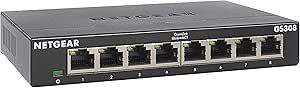 | Best for Simple Wired Expansion | Ports: 8 Gigabit Ethernet ports | Data transfer rate: 1 Gbps | Interface: RJ45 | VIEW LATEST PRICE | See Our Full Breakdown |
| NETGEAR GS308EP 8-Port Gigabit Ethernet PoE+ Smart Managed Switch |  | Best for PoE Devices | Ports: 8 Gigabit Ethernet ports | PoE: 8 PoE+ ports | Total PoE power budget: 62 W | VIEW LATEST PRICE | See Our Full Breakdown |
| NETGEAR GS305E 5-Port Gigabit Easy Smart Managed Ethernet Switch |  | Best for a Compact Managed Home Network | Ports: 5 Gigabit Ethernet ports | Data transfer rate: 1000 Mbps | Interface: RJ45 | VIEW LATEST PRICE | See Our Full Breakdown |
| NETGEAR Nighthawk R6700AX WiFi 6 Router |  | Best Standalone WiFi 6 Router | WiFi generation: WiFi 6 (802.11ax) | Frequency bands: Dual-band, 2.4 GHz and 5 GHz | Maximum WiFi speed: Up to 1.8 Gbps | VIEW LATEST PRICE | See Our Full Breakdown |
| NETGEAR Orbi 370 Series WiFi 7 Mesh System, 3-Pack, Up to 6,000 sq. ft. |  | Best Value WiFi 7 Mesh | WiFi generation: WiFi 7 (802.11be) | Frequency band: Dual-band | Maximum data transfer rate: Up to 5 Gbps | VIEW LATEST PRICE | See Our Full Breakdown |
| NETGEAR Nighthawk AX3000 WiFi 6 Router (RAX36) |  | Best Standalone WiFi 6 Router | Wi-Fi generation: Wi-Fi 6 (802.11ax) | Speed: Up to 3 Gbps (AX3000) | Frequency band: Dual-band | VIEW LATEST PRICE | See Our Full Breakdown |
| NETGEAR GS108MX 8-Port Gigabit Unmanaged Ethernet Switch with 10G/Multi-Gig Port |  | Best for a Mixed-Speed Wired Network | Model: GS108MX-100NAS | Ports: 8 × 1 Gbps Ethernet; 1 × 10G/Multi-Gig Ethernet | Switch type: Unmanaged | VIEW LATEST PRICE | See Our Full Breakdown |
| NETGEAR Orbi 770 Series WiFi 7 Tri-Band Mesh System, 3-Pack |  | Best Premium Mesh System | System components: Router and two satellites | WiFi generation: WiFi 7 (802.11be) | Frequency band: Tri-band | VIEW LATEST PRICE | See Our Full Breakdown |
| NETGEAR GS752TPP 52-Port Gigabit Ethernet Smart Managed PoE+ Switch |  | Best for High-Port PoE Deployments | Total ports: 52 | Gigabit Ethernet ports: 48 | PoE+ ports: 48 | VIEW LATEST PRICE | See Our Full Breakdown |
| NETGEAR Nighthawk RS90 Dual-Band WiFi 7 Router |  | Best Standalone WiFi 7 Router | WiFi generation: WiFi 7 | Frequency bands: Dual-band, 2.4 GHz and 5 GHz | Maximum data rate: Up to 3.6 Gbps | VIEW LATEST PRICE | See Our Full Breakdown |
| NETGEAR GS108 8-Port Gigabit Ethernet Unmanaged Switch |  | Best Simple 8-Port Switch | Ports: 8 x Gigabit Ethernet RJ45 | Data transfer rate: 1 Gbps | Switch type: Unmanaged, Layer 1 | VIEW LATEST PRICE | See Our Full Breakdown |
| Netgear networking product | Mounting | Ports |
|---|---|---|
| NETGEAR GS105Ev2 5-Port Gigabi | Desktop or wall mount | 5 Gigabit Ethernet ports |
| NETGEAR GS308 8-Port Gigabit E | Desktop or wall mount | 8 Gigabit Ethernet ports |
| NETGEAR GS308EP 8-Port Gigabit | Desktop or wall mount | 8 Gigabit Ethernet ports |
| NETGEAR GS305E 5-Port Gigabit | Desktop or wall mount | 5 Gigabit Ethernet ports |
| NETGEAR Nighthawk R6700AX WiFi | — | — |
| NETGEAR Orbi 370 Series WiFi 7 | — | — |
| NETGEAR Nighthawk AX3000 WiFi | — | — |
| NETGEAR GS108MX 8-Port Gigabit | Desktop or wall mount | 8 × 1 Gbps Ethernet; 1 × 10G/Multi-Gig Ethernet |
| NETGEAR Orbi 770 Series WiFi 7 | — | — |
| NETGEAR GS752TPP 52-Port Gigab | Desktop or rack mount | — |
| NETGEAR Nighthawk RS90 Dual-Ba | — | — |
| NETGEAR GS108 8-Port Gigabit E | Desktop or wall mount | 8 x Gigabit Ethernet RJ45 |
More Details on Our Top Picks
NETGEAR GS105Ev2 5-Port Gigabit Easy Smart Managed Switch
The GS105Ev2 suits buyers who need a few wired connections and want more control than a basic switch provides. Its five Gigabit ports cover a small desk, media setup, or home lab, while VLAN configuration, traffic prioritization, and port monitoring help organize traffic beyond simple plug-and-play switching. Compared with the GS308, it has three fewer ports, but adds management tools the unmanaged model lacks. The GS305E offers a similar five-port managed setup and lists IGMP snooping; this GS105Ev2 instead calls out security management. Its fanless metal enclosure runs quietly and can sit on a desk or mount on a wall. The tradeoffs are limited port capacity and regional compatibility restricted to the U.S. and Canada.
Pros:- Five Gigabit RJ45 ports with auto-negotiation
- Management tools include VLANs, traffic prioritization, and port monitoring
- Fanless metal design supports quiet operation
- Desktop or wall mounting and energy-efficient operation
Cons:- Only five ports, fewer than the eight-port GS308 and GS308EP
- No PoE support is specified
- Regional compatibility is limited to the U.S. and Canada
Best for: Home-office users or hobbyists who need up to five wired connections plus VLAN, prioritization, or monitoring controls.
Not ideal for: Buyers needing PoE, more than five connections, or a switch intended for use outside the U.S. and Canada.
- Ports:5 Gigabit Ethernet ports
- Data transfer rate:1000 Mbps
- Interface:RJ45
- Management:Easy Smart managed; VLAN, traffic prioritization, port monitoring, and security features
- Mounting:Desktop or wall mount
- Cooling:Fanless
- Dimensions:3.7 × 3.9 × 1.06 in
- Regional compatibility:United States and Canada
Our verdict“Choose the GS105Ev2 for a quiet, compact five-port setup where management controls matter more than extra connections or PoE.”
NETGEAR GS308 8-Port Gigabit Ethernet Unmanaged Network Switch
The GS308 is the straightforward choice when the main need is adding wired connections, not managing network traffic. Its eight Gigabit ports give a home or small office room to connect computers, printers, televisions, and other Ethernet devices, while plug-and-play setup avoids configuration work. That simplicity is its main advantage over the GS308EP, which adds PoE+ and smart management but is better suited to users who need those controls. The GS308 also provides more ports than the five-port GS105Ev2, though it does not offer that model’s VLAN or monitoring tools. A fanless metal case keeps operation silent and supports desk or wall placement. Skip it if you need PoE, traffic controls, or compatibility beyond the U.S. and Canada.
Pros:- Eight Gigabit Ethernet ports for expanding a wired network
- Plug-and-play setup requires no software or configuration
- Fanless metal case operates silently
- Supports desktop or wall mounting
Cons:- Unmanaged design lacks VLAN, QoS, and port-monitoring controls
- No PoE support is specified
- Regional compatibility is limited to the U.S. and Canada
Best for: Households and small offices that need to connect several wired devices without configuring a managed switch.
Not ideal for: Installers powering cameras or access points, or network users who need VLANs, QoS, or port monitoring.
- Ports:8 Gigabit Ethernet ports
- Data transfer rate:1 Gbps
- Interface:RJ45
- Management:Unmanaged, plug-and-play
- Case material:Metal
- Cooling:Fanless
- Mounting:Desktop or wall mount
- Warranty:3-year limited hardware warranty
- Regional compatibility:U.S. and Canada
Our verdict“Pick the GS308 for quiet, no-configuration expansion when eight wired ports matter more than management or PoE.”
NETGEAR GS308EP 8-Port Gigabit Ethernet PoE+ Smart Managed Switch
The GS308EP is the most purpose-built switch here for wiring devices that need both network access and power. It has eight PoE+ ports and a 62 W total budget, so compatible cameras, VoIP phones, and access points can connect without separate power adapters at each device. Smart management adds VLANs, QoS, port monitoring, and per-port PoE controls—capabilities the unmanaged GS308 does not provide. That extra utility comes with a firm limit: the 62 W budget is shared across all ports, so buyers should check the combined power needs of their devices. It is also a larger, heavier option than the compact five-port GS305E. The listed plastic case may be less appealing than metal alternatives, though the fanless design keeps it quiet.
Pros:- Eight PoE+ ports can power compatible network devices
- 62 W total PoE budget with per-port PoE controls
- VLAN, QoS, and port-monitoring features
- Fanless design supports quiet desktop or wall-mounted use
Cons:- The 62 W PoE budget is shared across all eight ports
- Product details list a plastic case rather than metal
- Larger and heavier than compact five-port models such as the GS305E
Best for: Small-office and home-security installers connecting PoE cameras, VoIP phones, or access points who also want basic network controls.
Not ideal for: Buyers with high combined PoE demand, no PoE devices, or a need for a compact switch with a listed metal case.
- Ports:8 Gigabit Ethernet ports
- PoE:8 PoE+ ports
- Total PoE power budget:62 W
- Switching data rate:16 Gbps
- Management:Smart managed; VLAN, QoS, port monitoring, and per-port PoE controls
- Mounting:Desktop or wall mount
- Cooling:Fanless
- Dimensions:10.2 × 10.2 × 2.2 in
- Warranty:3-year limited hardware warranty
Our verdict“Choose the GS308EP when powering several PoE devices and managing their traffic is worth working within a 62 W shared budget.”
NETGEAR GS305E 5-Port Gigabit Easy Smart Managed Ethernet Switch
The GS305E is a compact managed switch for buyers who want a small wired network with a few traffic controls. Its five Gigabit ports suit computers, printers, and NAS storage, while the web interface provides VLANs, QoS, and IGMP snooping. That last feature helps manage multicast traffic, making this a more specific fit than the simpler, unmanaged GS308. Compared with the GS105Ev2, it shares the five-port, fanless format but explicitly lists IGMP snooping and a web browser interface. Its metal case can sit on a desk or mount on a wall without adding fan noise. The limits are just as clear: it does not supply power over Ethernet, needs an existing router for internet connectivity, and is listed for U.S. and Canada use.
Pros:- Five Gigabit ports in a compact format
- Web interface supports VLANs, QoS, and IGMP snooping
- Fanless metal case supports quiet operation
- Desktop or wall mounting with a limited 3-year hardware warranty
Cons:- Does not support Power over Ethernet
- Requires an existing router for internet connectivity
- Regional compatibility is limited to the U.S. and Canada
Best for: Home-office users with a router who want a small, quiet managed switch for a handful of wired devices and multicast-aware networking.
Not ideal for: Buyers who need PoE, more than five Ethernet connections, or a device to replace their router.
- Ports:5 Gigabit Ethernet ports
- Data transfer rate:1000 Mbps
- Interface:RJ45
- Management:Web browser interface
- Features:VLAN, QoS, and IGMP snooping
- Case and cooling:Metal case; fanless
- Mounting:Desktop or wall mount
- Dimensions:3.9 × 3.7 × 1.1 in
- Warranty:Limited 3-year hardware warranty
Our verdict“Choose the GS305E for a compact five-port network where VLANs, QoS, or IGMP snooping are useful and PoE is not needed.”
NETGEAR Nighthawk R6700AX WiFi 6 Router
The R6700AX is the only router in this group, so it addresses a different need from the GS105Ev2, GS308, and other Ethernet switches: creating a wireless network rather than adding wired ports. Its dual-band WiFi 6 design is rated for speeds up to 1.8 Gbps, coverage up to 1,500 square feet, and up to 20 connected devices. Four Gigabit LAN ports also leave room for wired computers or consoles. Compared with the WiFi 6 Nighthawk AX3000 (RAX36) elsewhere in this roundup, the R6700AX is listed with more modest speed and coverage figures, making it a fit for smaller homes rather than broad-area coverage. App setup, WPA3, and automatic firmware updates simplify upkeep. It still needs a separate modem or gateway, and walls or interference can reduce coverage.
Pros:- Dual-band WiFi 6 with listed speeds up to 1.8 Gbps
- Four Gigabit LAN ports for wired devices
- WPA3 security, guest network, and automatic firmware updates
- Setup and management through the Nighthawk app or a web browser
Cons:- Requires a separate modem or gateway with an RJ45 Ethernet port
- Coverage can be reduced by walls, floors, and interference
- NETGEAR Armor requires a subscription after its 30-day trial
Best for: Residents of smaller homes with a separate modem or gateway who want WiFi 6, app-based setup, and several wired connections.
Not ideal for: Buyers without a separate modem or gateway, households needing wider coverage or capacity beyond the listed 20 devices, or users avoiding subscription-based security services.
- WiFi generation:WiFi 6 (802.11ax)
- Frequency bands:Dual-band, 2.4 GHz and 5 GHz
- Maximum WiFi speed:Up to 1.8 Gbps
- Coverage:Up to 1,500 sq. ft.
- Maximum connected devices:Up to 20
- Ethernet ports:Four 1 Gigabit LAN ports and one 1 Gigabit WAN port
- Security:WPA2, WPA3, automatic firmware updates, and guest network
- Setup and management:NETGEAR Nighthawk app or web browser
- Internet service requirement:Separate modem or gateway with an RJ45 Ethernet port
Our verdict“Pick the R6700AX for a smaller home that needs WiFi 6 and wired LAN ports, provided you already have a separate modem or gateway.”
NETGEAR Orbi 370 Series WiFi 7 Mesh System, 3-Pack, Up to 6,000 sq. ft.
I’d choose the Orbi 370 three-pack for a large home that needs mesh coverage and WiFi 7 without stepping up to the Orbi 770’s higher capacity. Its router and two satellites are rated for up to 6,000 sq. ft. and 70 devices, making it a better fit for spreading a signal across multiple floors than the single-unit Nighthawk AX3000. Dual-band WiFi 7 reaches up to 5 Gbps, though the Orbi 770’s tri-band design and 11 Gbps maximum give it more headroom for busier networks. The app-based management and compatibility with WiFi 6 and WiFi 5 devices make upgrading less disruptive. The tradeoffs are a lower device ceiling than the 770 and an Armor subscription after its 30-day trial; this model is also listed for US use only.
Pros:- Router and two satellites provide rated coverage up to 6,000 sq. ft.
- WiFi 7 supports maximum speeds up to 5 Gbps.
- Works with WiFi 6 and WiFi 5 devices.
- Orbi app provides setup and network management.
Cons:- Dual-band design has less capacity headroom than the tri-band Orbi 770.
- NETGEAR Armor requires a separate subscription after the 30-day trial.
- Designed for use in the US only.
Best for: Households with several rooms or floors to cover that want a WiFi 7 mesh kit for up to 70 devices without the Orbi 770’s higher capacity.
Not ideal for: Very large or device-dense homes that need the Orbi 770’s wider rated coverage, tri-band WiFi, or support for up to 100 devices.
- WiFi generation:WiFi 7 (802.11be)
- Frequency band:Dual-band
- Maximum data transfer rate:Up to 5 Gbps
- Coverage:Up to 6,000 sq. ft.
- Device capacity:Up to 70 devices
- Included components:Router and two satellites
- LAN port bandwidth:2.5 Gbps
- Management:Orbi app
Our verdict“Choose the Orbi 370 if you want a three-node WiFi 7 mesh for a sizable home, but do not need the Orbi 770’s extra coverage and capacity.”
NETGEAR Nighthawk AX3000 WiFi 6 Router (RAX36)
The Nighthawk AX3000 is a straightforward choice for a smaller home that needs one WiFi 6 router rather than a multi-node mesh. Its rated 2,000 sq. ft. coverage and capacity for up to 25 devices suit a modest household, while four Gigabit Ethernet ports give wired devices direct connections. Compared with the Orbi 370, it costs less complexity in setup and space, but it cannot extend coverage with included satellites; homes with weak signal areas may be better served by that mesh kit. Its AX3000 rating reaches up to 3 Gbps, but the listed compatible internet service speed is up to 1 Gbps, so the headline wireless rate is not a promise of a matching internet connection. A separate cable modem is required, which adds another device and setup step.
Pros:- WiFi 6 with a maximum wireless speed of up to 3 Gbps.
- Rated to cover up to 2,000 sq. ft. and support up to 25 devices.
- Four 1 Gbps Ethernet ports for wired connections.
- WPA3 security support.
Cons:- Requires a separate cable modem for internet access.
- Listed compatible internet service speeds are up to 1 Gbps.
- Single-router coverage is less suited to homes with distant dead zones than the Orbi 370 mesh system.
Best for: Small-home or apartment residents with cable internet and up to 25 connected devices who want a WiFi 6 router with multiple wired ports.
Not ideal for: People who need mesh coverage across a large or multi-floor home, or buyers who want a modem and router in one device.
- Wi-Fi generation:Wi-Fi 6 (802.11ax)
- Speed:Up to 3 Gbps (AX3000)
- Frequency band:Dual-band
- Coverage:Up to 2,000 sq. ft.
- Device capacity:Up to 25 devices
- Ethernet ports:4 × 1 Gbps
- Processor:1.7 GHz quad-core
- Modem:Not built in; separate modem required
Our verdict“Pick the RAX36 for a modest home that needs a standalone WiFi 6 router and already has, or plans to add, a separate modem.”
NETGEAR GS108MX 8-Port Gigabit Unmanaged Ethernet Switch with 10G/Multi-Gig Port
I’d pick the GS108MX when a wired network needs several standard Gigabit connections plus one faster link for a compatible NAS, workstation, or uplink. It provides eight 1 Gbps ports and one 10G/Multi-Gig port, a more specialized mix than the simpler GS308, which is an 8-port Gigabit unmanaged switch. That extra port can reduce the bottleneck on a fast device, but it does not make all eight standard ports multi-gig. Setup is plug-and-play, and the fanless metal case avoids operating noise in a home office. The tradeoff is its unmanaged design: there are no configurable network controls for segmenting or prioritizing traffic. Its listed dimensions are also substantial for a small desk, though it can be wall-mounted.
Pros:- Combines eight 1 Gbps Ethernet ports with one 10G/Multi-Gig port.
- Plug-and-play setup needs no software or configuration.
- Fanless metal construction operates silently.
- Supports desktop or wall mounting.
Cons:- Unmanaged operation offers no configurable network controls.
- Only one port is 10G/Multi-Gig; the other eight are Gigabit.
- Its listed dimensions may take up considerable desk or shelf space.
Best for: Home-office users or small teams connecting several Gigabit devices alongside one multi-gig NAS, workstation, or network uplink.
Not ideal for: Buyers who need VLANs or other configurable controls, or who need multiple multi-gig ports rather than one faster connection.
- Model:GS108MX-100NAS
- Ports:8 × 1 Gbps Ethernet; 1 × 10G/Multi-Gig Ethernet
- Switch type:Unmanaged
- Interface:RJ45
- Layer:Layer 1
- Case material:Metal
- Mounting:Desktop or wall mount
- Cooling:Fanless
Our verdict“Choose the GS108MX over a basic GS308 when one device needs a faster-than-Gigabit wired link, and skip it if you need managed controls.”
NETGEAR Orbi 770 Series WiFi 7 Tri-Band Mesh System, 3-Pack
For a large, device-heavy home, the Orbi 770 earns its premium role with the broadest mesh capacity in this group: its router and two satellites are rated for up to 8,000 sq. ft. and 100 devices. Tri-band WiFi 7 offers speeds up to 11 Gbps, giving it more wireless headroom than the dual-band Orbi 370, which is rated for 6,000 sq. ft. and 70 devices. That difference matters most when many compatible devices share the network or the home has more demanding coverage needs—not every internet plan or device can use the maximum rate. App-guided setup, WPA3, and compatibility with WiFi 6 and WiFi 5 help make the upgrade practical. Its compromises include a US-only designation and Armor protection that becomes subscription-based after the included 30-day trial.
Pros:- Router and two satellites are rated to cover up to 8,000 sq. ft.
- Tri-band WiFi 7 supports speeds up to 11 Gbps.
- Supports up to 100 devices and works with WiFi 6 and WiFi 5 devices.
- App-guided setup, WPA3 security, and automatic firmware updates.
Cons:- NETGEAR Armor requires a separate subscription after the 30-day trial.
- Listed for use in the US only.
- Actual coverage and speeds vary with home layout, client devices, and internet plan.
Best for: Large households with many connected devices, multiple floors, or broad coverage needs that can benefit from a tri-band WiFi 7 mesh system.
Not ideal for: Smaller homes or households with few devices that would not use the Orbi 770’s extra coverage and capacity over the Orbi 370.
- System components:Router and two satellites
- WiFi generation:WiFi 7 (802.11be)
- Frequency band:Tri-band
- Maximum data transfer rate:Up to 11 Gbps
- Coverage:Up to 8,000 sq. ft.
- Device capacity:Up to 100 devices
- Number of ports:7
- LAN port bandwidth:2,500 Mbps
- Setup and management:NETGEAR Orbi app
Our verdict“Choose the Orbi 770 for a large, busy home that needs more mesh coverage and device capacity than the Orbi 370 provides.”
NETGEAR GS752TPP 52-Port Gigabit Ethernet Smart Managed PoE+ Switch
The GS752TPP is built for a wired installation where the main challenge is powering and connecting many devices from one switch. It has 48 Gigabit Ethernet ports with PoE+ across all 48 and a 760 W total power budget, making it a better fit for access points, cameras, and phones than the desktop-oriented GS108MX. Four 1G SFP ports add fiber connectivity, while smart management through NETGEAR Insight gives administrators more oversight than an unmanaged switch can offer. This scale is also the tradeoff: 52 total ports and a 6.26 kg chassis suit a rack or dedicated network area, not a typical desk. The supplied product data lists desktop or rack mounting and US/Canada regional compatibility; buyers outside those regions should check fit before choosing it.
Pros:- Provides 48 Gigabit Ethernet ports with PoE+.
- 760 W total PoE power budget supports a substantial powered-device deployment.
- Four 1G SFP ports provide fiber connections.
- Managed operation with remote management through NETGEAR Insight.
Cons:- 52-port capacity and 6.26 kg weight are excessive for small home networks.
- Regional compatibility is limited to the US and Canada.
Best for: Small-business or institutional network administrators connecting many PoE+ access points, cameras, or phones in a rack or dedicated equipment space.
Not ideal for: Home users or small offices with only a handful of wired devices, or buyers outside the US and Canada.
- Total ports:52
- Gigabit Ethernet ports:48
- PoE+ ports:48
- PoE power budget:760 W
- SFP ports:4 × 1G
- Switch type:Managed
- Data transfer rate:48 Gbps
- Mounting:Desktop or rack mount
Our verdict“Choose the GS752TPP when a business needs dozens of managed Gigabit ports with PoE+ power, not for a small household network.”
NETGEAR Nighthawk RS90 Dual-Band WiFi 7 Router
The Nighthawk RS90 is my pick for households ready to move to WiFi 7 without switching to a mesh system. Its stated speeds of up to 3.6 Gbps and coverage up to 2,000 sq. ft. suit a home with many connected devices, while the 2.5 Gig WAN port leaves room for a faster internet plan. Compared with the Nighthawk R6700AX WiFi 6 Router, the RS90 offers a newer WiFi generation and a faster WAN connection; the R6700AX may be a better fit if WiFi 6 meets your needs. The RS90 is still a single-router solution, so it cannot match the wider multi-node reach of the Orbi 370 Series WiFi 7 Mesh System. It also needs a separate modem or gateway, and ongoing Armor protection requires a subscription after the trial.
Pros:- WiFi 7 support with stated wireless speeds up to 3.6 Gbps
- Coverage rated for up to 2,000 sq. ft. and 50 devices
- 2.5 Gig WAN port plus four 1 Gig Ethernet LAN ports
- App-based management and WPA2/WPA3 security support
Cons:- Requires a separate modem or gateway with an Ethernet port
- Single-router coverage can be reduced by walls, floors, and interference
- Continued NETGEAR Armor protection requires a subscription after the 30-day trial
Best for: Households with an existing modem or gateway that want a WiFi 7 upgrade, several wired connections, and coverage for a typical single-home layout.
Not ideal for: People who need whole-home coverage across multiple floors or distant rooms, or anyone who needs a router and modem in one device.
- WiFi generation:WiFi 7
- Frequency bands:Dual-band, 2.4 GHz and 5 GHz
- Maximum data rate:Up to 3.6 Gbps
- Coverage and device capacity:Up to 2,000 sq. ft.; up to 50 devices
- WAN port:1 x 2.5 Gig
- LAN ports:4 x 1 Gig Ethernet
- Processor and antennas:Quad-core 2.0 GHz; 4 fixed antennas
- Security and management:WPA2, WPA3; NETGEAR Nighthawk app
- Internet connection requirement:Separate modem or gateway with an RJ45 Ethernet port
Our verdict“Choose the RS90 if you want a standalone WiFi 7 router with a multi-gig WAN port; choose an Orbi mesh kit if your home needs broader coverage.”
NETGEAR GS108 8-Port Gigabit Ethernet Unmanaged Switch
The GS108 is a straightforward way to add wired connections when a router’s LAN ports are already occupied. Its eight Gigabit Ethernet ports support common wired devices such as computers, printers, and network storage, while plug-and-play setup avoids the configuration work required by managed models. Compared with the GS105Ev2 5-Port Gigabit Easy Smart Managed Switch, the GS108 gives you three more ports and simpler operation, but it lacks traffic controls and other management options. For a similarly simple eight-port alternative, the GS308 serves the same basic use case, so the GS108’s metal, fanless housing and desktop or wall-mount placement are the more relevant distinctions here. Its 1 Gbps ports are not a fit for multi-gig links, and the listed regional compatibility is limited to the U.S. and Canada.
Pros:- Eight 1 Gbps Ethernet ports for adding wired devices
- Plug-and-play setup requires no switch configuration
- Fanless metal design operates silently
- Supports desktop or wall-mounted placement
Cons:- Unmanaged operation provides no configuration or traffic-control options
- Gigabit-only ports do not support multi-gigabit connections
- Product data specifies use in the U.S. and Canada only
Best for: Home users or small offices that need up to eight additional wired Gigabit connections and prefer a silent, configuration-free switch.
Not ideal for: Buyers who need VLANs, traffic controls, PoE power, multi-gigabit ports, or a switch specified for regions beyond the U.S. and Canada.
- Ports:8 x Gigabit Ethernet RJ45
- Data transfer rate:1 Gbps
- Switch type:Unmanaged, Layer 1
- Mounting:Desktop or wall mount
- Case material:Metal
- Power:12 V; maximum 2.8 W
- Dimensions and weight:8.54 × 6.5 × 4.29 in; 1.7 lb
- Compatibility:PC and Mac; U.S. and Canada
Our verdict“Pick the GS108 for silent, simple expansion of a Gigabit wired network; choose a managed or multi-gig switch if you need more control or faster links.”

How We Picked
I compared these 12 Netgear products by the network problem each one solves: wireless coverage, router performance, wired port expansion, managed traffic control, or Power over Ethernet. For routers and mesh systems, I weighed Wi-Fi generation, single-router versus multi-unit design, and whether the product makes sense for a typical home or a larger coverage area. For switches, I focused on port count, management features, PoE support, and whether multi-gig connectivity has a clear use.
The ranking favors products that offer a strong fit for a distinct buyer and avoid paying in complexity for features they may not use. That puts versatile home networking options ahead of more specialized business hardware for most readers, while the GS752TPP remains relevant for large PoE installations. I also separate simple unmanaged switches from managed models: control can help with segmented or device-heavy networks, but it adds setup work. Because these products serve different jobs, the picks are grouped by practical use rather than treated as interchangeable.
| Netgear networking product | Mounting |
|---|---|
| NETGEAR GS105Ev2 5-Port Gigabi | Desktop or wall mount |
| NETGEAR GS308 8-Port Gigabit E | Desktop or wall mount |
| NETGEAR GS308EP 8-Port Gigabit | Desktop or wall mount |
| NETGEAR GS305E 5-Port Gigabit | Desktop or wall mount |
| NETGEAR Nighthawk R6700AX WiFi | — |
| NETGEAR Orbi 370 Series WiFi 7 | — |
| NETGEAR Nighthawk AX3000 WiFi | — |
| NETGEAR GS108MX 8-Port Gigabit | Desktop or wall mount |
| NETGEAR Orbi 770 Series WiFi 7 | — |
| NETGEAR GS752TPP 52-Port Gigab | Desktop or rack mount |
| NETGEAR Nighthawk RS90 Dual-Ba | — |
| NETGEAR GS108 8-Port Gigabit E | Desktop or wall mount |
Factors to Consider When Choosing Best Netgear Networking Products
Before choosing a Netgear device, identify which part of your network is limiting you. A faster router cannot fix weak coverage in a distant room by itself, and a larger switch does not improve wireless performance. I’d use these factors to avoid buying capability your devices, layout, or internet service cannot use.
Decide Whether You Need a Router or Mesh System
A router is the simpler choice when one central location can reach the rooms and devices that matter. Mesh makes more sense when walls, multiple floors, or a spread-out layout leave persistent dead zones; it uses additional units to extend coverage rather than relying on one device. Before opting for mesh, check whether you can place the extra units where they can still receive a strong connection from the main unit. A mesh kit cannot overcome poor placement or a weak internet connection. Also check whether the system fits your willingness to manage multiple units and potential wired backhaul. Choose based on the home’s layout, not just the largest coverage claim.
Match Wi-Fi Generation to Your Devices
A newer Wi-Fi generation can improve capacity and support newer devices, but it does not automatically make every connection faster. Older phones, laptops, and smart-home devices continue to use the standards they support. Check which devices actually need faster wireless performance and whether your internet plan can supply it. If most of your equipment is older or used for basic browsing, a previous-generation router may be a more sensible fit. For a household adding newer devices, newer Wi-Fi can give the network more room to grow. Avoid upgrading based only on the generation label when coverage or internet speed is the real constraint.
Choose Switch Management Only When You Need Control
Unmanaged switches are designed to add wired ports with little configuration, making them a natural fit for TVs, consoles, computers, and other Ethernet devices. Smart managed models can offer more control over how traffic is organized, which can help when a network includes separate device groups or needs closer administration. That flexibility also brings a learning curve and extra settings to maintain. A common mistake is buying a managed switch for a basic home setup without a plan to use its controls. Think about whether you need network segmentation or traffic management now, not just whether those features appear on a spec sheet. If not, simplicity may be the better long-term choice.
Check PoE Requirements Before Buying a Switch
Power over Ethernet lets a compatible switch send power and data over one Ethernet cable to devices such as access points, cameras, or phones. This can reduce the need for separate power supplies and make device placement more flexible. Confirm that each device supports PoE and check the power standard and total power budget it requires. A switch with PoE ports is not automatically suitable for every powered device, especially when several devices draw power at once. For a small deployment, focus on the number of powered endpoints you expect to connect. For a larger installation, account for future additions and the work needed to administer the network.
Pay for Multi-Gig Only If the Whole Path Supports It
A multi-gig port can help when a fast storage device, workstation, or upstream network link can use speeds beyond Gigabit Ethernet. It will not make standard Gigabit devices communicate faster, and it cannot raise internet throughput beyond the service and equipment in the connection path. Check the network adapter, cabling, router or switch connection, and destination device before buying for a single high-speed port. A bottleneck at any point limits the result. For ordinary wired devices, a larger count of Gigabit ports may be more useful than one faster connection. Treat multi-gig as a targeted upgrade for a known need, rather than a general-purpose speed boost.
Plan for Placement, Port Growth, and Maintenance
Count the wired devices you have today, then leave room for additions such as a printer, access point, camera, or network storage. A compact switch can solve an immediate shortage, but too few ports may lead to a second device and extra cabling later. For wireless gear, think about where the router or mesh units can sit with a clear, practical connection to power and any wired network links. Business switches also call for space, cable organization, and someone who can handle configuration or troubleshooting. Keep the full setup in view: a device’s role, placement, and ongoing administration matter as much as its headline specifications. Buying for the network you expect to maintain is more useful than choosing the most feature-packed option.
Frequently Asked Questions
Should I choose the Orbi 370 or Orbi 770 for a home that needs mesh Wi-Fi?
I’d compare them by how much Wi-Fi capability and room to grow you need, rather than assuming every home benefits from the higher-tier system. The Orbi 770 is the premium Wi-Fi 7 option in this lineup, while the Orbi 370 is another mesh choice for buyers prioritizing whole-home coverage. Check the wireless standards supported by your devices and whether your internet service can make use of the added capability. If your main problem is coverage rather than speed, placement and the home layout may matter more than the model tier. Choose the 770 when newer Wi-Fi features are a deliberate priority; otherwise, the 370 may be the more suitable match.
Is the Nighthawk RS90 a better choice than a mesh system?
The RS90 is a standalone dual-band Wi-Fi 7 router, while the Orbi systems are mesh kits designed to spread wireless coverage through multiple units. I’d choose the RS90 if one central router can serve the important areas of your home and you want a single-router setup. Mesh is a better fit when distance, floors, or walls cause weak spots that a centrally placed router cannot address. Mesh adds more equipment and placement decisions, so it is not automatically preferable for a smaller home. Map where coverage fails before deciding between a stronger central router and a multi-unit system.
Do I need a managed switch for a home network?
Most homes only need an unmanaged switch when the goal is to connect more wired devices. The GS308 and GS108 are aimed at that straightforward use, while the GS305E and GS105Ev2 add smart management features. Those controls are useful when you have a specific need, such as organizing network traffic or administering a more involved setup. If you do not plan to configure or maintain those features, the extra control may add work without improving everyday connectivity. I’d start with the network problem you need to solve, not the word “managed” on the product name.
Can the GS308EP power my access points or security cameras?
It can be a fit for compatible PoE devices, but I’d verify the power requirements of every access point, camera, or other endpoint before choosing it. Check that each device supports the switch’s PoE standard and that the combined demand stays within the switch’s available power budget. The GS308EP also offers smart management, which may be helpful if you need control beyond basic connectivity. If your devices use separate power adapters or do not support PoE, that feature will not simplify their installation. For a larger collection of powered devices, compare the deployment scale with the much higher-capacity GS752TPP.
When is the GS108MX’s multi-gig port worth choosing over a basic Gigabit switch?
I’d choose the GS108MX when you have a specific device or network link that supports speeds above Gigabit Ethernet, such as compatible storage or a workstation. The multi-gig port can only help when the connected equipment and the rest of the data path support it. It does not speed up the switch’s Gigabit-only connections or improve internet service on its own. If your wired devices are standard Gigabit clients, a simpler GS108 or GS308 may be all you need. Confirm the capabilities of both endpoints before paying for a faster port.
Conclusion
For most buyers choosing among these best Netgear networking products, I’d start with the network problem rather than the feature list. My best overall pick for homes needing broad mesh coverage is the Orbi 770 Series; for a simpler wired expansion, the GS308 is the best value in role and ease of use. The RS90 is the best premium standalone router for a home that does not need mesh, while the GS108 is my best pick for beginners who just want more Ethernet ports. For specific needs, choose the GS308EP for a small PoE setup, the GS108MX for a compatible multi-gig connection, or the GS752TPP for a large managed PoE network. Match the device to the coverage, port, or power requirement you can name, and skip features your network cannot use.