
TL;DR

Get the latest gadgets delivered free with Prime
- Fast, free delivery on millions of items
- Prime Video, Amazon Music and more included
- Member-only deals all year
A developer has launched a web application that presents Wikipedia within a Windows XP-style desktop interface. This allows users to browse Wikipedia in a nostalgic, familiar environment. The project is currently accessible online and has garnered attention for its unique aesthetic and functionality.
A web application has been launched that allows users to browse Wikipedia within a Windows XP-style desktop environment, providing a nostalgic experience for users and tech enthusiasts alike.
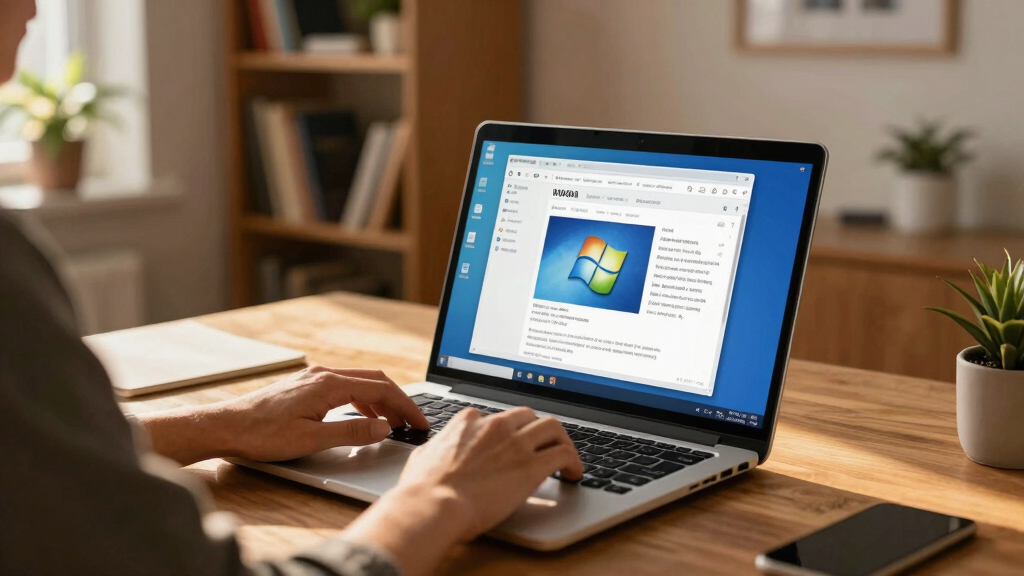
The project, created by developer Sami Smith, offers a browser-based interface that mimics the look and feel of the Windows XP desktop, complete with icons, start menu, and taskbar. Users can navigate Wikipedia articles through this interface, which simulates the classic Windows XP aesthetic. The tool is accessible via a dedicated website, allowing anyone to experience Wikipedia in this retro environment without installing additional software. The interface includes clickable icons for Wikipedia, a start menu for navigation, and a taskbar mimicking Windows XP’s design, all built with modern web technologies.
Why It Matters
This development is notable because it combines nostalgia with functional utility, offering a novel way to engage with Wikipedia. It may appeal to users interested in retro computing, user interface design, or those seeking a unique browsing experience. Additionally, it demonstrates how web technologies can recreate classic operating system environments, potentially inspiring similar projects or educational tools.
As an affiliate, we earn on qualifying purchases.
Background
Windows XP, released in 2001, remains an iconic operating system with a dedicated nostalgic following. Over the years, various emulators and themes have attempted to recreate its look, but this project is among the first to integrate a major online resource—Wikipedia—within a fully simulated XP environment. The project aligns with broader trends of retro computing nostalgia and web-based emulation, though it is distinct in its focus on combining a familiar OS interface with an expansive knowledge base.
“I wanted to create a fun, nostalgic way for people to explore Wikipedia that feels like using an old Windows XP computer.”
— Sami Smith, developer
“It’s a clever way to combine retro UI with modern content. I’m curious how well it performs with large articles.”
— Tech enthusiast on Hacker News
nostalgic Windows XP icons and start menu
As an affiliate, we earn on qualifying purchases.
As an affiliate, we earn on qualifying purchases.
What Remains Unclear
It is not yet clear how the interface handles large Wikipedia articles or whether it supports additional features like editing or multimedia content. The project’s long-term stability and scalability are also still to be determined.
web-based Windows XP interface software
As an affiliate, we earn on qualifying purchases.
As an affiliate, we earn on qualifying purchases.
What’s Next
Developers may enhance the interface with additional features, improve performance, or expand compatibility. Monitoring user feedback and potential updates will be key to understanding its future development.
retro computer emulation accessories
As an affiliate, we earn on qualifying purchases.
As an affiliate, we earn on qualifying purchases.
Key Questions
Is this tool officially affiliated with Wikipedia or Microsoft?
No, the project is independently developed by Sami Smith and is not officially affiliated with Wikipedia or Microsoft.
Can I edit Wikipedia articles through this interface?
No, the interface is designed solely for browsing Wikipedia content in a nostalgic environment. Editing features are not supported.
Is this accessible on mobile devices?
The interface is optimized for desktop browsers; mobile compatibility has not been confirmed and may be limited.
Will this project be open-sourced or available for customization?
There is no official announcement about open-sourcing the project yet. Future plans remain unclear.
How does this compare to other retro computing projects?
This project is unique in integrating a major online resource within a simulated Windows XP environment, whereas most retro projects focus on emulators or themes without web-based content integration.
Fall Picks
fall essentials
As an affiliate, we earn on qualifying purchases.