Choosing the best external hard drives in 2027 depends largely on whether you prioritize raw storage capacity or transfer speed. The WD My Passport 6TB stands out as the best overall pick for most users, offering a reliable balance of portability, large capacity, and solid performance for everyday backups. For those who need lightning-fast transfer rates for video editing or large file transfers, the Samsung T9 Portable SSD is the superior choice, though it comes at a higher price per gigabyte. Meanwhile, the WD_BLACK 8TB D10 Game Drive remains the go-to option for gamers needing massive storage for consoles without sacrificing speed. The main tradeoff you face is between cost-effective mechanical drives and expensive, faster solid-state drives. Continue reading to see which model fits your specific workflow and budget.

Get the latest gadgets delivered free with Prime
- Fast, free delivery on millions of items
- Prime Video, Amazon Music and more included
- Member-only deals all year
Complete the kit



Key Takeaways
- SSDs like the Samsung T9 and SanDisk Extreme offer transfer speeds 5-10x faster than traditional HDDs, making them mandatory for editing high-resolution video directly from the drive.
- The WD_BLACK D10 is the only drive in this list with a built-in cooling fan, a critical feature for sustained high-throughput gaming loads that cause other drives to throttle.
- Mechanical drives like the Seagate Expansion 24TB provide the lowest cost per terabyte, but their fragility means they should rarely be transported while spinning.
- Mac-specific formatting and software, such as in the WD My Passport for Mac, reduce setup friction but lock the drive out of Windows compatibility without reformatting.
- USB-C connectivity is now standard across premium picks like the Samsung T7, but budget options like the UnionSine 1TB may still rely on older micro-USB or USB-A cables.
| Seagate Expansion 4TB Desktop External Hard Drive, USB 3.0 |  | Best Desktop Drive for Simple Bulk Storage | Storage capacity: 4 TB | Drive type: Mechanical hard drive | Form factor: 3.5 inches | VIEW LATEST PRICE | See Our Full Breakdown |
| WD My Passport 6TB Portable External Hard Drive |  | Best Portable High-Capacity Drive | Storage capacity: 6 TB | Drive type: Mechanical hard disk | Form factor: 2.5 inches | VIEW LATEST PRICE | See Our Full Breakdown |
| Seagate 2TB Portable External Hard Drive, USB 3.0 (STGX2000400) |  | Best for Simple, Lightweight Backups | Storage capacity: 2 TB | Drive type: Portable hard drive | Interface: USB 3.0 | VIEW LATEST PRICE | See Our Full Breakdown |
| WD_BLACK 8TB D10 Game Drive Portable External Hard Drive HDD Compatible with PlayStation, Xbox, PC & Mac |  | Best for Expanding a Game Library | Storage capacity: 8 TB | Drive type: Hard disk drive | Interface: USB 3.2 | VIEW LATEST PRICE | See Our Full Breakdown |
| Samsung T9 Portable SSD, 1TB, USB 3.2 Gen 2×2 | 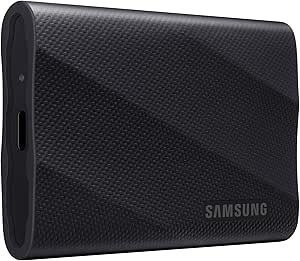 | Best Premium SSD for Fast Transfers | Storage capacity: 1 TB | Drive type: Portable SSD | Interface: USB 3.0; maximum performance requires USB 3.2 Gen 2×2 | VIEW LATEST PRICE | See Our Full Breakdown |
| WD My Passport for Mac 5TB Portable External Hard Drive, Navy |  | Best for Mac Backup Capacity | Storage capacity: 5 TB | Drive form factor: 2.5 inches | Interface: USB 3.2 | VIEW LATEST PRICE | See Our Full Breakdown |
| SanDisk Extreme Portable SSD, 1TB, Up to 2000MB/s |  | Best Rugged Portable SSD | Storage capacity: 1 TB | Drive type: Portable SSD | Read speed: Up to 2000 MB/s | VIEW LATEST PRICE | See Our Full Breakdown |
| UnionSine 1TB Ultra-Slim Portable External Hard Drive, USB 3.0 | 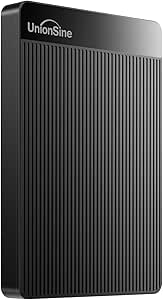 | Best Plug-and-Play Budget Storage | Storage capacity: 1 TB | Drive type: Mechanical hard disk | Form factor: 2.5 inches | VIEW LATEST PRICE | See Our Full Breakdown |
| WD My Passport 1TB Portable External Hard Drive, Black |  | Best for Secure Everyday Backups | Storage capacity: 1 TB | Drive type: Mechanical hard disk | Form factor: 2.5 inches | VIEW LATEST PRICE | See Our Full Breakdown |
| WD 2TB Elements Portable External Hard Drive for Windows, USB 3.2 Gen 1/USB 3.0 for PC & Mac, Plug and Play Ready | 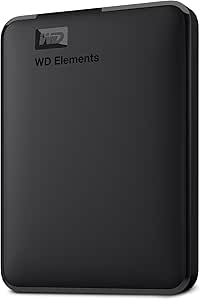 | Best Simple 2TB Cross-Platform Drive | Storage capacity: 2 TB | Hard disk interface: USB 2.0/3.0 | Data transfer rate: 5 Gbps | VIEW LATEST PRICE | See Our Full Breakdown |
| Seagate Expansion 24TB External Hard Drive |  | Best High-Capacity Desktop Storage | Storage Capacity: 24 TB | Interface: USB 3.0 | Form Factor: 3.5 inches | VIEW LATEST PRICE | See Our Full Breakdown |
| Samsung T7 Portable SSD, 1TB, Titan Gray, USB 3.2 Gen 2 | 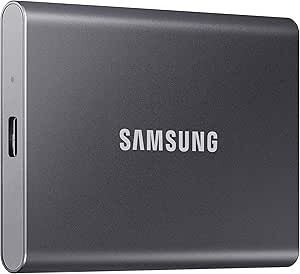 | Best Performance for Creators | Storage Capacity: 1 TB | Interface: USB 3.2 Gen 2 | Read Speed: Up to 1,050 MB/s | VIEW LATEST PRICE | See Our Full Breakdown |
| WD 6TB My Passport Portable External Hard Drive – Blue, USB 3.1/3.0 |  | Best Secure Portable Storage | Storage Capacity: 6 TB | Interface: USB 3.0 / 3.1 | Security: Hardware Encryption & Password | VIEW LATEST PRICE | See Our Full Breakdown |
| Seagate Expansion 4TB Portable External Hard Drive, USB 3.0, USB-C |  | Best Balanced Portable HDD | Storage Capacity: 4 TB | Interface: USB 3.0 with USB-C support | Weight: 268 g | VIEW LATEST PRICE | See Our Full Breakdown |
| WD My Passport 5TB Portable External Hard Drive |  | Best Value for Security Features | Storage Capacity: 5 TB | Interface: USB 3.0 | Warranty: 3-year limited | VIEW LATEST PRICE | See Our Full Breakdown |
| external hard drife | Storage capacity | Interface | Read speed | Drive type |
|---|---|---|---|---|
| Seagate Expansion 4TB Desktop | 4 TB | USB 3.0 | 120 MB/s | Mechanical hard drive |
| WD My Passport 6TB Portable Ex | 6 TB | — | 110 MB/s | Mechanical hard disk |
| Seagate 2TB Portable External | 2 TB | USB 3.0 | 120 MB/s | Portable hard drive |
| WD_BLACK 8TB D10 Game Drive Po | 8 TB | USB 3.2 | 259 MB/s | Hard disk drive |
| Samsung T9 Portable SSD | 1 TB | USB 3.0; maximum performance requires USB 3.2 Gen 2×2 | — | Portable SSD |
| WD My Passport for Mac 5TB Por | 5 TB | USB 3.2 | 130 MB/s | — |
| SanDisk Extreme Portable SSD | 1 TB | — | Up to 2000 MB/s | Portable SSD |
| UnionSine 1TB Ultra-Slim Porta | 1 TB | — | Up to 125 MB/s | Mechanical hard disk |
| WD My Passport 1TB Portable Ex | 1 TB | — | — | Mechanical hard disk |
| WD 2TB Elements Portable Exter | 2 TB | — | — | — |
| Seagate Expansion 24TB Externa | 24 TB | USB 3.0 | 140 MB/s | — |
| Samsung T7 Portable SSD | 1 TB | USB 3.2 Gen 2 | Up to 1,050 MB/s | — |
| WD 6TB My Passport Portable Ex | 6 TB | USB 3.0 / 3.1 | — | — |
| Seagate Expansion 4TB Portable | 4 TB | USB 3.0 with USB-C support | 120 MB/s | — |
| WD My Passport 5TB Portable Ex | 5 TB | USB 3.0 | — | — |
More Details on Our Top Picks
Seagate Expansion 4TB Desktop External Hard Drive, USB 3.0
The Seagate Expansion 4TB is a straightforward choice for adding roomy storage to a desk-bound computer. Its 4TB mechanical drive suits photo libraries, video files, and routine backups, while plug-and-play drag-and-drop setup avoids extra software. Unlike the portable WD My Passport 6TB, this desktop model needs its own power adapter, so it is better left connected at home than carried between locations. Its stated read speed is 120 MB/s, which is fine for general file storage but far behind the Samsung T9 SSD for large, frequent transfers. Mac users can use it, though Apple Time Machine requires reformatting. I’d choose it for accessible capacity and simple setup, not portability or speed.
Pros:- 4TB capacity for photos, videos, music, and other files
- Drag-and-drop setup without required software
- Works with Windows and Mac computers
- Includes an 18-inch USB 3.0 cable and 18W power adapter
Cons:- Requires an external power adapter, unlike portable bus-powered drives
- Time Machine use requires reformatting
- Mechanical drive speed is modest compared with the Samsung T9 SSD
Best for: Desktop users who want a simple 4TB home drive for media libraries, documents, and routine backups
Not ideal for: Travelers and Mac users who want a ready-to-use Time Machine drive, since it needs an adapter and reformatting for Time Machine
- Storage capacity:4 TB
- Drive type:Mechanical hard drive
- Form factor:3.5 inches
- Interface:USB 3.0
- Rotational speed:5400 rpm
- Read speed:120 MB/s
- Compatibility:Windows, Mac
- Included accessories:18-inch USB 3.0 cable, 18W power adapter
Our verdict“Choose this Seagate for uncomplicated, desk-based 4TB storage, but pick a portable drive if you need to carry your files around.”
WD My Passport 6TB Portable External Hard Drive
The WD My Passport 6TB packs substantial storage into a slim 2.5-inch portable drive, making it a strong fit for people who carry large work or media libraries between computers. Its password protection and hardware encryption add a layer of privacy that the simpler Seagate Expansion 4TB does not list, and included backup software adds options for scheduled protection. The capacity is the main draw: it exceeds the Seagate’s 4TB while staying portable. The tradeoff is that it remains a mechanical hard drive, with a stated 110 MB/s read speed, so it cannot match the Samsung T9’s transfer pace or drop resistance. I’d favor it for capacity and security on the move, not for rapid editing or frequent large-file transfers.
Pros:- 6TB capacity in a slim 2.5-inch portable form
- Password protection and hardware encryption
- Backup software includes ransomware defense
- Supports USB 2.0, USB 3.0, and USB 3.2 Gen 2
Cons:- Mechanical drive is slower than the Samsung T9 SSD
- Listed read speed is 110 MB/s
- Portable design offers less capacity than a desk-based high-capacity drive
Best for: Mobile professionals and students who need several terabytes of portable storage with password protection for work or media files
Not ideal for: Video editors and other users who regularly move large files and need SSD-level transfer speeds
- Storage capacity:6 TB
- Drive type:Mechanical hard disk
- Form factor:2.5 inches
- Connectivity:USB 2.0, USB 3.0, USB 3.2 Gen 2
- Read speed:110 MB/s
- Data transfer rate:5 Gbit/s
- Security:Password protection and hardware encryption
- Compatible devices:Desktop, laptop, tablet
Our verdict“Pick the My Passport 6TB if you need a large, portable library with security features and can accept mechanical-drive speeds.”
Seagate 2TB Portable External Hard Drive, USB 3.0 (STGX2000400)
For buyers who want an uncomplicated portable drive, the Seagate 2TB keeps setup simple: connect the included cable and drag files over, with no required backup software. That simplicity makes it less involved than the WD My Passport 6TB, which adds encryption and backup tools, but it also means fewer built-in security and backup features. Its 2TB capacity works for everyday documents, photos, and a moderate media collection; it is a tighter fit than either the WD’s 6TB or the desktop Seagate Expansion’s 4TB. The stated 120 MB/s read speed is suitable for routine access, not fast editing workflows like those better served by the Samsung T9. I’d pick this model for straightforward file storage, not for a growing archive or advanced protection needs.
Pros:- Portable design for carrying files between locations
- Plug-and-play setup with drag-and-drop file transfers
- Works with Windows and Mac
- Includes an 18-inch USB 3.0 cable
Cons:- 2TB capacity is less than the WD My Passport 6TB and Seagate Expansion 4TB
- No listed hardware encryption or bundled backup software
- Requires a computer connection to access files
Best for: Students and casual computer users who want a basic portable drive for documents, photos, and everyday backups
Not ideal for: People building a large media archive or seeking hardware encryption and bundled backup protections
- Storage capacity:2 TB
- Drive type:Portable hard drive
- Interface:USB 3.0
- Compatibility:Windows, Mac
- Included cable:18 inches
- Read speed:120 MB/s
- Rotational speed:7200 RPM
- Warranty:1 year
Our verdict“Choose this Seagate for basic portable backups and everyday files, but move up to a higher-capacity drive for a large collection.”
WD_BLACK 8TB D10 Game Drive Portable External Hard Drive HDD Compatible with PlayStation, Xbox, PC & Mac
The WD_BLACK D10 8TB is built around a different priority from general portable drives: keeping a large console or PC game library installed and ready. Its 8TB capacity and 7200 rpm mechanism give it more room and higher listed speeds than the 2TB Seagate portable drive, while active cooling supports extended sessions. Two USB-A charging ports are useful for accessories near a gaming setup. This is not as convenient for travel as the slim WD My Passport 6TB, and its external power requirement makes it better suited to a stationary entertainment center. Although the product description calls it portable, the power needs and gaming-focused design favor a fixed setup. I’d choose it for game storage and recordings, not as a pocketable everyday backup drive.
Pros:- 8TB capacity for large game libraries and recordings
- 7200 rpm drive with stated read speed up to 259 MB/s
- Active cooling for extended use
- Two 7.5W USB-A ports for charging accessories
Cons:- Requires an external power source for optimal performance
- Less convenient to carry than the WD My Passport 6TB
- Mechanical drive is not as fast as the Samsung T9 SSD
Best for: Console and PC gamers who want substantial external space for installed games and gameplay recordings at a stationary setup
Not ideal for: Travelers or general-purpose users who want a compact drive that runs without an external power source
- Storage capacity:8 TB
- Drive type:Hard disk drive
- Interface:USB 3.2
- Rotational speed:7200 rpm
- Read speed:259 MB/s
- Write speed:250 MB/s
- Compatible devices:PlayStation, Xbox, PC, Mac
- Additional features:Active cooling, two 7.5W USB Type-A charging ports
- Warranty:3-year limited
Our verdict“Choose the WD_BLACK D10 for a powered gaming station that needs lots of extra space, not for portable everyday storage.”
Samsung T9 Portable SSD, 1TB, USB 3.2 Gen 2×2
The Samsung T9 1TB is the speed-first pick in this group. Its stated read and write speeds of up to 2,000 MB/s make it far better suited than the mechanical WD My Passport 6TB for moving large project files or working directly from external storage. The compact SSD design also avoids the moving mechanism found in the Seagate Expansion and other hard drives, and it is rated for drops up to 9.8 feet. AES 256-bit hardware encryption adds data protection. The clear compromise is capacity: 1TB is a fraction of the 6TB WD or 8TB WD_BLACK D10. Maximum speeds also depend on a compatible USB 3.2 Gen 2×2 host, cable, and UASP mode, so older systems may not reach them. I’d select it for speed and portability, not bulk archiving.
Pros:- Read and write speeds up to 2,000 MB/s
- AES 256-bit hardware encryption
- Rated to withstand drops up to 9.8 feet
- Compatible with computers, tablets, iPhone 15/16, and listed game consoles
Cons:- 1TB capacity is far below the WD My Passport 6TB and WD_BLACK D10 8TB
- Maximum speeds require a compatible host, cable, and UASP mode
- Host-device compatibility may vary
Best for: Photographers, video editors, and mobile professionals who prioritize fast transfers, compact storage, and drop resistance over maximum capacity
Not ideal for: Buyers who need several terabytes for a large archive or whose devices cannot take advantage of USB 3.2 Gen 2×2 speeds
- Storage capacity:1 TB
- Drive type:Portable SSD
- Interface:USB 3.0; maximum performance requires USB 3.2 Gen 2×2
- Read/write speed:Up to 2,000 MB/s
- Hardware encryption:AES 256-bit
- Drop resistance:Up to 9.8 ft
- Compatible devices:Mac, PC, tablet, iPhone 15/16
- Compatible game consoles:Xbox Series S/X, PlayStation 4/5
Our verdict“Choose the Samsung T9 when fast transfers and a rugged portable SSD matter more than the capacity of a traditional hard drive.”
WD My Passport for Mac 5TB Portable External Hard Drive, Navy
For Mac owners who need a large portable archive, this 5TB capacity sets it apart from the 1TB WD My Passport and UnionSine drives in this lineup. Its slim 2.5-inch design keeps that storage easy to carry, while USB-C and USB-A connectivity offers flexibility across newer and older computers. WD’s backup software, password protection, and hardware encryption add safeguards that the simpler WD Elements does not emphasize. The tradeoff is speed: its stated read rate of 130 MB/s suits file storage and routine backups, not rapid editing from the drive. It is also configured for Mac, so using it with other operating systems may require reformatting. I’d choose it for a Mac-centered backup library, not for frequent cross-platform swapping or speed-sensitive project work.
Pros:- 5TB capacity in a slim, portable 2.5-inch drive
- USB-C and USB-A connections support a range of computers
- Backup software includes ransomware defense
- Password protection and hardware encryption add file security
Cons:- Mac-focused setup may require reformatting for other operating systems
- 130 MB/s stated read speed is modest for large, active project files
Best for: Mac users who want a portable, high-capacity drive for backups, photos, and long-term file storage.
Not ideal for: People who regularly move the drive between Mac and other operating systems without reformatting, or who need SSD-level transfer speeds.
- Storage capacity:5 TB
- Drive form factor:2.5 inches
- Interface:USB 3.2
- Connectivity:USB-C and USB-A
- Read speed:130 MB/s
- Encryption:Hardware encryption
- Platform:Mac
- Enclosure material:Metal
Our verdict“Choose this for a Mac-based portable backup library with substantial capacity, but skip it if speed or effortless cross-platform use matters most.”
SanDisk Extreme Portable SSD, 1TB, Up to 2000MB/s
This is the lineup’s speed-and-durability choice: an SSD rated for up to 2000 MB/s read speeds in a 1.6-ounce enclosure with IP65 water and dust resistance and drop protection up to 3 meters. Compared with the mechanical WD My Passport 1TB, it is better suited to moving active project files or carrying data through rougher conditions, though its 1TB capacity is smaller than the 5TB Mac Passport. The compact USB-C connection also works with listed computers, phones, tablets, and PlayStation 5, making it more versatile for on-the-go workflows. The main tradeoff is capacity per drive, and the advertised read speed does not describe write performance, which is lower. Password protection also depends on downloaded software and supported operating systems.
Pros:- Up to 2000 MB/s read speed for fast file access and transfers
- IP65-rated water and dust resistance
- Drop protection up to 3 meters
- Lightweight USB-C design supports computers and mobile devices
Cons:- 1TB capacity is less suited to large media archives than the WD My Passport for Mac 5TB
- Write speed is lower than the stated maximum read speed
- Password protection requires software and supported operating systems
Best for: Photographers, video creators, and frequent travelers who need a rugged 1TB drive for transferring active files between compatible devices.
Not ideal for: Buyers seeking several terabytes for an archive, or users who want password protection without installing software.
- Storage capacity:1 TB
- Drive type:Portable SSD
- Read speed:Up to 2000 MB/s
- Connector:USB Type-C
- Water and dust resistance:IP65
- Drop protection:Up to 3 m
- Encryption:256-bit AES
- Weight:1.6 oz
- Dimensions:3.35 × 2 × 0.39 in
Our verdict“Pick this compact SSD for fast, rugged file transport, but choose a higher-capacity HDD for a large, lower-speed archive.”
UnionSine 1TB Ultra-Slim Portable External Hard Drive, USB 3.0
The UnionSine keeps the proposition straightforward: 1TB of mechanical storage, a bundled USB 3.0 cable, and plug-and-play use without extra software. Its USB 2.0 support can also help when connecting to older equipment, while the WD My Passport 1TB offers more emphasis on encrypted storage and backup software. Compared with the SanDisk Extreme Portable SSD, this drive is a slower choice for active projects, but its conventional hard-drive format is a practical fit for basic file storage and compatible televisions or consoles. The listed read and write speeds—up to 125 MB/s and 103 MB/s—are modest, and the 5400 rpm mechanism is less suited to frequent heavy transfers than an SSD. I’d favor it for simple device-to-device storage, not rugged travel or secure backups.
Pros:- Plug-and-play setup without software installation
- USB 3.0 and USB 2.0 connectivity
- Compact 2.5-inch casing with anti-slip stripes
- Includes a USB 3.0 cable and three-year manufacturer warranty
Cons:- Mechanical 5400 rpm drive is slower than the SanDisk Extreme Portable SSD
- Stated read and write speeds are maximum figures rather than guaranteed performance
- No listed password protection or hardware encryption
Best for: Buyers who want a simple 1TB drive for documents, media, or compatible consoles and televisions, with no software setup.
Not ideal for: Users who need fast transfers, hardware encryption, or a rugged drive for frequent travel.
- Storage capacity:1 TB
- Drive type:Mechanical hard disk
- Form factor:2.5 inches
- Connectivity:USB 3.0 and USB 2.0
- Read speed:Up to 125 MB/s
- Write speed:Up to 103 MB/s
- Rotational speed:5400 rpm
- Compatible devices:Desktop, gaming console, laptop, television
- Warranty:Three years
Our verdict“Choose UnionSine for uncomplicated everyday storage and broad older-device connectivity, not for speed, security features, or rough handling.”
WD My Passport 1TB Portable External Hard Drive, Black
For buyers who want more than a plain storage volume, the WD My Passport 1TB pairs portable mechanical storage with included backup software, ransomware defense, password protection, and hardware encryption. That makes it a more security-focused everyday pick than the plug-and-play UnionSine 1TB, which keeps setup simpler but does not list comparable safeguards. It is also a sensible lower-capacity alternative to the WD My Passport for Mac 5TB if a compact backup drive matters more than a large archive. The tradeoff is the familiar limitation of a mechanical drive: it is not the right choice for SSD-like transfer speeds, and access requires a USB connection. Its 1TB capacity may also fill quickly for large photo or video collections.
Pros:- Password protection and hardware encryption
- Included backup software offers ransomware defense
- Slim 2.5-inch portable design
- Three-year limited warranty
Cons:- Mechanical hard drive is slower than the SanDisk Extreme Portable SSD
- 1TB may be limiting for extensive media libraries
- Files require a USB connection to access
Best for: Laptop and desktop owners who want a portable 1TB backup drive with bundled security and backup tools.
Not ideal for: Creators working with large active files, or people who need more capacity than 1TB or wireless access to stored files.
- Storage capacity:1 TB
- Drive type:Mechanical hard disk
- Form factor:2.5 inches
- Connectivity:USB 2.0/3.0
- Security:Password protection and hardware encryption
- Included software:Acronis True Image for Western Digital
- Color:Black
- Warranty:3-year limited warranty
Our verdict“Choose this for portable, security-minded everyday backups; opt for the UnionSine for simpler setup or an SSD for faster transfers.”
WD 2TB Elements Portable External Hard Drive for Windows, USB 3.2 Gen 1/USB 3.0 for PC & Mac, Plug and Play Ready
The WD Elements is the straightforward middle ground for buyers who need more room than the 1TB WD My Passport or UnionSine, without the Mac-focused setup of the 5TB Passport. Its 2TB capacity and plug-and-play compatibility with Windows and Mac make it a practical general-purpose backup or file-transfer drive. USB 3.2 Gen 1 supports a 5 Gbps interface rate, but that figure is not the same as the drive’s real-world file speed; the listing’s stated read speed is 1 GB/s, an unusually high claim for a 5400 rpm mechanical disk, so I would not choose it on that figure alone. The product data also describes a 3.5-inch form factor and the need for external power, which undercuts the portable label. It lacks the My Passport line’s listed security software and encryption.
Pros:- 2TB capacity exceeds the 1TB UnionSine and WD My Passport options
- Plug-and-play compatibility with Windows PCs and Macs
- USB 3.2 Gen 1 interface supports a 5 Gbps data rate
- Compact listed dimensions for a desktop or home-office setup
Cons:- The listed 3.5-inch form factor requires an external power source
- No password protection or backup software is listed, unlike the WD My Passport drives
- The stated 1 GB/s read speed may not reflect typical performance from a 5400 rpm mechanical drive
Best for: Windows and Mac users who want a simple 2TB drive for backups or file transfers and can use external power.
Not ideal for: Travelers who need a self-powered pocket drive, or buyers who want included encryption and backup software.
- Storage capacity:2 TB
- Hard disk interface:USB 2.0/3.0
- Data transfer rate:5 Gbps
- Form factor:3.5 inches
- Rotational speed:5400 RPM
- Stated read speed:1 GB/s
- Weight:4.64 ounces
- Dimensions:5.8 × 4.8 × 1.8 in
- Compatible platforms:Windows and Mac
Our verdict“Choose the Elements for simple 2TB cross-platform storage near a power source, but pick a self-powered portable drive for travel.”
Seagate Expansion 24TB External Hard Drive
This 24TB desktop drive is built for users who need to archive massive libraries of media, video projects, or raw data without worrying about running out of space. Unlike the WD My Passport 6TB, which prioritizes portability, the Seagate Expansion stays on a desk and requires a wall outlet, but that tradeoff buys you triple the storage in a single unit. It connects via USB 3.0 and works out of the box with Windows, though Mac users must reformat it for Time Machine. The inclusion of Rescue Data Recovery Services adds a safety net for those storing irreplaceable files.
However, this is not a drive for travel. At 3 pounds and requiring an external power adapter, it is strictly a stationary solution. If you need to carry your data to a client meeting, look at the Samsung T7 instead. This model is best for those who value volume over mobility.
Pros:- Massive 24TB capacity reduces the need for multiple drives
- Includes Rescue Data Recovery Services for added peace of mind
- Simple drag-and-drop setup on Windows without extra software
- 7200 RPM rotation helps with sustained transfer speeds
Cons:- Requires an external power adapter, limiting placement options
- Bulky 3.5-inch form factor is not portable
- Mac users must manually reformat the drive for Time Machine compatibility
Best for: Video editors and photographers with large archives who keep their primary workstation stationary.
Not ideal for: Frequent travelers or students who need to move their drive between locations; it requires a power outlet and is too bulky.
- Storage Capacity:24 TB
- Interface:USB 3.0
- Form Factor:3.5 inches
- Read Speed:140 MB/s
- Weight:3 pounds
- Power:18W Adapter Required
- Warranty:1-year limited
Our verdict“Choose this drive if you need enormous storage for a fixed workstation and can tolerate a power cable.”
Samsung T7 Portable SSD, 1TB, Titan Gray, USB 3.2 Gen 2
The Samsung T7 stands out for those who prioritize speed and durability over sheer capacity. With read speeds up to 1,050 MB/s, it is significantly faster than mechanical drives like the Seagate Expansion 4TB, making it ideal for editing 4K video directly from the drive. Its aluminum unibody offers shock resistance and drop protection up to six feet, a feature critical for creators working on location. It includes both USB-C and USB-A cables, ensuring broad compatibility.
The main limitation is capacity; at 1TB, you will fill it up much faster than with the 5TB or 6TB options in this roundup. You also need a USB 3.2 Gen 2 port to unlock its full potential; on older USB 3.0 ports, you will see slower speeds. It is a premium choice for professionals who can afford to buy multiple drives as their projects grow.
Pros:- Extremely fast read/write speeds suitable for running applications and editing video
- Rugged aluminum body with 6-foot drop protection
- Includes both USB-C and USB-A cables for versatile connectivity
- 256-bit AES hardware encryption for secure data handling
Cons:- Limited 1TB capacity compared to high-capacity HDD options
- Full speeds require a specific USB 3.2 Gen 2 host connection
- Premium price point per gigabyte
Best for: Video editors, photographers, and gamers who need fast, durable, and compact storage for active projects.
Not ideal for: Users with massive archives who need more than 1TB of storage; the cost-per-terabyte is higher than HDDs.
- Storage Capacity:1 TB
- Interface:USB 3.2 Gen 2
- Read Speed:Up to 1,050 MB/s
- Write Speed:Up to 1,000 MB/s
- Drop Protection:Up to 6 feet
- Encryption:256-bit AES Hardware
- Included Cables:USB-C to C and USB-C to A
Our verdict“This is the go-to drive for professionals who need speed and ruggedness more than massive storage volume.”
WD 6TB My Passport Portable External Hard Drive – Blue, USB 3.1/3.0
The WD My Passport 6TB strikes a balance between high capacity and portability, offering a sleek aluminum-glass design that looks professional on a desk. It includes Acronis backup software with ransomware defense, providing a layer of security that the basic WD Elements models lack. The built-in password protection and hardware encryption make it suitable for storing sensitive business documents or personal financial records.
Compared to the Samsung T7, the WD Passport is much slower, as it relies on a mechanical 5400 RPM drive. You should not plan to edit video directly from this drive. Additionally, the glass front panel, while attractive, is prone to scratches and fingerprints, requiring careful handling. It is a strong choice for secure, large-volume backups, but not for high-performance tasks.
Pros:- 6TB capacity in a compact, portable 2.5-inch form factor
- Includes Acronis software with ransomware protection
- Hardware encryption and password protection for data security
- Slim, modern design with a premium aluminum-glass finish
Cons:- Glass enclosure is susceptible to scratches and smudges
- Mechanical drive limits transfer speeds compared to SSDs
- Backup software can feel bloated for users who prefer simple drag-and-drop
Best for: Professionals who need to transport large amounts of sensitive data with hardware-level encryption and backup software.
Not ideal for: Creative professionals who need to edit files directly from the drive; the mechanical speed is too slow for that workflow.
- Storage Capacity:6 TB
- Interface:USB 3.0 / 3.1
- Security:Hardware Encryption & Password
- Software:Acronis with Ransomware Defense
- Form Factor:2.5 inches
- Enclosure Material:Aluminum and Glass
Our verdict“Pick this drive if you need secure, high-capacity portable storage for sensitive files and automated backups.”
Seagate Expansion 4TB Portable External Hard Drive, USB 3.0, USB-C
The Seagate Expansion 4TB offers a practical middle ground for users who find 1TB too small but don’t need the bulk of a 24TB desktop drive. At 268 grams, it is light enough to toss in a backpack alongside a laptop. The inclusion of a USB-C cable is a modern touch, making it immediately compatible with newer laptops without needing an adapter, unlike the older WD My Passport 5TB which may require specific cable checks.
It provides Rescue Data Recovery Services, a valuable feature for accidental deletions. However, as a mechanical drive, it is slower than the Samsung T7. You will wait longer for large file transfers. It is also not fanless or silent, producing a slight hum. This drive is best for general media storage, such as backing up phone photos or storing movies, rather than professional creative work.
Pros:- Lightweight 268g design makes it highly portable
- Includes USB-C cable for modern device compatibility
- 4TB capacity is ideal for media libraries without being oversized
- Includes Rescue Data Recovery Services
Cons:- Mechanical drive is slower than SSD alternatives
- Plastic casing feels less durable than metal or glass competitors
- Warranty is limited to 1 year
Best for: Students and casual users who need portable, high-capacity storage for media libraries and documents.
Not ideal for: Users who need to run applications or edit video from the drive; the mechanical speed will frustrate that workflow.
- Storage Capacity:4 TB
- Interface:USB 3.0 with USB-C support
- Weight:268 g
- Read Speed:120 MB/s
- Service:Rescue Data Recovery Services
- Warranty:1 year
- Form Factor:2.5 inches
Our verdict“This is a solid, no-frills portable drive for users who want decent capacity and modern connectivity without paying for SSD speeds.”
WD My Passport 5TB Portable External Hard Drive
The WD My Passport 5TB is an established choice for users who want security features at a competitive capacity point. It offers 5TB of storage in a slim package, sitting between the 4TB and 6TB models in terms of volume. Like its larger sibling, the WD 6TB My Passport, it includes Acronis True Image and hardware encryption. However, this older model often comes with a 3-year warranty, which is longer than the 1-year warranty found on the Seagate Expansion 4TB.
The tradeoff is connectivity and speed. It uses USB 3.0, which is slower than the USB 3.2 Gen 2 found on the Samsung T7. It also requires reformatting for Mac users, a hassle that the newer WD My Passport for Mac variants avoid. It is a reliable workhorse for backups, but it lacks the modern USB-C convenience and speed of newer drives.
Pros:- 3-year limited warranty exceeds many competitors in this segment
- Includes Acronis True Image for automated backups
- Hardware encryption and password protection are standard
- Slim, lightweight design at just 7.4 ounces
Cons:- Requires reformatting for Mac compatibility
- Older USB 3.0 interface is slower than newer USB-C/3.2 standards
- Does not include a USB-C cable in the box
Best for: Windows users who prioritize a longer warranty period and built-in security software over raw transfer speed.
Not ideal for: Mac users who want plug-and-play Time Machine support; this drive requires manual reformatting.
- Storage Capacity:5 TB
- Interface:USB 3.0
- Warranty:3-year limited
- Security:Password & Hardware Encryption
- Software:Acronis True Image
- Weight:7.4 ounces
- Dimensions:4.22 × 2.95 × 0.75 inches
Our verdict“Choose this drive if you want a secure, 5TB backup solution with a longer warranty and don’t mind USB-A connections.”
How We Picked
I evaluated these 15 products by analyzing their interface speeds, physical durability, and intended use cases. The primary differentiator was the technology type: traditional spinning hard disk drives (HDDs) versus solid-state drives (SSDs). I prioritized drives that offer a clear advantage in their specific category, whether that is maximum capacity for archiving or maximum bandwidth for creative workflows.
Build quality and portability were secondary but vital criteria. I favored models with robust casing or shock resistance for portable units, while desktop units were judged on cooling efficiency and noise levels. Compatibility with both Windows and macOS without extensive reformatting was also a key factor in ranking the top contenders higher than niche-specific drives.
| external hard drife | Drive type | Interface |
|---|---|---|
| Seagate Expansion 4TB Desktop | Mechanical hard drive | USB 3.0 |
| WD My Passport 6TB Portable Ex | Mechanical hard disk | — |
| Seagate 2TB Portable External | Portable hard drive | USB 3.0 |
| WD_BLACK 8TB D10 Game Drive Po | Hard disk drive | USB 3.2 |
| Samsung T9 Portable SSD | Portable SSD | USB 3.0; maximum performance requires USB 3.2 Gen 2×2 |
| WD My Passport for Mac 5TB Por | — | USB 3.2 |
| SanDisk Extreme Portable SSD | Portable SSD | — |
| UnionSine 1TB Ultra-Slim Porta | Mechanical hard disk | — |
| WD My Passport 1TB Portable Ex | Mechanical hard disk | — |
| WD 2TB Elements Portable Exter | — | — |
| Seagate Expansion 24TB Externa | — | USB 3.0 |
| Samsung T7 Portable SSD | — | USB 3.2 Gen 2 |
| WD 6TB My Passport Portable Ex | — | USB 3.0 / 3.1 |
| Seagate Expansion 4TB Portable | — | USB 3.0 with USB-C support |
| WD My Passport 5TB Portable Ex | — | USB 3.0 |
Factors to Consider When Choosing Best External Hard Drives
Selecting the right external storage solution requires balancing three competing factors: speed, capacity, and price. Understanding how these interact prevents overpaying for features you won’t use or buying a drive that bottlenecks your workflow.HDD vs. SSD: Speed vs. Capacity
The fundamental choice is between mechanical HDDs and solid-state SSDs. HDDs use spinning platters, which makes them slower but significantly cheaper for large capacities, ideal for cold storage or media libraries where access speed is less critical. SSDs use flash memory, offering vastly faster read/write speeds and better shock resistance, but they cost much more per gigabyte. If you edit 4K video or move large datasets daily, an SSD is worth the premium. For simple backups of documents and photos, an HDD saves money without impacting performance noticeably.
Interface Standards and Real-World Speeds
Don’t just look at the drive’s rated speed; check the interface. USB 3.0/3.2 Gen 1 caps out around 5 Gbps, which is sufficient for most HDDs but bottlenecks many SSDs. Newer standards like USB 3.2 Gen 2×2 (found in the Samsung T9) allow for much higher bandwidth. However, your computer must also support this faster port to benefit. A fast drive on an old port performs no better than a slow drive. Always match the drive’s interface to your computer’s available ports to avoid wasted potential.
Portability and Durability Factors
If you travel with your drive, durability is non-negotiable. Mechanical drives are fragile; a drop while spinning can destroy the data. Look for SSDs or HDDs with rubberized bumpers and shock sensors for travel. Desktop drives, like the Seagate Expansion 24TB, are heavy and require power bricks, making them unsuitable for on-the-go use. Consider whether you need a compact form factor that fits in a pocket or if you are building a stationary backup station. The physical size directly correlates with the internal components and power requirements.
Mac vs. Windows Compatibility
Many drives come pre-formatted for a specific OS. While exFAT is a universal format that works on both, some drives ship with NTFS (Windows) or APFS/HFS+ (macOS). Mac-specific drives, like the WD My Passport for Mac, often include pre-installed software for Time Machine but may require reformatting to work seamlessly on Windows. If you switch between systems, verify the file system or be prepared to reformat the drive, which erases all data. Buying a drive that matches your primary ecosystem reduces initial setup friction.
Data Security and Encryption
Hardware encryption adds a layer of security that software encryption cannot match in speed. Drives like the WD My Passport series often include built-in 256-bit AES encryption managed via password. This is critical if you store sensitive personal or business data. Without encryption, a lost drive is an open book to anyone who plugs it in. Check if the encryption is transparent (doesn’t slow down transfers) and if the password recovery process is manageable. If you handle confidential data, hardware encryption is a mandatory feature, not an optional extra.
Frequently Asked Questions
Can I use an external hard drive directly for gaming on my console?
Yes, but with caveats. Most modern consoles like the PS5 and Xbox Series X allow you to store games on an external HDD, but they cannot play next-gen games directly from it due to speed limitations. You can play PS4 or Xbox One titles from an external HDD. For playing current-gen games directly, you need an external SSD with USB 3.2 Gen 2 or faster, or an internal NVMe SSD. The WD_BLACK D10 is designed for this, offering enough speed and capacity to handle large game libraries efficiently.
Why is my new external hard drive slower than advertised?
Several factors cause bottlenecks. First, ensure you are using the correct cable; many drives come with USB-C to USB-A cables that may limit speed if your port is older. Second, check your computer’s port type; a USB 2.0 port will severely cap the speed of any modern drive. Third, the file system matters; NTFS is generally faster for Windows users than exFAT. Finally, fragmentation on mechanical drives can slow down access times over months of use, requiring defragmentation or reformatting.
Is it safe to leave an external hard drive plugged in all the time?
For mechanical HDDs, leaving them plugged in and powered on 24/7 can shorten their lifespan due to constant spinning and heat generation. It is better to use sleep modes or disconnect them when not in use. SSDs, however, do not have moving parts and handle constant connection better, though heat dissipation is still a concern. If you use the drive for a Time Machine backup or similar background task, ensure it has adequate ventilation. For long-term archiving, disconnecting the drive after data transfer is the safest practice to prevent power surge damage.
Do I really need a 24TB drive, or is 4TB enough?
For most users, 4TB to 6TB is the sweet spot for cost and capacity. A 24TB drive, like the Seagate Expansion 24TB, is targeted at professional video editors, photographers with massive raw libraries, or small businesses needing a network-attached storage substitute. If you are backing up standard documents, photos, and occasional videos, 24TB is overkill and significantly more expensive. Only buy high-capacity drives if you have a concrete plan to fill them with large media files or if you need a central repository for multiple devices.
How do I protect my data if my external drive fails?
Never rely on a single external drive as your sole backup. Follow the 3-2-1 rule: keep three copies of your data, on two different media types, with one copy offsite. Use the external drive for one copy, your internal drive for another, and cloud storage or a second external drive stored elsewhere for the third. Regularly verify your backups by restoring a small file to ensure the data is readable. Drives fail silently, so redundancy is the only way to guarantee data safety.
Conclusion
The best external hard drives vary significantly based on your specific needs. For most users seeking a reliable, portable backup solution, the WD My Passport 6TB is the best overall choice due to its balance of capacity and ease of use. If you are a creative professional or gamer who needs speed, the Samsung T9 or WD_BLACK D10 are the premium picks that justify their higher cost through performance. For those on a tight budget, the WD 2TB Elements offers solid, no-frills storage without breaking the bank. Mac users will find the WD My Passport for Mac most convenient, while those needing massive archive space should look at the Seagate Expansion 24TB. Choose the drive that aligns with your workflow, not just the one with the highest specs.
Black Friday Picks

Sonos One Two-Room Smart Speaker Set with Alexa, Black
As an affiliate, we earn on qualifying purchases.