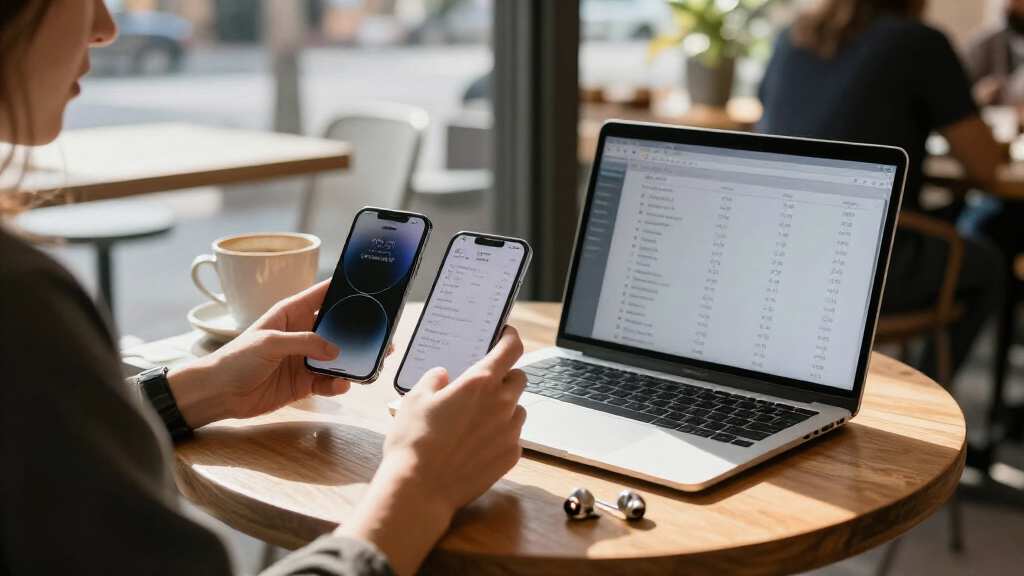

The best Apple tech deals depend on whether you need a daily-use device or a focused accessory. My best overall pick is the iPad 11-inch with A16, which offers a versatile starting point for browsing, streaming, and everyday tasks. For laptop buyers, the 13-inch MacBook Air with M5 is the standout, while the AirPods 4 with Active Noise Cancellation suit listeners who want noise control without choosing an AirPods Pro model. The main tradeoffs are renewed versus new condition, entry-level versus premium features, and compatibility with the Apple devices you already own. Read on for the full breakdown of all 11 picks and how to choose among them.

Get the latest gadgets delivered free with Prime
- Fast, free delivery on millions of items
- Prime Video, Amazon Music and more included
- Member-only deals all year
Complete the kit



Key Takeaways
- The iPad 11-inch with A16 is the broadest-fit pick: it serves everyday tablet needs, while the MacBook Air is the better choice for laptop work.
- AirPods options differ most by fit and noise control: compare open-style AirPods 4 with the in-ear Pro models before prioritizing extras.
- Renewed earbuds add more choice but require closer condition checks: confirm the seller, return terms, and included charging case before buying.
- Apple Pencil Pro and Apple Pencil USB-C serve different workflows: choose based on the specific iPad features and drawing tools you need, not the name alone.
- The simplest accessories can be the right buy: Lightning EarPods make sense for compatible devices when wired listening matters more than wireless convenience.
| Apple AirPods Pro (3rd Generation) (Renewed) |  | Best Renewed Premium Earbuds | Model: AirPods Pro 3rd Generation | Form factor: In-ear | Connectivity: Bluetooth | VIEW LATEST PRICE | See Our Full Breakdown |
| Apple iPad 11-inch with A16 Chip, 128GB, Wi-Fi, Silver |  | Best Overall Apple Tablet Deal | Display: 11-inch Liquid Retina with True Tone | Chip: A16 | Storage: 128GB | VIEW LATEST PRICE | See Our Full Breakdown |
| Apple AirPods 4 (Renewed) | 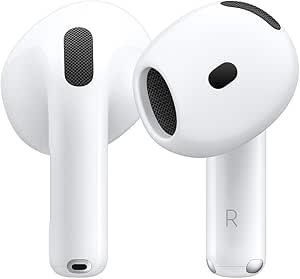 | Best Entry-Level Renewed AirPods | Condition: Renewed | Style: Without Active Noise Cancellation | Connectivity: Wireless, Bluetooth 5.3 | VIEW LATEST PRICE | See Our Full Breakdown |
| Apple AirPods Pro 3 Wireless Earbuds with Active Noise Cancellation |  | Best New Pro Earbuds | Product type: Wireless earbuds | Active noise cancellation: Removes up to 2x more unwanted noise than AirPods Pro 2 | Listening time: Up to 8 hours with ANC; up to 10 hours in Transparency mode using the Hearing Aid feature | VIEW LATEST PRICE | See Our Full Breakdown |
| Apple AirPods Pro (2nd Generation) with MagSafe Charging Case (USB-C), Renewed Premium | 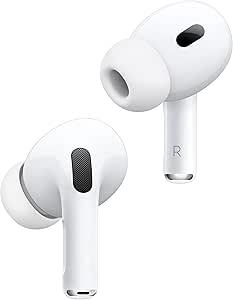 | Best Renewed Pro Value | Model: AirPods Pro (2nd Generation) | Condition: Renewed Premium; professionally inspected, tested, and cleaned | Connectivity: Bluetooth 5.3, wireless | VIEW LATEST PRICE | See Our Full Breakdown |
| Apple Pencil Pro |  | Best for Creative iPad Users | Model: MX2D3AM/A | Compatibility: iPad Pro 13-inch and 11-inch (M4 and M5); iPad Air 11-inch and 13-inch (M2, M3, and M4); iPad mini (A17 Pro) | Charging and pairing: Magnetic wireless charging and pairing | VIEW LATEST PRICE | See Our Full Breakdown |
| Apple EarPods with Lightning Connector |  | Best Wired Pick for Lightning Devices | Connector: Lightning | Compatibility: Devices with a Lightning connector and iOS 10 or later; compatible iPad models with iPadOS | Controls: Built-in remote for volume, music and video playback, and calls | VIEW LATEST PRICE | See Our Full Breakdown |
| Apple MacBook Air 13-inch Laptop with M5 Chip, 16GB Memory, 512GB SSD, Silver | 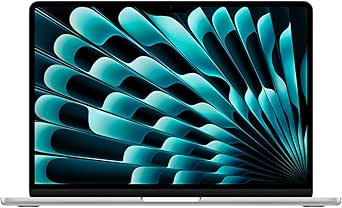 | Best Overall Mac Deal | Model: MDH74LL/A | Display: 13.6-inch Liquid Retina | Chip: Apple M5 | VIEW LATEST PRICE | See Our Full Breakdown |
| Apple Pencil (USB-C) |  | Best Value Stylus for Everyday Notes | Model: MUWA3AM/A | Compatibility: Select iPad Pro, iPad Air, iPad, and iPad mini models | Connectivity and charging: USB-C | VIEW LATEST PRICE | See Our Full Breakdown |
| Apple AirPods 4 with Active Noise Cancellation (Renewed) |  | Best Open-Fit Noise-Control Earbuds | Generation: 4th Gen. | Model number: A3056 | Noise control: Active Noise Cancellation, Adaptive Audio, Transparency mode | VIEW LATEST PRICE | See Our Full Breakdown |
| Apple AirPods 5 Wireless Earbuds with Active Noise Cancellation |  | Best Open-Ear Pick | Manufacturer: Apple | Model: MKFW4LL/A | Design: Open-ear | VIEW LATEST PRICE | See Our Full Breakdown |
| Apple tech deal | Model | Weight |
|---|---|---|
| Apple AirPods Pro | AirPods Pro 3rd Generation | 6.08 ounces |
| Apple iPad 11-inch with A16 Ch | — | — |
| Apple AirPods 4 | — | — |
| Apple AirPods Pro 3 Wireless E | — | 0.32 ounces (9.07 g) |
| Apple AirPods Pro | AirPods Pro (2nd Generation) | — |
| Apple Pencil Pro | MX2D3AM/A | 0.68 ounces |
| Apple EarPods with Lightning C | MWTY3AM/A | 1.37 ounces (0.04 kg) |
| Apple MacBook Air 13-inch Lapt | MDH74LL/A | 2.71 pounds |
| Apple Pencil | MUWA3AM/A | 0.88 ounces |
| Apple AirPods 4 with Active No | — | — |
| Apple AirPods 5 Wireless Earbu | MKFW4LL/A | — |
More Details on Our Top Picks
Apple AirPods Pro (3rd Generation) (Renewed)
AirPods Pro 3 (Renewed) suit buyers who want Apple’s latest listed Pro features without choosing a new retail unit. Compared with the Renewed AirPods Pro (2nd Generation), they add heart rate sensing, Live Translation, and up to 8 hours of listening with noise cancellation on, versus the older model’s listed 6 hours. Active noise cancellation is also described as removing up to twice as much unwanted noise as AirPods Pro 2, making these a stronger fit for commutes and busy workspaces.
The tradeoff is the 90-day limited warranty and renewed condition, which may be less reassuring than buying new. They are also listed as not water resistant, so workout use calls for care despite the heart-rate feature. Choose these over AirPods 4 (Renewed) if noise reduction matters; pick AirPods 4 if you prefer an open, non-Pro style and can do without ANC.
Pros:- Active noise cancellation is described as removing up to 2x more unwanted noise than AirPods Pro 2
- Heart rate sensing supports up to 50 workout types
- Up to 8 hours of listening with active noise cancellation on
- Includes Spatial Audio and Live Translation
Cons:- Renewed condition comes with a 90-day limited warranty
- Not water resistant
- Listening time falls when active noise cancellation is enabled
Best for: Apple users who want Pro-level noise cancellation, workout heart-rate sensing, and newer translation features in a renewed pair.
Not ideal for: Buyers who want a new product, water resistance for sweaty workouts, or longer warranty coverage.
- Model:AirPods Pro 3rd Generation
- Form factor:In-ear
- Connectivity:Bluetooth
- Charging:USB-C
- Battery life:Up to 8 hours
- Weight:6.08 ounces
- Water resistance:Not water resistant
- Warranty:90 days limited warranty
Our verdict“Choose these renewed AirPods Pro 3 if noise cancellation and newer health features matter more than a new-product warranty or water resistance.”
Apple iPad 11-inch with A16 Chip, 128GB, Wi-Fi, Silver
The 11-inch iPad with A16 is the most versatile pick in this group: unlike the earbuds, it can handle reading, video calls, gaming, document work, and light creative tasks on one device. Its 128GB storage gives everyday users room for apps and files, while the A16 chip is suited to gaming and photo or video editing. The 12MP Center Stage front camera is useful for calls because it keeps the speaker framed, and the rear camera can capture 4K video.
Compared with a MacBook Air, this iPad is more portable and supports touch and Apple Pencil input, but it is not a direct laptop replacement for every workflow. The Magic Keyboard Folio and Apple Pencil are compatible accessories, not listed inclusions, so adding them changes the overall spend. Wi-Fi-only connectivity also makes it less suited to work away from known networks than a cellular tablet.
Pros:- A16 chip supports gaming and photo and video editing
- 11-inch Liquid Retina display includes True Tone
- 12MP front camera with Center Stage and 12MP rear camera with 4K video
- Supports Apple Pencil and Magic Keyboard Folio
Cons:- Apple Pencil and Magic Keyboard Folio are not listed as included
- Wi-Fi connectivity is specified, with no cellular option listed
- A tablet interface may not replace a laptop for keyboard-heavy workflows
Best for: Students, families, and casual creators who want one portable Apple device for video calls, browsing, media, and basic productivity.
Not ideal for: Buyers who need cellular access, a built-in keyboard, or a laptop-first setup without buying accessories separately.
- Display:11-inch Liquid Retina with True Tone
- Chip:A16
- Storage:128GB
- Connectivity:Wi-Fi 6
- Front camera:12MP Center Stage
- Rear camera:12MP Wide with True Tone flash; 4K video
- Security:Touch ID
- Connector:USB-C
Our verdict“Pick this iPad for flexible everyday use if Wi-Fi is enough and you are comfortable treating the keyboard and Pencil as separate add-ons.”
Apple AirPods 4 (Renewed)
AirPods 4 (Renewed) make sense for listeners who want a simple, lighter-feeling alternative to the in-ear seal of AirPods Pro 3. Their redesigned shape, short stem, and quick-press controls keep daily listening straightforward, while the H2 chip adds Personalized Spatial Audio and Voice Isolation for clearer calls in noisy settings. The case extends total listening time to up to 30 hours, so they can suit a full week of short commutes and calls between charges.
The main compromise is the absence of active noise cancellation: unlike either AirPods Pro model here, they will not actively reduce surrounding sound. Single-charge listening is listed at up to 5 hours, shorter than the Pro 3’s 8 hours with ANC on. Their water resistance is an advantage over the Pro listings, but renewed condition and a 90-day warranty still make them a less suitable choice for anyone seeking a new pair or more coverage.
Pros:- Redesigned contour and shorter stem
- Personalized Spatial Audio with dynamic head tracking
- Voice Isolation helps clarify calls in noisy conditions
- Up to 30 hours of listening with the charging case
Cons:- No active noise cancellation
- Up to 5 hours of listening per charge
- Renewed condition includes a 90-day warranty
Best for: Listeners who prefer a non-Pro fit and want renewed Apple earbuds for calls, casual listening, and Spatial Audio.
Not ideal for: Commuters and frequent flyers who need active noise cancellation, or buyers who want a longer warranty than 90 days.
- Condition:Renewed
- Style:Without Active Noise Cancellation
- Connectivity:Wireless, Bluetooth 5.3
- Audio features:Personalized Spatial Audio with dynamic head tracking; Voice Isolation
- Battery life:Up to 5 hours per charge; up to 30 hours with case
- Charging time:2 hours
- Water resistance:Water resistant
- Warranty:90 days
Our verdict“Choose AirPods 4 (Renewed) for everyday listening and calls if you prefer their non-Pro fit and do not need noise cancellation.”
Apple AirPods Pro 3 Wireless Earbuds with Active Noise Cancellation
For buyers who want Pro features without the uncertainty of a renewed listing, AirPods Pro 3 are the clear new-purchase alternative in this earbud group. They combine active noise cancellation, Adaptive EQ, and five ear-tip sizes, giving more room to find a secure fit than the AirPods 4’s redesigned non-Pro shape. Heart rate sensing, hearing-health tools, and Live Translation extend their appeal beyond music, especially for Apple users who will make use of those connected features.
Battery life is listed at up to 8 hours with ANC on, ahead of the AirPods Pro 2 (Renewed) listing’s 6 hours. The tradeoff is that several functions require an iPhone or another Apple device, and the 10-hour figure applies to Transparency mode with the Hearing Aid feature rather than ordinary ANC listening. If those newer features are not a priority, renewed Pro 2 or AirPods 4 may be a simpler fit.
Pros:- Active noise cancellation is described as removing up to 2x more unwanted noise than AirPods Pro 2
- Five ear-tip sizes support a more personalized fit
- Up to 8 hours of listening with ANC enabled
- Includes heart rate sensing, Live Translation, and hearing-health features
Cons:- Some features require an iPhone or another Apple device
- The 10-hour battery figure applies to a specific Transparency and Hearing Aid use case
- Advanced features may be unnecessary for basic listening and calls
Best for: Apple users who want a new pair of noise-cancelling earbuds with multiple fit options, workout sensing, and hearing-health features.
Not ideal for: Listeners outside the Apple ecosystem or buyers who do not need advanced Pro features and would rather choose a simpler AirPods 4 model.
- Product type:Wireless earbuds
- Active noise cancellation:Removes up to 2x more unwanted noise than AirPods Pro 2
- Listening time:Up to 8 hours with ANC; up to 10 hours in Transparency mode using the Hearing Aid feature
- Ear-tip sizes:5
- Features:Heart rate sensing, Live Translation, Adaptive EQ, Hearing Aid, Conversation Boost, Hearing Protection
- Dimensions:1.1 x 0.8 x 1.2 inches
- Weight:0.32 ounces (9.07 g)
- Model number:MFHP4LL/A
Our verdict“Choose AirPods Pro 3 if you want a new, feature-rich Apple earbud set and will use its fit options, noise control, and health tools.”
Apple AirPods Pro (2nd Generation) with MagSafe Charging Case (USB-C), Renewed Premium
Renewed AirPods Pro (2nd Generation) offer the established Pro essentials—Adaptive Noise Cancellation, Transparency mode, and a wireless MagSafe case with USB-C—without requiring the newer health and translation features found on AirPods Pro 3. Their listed 365-day warranty is a meaningful point in their favor against the renewed AirPods Pro 3 and AirPods 4 in this lineup, both listed with 90-day coverage. That makes this the more reassuring renewed pick for buyers focused on core listening features.
The compromises are clear: battery life is listed at up to 6 hours, below the Pro 3’s 8 hours with ANC, and this model is not water resistant. It is also a renewed, non-Apple-certified listing, so buyers seeking a new unit should choose the new AirPods Pro 3 instead. Compared with AirPods 4, these add noise control and an in-ear Pro design, but may be more than needed for casual listening.
Pros:- Adaptive Noise Cancellation and Transparency mode
- MagSafe wireless charging case with USB-C
- Bluetooth 5.3 connectivity with touch, voice, and Siri controls
- Listed 365-day warranty
Cons:- Renewed Premium and not listed as Apple certified
- Up to 6 hours of battery life, below the Pro 3 listing
- Not water resistant
Best for: Value-focused Apple users who want Pro-style noise control and a MagSafe USB-C case, with longer stated warranty coverage on a renewed product.
Not ideal for: Buyers who want a new product, water resistance, the latest Pro 3 features, or the longest listed listening time.
- Model:AirPods Pro (2nd Generation)
- Condition:Renewed Premium; professionally inspected, tested, and cleaned
- Connectivity:Bluetooth 5.3, wireless
- Noise control:Adaptive Noise Cancellation, Transparency mode
- Battery life:Up to 6 hours
- Driver:11 mm dynamic
- Water resistance:Not water resistant
- Warranty:365 days
Our verdict“Choose renewed AirPods Pro 2 if you want core Pro noise control and a MagSafe case, and value the longer stated warranty over newer features.”
Apple Pencil Pro
I’d pick Apple Pencil Pro for people who draw, annotate, or take handwritten notes often enough to benefit from its extra controls. Squeeze and barrel roll gestures can make changing tools feel more immediate, while pressure and tilt sensitivity, low latency, and haptic feedback support more expressive work. Magnetic pairing and charging also keep it attached to compatible iPads between sessions. Compared with Apple Pencil (USB-C), this model adds richer gestures and haptics, making it the stronger fit for active creative workflows; the USB-C version is a simpler choice for basic writing and sketching. The tradeoffs are its narrow compatibility list and separate purchase. I’d check the exact iPad model before choosing, since this Pencil Pro works only with specified recent iPads.
Pros:- Pressure and tilt sensitivity support expressive drawing and precise markup.
- Squeeze and barrel roll gestures provide quick access to tools.
- Haptic feedback and hover support are available on compatible iPads.
- Magnetic attachment handles pairing and wireless charging.
Cons:- Works only with specified iPad Pro, iPad Air, and iPad mini models.
- Sold separately from the iPad.
- Its advanced controls may add little for users who mainly write simple notes.
Best for: Illustrators and frequent handwritten-note takers with a compatible recent iPad who will use pressure-sensitive drawing and quick tool gestures.
Not ideal for: Owners of iPads outside the listed compatibility range, or occasional note-takers who can get by with Apple Pencil (USB-C).
- Model:MX2D3AM/A
- Compatibility:iPad Pro 13-inch and 11-inch (M4 and M5); iPad Air 11-inch and 13-inch (M2, M3, and M4); iPad mini (A17 Pro)
- Charging and pairing:Magnetic wireless charging and pairing
- Input features:Squeeze and barrel roll gestures; haptic feedback; hover on compatible iPads
- Precision:Pixel-perfect precision, tilt and pressure sensitivity, low latency
- Weight:0.68 ounces
- Battery:1 Lithium Ion battery, included
Our verdict“Choose Apple Pencil Pro for regular creative work on a compatible iPad; choose Apple Pencil (USB-C) for a simpler stylus workflow.”
Apple EarPods with Lightning Connector
I’d choose Apple EarPods with Lightning Connector for someone who wants straightforward wired listening and call controls without managing a separate wireless connection. The built-in remote handles playback, volume, and calls, while the microphone supports FaceTime and Siri. Their Lightning plug makes them a direct fit for compatible devices, but it also limits their usefulness: unlike the wireless AirPods 4 with Active Noise Cancellation, they need a Lightning port and offer no noise-control modes. That wired simplicity may suit a desk, commute, or backup pair, but buyers with newer devices that lack Lightning should look elsewhere. The ear-shaped design is intended to fit comfortably, though a fixed shape won’t suit every ear as well as earbuds with adjustable tips. I see these as a practical, basic accessory, not a feature-rich audio upgrade.
Pros:- Wired Lightning connection avoids charging the earbuds.
- Remote controls volume, playback, and calls.
- Built-in microphone supports calls, FaceTime, and Siri.
- Ear-shaped design is intended for a comfortable fit.
Cons:- Requires a compatible Lightning connector and operating system.
- Wired use is less convenient than AirPods 4 with Active Noise Cancellation.
- Fixed earbud shape may not fit every listener comfortably.
Best for: People with a Lightning-equipped iPhone or iPad who want wired earbuds for calls, media controls, and everyday listening.
Not ideal for: Buyers whose devices lack a Lightning connector, or listeners seeking wireless convenience and active noise control.
- Connector:Lightning
- Compatibility:Devices with a Lightning connector and iOS 10 or later; compatible iPad models with iPadOS
- Controls:Built-in remote for volume, music and video playback, and calls
- Microphone:Built-in
- Model:MWTY3AM/A
- Weight:1.37 ounces (0.04 kg)
Our verdict“Pick these EarPods for simple wired use with a Lightning device, but choose AirPods 4 if you want wireless listening and noise-control features.”
Apple MacBook Air 13-inch Laptop with M5 Chip, 16GB Memory, 512GB SSD, Silver
Among these picks, the MacBook Air 13-inch with M5 is the broadest upgrade: it provides a full laptop platform rather than a single-purpose accessory. Its 16GB unified memory, 512GB SSD, and 13.6-inch Liquid Retina display suit everyday work, study, and creative tasks, while a listed battery life of up to 18 hours supports long stretches away from an outlet. At 2.71 pounds, it is also easier to carry than a larger workstation-style machine. Compared with the iPad 11-inch with A16 elsewhere in the roundup, this Air is the better fit for traditional laptop workflows and built-in keyboard use, though it is less tablet-like. The key compromises are just two Thunderbolt 4 ports and storage that may feel tight for large media libraries. I’d favor it as the most versatile Apple purchase here, provided those limits match your workload.
Pros:- M5 chip and 16GB unified memory suit a range of everyday and creative workloads.
- Up to 18 hours of listed battery life supports extended mobile use.
- At 2.71 pounds, it is designed for easy carrying.
- MagSafe, two Thunderbolt 4 ports, and a headphone jack offer useful connection options.
Cons:- Two Thunderbolt 4 ports may require a hub for multiple wired accessories.
- The 512GB SSD may constrain users with large local files.
- A laptop is less suited than the iPad 11-inch to touch-first tablet use.
Best for: Students and mobile professionals who need a lightweight Mac for everyday work, video calls, and multitasking without a large laptop.
Not ideal for: People with extensive local video or photo libraries, or users who regularly connect several wired peripherals without a hub.
- Model:MDH74LL/A
- Display:13.6-inch Liquid Retina
- Chip:Apple M5
- Memory:16GB unified memory
- Storage:512GB SSD
- Battery life:Up to 18 hours
- Ports:Two Thunderbolt 4 ports, MagSafe charging port, headphone jack
- Weight:2.71 pounds
Our verdict“Choose this MacBook Air for a portable, all-purpose Mac; pass if you need more built-in ports or substantially more storage.”
Apple Pencil (USB-C)
For basic writing, sketching, and document markup, I’d start with Apple Pencil (USB-C) rather than paying for the more gesture-focused Apple Pencil Pro. It offers pixel-perfect precision, tilt sensitivity, and low latency, so handwriting and simple illustrations can feel responsive. USB-C handles pairing and charging, and magnetic attachment gives it a convenient place to stay on compatible iPads. The tradeoff is a more restrained feature set: unlike Apple Pencil Pro, this model doesn’t list squeeze or barrel roll gestures, pressure sensitivity, or haptic feedback. Hover is available only on select iPad Pro and iPad Air models, so it shouldn’t be the deciding feature without checking compatibility. Its broad support across select iPad families makes it a practical everyday stylus, but buyers should confirm their exact iPad is supported before ordering.
Pros:- Pixel-perfect precision and low latency support responsive writing and sketching.
- Tilt sensitivity adds control for drawing and shading.
- USB-C handles pairing and charging.
- Magnetic attachment keeps it with compatible iPads.
Cons:- Compatible only with specified iPad models.
- Hover works only with select iPad Pro and iPad Air models.
- Lacks the listed pressure sensitivity, haptic feedback, and advanced gestures of Apple Pencil Pro.
Best for: Students and casual iPad users who mainly handwrite notes, mark up documents, or make simple sketches.
Not ideal for: Illustrators who want pressure-sensitive strokes, haptic feedback, or the extra tool gestures found on Apple Pencil Pro.
- Model:MUWA3AM/A
- Compatibility:Select iPad Pro, iPad Air, iPad, and iPad mini models
- Connectivity and charging:USB-C
- Features:Pixel-perfect precision, tilt sensitivity, low latency, magnetic attachment
- Hover:Supported on select iPad Pro and iPad Air models
- Dimensions:6.1 x 0.3 x 0.3 inches
- Weight:0.88 ounces
Our verdict“Choose Apple Pencil (USB-C) for everyday notes and sketches; step up to Apple Pencil Pro for advanced drawing controls.”
Apple AirPods 4 with Active Noise Cancellation (Renewed)
I’d consider these renewed AirPods 4 with Active Noise Cancellation for listeners who want Apple’s noise-management modes in a familiar open-fit earbud design. Active Noise Cancellation, Adaptive Audio, and Transparency mode let the listening experience adjust across different surroundings, while Voice Isolation can help reduce background noise on calls. Their USB-C case with speaker adds a locating aid, and the listed five-hour battery life per charge gives less room for long listening stretches than buyers may want. Compared with the wired Apple EarPods with Lightning Connector, these offer wireless use and noise control, but introduce battery management; compared with other AirPods options in this roundup, this is a renewed unit with a stated 90-day warranty. The fit and water resistance details are not quantified in the supplied specs, so I’d avoid choosing them based on a guaranteed fit or water-use rating.
Pros:- Active Noise Cancellation, Adaptive Audio, and Transparency mode support different listening settings.
- Voice Isolation helps reduce background noise during calls.
- USB-C charging case includes a speaker.
- Skin-detecting sensor pauses audio when the earbuds are removed.
Cons:- Listed battery life is five hours.
- Renewed condition comes with a 90-day warranty.
- Water resistance is listed without a rating or depth limit.
Best for: Apple-device owners who prefer an open-fit earbud and want wireless listening, noise-control modes, and a USB-C case.
Not ideal for: Buyers who need long stretches between charges, want a quantified water-resistance rating, or prefer a sealed in-ear fit.
- Generation:4th Gen.
- Model number:A3056
- Noise control:Active Noise Cancellation, Adaptive Audio, Transparency mode
- Connectivity:Wireless, Bluetooth 5.3
- Battery average life:5 hours
- Charging case:USB-C case with speaker
- Water resistance:Water Resistant; rating not specified
- Warranty:90 days
Our verdict“Choose these renewed AirPods 4 for open-fit wireless listening with noise-control modes, but skip them if battery runtime or a longer stated warranty is your priority.”
Apple AirPods 5 Wireless Earbuds with Active Noise Cancellation
AirPods 5 stand out for shoppers who want noise control without the sealed fit of AirPods Pro 3. Their open-ear design keeps the feel less enclosed, while Active Noise Cancellation, Transparency, and Adaptive Audio let listeners adjust to changing surroundings. Personalized Spatial Audio with dynamic head tracking adds a more immersive option for supported content, and the IP57 rating offers added protection for workouts or rainy commutes.
The tradeoff is stamina: with noise cancellation on, listening lasts up to 4 hours per charge, and the USB-C case brings total time to up to 20 hours. That makes them less suited to long stretches away from charging than a buyer might want. Compared with AirPods Pro 3, these make more sense for people who dislike in-ear tips, but the open fit may provide a less secure seal and less isolation. I’d choose them for comfort preference and versatile listening modes, not maximum battery life.
Pros:- Active Noise Cancellation, Transparency, and Adaptive Audio support different listening environments.
- Open-ear design suits people who dislike the sealed fit of AirPods Pro 3.
- IP57 dust, sweat, and water resistance adds protection for exercise and wet-weather use.
- USB-C case provides up to 20 hours of total listening time.
Cons:- Up to 4 hours per charge with Active Noise Cancellation on means frequent recharging for extended listening.
- Open-ear fit may feel less secure and provide less isolation than AirPods Pro 3.
- The 20-hour total with the case is limited for buyers who prioritize longer time between charges.
Best for: Apple users who prefer an open-ear fit and want noise-control modes for commutes, calls, and workouts.
Not ideal for: Listeners seeking a sealed in-ear fit, stronger passive isolation, or long uninterrupted listening sessions with Active Noise Cancellation enabled.
- Manufacturer:Apple
- Model:MKFW4LL/A
- Design:Open-ear
- Dust and water resistance:IP57
- Listening time with Active Noise Cancellation:Up to 4 hours per charge
- Total listening time with case:Up to 20 hours
- Charging case:USB-C
- Audio features:Active Noise Cancellation, Transparency, Adaptive Audio, and Personalized Spatial Audio with dynamic head tracking
Our verdict“Choose AirPods 5 if you want Apple’s listening modes in an open-ear fit; choose AirPods Pro 3 if a sealed fit and stronger isolation matter more.”

How We Picked
I ranked these 11 products by how clearly they meet a practical buyer need, how much useful capability they offer, and how easily a reader can tell which alternative fits better. For devices, I weighed performance headroom, storage or memory configuration, everyday usability, and versatility. For earbuds, I focused on fit style, active noise cancellation, charging and connection details, and the added uncertainty that can come with renewed condition.
The order gives priority to options with broad usefulness and a clear role, then places more specialized accessories and narrower alternatives where they make sense. A renewed product can be a compelling way to access a higher-tier feature set, but it ranks behind a comparable new model when condition history and warranty terms need extra checking. I also treated compatibility as a deciding factor: a Pencil is only a good match for a compatible iPad, and Lightning EarPods are useful only with devices that support that connector or an appropriate adapter.
Factors to Consider When Choosing Best Apple Tech Deals
Before choosing among these Apple devices and accessories, match the purchase to your existing setup and the job you need it to do. A device that looks like a strong deal can become a poor fit if it duplicates hardware you own, lacks the connection your device needs, or has features you will not use.
Start With the Device You Need to Replace or Add
Decide whether you are filling a real gap or adding a second screen, computer, or pair of earbuds. A tablet can handle reading, video, and lighter tasks, but it may not replace a laptop if your work depends on desktop software or a full keyboard workflow. A MacBook Air is a more direct fit for sustained work, while its larger role may be unnecessary if your main need is casual browsing. Accessories can be the most sensible purchase when your core device is still working well. Write down the tasks you expect to do each week before comparing features. This keeps a tempting accessory from taking priority over a device that would solve a more pressing need.
Check Compatibility Before Choosing a Pencil or Connector
Apple accessories do not work with every Apple device, so check the exact model and generation of your iPad or iPhone before buying. Pencil support varies, and the more advanced Pencil features only matter when both your iPad and apps can use them. A USB-C connector may simplify charging across newer devices, but it does not by itself confirm stylus compatibility. Lightning EarPods are a specific wired option, not a universal replacement for every headphone jack or USB-C port. Avoid relying on a product family name alone; verify compatibility against the device model number. This small check can prevent a return and is more useful than choosing an accessory by feature list alone.
Treat Renewed Condition as Part of the Purchase
A renewed label does not tell you everything about an item’s wear, battery condition, packaging, or included accessories. Before choosing renewed AirPods, read the seller’s condition description and confirm what is included in the box. Pay special attention to the charging case, since a missing or mismatched case can change the convenience of the purchase. Check the return window and warranty coverage, and decide whether you would accept cosmetic marks or reduced battery life. A new model may be the calmer choice when predictable condition matters more than accessing a particular feature set. Renewed makes more sense when the terms are clear and you are comfortable checking the item on arrival.
Choose Earbuds by Fit Before Extra Features
Noise cancellation can reduce background sound, but it cannot make every earbud comfortable for every listener. Open-style AirPods and in-ear Pro models feel different and suit different preferences for isolation and awareness of nearby sound. If you dislike silicone tips or a sealed fit, a Pro model may not be the right upgrade even if its feature list is longer. If you commute or often listen in noisy spaces, active noise cancellation may matter more than a simpler design. Consider where you listen, how long you wear earbuds, and whether you want to hear your surroundings. Comfort and fit should settle the shortlist before you compare secondary controls or charging details.
Pay for Headroom You Will Use
Higher performance, more memory, or extra accessory features can extend a device’s usefulness, but they are poor value when your workload does not need them. For a laptop, think about how many demanding apps you run at once and how much local storage your files require. For an iPad, consider whether it is mainly for media and browsing or part of a creative workflow with a Pencil. The more capable Pencil can suit detailed drawing and shortcut-heavy work, while a simpler stylus may be enough for notes and basic markups. Leave room for future use, but do not pay for imagined projects at the expense of essentials such as storage or a keyboard. A balanced configuration usually serves longer than a premium feature you rarely touch.
Compare the Whole Setup, Not Just One Item
An Apple purchase often works best as part of a setup, so account for accessories you may need after choosing the main product. A tablet used for school or work may call for a keyboard, case, or stylus, while earbuds depend on having a compatible device and a charging routine that suits you. Check whether cables, adapters, or a case are included rather than assuming they come in the box. Also think about how the new item fits with devices you already own, including shared charging standards and everyday storage needs. A lower-cost device can require extra purchases, while a more complete setup may be easier to use immediately. Compare the finished setup you want, not only the product name.
Frequently Asked Questions
Should I choose renewed AirPods or a new AirPods model?
Choose renewed AirPods when the specific model or feature set suits you and the condition, return, and warranty terms are clear. Choose new when you prefer predictable condition, straightforward support, and less uncertainty about battery wear. For renewed earbuds, confirm the charging case is included and check whether the seller explains cosmetic condition. Compare fit and noise-control needs as well, since a newer or renewed label alone does not determine which design will feel right. If you cannot verify the seller’s terms, the new option is the simpler decision.
Are AirPods Pro a better choice than AirPods 4 with noise cancellation?
Neither design is automatically better for every listener because fit is a major difference. AirPods Pro use an in-ear style that may suit people who want a more sealed fit, while AirPods 4 have an open-style fit that some listeners find more comfortable. Compare the exact model’s features and controls, but first decide whether you like silicone tips and greater isolation. If you are unsure, comfort and how much of your surroundings you want to hear should guide the choice. The best feature set is of little benefit if you do not enjoy wearing the earbuds.
Can the Apple Pencil Pro or Apple Pencil USB-C work with any iPad?
No. Pencil compatibility depends on the exact iPad model, and the two styluses do not support identical features or devices. Check Apple’s compatibility information for your iPad before ordering, including its generation and connector details. Then decide whether your work needs the Pencil Pro’s more advanced creative controls or whether the USB-C model covers notes and basic markup. Do not assume that a newer iPad supports every Pencil or that a USB-C connection means universal compatibility. Confirming the pairing first is the best way to avoid buying a stylus that cannot connect to your tablet.
Is the iPad 11-inch with A16 enough for school or work, or should I get the MacBook Air?
The iPad is a strong fit for reading, video calls, note-taking, browsing, and many everyday tasks, especially when portability and touch interaction matter. The MacBook Air makes more sense for work that relies on desktop apps, extensive typing, multitasking, or a traditional file workflow. Factor in the accessories you would need to make an iPad comfortable for longer writing sessions, such as a keyboard or Pencil. If you already have a computer for demanding tasks, the iPad can fill a useful companion role. If one device must handle nearly all your work, a laptop is the safer choice.
What should I check before buying Lightning EarPods for a newer Apple device?
Check the port on the exact device and confirm whether it accepts Lightning audio directly. A device with USB-C will not connect to Lightning EarPods without a suitable adapter, and adapter support can vary by use. Think about whether a wired connection is useful enough to justify the extra cable or adapter, especially if you already own wireless earbuds. Lightning EarPods can suit compatible devices when you want a simple wired option and do not want to manage wireless charging. If your device lacks Lightning, a connector-matched headset may be the more straightforward purchase.
Conclusion
For most shoppers, my best overall pick is the iPad 11-inch with A16, thanks to its broad everyday role. The best value depends on your needs: choose a renewed AirPods option only when its condition and return terms check out, or opt for wired EarPods if a simple compatible connection is all you need. My best premium pick is the 13-inch MacBook Air with M5 for buyers who need a capable laptop, while the iPad is the best choice for beginners entering Apple’s tablet lineup. For specific needs, select AirPods Pro for an in-ear fit and noise control, AirPods 4 for an open-style alternative, and the Pencil that matches your exact iPad and creative workflow. The right choice comes down to the device you need, the fit you prefer, and whether renewed condition is a tradeoff you accept.
Black Friday Picks

Amazon Kindle Paperwhite (16 GB, 11th Generation, 2021) – 6.8-inch Display, Adjustable Warm Light, Black
As an affiliate, we earn on qualifying purchases.