
Editorial update log
November 27, 2026:
Deal update: RoundupForge price history now flags ASIN B0BP9SNVH9 on amazon.com as below its typical tracked range. RF labels the deal as all_time_low.
Exact pricing remains intentionally gated through the live Grimfaste price module in the article.
The best Apple TV streaming devices depend on whether you mean Apple’s own hardware or streaming players that can show the Apple TV app. For most buyers seeking Apple’s tvOS experience, the Apple TV 4K (3rd Generation) is the strongest fit; the Roku Streaming Stick 4K is a simpler, compact alternative, while the Google TV Streamer 4K suits viewers who want Google’s content discovery and a larger storage allowance. The main tradeoffs are platform preference, connection options, app experience, and whether a renewed Apple device fits your needs. Several Roku and Fire TV entries are close variants, so the right choice may come down to remote features and setup rather than a major performance gap. Read on for the full comparison and help matching a device to your TV and viewing habits.

Get the latest gadgets delivered free with Prime
- Fast, free delivery on millions of items
- Prime Video, Amazon Music and more included
- Member-only deals all year
Complete the kit



Key Takeaways
- Apple TV 4K (3rd Generation) is the clearest choice for buyers who specifically want Apple hardware and tvOS; the other platforms are alternatives for watching Apple TV content, not Apple TV devices.
- The Roku Streaming Stick 4K appears multiple times, including a renewed listing, so compare the exact seller condition and package rather than treating every listing as a different model.
- Google TV Streamer 4K stands apart with 32 GB of storage and a Google TV interface, making it a different platform choice rather than a direct tvOS substitute.
- The Roku Ultra models and streaming sticks serve different setup needs: a stick keeps the installation compact, while the Ultra players suit buyers who prefer a separate box and the listed remote features.
- Fire TV options span several model names, but buyers should compare their preferred Alexa-centered interface and the exact model included instead of assuming every 4K-labeled device offers the same experience.
| Roku Streaming Stick 4K with Voice Remote |  | Best Compact Roku Pick | Model: 3820R2 | Video output: 4K UHD, up to 2160p at 60 fps | HDR formats: Dolby Vision, HDR10, HDR10+ | VIEW LATEST PRICE | See Our Full Breakdown |
| Roku Streaming Stick 4K with Voice Remote (Renewed) | 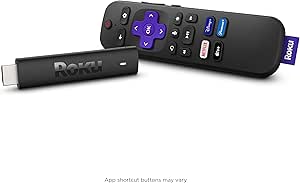 | Best Renewed Roku Option | Model: 3820R | Condition: Renewed | Video resolution: 4K | VIEW LATEST PRICE | See Our Full Breakdown |
| Google TV Streamer 4K with Voice Remote, 32 GB, Hazel |  | Best for Google TV Households | Resolution: 4K (3840 × 2160) | Video support: HDR, Dolby Vision | Connectivity: Ethernet, Wi-Fi, HDMI | VIEW LATEST PRICE | See Our Full Breakdown |
| Amazon Fire TV Stick 4K Max (2nd Gen) Streaming Device |  | Best for Alexa and Wi-Fi 6E | Processor: Quad-core 2.0 GHz | Storage: 16 GB | Wi-Fi: Wi-Fi 6E tri-band (2.4 GHz, 5 GHz, and 6 GHz) | VIEW LATEST PRICE | See Our Full Breakdown |
| Roku Ultra 4K Streaming Player with Voice Remote Pro |  | Best Roku Premium Pick | Video output resolution: 3840 × 2160 pixels | Video formats: HDR10, HDR10+, Dolby Vision, H.264/AVC, H.265/HEVC, AV1, VP9 | Connectivity: Bluetooth, Ethernet, HDMI, USB, Wi-Fi 6 | VIEW LATEST PRICE | See Our Full Breakdown |
| Amazon Fire TV Stick 4K Plus with Alexa Voice Remote |  | Best for Wi-Fi 6 households | Maximum resolution: 2160p at up to 60 fps | HDR formats: Dolby Vision, HDR10, HDR10+, HLG | Audio: Dolby Atmos; 7.1 surround sound; HDMI passthrough up to 5.1 | VIEW LATEST PRICE | See Our Full Breakdown |
| Roku Ultra LT 4K Streaming Device with Dolby Vision, Dual-Band Wi-Fi, Voice Remote, HDMI Cable, and USB Extension Cord |  | Best for a straightforward Roku setup | Resolution: 4K UHD (3840 × 2160) | HDR: Dolby Vision | Wireless: 802.11ac dual-band Wi-Fi | VIEW LATEST PRICE | See Our Full Breakdown |
| TiVo Stream 4K Streaming Media Player |  | Best for combining streaming and live TV discovery | Resolution: 4K | HDR: Dolby Vision | Audio: Dolby Atmos | VIEW LATEST PRICE | See Our Full Breakdown |
| Amazon Fire TV Stick 4K Select with Alexa Voice Remote |  | Best entry-level 4K Fire TV pick | Maximum resolution: 2160p at up to 60 fps | HDR formats: HDR10, HDR10+, HLG | Audio: HDMI passthrough for Dolby-encoded audio | VIEW LATEST PRICE | See Our Full Breakdown |
| Apple TV HD (4th Generation), 32GB, Black (Renewed) |  | Best for older 1080p Apple setups | Model: Apple TV (4th Generation), MR912BZ/A | Resolution: 1080p (1920 × 1080) | Storage: 32 GB | VIEW LATEST PRICE | See Our Full Breakdown |
| Roku Streaming Stick 4K with Voice Remote |  | Best Compact Roku Pick | Model: 3820CA2 | Connection: Wi-Fi | Connector: HDMI | VIEW LATEST PRICE | See Our Full Breakdown |
| Apple TV 4K (3rd Generation), 64GB, Wi-Fi, Black (Renewed) |  | Best for Apple Ecosystems | Model: Apple TV 4K (3rd generation), MN873LL/A | Storage: 64GB | Connectivity: Wi-Fi, Bluetooth, Thread | VIEW LATEST PRICE | See Our Full Breakdown |
| Apple TV streaming device | Connectivity | Storage | Audio |
|---|---|---|---|
| Roku Streaming Stick 4K with V | Wi-Fi, HDMI | — | — |
| Roku Streaming Stick 4K with V | HDMI; long-range Wi-Fi | 4 GB | — |
| Google TV Streamer 4K with Voi | Ethernet, Wi-Fi, HDMI | 32 GB | — |
| Amazon Fire TV Stick 4K Max | — | 16 GB | Dolby Atmos, 7.1 surround sound, stereo, HDMI audio pass-through |
| Roku Ultra 4K Streaming Player | Bluetooth, Ethernet, HDMI, USB, Wi-Fi 6 | — | Dolby Atmos |
| Amazon Fire TV Stick 4K Plus w | — | 8 GB | Dolby Atmos; 7.1 surround sound; HDMI passthrough up to 5.1 |
| Roku Ultra LT 4K Streaming Dev | — | — | — |
| TiVo Stream 4K Streaming Media | Wi-Fi, HDMI | — | Dolby Atmos |
| Amazon Fire TV Stick 4K Select | — | 8 GB | HDMI passthrough for Dolby-encoded audio |
| Apple TV HD | Wireless, HDMI | 32 GB | Dolby Digital Plus 7.1 |
| Roku Streaming Stick 4K with V | — | — | — |
| Apple TV 4K | Wi-Fi, Bluetooth, Thread | 64GB | Dolby Atmos |
More Details on Our Top Picks
Roku Streaming Stick 4K with Voice Remote
For buyers who want a compact way to stream Apple TV+ and other services, this Roku stick pairs 4K video with Dolby Vision and HDR10+ without occupying much space around the TV. Its long-range Wi-Fi receiver is useful when the screen is farther from the router, while the slim HDMI design is less likely than a box-style player to block a neighboring port. Compared with the Roku Ultra, it gives up Ethernet, Bluetooth headphone support, and the rechargeable remote, so it suits simpler setups rather than viewers who want extra connections and remote conveniences. The included voice remote handles searches and compatible TV controls. You’ll need an HDMI-equipped TV and reliable internet, and the supplied specs list 1 GB of RAM, a constraint for buyers focused on hardware headroom.
Pros:- Supports 4K UHD, Dolby Vision, and HDR10+ on compatible TVs
- Long-range Wi-Fi can help in rooms farther from the router
- Slim HDMI stick design leaves nearby TV ports easier to reach
- Voice remote supports searching and compatible TV controls
Cons:- Requires an HDMI port, compatible 4K TV for 4K playback, and internet access
- No Ethernet or Bluetooth headphone support is listed
- Listed RAM is 1 GB
Best for: Viewers who want a small 4K Roku device that can tuck behind the TV and stream Apple TV+ alongside other services.
Not ideal for: People who want wired Ethernet, Bluetooth headphone listening, or the rechargeable, hands-free remote features of the Roku Ultra.
- Model:3820R2
- Video output:4K UHD, up to 2160p at 60 fps
- HDR formats:Dolby Vision, HDR10, HDR10+
- Connectivity:Wi-Fi, HDMI
- Memory:1 GB RAM, 16 GB storage
- Voice control:Yes
- Dimensions:3.7 × 0.8 × 0.45 in
Our verdict“Choose this compact Roku stick for 4K Apple TV+ streaming and long-range Wi-Fi, but choose the Roku Ultra if you want Ethernet and a more capable remote.”
Roku Streaming Stick 4K with Voice Remote (Renewed)
This renewed Roku stick makes sense for buyers who want the same core 4K, Dolby Vision, and HDR10+ streaming format support as the standard Roku Streaming Stick 4K, while accepting a renewed condition and a 90-day limited warranty. It can stream Apple TV+ through Roku’s channel platform, and the voice remote covers searches, playback, and compatible TV power and volume. Its long-range Wi-Fi is a useful fit when the TV is not close to the router. Compared with the new Roku Streaming Stick 4K, the main distinction here is condition and warranty coverage, not a clear feature upgrade; its listed storage is 4 GB, versus 16 GB in the other model’s specs. Buyers who value a longer warranty or want the Roku Ultra’s Ethernet and rechargeable remote should look elsewhere.
Pros:- Supports 4K video, Dolby Vision, and HDR10+
- Voice remote handles searches, playback, and compatible TV controls
- Long-range Wi-Fi suits TVs located away from the router
- Provides access to free, live, and subscription channels
Cons:- Renewed condition may not suit buyers who want a new device
- Includes a 90-day limited warranty
- Requires an HDMI port and internet; some content needs paid subscriptions
Best for: Shoppers comfortable buying a renewed streaming stick who want Roku access to Apple TV+ and 4K HDR playback.
Not ideal for: Buyers who prefer a new device, want a longer warranty, or need the Roku Ultra’s Ethernet and advanced remote features.
- Model:3820R
- Condition:Renewed
- Video resolution:4K
- Supported formats:Dolby Vision, HDR10+
- Connectivity:HDMI; long-range Wi-Fi
- Storage:4 GB
- Warranty:90-day limited warranty
Our verdict“Pick this renewed Roku stick if its core 4K HDR features meet your needs and you accept renewed condition and shorter warranty coverage.”
Google TV Streamer 4K with Voice Remote, 32 GB, Hazel
The Google TV Streamer is the strongest fit here for viewers who want a 32 GB device and a content-first home screen that brings services together with personalized recommendations and a watchlist. It supports 4K HDR with Dolby Vision, voice search, and smart home control, giving it a broader living-room role than the Roku Streaming Stick 4K’s compact, stick-only setup. Its Ethernet connection also offers a wired option that the stick lacks, although Wi-Fi is available too. The tradeoff is setup: an HDMI 2.1 cable is required but not included, so buyers need to supply one. Unlike the Fire TV Stick 4K Max, this model’s listed strengths center on Google TV organization and storage rather than Wi-Fi 6E and Alexa remote controls.
Pros:- Google TV brings multiple services together with recommendations and a watchlist
- Supports 4K HDR with Dolby Vision
- 32 GB storage and 4 GB RAM are listed
- Includes Ethernet as well as Wi-Fi connectivity
Cons:- HDMI 2.1 cable is required but sold separately
- Its larger set-top design is less discreet than a streaming stick
Best for: Viewers invested in Google TV and smart home features who want a 4K Dolby Vision streamer with more listed storage and Ethernet.
Not ideal for: People who want everything needed for HDMI connection in the box or prefer Alexa controls and Wi-Fi 6E.
- Resolution:4K (3840 × 2160)
- Video support:HDR, Dolby Vision
- Connectivity:Ethernet, Wi-Fi, HDMI
- Storage:32 GB
- RAM:4 GB
- Controller:Voice remote
- Warranty:1 year
Our verdict“Choose the Google TV Streamer if you value content organization, Ethernet, and 32 GB storage more than a hidden stick design or Alexa features.”
Amazon Fire TV Stick 4K Max (2nd Gen) Streaming Device
Among these options, the Fire TV Stick 4K Max is the pick for buyers with a compatible newer router who want Wi-Fi 6E, 16 GB of storage, and Alexa control in a compact HDMI device. It supports 4K formats including Dolby Vision and HDR10+, plus Dolby Atmos audio, so it can serve as a capable hub for compatible home theater gear. Compared with the Roku Streaming Stick 4K, it adds Wi-Fi 6E and a remote with IR device control, but those advantages matter only if your router and equipment support them. Its remote is better suited to Alexa-centered homes than the Roku Ultra’s rechargeable, backlit remote with hands-free voice control. Some services and features require subscriptions or compatible equipment, and a compatible 4K TV is needed for 4K playback.
Pros:- Supports 4K, Dolby Vision, HDR10+, and Dolby Atmos
- Wi-Fi 6E tri-band connectivity for compatible routers
- 16 GB storage and a quad-core 2.0 GHz processor
- Alexa remote includes voice control and IR device control
Cons:- Wi-Fi 6E benefits require a compatible router
- Some services and features require subscriptions or compatible equipment
- 4K playback requires a compatible Ultra HD TV
Best for: Alexa users with a Wi-Fi 6E router who want a compact 4K streamer with Dolby Atmos support and IR control for compatible devices.
Not ideal for: Households without Wi-Fi 6E that would rather have Ethernet or Roku Ultra’s rechargeable, backlit remote features.
- Processor:Quad-core 2.0 GHz
- Storage:16 GB
- Wi-Fi:Wi-Fi 6E tri-band (2.4 GHz, 5 GHz, and 6 GHz)
- Video formats:Dolby Vision, HDR10, HDR10+, HLG, H.265, H.264, VP9, AV1
- Audio:Dolby Atmos, 7.1 surround sound, stereo, HDMI audio pass-through
- Output resolution:2160p, 1080p, and 720p up to 60 fps
- Remote:Alexa Voice Remote Enhanced with voice control and IR device control
Our verdict“Choose the Fire TV Stick 4K Max if Alexa and Wi-Fi 6E fit your setup; otherwise, the Roku Streaming Stick 4K offers a simpler alternative.”
Roku Ultra 4K Streaming Player with Voice Remote Pro
The Roku Ultra is the most connected Roku option in this group, pairing 4K Dolby Vision and HDR10+ with Wi-Fi 6, Ethernet, and Bluetooth headphone support. That mix gives buyers more ways to handle network and listening needs than the Roku Streaming Stick 4K, which keeps things smaller but omits the listed wired connection and headphone support. The rechargeable Voice Remote Pro adds backlit buttons, hands-free voice control, and a lost remote finder—useful conveniences for regular viewers. It also supports Dolby Atmos and current video formats including AV1. The tradeoff is a box-style player rather than a stick that hides behind the screen, and its expanded features may be unnecessary for a basic TV setup. You still need compatible equipment and internet access for streaming.
Pros:- Supports 4K, Dolby Vision, HDR10+, and Dolby Atmos
- Offers Wi-Fi 6, Ethernet, and Bluetooth headphone support
- Rechargeable remote includes backlit buttons, hands-free voice, and a lost remote finder
- Supports AV1 video
Cons:- Box-style player is less discreet than a stick behind the TV
- Requires a compatible TV and internet connection for streaming
- Its added connectivity and remote features may be unnecessary for simple setups
Best for: Frequent Roku viewers who want Ethernet or Bluetooth headphone listening and will use the rechargeable, hands-free remote features.
Not ideal for: Buyers who want the smallest possible device or only need straightforward streaming through a basic HDMI stick.
- Video output resolution:3840 × 2160 pixels
- Video formats:HDR10, HDR10+, Dolby Vision, H.264/AVC, H.265/HEVC, AV1, VP9
- Connectivity:Bluetooth, Ethernet, HDMI, USB, Wi-Fi 6
- Audio:Dolby Atmos
- Remote:USB-C charging, backlit buttons, hands-free voice control, lost remote finder
- Dimensions:5 × 4.9 × 1 in
- Supported services:Apple TV+, Disney+, Hulu, Netflix, Prime Video
Our verdict“Choose the Roku Ultra for its Ethernet, Bluetooth headphone support, and feature-rich rechargeable remote; choose the Roku Streaming Stick 4K for a more discreet setup.”
Amazon Fire TV Stick 4K Plus with Alexa Voice Remote
I’d choose the Fire TV Stick 4K Plus for a home where several devices compete for Wi-Fi and the TV can take advantage of 4K HDR. Its Wi-Fi 6 support can help keep streaming responsive on a compatible network, while Dolby Vision, HDR10+, and Dolby Atmos cover a broad range of home theater formats. Alexa voice search and smart home controls add convenience beyond finding shows. Compared with the Fire TV Stick 4K Select, this model adds Wi-Fi 6 and Dolby Vision support, making it the stronger fit for a newer entertainment setup. The tradeoff is that those features depend on compatible equipment, and its 8 GB storage is modest. I’d skip it if you mainly watch HD or want a device dedicated to Apple services.
Pros:- Supports 4K at up to 60 fps with Dolby Vision and HDR10+
- Wi-Fi 6 can suit busy homes with compatible routers
- Dolby Atmos support for compatible audio equipment and content
- Alexa remote supports voice search and compatible smart home controls
Cons:- Wi-Fi 6 and 4K HDR benefits require compatible home equipment
- Some apps, content, and cloud gaming require separate subscriptions
- 8 GB of storage limits room for installed apps
Best for: Households with a Wi-Fi 6 router and a 4K Dolby Vision TV that also want Alexa smart home controls
Not ideal for: Viewers with an HD-only television, an older router, or a preference for Apple’s tvOS and ecosystem
- Maximum resolution:2160p at up to 60 fps
- HDR formats:Dolby Vision, HDR10, HDR10+, HLG
- Audio:Dolby Atmos; 7.1 surround sound; HDMI passthrough up to 5.1
- Processor:Quad-core 1.7 GHz
- Storage:8 GB
- Wireless:Dual-band Wi-Fi 6; Bluetooth 5.2 + BLE
- Ports:HDMI 2.1 output with ARC input support; micro USB
- Dimensions and weight:99 × 30 × 14 mm housing; 43.5 g
Our verdict“Pick this Fire TV Stick if you want broad 4K HDR support and Wi-Fi 6 on a compatible setup, but skip it if Apple TV integration is your priority.”
Roku Ultra LT 4K Streaming Device with Dolby Vision, Dual-Band Wi-Fi, Voice Remote, HDMI Cable, and USB Extension Cord
The Roku Ultra LT is a practical choice if you want a familiar, service-focused interface and a box-style player rather than an HDMI stick. It handles 4K UHD and Dolby Vision, and the included voice remote can control the player, TV power, and volume. Roku OS gives it a different feel from the Fire TV Stick 4K Plus: this pick centers on finding and opening streaming services, while the Fire TV option brings Alexa smart home controls and Wi-Fi 6. The Roku package also includes an HDMI cable and USB extension cord, which can simplify setup. Its main limitation is wireless dependence: the listing calls for a strong Wi-Fi connection at high picture quality, and there’s no stated Dolby Atmos support. Apple TV+ is available as a service, but this is not an Apple TV device.
Pros:- Supports 4K UHD and Dolby Vision
- Voice remote controls streaming, TV power, and volume
- HDMI cable and USB extension cord are included
- Roku OS supports services including Apple TV+
Cons:- High-quality streaming depends on a strong Wi-Fi connection
- Wireless specification is 802.11ac rather than Wi-Fi 6
- Dolby Atmos support is not listed
Best for: Viewers who want a simple Roku interface, a TV-controlling voice remote, and included setup cables
Not ideal for: Buyers seeking an Apple-designed device, Wi-Fi 6, or listed Dolby Atmos support
- Resolution:4K UHD (3840 × 2160)
- HDR:Dolby Vision
- Wireless:802.11ac dual-band Wi-Fi
- Operating system:Roku OS
- RAM and storage:2 GB RAM; 2 GB storage capacity
- Video codec:HEVC (H.265)
- Included accessories:Voice remote, HDMI cable, USB extension cord
- Dimensions and weight:5 × 4.9 × 1 in; 5.9 oz
Our verdict“Choose the Roku Ultra LT for an approachable Roku experience with included cables, but choose the Fire TV Stick 4K Plus if Wi-Fi 6 or Alexa smart home control matters more.”
TiVo Stream 4K Streaming Media Player
The TiVo Stream 4K stands apart by bringing streaming apps and live TV discovery together with cross-app search, watch lists, and personalized recommendations. That can help viewers who browse across services decide what to watch without treating each app as a separate destination. It also supports 4K, Dolby Vision, and Dolby Atmos, plus Google Assistant voice control through Android TV. Compared with the Roku Ultra LT, TiVo puts more emphasis on unified recommendations and search; Roku is the simpler fit for people who mainly want a straightforward service menu and a remote that controls TV power and volume. The TiVo has only 2 GB of RAM and 8 GB of storage, and it relies on Wi-Fi for streaming. I’d choose it for discovery, not as an Apple ecosystem companion.
Pros:- Combines streaming apps and live TV discovery features
- Cross-app search and watch lists can simplify finding programs
- Supports 4K, Dolby Vision, and Dolby Atmos
- Google Assistant voice control is integrated
Cons:- Streaming requires Wi-Fi
- 2 GB RAM and 8 GB storage are limited
- The 90-day warranty is short compared with what some buyers may expect
Best for: Viewers who switch between live TV and several streaming apps and want cross-service search and watch lists
Not ideal for: Apple ecosystem-focused buyers or households that need wired networking or generous app storage
- Resolution:4K
- HDR:Dolby Vision
- Audio:Dolby Atmos
- Operating system:Android TV
- RAM and storage:2 GB RAM; 8 GB storage
- Video codec:VP9 Profile 2
- Connectivity:Wi-Fi, HDMI
- Dimensions:3.03 × 2.09 × 0.63 in
- Warranty:90 days
Our verdict“Choose the TiVo Stream 4K if cross-app discovery and live TV matter more than an Apple-native interface or extra storage.”
Amazon Fire TV Stick 4K Select with Alexa Voice Remote
The Fire TV Stick 4K Select makes sense for a buyer who wants 4K streaming and Alexa without needing the more advanced connectivity of the Fire TV Stick 4K Plus. It supports HDR10+, HLG, and 4K up to 60 fps, along with voice search, compatible TV controls, and access to ad-supported content. Against the 4K Plus, the Select gives up Dolby Vision and Wi-Fi 6, so I’d favor it for a simpler setup with a standard dual-band router and a TV that supports HDR10+ rather than Dolby Vision. Its 8 GB storage is shared with the Plus, and cloud gaming depends on compatible services, subscriptions, and a controller. This is a Fire TV option, not a substitute for Apple TV hardware or tvOS.
Pros:- Streams up to 4K at 60 fps
- Supports HDR10+ and HLG
- Alexa Voice Remote supports search and compatible TV controls
- Offers access to streaming apps and free ad-supported content
Cons:- Does not list Dolby Vision support, unlike the Fire TV Stick 4K Plus
- Wi-Fi specification stops at 802.11ac
- Cloud gaming can require subscriptions and a compatible controller
Best for: 4K TV owners who want Alexa voice search and HDR10+ without needing Wi-Fi 6 or Dolby Vision
Not ideal for: Buyers with a Dolby Vision display, a Wi-Fi 6 network they want to use, or a preference for Apple TV integration
- Maximum resolution:2160p at up to 60 fps
- HDR formats:HDR10, HDR10+, HLG
- Audio:HDMI passthrough for Dolby-encoded audio
- Processor:Quad-core 1.7 GHz
- Storage:8 GB
- Wireless:Dual-band, dual-antenna MIMO; 802.11a/b/g/n/ac
- Bluetooth:Bluetooth 5.0 and Bluetooth Low Energy
- Ports:HDMI output; micro-USB for power
- Dimensions and weight:99 × 30 × 14 mm; 42 g
Our verdict“Pick the 4K Select for Alexa and HDR10+ on a basic 4K setup, but step up to the 4K Plus if Dolby Vision or Wi-Fi 6 is a priority.”
Apple TV HD (4th Generation), 32GB, Black (Renewed)
This Apple TV HD is the Apple-native choice here, but its age and 1080p ceiling make it a narrow recommendation. Siri voice control and AirPlay suit households that already use Apple devices and want to send compatible content to a television. Its 32 GB storage also exceeds the 8 GB listed for both Fire TV sticks, giving more room for apps. Yet the Fire TV Stick 4K Plus and Roku Ultra LT both support 4K, while this renewed Apple model tops out at 1080p. That difference matters most on a 4K TV or for viewers choosing a device to keep for years. The renewed condition also means prior use, so I’d reserve this for someone with an HD television who specifically values AirPlay and Siri over newer video formats.
Pros:- Integrates Siri voice control and AirPlay
- 32 GB storage provides more capacity than the listed Fire TV sticks
- Supports Dolby Digital Plus 7.1 audio
- Provides access to supported streaming and entertainment apps
Cons:- Maximum resolution is 1080p, below the 4K support of the Fire TV Stick 4K Plus and Roku Ultra LT
- Renewed condition means the device may have been used previously
- Older fourth-generation model may be a poor fit for buyers seeking newer hardware
Best for: Apple-device owners with a 1080p television who want AirPlay, Siri, and access to supported streaming apps
Not ideal for: 4K TV owners, buyers seeking current-generation Apple TV hardware, or anyone uncomfortable purchasing a renewed device
- Model:Apple TV (4th Generation), MR912BZ/A
- Resolution:1080p (1920 × 1080)
- Storage:32 GB
- Audio:Dolby Digital Plus 7.1
- Chip:Apple A8
- Connectivity:Wireless, HDMI
- Control:Remote control and voice control
- Condition:Renewed
Our verdict“Choose this renewed Apple TV HD only for a 1080p screen and a strong need for Siri or AirPlay; 4K viewers should select a newer 4K streamer.”
Roku Streaming Stick 4K with Voice Remote
The Roku Streaming Stick 4K is a strong fit for viewers who want 4K streaming in a small HDMI-connected device without committing to an Apple-only setup. It supports Dolby Vision and HDR10+, while AirPlay makes it easy to send compatible content from an iPhone, iPad, or Mac. Its long-range Wi-Fi receiver is designed to help in rooms where the router is farther away, and the voice remote also controls TV functions. Compared with the Apple TV 4K (3rd Generation), this Roku is less centered on Apple services and smart-home features, but it offers a compact stick form and access to a broad range of streaming apps. The tradeoff is that picture quality depends on the TV and the content, and some channels require separate subscriptions or may not be available in every region.
Pros:- Supports 4K, Dolby Vision, and HDR10+ on compatible TVs and content
- AirPlay support makes sharing from compatible Apple devices straightforward
- Long-range Wi-Fi receiver is designed to improve reception farther from the router
- Voice remote includes TV controls
Cons:- Does not list Dolby Atmos audio support
- Some channels require separate payment, and service availability varies by region
- Supported resolution depends on the TV and the selected content
Best for: Viewers who want a compact 4K streamer with AirPlay, voice control, and access to a broad selection of services.
Not ideal for: Apple-focused households seeking an Apple TV interface, Dolby Atmos support, or Thread smart-home hub features.
- Model:3820CA2
- Connection:Wi-Fi
- Connector:HDMI
- Maximum video resolution:3840 × 2160
- Video formats:Dolby Vision, H.265/HEVC
- Supported services:Apple TV+, Netflix, Disney+, Prime Video, YouTube, and others
- Controller:Voice remote
- Dimensions:0.45 × 0.83 × 3.72 inches
Our verdict“Choose this compact Roku if you want 4K, AirPlay, and broad app access, but pick the Apple TV 4K for deeper Apple and smart-home integration.”
Apple TV 4K (3rd Generation), 64GB, Wi-Fi, Black (Renewed)
For households already using iPhones, iPads, or other Apple services, this Apple TV 4K offers the most direct fit in this pair. Its A15 Bionic chip, Siri voice commands, and touch-enabled clickpad support a polished Apple TV experience, while 4K Dolby Vision, HDR10+, and Dolby Atmos cover compatible home theater setups. Thread support also gives it a role beyond streaming as a smart-home hub. Against the Roku Streaming Stick 4K, it brings tighter Apple integration and Atmos support, but it is a box-style device rather than a compact stick and may be more than needed for viewers who mainly want access to popular apps. This listing is renewed, with a 90-day limited warranty, so buyers should weigh that shorter coverage against choosing a new device. It also requires an HD-capable TV.
Pros:- 4K Dolby Vision and HDR10+ support for compatible TVs and content
- Dolby Atmos support for compatible audio equipment and programming
- A15 Bionic chip and Siri Remote with touch control and voice commands
- Thread support adds smart-home hub functionality
Cons:- Renewed condition comes with a 90-day limited warranty
- Requires an HD-capable TV and compatible content to deliver its video formats
- Box-style design is less discreet than the Roku Streaming Stick 4K
Best for: Apple households that want a dedicated 4K streamer with Dolby Atmos, Siri control, and Thread smart-home hub support.
Not ideal for: Buyers who want a new device with longer warranty coverage, a low-profile HDMI stick, or only basic access to streaming apps.
- Model:Apple TV 4K (3rd generation), MN873LL/A
- Storage:64GB
- Connectivity:Wi-Fi, Bluetooth, Thread
- Video formats:4K Dolby Vision, HDR10+
- Audio:Dolby Atmos
- Chip:A15 Bionic
- Included components:Apple TV 4K, power cord, Siri Remote
- Warranty:90-day limited warranty
- Dimensions:4 × 6 × 2 inches
Our verdict“Pick this renewed Apple TV 4K for Apple services, Dolby Atmos, and Thread support, provided its 90-day warranty suits you.”

How We Picked
I ranked these devices by how well they serve the search behind “best Apple TV streaming devices”: choosing between Apple’s own streaming hardware and other players that provide access to the Apple TV app. The main criteria were platform fit, stated video format support, remote and setup convenience, storage where specified, and whether the form factor suits a crowded TV area or a more permanent setup. I also accounted for renewed listings, where condition and seller terms can matter as much as the device name.
The Apple TV 4K leads for shoppers who want Apple’s own platform, while Roku, Google TV, Fire TV, and TiVo picks earn places for distinct interface and setup preferences. Similar Roku and Fire TV entries are separated by their model, bundled remote, and intended buyer rather than being presented as entirely different classes of device. The renewed Apple TV HD ranks as a legacy option, not a peer to the newer 4K choice. Since the list includes duplicate Roku listings and models from different generations, I treat the exact product and condition as part of the buying decision.
| Apple TV streaming device | Connectivity | Audio |
|---|---|---|
| Roku Streaming Stick 4K with V | Wi-Fi, HDMI | — |
| Roku Streaming Stick 4K with V | HDMI; long-range Wi-Fi | — |
| Google TV Streamer 4K with Voi | Ethernet, Wi-Fi, HDMI | — |
| Amazon Fire TV Stick 4K Max | — | Dolby Atmos, 7.1 surround sound, stereo, HDMI audio pass-through |
| Roku Ultra 4K Streaming Player | Bluetooth, Ethernet, HDMI, USB, Wi-Fi 6 | Dolby Atmos |
| Amazon Fire TV Stick 4K Plus w | — | Dolby Atmos; 7.1 surround sound; HDMI passthrough up to 5.1 |
| Roku Ultra LT 4K Streaming Dev | — | — |
| TiVo Stream 4K Streaming Media | Wi-Fi, HDMI | Dolby Atmos |
| Amazon Fire TV Stick 4K Select | — | HDMI passthrough for Dolby-encoded audio |
| Apple TV HD | Wireless, HDMI | Dolby Digital Plus 7.1 |
| Roku Streaming Stick 4K with V | — | — |
| Apple TV 4K | Wi-Fi, Bluetooth, Thread | Dolby Atmos |
Factors to Consider When Choosing Best Apple TV Streaming Devices
Before choosing, settle one point: do you want an Apple-made device, or a different streaming player that can run the Apple TV app? That distinction prevents a common mismatch between the search term and the product you actually need. Then weigh your TV, network, preferred interface, and comfort with renewed electronics.
Decide Whether You Need Apple Hardware or the Apple TV App
“Apple TV” can mean Apple’s streaming box, the Apple TV app, or the Apple TV+ service, and listings may blur those meanings. If you want tvOS and close integration with other Apple devices, prioritize an Apple TV model. If your goal is simply watching Apple TV content, a Roku, Fire TV, Google TV, or TiVo device may be enough if the app is available for that model and region. Check app availability before buying, especially for older hardware. This distinction can prevent paying for a platform you do not need—or buying an alternative that lacks the Apple-specific experience you expected.
Match the Device to Your TV and Connection
Check your TV’s available HDMI ports, resolution, and support for formats such as Dolby Vision before choosing a player. A device’s listed capability only helps when the television and the content support it too. Streaming sticks are useful when space behind the TV is tight, but they can be awkward if the HDMI ports are recessed or crowded. Box-style players may fit better in a media cabinet and can suit a more permanent setup. Also check whether the required HDMI cable is included; the Roku Ultra LT listing names one, while other bundles may differ.
Choose an Interface You Will Want to Use
The home screen shapes everyday use more than a long feature list does. Roku, Fire TV, Google TV, TiVo, and tvOS organize apps and recommendations differently, so consider which interface feels natural for your household. Voice controls can help people who prefer searching by speaking, but remote design and voice assistant support vary by model. If family members already use Alexa, Google services, or Apple devices, that ecosystem may make setup and control feel more familiar. Avoid choosing by brand loyalty alone: confirm that your preferred apps and controls are supported on the specific device.
Treat Storage and Performance Claims as Practical Questions
Extra storage matters most if you install many apps or want room for features that depend on local capacity; it may add little for a household that uses a handful of streaming services. The Google TV Streamer listing specifies 32 GB, while the Apple TV 4K listing here specifies 64 GB, but those figures do not by themselves tell you how fast a device feels. Software support, network quality, and interface design also shape responsiveness. A stable Wi-Fi connection can matter more to playback than a storage upgrade. Choose capacity around your habits rather than assuming the largest number is automatically the best fit.
Compare Renewed Listings with Extra Care
Renewed hardware can make an older or higher-tier device accessible, but condition, included accessories, return terms, and warranty coverage can vary by seller. Check whether the remote, power supply, and any required cables are included before comparing it with a new listing. The Apple TV HD is an older generation and lacks the straightforward appeal of the 4K model for a compatible 4K television. A renewed Apple TV 4K may suit a buyer who wants Apple’s platform, but confirm the generation and connectivity details in the listing. Do not assume that “renewed” means identical condition or packaging across products.
Pick a Form Factor That Fits the Room
A streaming stick keeps the visible setup small and can travel easily between compatible TVs, which suits renters or secondary rooms. A separate player is easier to place on a shelf and may be preferable when the TV’s HDMI layout makes a stick inconvenient. Consider Wi-Fi coverage at the device location as well as its physical footprint; a compact player cannot compensate for a weak signal. Remote range, power access, and cable routing can affect daily convenience. The best form factor is the one that works cleanly with your particular TV and room, not simply the smallest device.
Frequently Asked Questions
Do I need an Apple TV device to watch Apple TV+?
No. Apple TV+ can be watched through the Apple TV app on supported streaming devices and televisions, so a Roku, Fire TV, Google TV, or TiVo player may work for that purpose. App availability depends on the specific model and region, so verify it before ordering. Buying an Apple TV box makes more sense if you specifically want tvOS or Apple’s hardware integration. If you only want the service, choosing another compatible platform can avoid paying for features you will not use.
Which pick makes the most sense if I own an iPhone and other Apple devices?
The Apple TV 4K is the most direct match if you want Apple’s own interface and integration with an Apple-centered household. The Roku, Fire TV, and Google TV models can still be suitable for streaming Apple TV content, but they use their own operating systems. Before deciding, check which Apple features matter to you beyond video playback, since app access alone does not make another device equivalent to tvOS. Also confirm that the specific Apple TV 4K listing is the generation and condition you intend to buy.
Should I choose a renewed Apple TV 4K or a new Roku or Fire TV stick?
Choose based on platform preference and listing confidence, not on the renewed label alone. A renewed Apple TV 4K suits someone who wants Apple hardware and is comfortable checking condition, included accessories, and seller return terms. A new Roku or Fire TV stick may be simpler if you want a compact setup and do not need tvOS. Check HDMI compatibility and the apps you use most on either option. If the renewed listing lacks clear condition or support details, a clearly specified alternative may be the less uncertain purchase.
Is an older Apple TV HD still a sensible buy for a 4K television?
It is a harder match for a 4K television because the Apple TV HD is an older, HD-focused model, while this roundup also includes an Apple TV 4K. The HD model may suit a secondary screen that does not need 4K playback, provided its apps and support still meet your needs. Check the listing’s generation, condition, and included remote carefully because it is renewed hardware. For a main 4K screen, the newer 4K option is the more fitting choice among the Apple devices listed here.
How should I choose between the repeated Roku Streaming Stick 4K listings?
Start by checking whether each listing is new or renewed and whether the bundle includes the same voice remote and accessories. The product names here repeat the Roku Streaming Stick 4K, so the list does not imply three distinct hardware designs. Compare the exact listing condition, seller terms, and package contents rather than relying on a repeated title. If those details are alike, choose the listing that gives you the clearest information and support. If you want a separate player rather than a stick, compare the Roku Ultra models instead.
Conclusion
For best overall Apple hardware, choose the Apple TV 4K (3rd Generation) if you want tvOS and Apple-device integration. For best value in a compact setup, the Roku Streaming Stick 4K is a straightforward alternative, while buyers who want to compare renewed listings should check condition and included accessories carefully. The Google TV Streamer 4K is a stronger match for people who prefer Google TV and want its stated 32 GB storage; Roku Ultra models better suit buyers who want a separate player. For beginners, Roku’s stick form factor keeps the setup simple, while Alexa users may prefer a Fire TV model. Choose the renewed Apple TV HD only for an HD screen or a specific legacy need, and verify the listing details before buying.
Black Friday Picks

Bose TV Speaker Compact Soundbar with Bluetooth and HDMI-ARC, Black
As an affiliate, we earn on qualifying purchases.