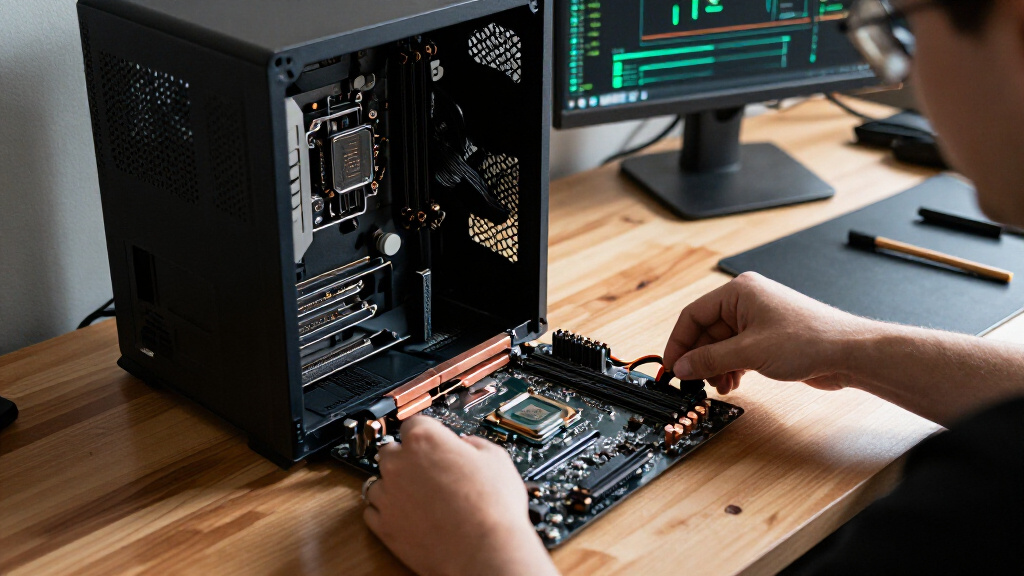

The best LGA 1700 motherboard overall in this roundup is the MSI PRO Z790-A WiFi II, which balances a high-end chipset, modern connectivity, and practical features without the specialist focus of a flagship gaming board. The ASUS TUF Gaming Z790-Plus WiFi is a strong alternative for a durable gaming build, while the GIGABYTE B760M Gaming Plus WiFi DDR4 suits buyers who want a more compact DDR4 system. Your main tradeoffs are chipset features versus board cost and expansion, DDR4 reuse versus a newer DDR5 build, and ATX flexibility versus Micro-ATX size. The 15 options range from basic H610 boards to premium Z790 models, so the right choice depends on your processor, case, memory, and plans for upgrades. Read on for the full breakdown and guidance on matching a board to your build.

Get the latest gadgets delivered free with Prime
- Fast, free delivery on millions of items
- Prime Video, Amazon Music and more included
- Member-only deals all year
Complete the kit



Key Takeaways
- Z790 is not automatically the right pick: it brings more enthusiast-oriented options, but B760 can be a better match if CPU overclocking and extra expansion are not priorities.
- DDR4 boards can make an existing build easier to reuse: several B760 picks support DDR4, while buyers assembling a new system should check memory type before choosing RAM.
- The MSI PRO Z790-A WiFi II stands out as the balanced pick: it pairs Z790 flexibility with a more practical feature mix than the premium ASUS ROG Maximus Z790 Hero.
- Compact builds have capable choices: Micro-ATX boards such as the GIGABYTE B760M Gaming Plus WiFi DDR4 offer a smaller footprint, but typically provide less room for expansion than ATX boards.
- H610 is best treated as a basic-platform choice: the ASRock H610M-HDV/M.2 R2.0 and MSI PRO H610M-G DDR4 suit simpler builds better than upgrade-heavy or feature-demanding systems.
| ASRock H610M-HDV/M.2 R2.0 Micro-ATX Motherboard |  | Best Entry-Level LGA 1700 Pick | Form factor: Micro-ATX | Chipset: Intel H610 | Processor socket: LGA 1700 | VIEW LATEST PRICE | See Our Full Breakdown |
| ASUS Z790 MAX GAMING WIFI7 ATX Motherboard |  | Best for Newer Wireless and DDR5 | Form factor: ATX | Chipset: Intel Z790 | Processor socket: LGA 1700 | VIEW LATEST PRICE | See Our Full Breakdown |
| GIGABYTE B760M Gaming Plus WiFi DDR4 Micro-ATX Motherboard |  | Best DDR4 Upgrade-Friendly Micro-ATX Pick | Form factor: Micro-ATX | Chipset: Intel B760 | Processor socket: LGA 1700 | VIEW LATEST PRICE | See Our Full Breakdown |
| ASUS ROG Maximus Z790 Hero WiFi 6E ATX Gaming Motherboard | 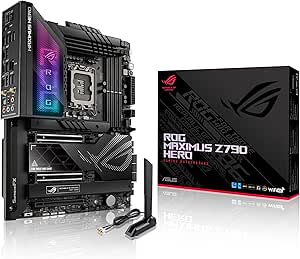 | Best Premium Overclocking and Expansion Pick | Form factor: ATX | Chipset: Intel Z790 | Processor socket: LGA 1700 | VIEW LATEST PRICE | See Our Full Breakdown |
| ASUS Prime B760M-A D4 Micro-ATX Motherboard |  | Best for DDR4 Home and Office Builds | Form factor: Micro-ATX | Chipset: Intel B760 | Processor socket: LGA 1700 | VIEW LATEST PRICE | See Our Full Breakdown |
| ASUS TUF Gaming Z790-Plus WiFi ATX Motherboard |  | Best for a Feature-Rich DDR5 Gaming Build | Socket and chipset: LGA 1700; Intel Z790 | Compatible processors: 12th, 13th, and 14th Gen Intel Core | Form factor: ATX | VIEW LATEST PRICE | See Our Full Breakdown |
| MSI PRO Z790-A WiFi II ATX Motherboard |  | Best for High-Speed Networking and Storage | Socket and chipset: LGA 1700; Intel Z790 | Compatible processors: Intel Core 12th, 13th, and 14th Gen; Pentium Gold; Celeron | Form factor: ATX | VIEW LATEST PRICE | See Our Full Breakdown |
| GIGABYTE Z790 AORUS Elite AX ATX Motherboard |  | Best for a Four-M.2 DDR5 Build | Socket and chipset: LGA 1700; Intel Z790 | Compatible processors: Intel Core 12th, 13th, and 14th Gen | Form factor: ATX | VIEW LATEST PRICE | See Our Full Breakdown |
| ASUS B760M-AYW WiFi D4 II MicroATX Motherboard |  | Best Compact Board for Reusing DDR4 | Socket and chipset: LGA 1700; Intel B760 | Compatible processors: Intel Core 12th, 13th, and 14th Gen; Pentium Gold; Celeron | Form factor: MicroATX | VIEW LATEST PRICE | See Our Full Breakdown |
| MSI PRO B760M-P DDR4 Micro-ATX Motherboard |  | Best for Budget-Friendly DDR4 Expansion | Socket and chipset: LGA 1700; Intel B760 | Compatible processors: Intel Core 12th, 13th, and 14th Gen; Pentium Gold; Celeron | Form factor: Micro-ATX | VIEW LATEST PRICE | See Our Full Breakdown |
| MSI PRO H610M-G DDR4 Micro-ATX Motherboard |  | Best Entry-Level LGA 1700 Pick | Form factor: Micro-ATX | Socket: LGA 1700 | Chipset: Intel H610 | VIEW LATEST PRICE | See Our Full Breakdown |
| GIGABYTE Z790 Eagle AX ATX Motherboard for Intel LGA 1700 |  | Best Z790 Feature Set for a DDR5 Build | Form factor: ATX | Socket: LGA 1700 | Chipset: Intel Z790 | VIEW LATEST PRICE | See Our Full Breakdown |
| ASUS TUF Gaming B760-Plus WiFi ATX Motherboard |  | Best for DDR5 Gaming Builds | Form factor: ATX | Socket: LGA 1700 | Chipset: Intel B760 | VIEW LATEST PRICE | See Our Full Breakdown |
| MSI PRO B760-P WiFi DDR4 ATX Motherboard |  | Best Value for Reusing DDR4 | Form factor: ATX | Socket: LGA 1700 | Chipset: Intel B760 | VIEW LATEST PRICE | See Our Full Breakdown |
| ASUS Z790-AYW WiFi W II ATX Motherboard |  | Best White Z790 Build | Form factor: ATX | Socket: LGA 1700 | Chipset: Intel Z790 | VIEW LATEST PRICE | See Our Full Breakdown |
| LGA 1700 motherboard | Form factor | Memory | Compatible processors | Storage |
|---|---|---|---|---|
| ASRock H610M-HDV/M.2 R2.0 Micr | Micro-ATX | DDR4; 2 slots; up to 64 GB | 14th-, 13th-, and 12th-generation Intel Core | Ultra M.2; 4 SATA ports |
| ASUS Z790 MAX GAMING WIFI7 ATX | ATX | DDR5; up to 192 GB | 12th-, 13th-, and 14th-generation Intel Core; Pentium Gold; Celeron | 3 M.2 slots; 4 SATA ports |
| GIGABYTE B760M Gaming Plus WiF | Micro-ATX | DDR4; 4 slots; up to 128 GB | 12th-, 13th-, and 14th-generation Intel Core | — |
| ASUS ROG Maximus Z790 Hero WiF | ATX | DDR5; up to 128 GB; 7000 MHz listed memory clock speed | 12th-, 13th-, and 14th-generation Intel Core | 5 M.2 slots; 6 SATA ports |
| ASUS Prime B760M-A D4 Micro-AT | Micro-ATX | DDR4; 4 slots | 12th- and 13th-generation Intel Core; Pentium Gold; Celeron | 2 M.2 slots |
| ASUS TUF Gaming Z790-Plus WiFi | ATX | DDR5; up to 256 GB; up to 7200 MHz | 12th, 13th, and 14th Gen Intel Core | 4 M.2 slots; 4 SATA ports |
| MSI PRO Z790-A WiFi II ATX Mot | ATX | 4 DDR5 DIMM slots; up to 256 GB; up to 7800+ MT/s (OC) | Intel Core 12th, 13th, and 14th Gen; Pentium Gold; Celeron | 4 PCIe Gen4 x4 M.2 slots; 6 SATA ports |
| GIGABYTE Z790 AORUS Elite AX A | ATX | DDR5; 4 DIMM slots; up to 128 GB | Intel Core 12th, 13th, and 14th Gen | 4 PCIe 4.0 x4 M.2 slots; 6 SATA ports |
| ASUS B760M-AYW WiFi D4 II Micr | MicroATX | DDR4; 2 slots; up to 96 GB | Intel Core 12th, 13th, and 14th Gen; Pentium Gold; Celeron | 2 M.2 slots; 4 SATA ports |
| MSI PRO B760M-P DDR4 Micro-ATX | Micro-ATX | DDR4, dual-channel; 4 slots; up to 128 GB | Intel Core 12th, 13th, and 14th Gen; Pentium Gold; Celeron | 1 M.2 slot with Shield Frozr; 4 SATA ports |
| MSI PRO H610M-G DDR4 Micro-ATX | Micro-ATX | DDR4, up to 3200 MHz | Intel 12th-, 13th-, and 14th-generation Core; Pentium Gold; Celeron | — |
| GIGABYTE Z790 Eagle AX ATX Mot | ATX | Dual-channel DDR5; 4 DIMM slots | Intel 12th-, 13th-, and 14th-generation Core | 3 M.2 slots |
| ASUS TUF Gaming B760-Plus WiFi | ATX | DDR5; 4 slots | — | — |
| MSI PRO B760-P WiFi DDR4 ATX M | ATX | Dual-channel DDR4; 4 slots; up to 128 GB | Intel 12th-, 13th-, and 14th-generation Core; Pentium Gold; Celeron | 4 SATA 3 ports; M.2 support |
| ASUS Z790-AYW WiFi W II ATX Mo | ATX | DDR5; 4 slots; up to 192 GB | Intel Core 12th-, 13th-, and 14th-generation; Pentium Gold; Celeron | 3 M.2 slots; 4 SATA ports |
More Details on Our Top Picks
ASRock H610M-HDV/M.2 R2.0 Micro-ATX Motherboard
I’d choose the ASRock H610M-HDV/M.2 R2.0 for a basic, compact LGA 1700 build where keeping the platform simple matters more than expansion. It supports 12th-, 13th-, and 14th-generation Intel Core processors, plus PCIe 4.0, Ultra M.2, and triple-display output. Compared with the B760-based GIGABYTE B760M Gaming Plus WiFi DDR4, this board is more limited: it has only two memory slots and a 64 GB ceiling, rather than four slots and support for up to 128 GB. That makes future memory upgrades less flexible, and H610 is a pared-back chipset. Still, four SATA ports and a three-year warranty give a straightforward builder the essentials. I’d skip it for a gaming or workstation system that needs several upgrades or extensive connectivity.
Pros:- Supports 12th-, 13th-, and 14th-generation Intel Core processors
- PCIe 4.0 graphics interface and Ultra M.2 support
- Triple-display support adds flexibility for a basic multi-monitor build
- Three-year manufacturer warranty
Cons:- Two memory slots and a 64 GB maximum limit memory expansion
- H610 chipset offers fewer expansion options than the B760 alternatives in this roundup
Best for: Budget-focused builders assembling a compact LGA 1700 PC for everyday tasks or light workloads, especially if they already have DDR4 memory.
Not ideal for: Buyers planning high memory capacity, frequent upgrades, or a feature-rich gaming system; its two DIMM slots and 64 GB limit leave less room to grow than the GIGABYTE B760M Gaming Plus WiFi DDR4.
- Form factor:Micro-ATX
- Chipset:Intel H610
- Processor socket:LGA 1700
- Compatible processors:14th-, 13th-, and 12th-generation Intel Core
- Memory:DDR4; 2 slots; up to 64 GB
- Graphics interface:PCI Express 4.0
- Storage:Ultra M.2; 4 SATA ports
- Warranty:3 years
Our verdict“Choose this board for a modest DDR4 LGA 1700 build; pick the GIGABYTE B760M Gaming Plus WiFi DDR4 if memory capacity and expansion matter more.”
ASUS Z790 MAX GAMING WIFI7 ATX Motherboard
The ASUS Z790 MAX GAMING WIFI7 is my pick for builders who want a modern connection mix on an LGA 1700 system without stepping up to the ROG Maximus Z790 Hero. It pairs the Z790 chipset and DDR5 support with Wi-Fi 7, PCIe 5.0, three M.2 slots, and rear 20 Gbps USB-C. The 14+1 DrMOS power stages give this board a more capable foundation than the entry-level ASRock H610M-HDV/M.2 R2.0, while its USB4 header offers a path to Thunderbolt-compatible connectivity with suitable add-on hardware. Its main caveat is software compatibility: Windows 10 has no listed Wi-Fi driver, and full Wi-Fi 7 functionality on Windows 11 requires version 24H2 or later. Buyers who don’t need Wi-Fi 7 or DDR5 may prefer a simpler DDR4 board.
Pros:- Wi-Fi 7 and PCIe 5.0 support
- Three M.2 slots and rear 20 Gbps USB-C
- DDR5 support and 14+1 DrMOS power stages
- USB4 header support for compatible add-on connectivity
Cons:- No Windows 10 Wi-Fi driver is listed
- Full Wi-Fi 7 functionality on Windows 11 requires version 24H2 or later
- DDR5 support makes it a poor fit for buyers reusing DDR4 memory
Best for: Builders pairing a 12th-, 13th-, or 14th-generation Intel processor with DDR5 who want Wi-Fi 7, PCIe 5.0, and several fast storage connections.
Not ideal for: Windows 10 users and buyers who want a no-fuss, lower-feature build; its listed wireless support is geared toward newer Windows versions, and its DDR5 platform may not suit an existing DDR4 setup.
- Form factor:ATX
- Chipset:Intel Z790
- Processor socket:LGA 1700
- Compatible processors:12th-, 13th-, and 14th-generation Intel Core; Pentium Gold; Celeron
- Memory:DDR5; up to 192 GB
- Power stages:14+1 DrMOS
- Wireless:Wi-Fi 7
- Storage:3 M.2 slots; 4 SATA ports
- USB-C:Rear 20 Gbps; front 5 Gbps
Our verdict“Choose it for a DDR5 LGA 1700 build centered on newer wireless and connectivity features, but skip it if your system depends on Windows 10 or DDR4.”
GIGABYTE B760M Gaming Plus WiFi DDR4 Micro-ATX Motherboard
For a compact build that still needs room to expand, I’d put the GIGABYTE B760M Gaming Plus WiFi DDR4 ahead of the more basic ASRock H610M-HDV/M.2 R2.0. Both use DDR4 and a Micro-ATX layout, but GIGABYTE provides four memory slots, support for up to 128 GB, and two PCIe 4.0 M.2 slots. The reinforced PCIe 4.0 x16 slot and enlarged MOSFET heatsinks also make it a more substantial foundation for a discrete graphics card and sustained workloads. Six SATA ports give storage builders more options than the ASRock’s four. The tradeoff is that this remains a DDR4 board, not a route to DDR5, and the supplied data lists no wireless specification despite the model name. Choose it for practical expansion, not for a premium connectivity feature set.
Pros:- Four DDR4 memory slots support up to 128 GB
- Two PCIe 4.0 M.2 slots
- Reinforced PCIe 4.0 x16 slot
- Six SATA ports and enlarged MOSFET heatsinks
Cons:- DDR4-only memory support rules out a DDR5 build
- The provided specifications do not state wireless connectivity details
Best for: Compact-PC builders who want to reuse DDR4 memory but need four DIMM slots, multiple M.2 drives, and a reinforced graphics-card slot.
Not ideal for: Builders seeking DDR5, or anyone choosing a board specifically for confirmed Wi-Fi features; the ASUS Z790 MAX GAMING WIFI7 has explicit Wi-Fi 7 support.
- Form factor:Micro-ATX
- Chipset:Intel B760
- Processor socket:LGA 1700
- Compatible processors:12th-, 13th-, and 14th-generation Intel Core
- Memory:DDR4; 4 slots; up to 128 GB
- Memory clock speed:3200 MHz
- M.2 storage:2 PCIe 4.0 M.2 slots
- Expansion slot:1 reinforced PCIe 4.0 x16 slot
- SATA ports:6
Our verdict“Pick this Micro-ATX board for a flexible DDR4 build with substantial memory and storage headroom, rather than for DDR5 or clearly specified wireless features.”
ASUS ROG Maximus Z790 Hero WiFi 6E ATX Gaming Motherboard
The ASUS ROG Maximus Z790 Hero is the premium choice here for a high-end LGA 1700 build that can use its extensive power, storage, and connectivity features. Its 20+1 power stages rated for 90 A, DDR5 support up to 7000 MHz, and cooling and overclocking tools suit buyers who want more tuning headroom than the ASUS Z790 MAX GAMING WIFI7 offers. The Hero also lists five M.2 slots, six SATA ports, dual Thunderbolt 4, Wi-Fi 6E, and 2.5Gb Ethernet, making it especially useful for builds with varied storage and peripheral needs. That breadth is wasted on a basic office PC, though, and its listed 9.3-pound weight and large dimensions call for careful case planning. I’d choose it for a feature-rich enthusiast system, not a restrained build.
Pros:- 20+1 power stages rated for 90 A with overclocking and cooling tools
- Five M.2 slots and six SATA ports
- Dual Thunderbolt 4 alongside Wi-Fi 6E and 2.5Gb Ethernet
- DDR5 support with a listed memory clock speed of 7000 MHz
Cons:- Its extensive feature set may go unused in a basic build
- Large dimensions and listed 9.3-pound weight require careful case and build planning
Best for: Enthusiast builders using a 12th-, 13th-, or 14th-generation Intel processor who want extensive storage, Thunderbolt 4, and robust overclocking controls.
Not ideal for: Basic gaming or productivity builders who won’t use multiple M.2 drives, Thunderbolt, or tuning features; the ASUS Z790 MAX GAMING WIFI7 provides a less elaborate feature set.
- Form factor:ATX
- Chipset:Intel Z790
- Processor socket:LGA 1700
- Compatible processors:12th-, 13th-, and 14th-generation Intel Core
- Memory:DDR5; up to 128 GB; 7000 MHz listed memory clock speed
- Power stages:20+1, rated for 90 A
- Networking:Wi-Fi 6E; Bluetooth 5.2; Intel 2.5Gb Ethernet
- Storage:5 M.2 slots; 6 SATA ports
- Thunderbolt:2 Thunderbolt 4 ports
Our verdict“Choose the ROG Maximus Z790 Hero when your LGA 1700 enthusiast build can use its storage, Thunderbolt, and tuning features; otherwise, a simpler Z790 board is a better fit.”
ASUS Prime B760M-A D4 Micro-ATX Motherboard
I’d shortlist the ASUS Prime B760M-A D4 for a practical Micro-ATX system that needs everyday connectivity and can reuse DDR4 memory. Its four memory slots, two M.2 slots, and 2.5Gb Ethernet make it more rounded for general use than the two-slot ASRock H610M-HDV/M.2 R2.0. DisplayPort and dual HDMI also give builders multiple display connections, while front USB-C, fan controls, and heatsinks add useful flexibility for a tidy home or office PC. The limit is processor-generation coverage: the supplied specifications list 12th- and 13th-generation Intel Core, Pentium Gold, and Celeron, but not 14th-generation Core support. It also stays on DDR4 rather than DDR5. Compared with GIGABYTE’s B760M Gaming Plus WiFi DDR4, this ASUS is a sensible display-and-networking-oriented alternative, not a confirmed wireless pick.
Pros:- Four DDR4 memory slots
- Two M.2 slots and PCIe 4.0 graphics interface
- 2.5Gb Ethernet and DisplayPort plus dual HDMI
- Front USB Type-C, heatsinks, fan controls, and Aura Sync lighting
Cons:- Provided processor compatibility lists 12th- and 13th-generation Intel Core, not 14th-generation Core
- DDR4-only memory support does not suit a DDR5 build
- Wireless connectivity is not listed in the provided specifications
Best for: Home and office builders with 12th- or 13th-generation Intel processors who want a compact DDR4 board with multiple display outputs and 2.5Gb Ethernet.
Not ideal for: Buyers planning a 14th-generation Intel Core build, seeking DDR5, or requiring specified Wi-Fi; the ASUS Z790 MAX GAMING WIFI7 lists newer processor support and Wi-Fi 7.
- Form factor:Micro-ATX
- Chipset:Intel B760
- Processor socket:LGA 1700
- Compatible processors:12th- and 13th-generation Intel Core; Pentium Gold; Celeron
- Memory:DDR4; 4 slots
- Storage:2 M.2 slots
- Networking:Realtek 2.5Gb Ethernet
- Video outputs:DisplayPort; 2 HDMI
- USB Type-C:Front USB 3.2 Gen 1 Type-C
Our verdict“Choose the Prime B760M-A D4 for a compact 12th- or 13th-generation DDR4 system with flexible displays and wired networking, but not for a 14th-generation or Wi-Fi-focused build.”
ASUS TUF Gaming Z790-Plus WiFi ATX Motherboard
The ASUS TUF Gaming Z790-Plus WiFi is a strong fit for a gaming PC that needs Z790 expansion without moving to an enthusiast-focused board. It pairs DDR5 support with PCIe 5.0, four M.2 slots, Wi-Fi 6, and 2.5Gb Ethernet, giving builders room for fast storage and a wired or wireless network connection. Compared with the MSI PRO Z790-A WiFi II, it offers a Thunderbolt 4 header, while MSI lists Wi-Fi 6E and six SATA ports. The tradeoff is that this ASUS board’s Thunderbolt connection requires a compatible add-in card, and DDR5 means it cannot reuse DDR4 memory. I’d choose it for a well-equipped gaming system, not for a build centered on built-in Thunderbolt or existing DDR4 parts.
Pros:- Supports 12th, 13th, and 14th Gen Intel Core processors
- Four M.2 slots provide room for multiple internal drives
- PCIe 5.0 support and DDR5 memory compatibility
- Wi-Fi 6, 2.5Gb Ethernet, and multiple USB-C connections
Cons:- Requires DDR5 memory, so DDR4 kits cannot be reused
- Thunderbolt 4 connectivity requires a separate card connected to the header
- Wi-Fi 6 is an older wireless standard than the MSI PRO Z790-A WiFi II’s Wi-Fi 6E
Best for: Gaming PC builders who want a Z790 platform, four M.2 slots, DDR5, and built-in Wi-Fi without stepping up to an enthusiast board.
Not ideal for: Builders reusing DDR4 memory or anyone who needs Thunderbolt 4 ports built directly onto the rear I/O rather than a header.
- Socket and chipset:LGA 1700; Intel Z790
- Compatible processors:12th, 13th, and 14th Gen Intel Core
- Form factor:ATX
- Memory:DDR5; up to 256 GB; up to 7200 MHz
- Expansion:PCIe 5.0
- Storage:4 M.2 slots; 4 SATA ports
- Networking:Wi-Fi 6; 2.5Gb Ethernet
- USB-C and add-in connectivity:Front USB 3.2 Gen 2 Type-C header; USB 3.2 Gen 2×2 Type-C; Thunderbolt 4 (USB4) header
Our verdict“Choose this board for a DDR5 gaming build that benefits from four M.2 slots and broad connectivity, but not if you need built-in Thunderbolt ports or DDR4 support.”
MSI PRO Z790-A WiFi II ATX Motherboard
The MSI PRO Z790-A WiFi II makes sense when fast networking and a large storage setup matter more than a gaming-branded design. Its Wi-Fi 6E, Bluetooth 5.3, 2.5Gb Ethernet, and four Gen4 M.2 slots cover a broad range of current peripherals and drives; six SATA ports add flexibility for larger libraries. Compared with the ASUS TUF Gaming Z790-Plus WiFi, MSI lists Wi-Fi 6E and more SATA connections, while ASUS includes a Thunderbolt 4 header and specifies memory support up to 7200 MHz. This MSI board also provides a PCIe 5.0 graphics slot, but its four M.2 connectors are Gen4 rather than Gen5. DDR5 speeds above standard settings require memory overclocking, so I’d favor it for a connected workstation or gaming build, not for a system that needs Gen5 storage.
Pros:- Four PCIe Gen4 x4 M.2 connectors and six SATA ports
- Wi-Fi 6E, Bluetooth 5.3, and 2.5Gb Ethernet
- PCIe 5.0 x16 graphics slot
- USB 20Gbps Type-C and HDMI 2.1 and DisplayPort 1.4 outputs
Cons:- All four M.2 slots are Gen4 rather than Gen5
- DDR5 memory is required, and higher listed speeds need overclocking
- LGA 1700 processor support limits reuse in a newer socket-based build
Best for: Builders assembling an LGA 1700 desktop with several M.2 or SATA drives who want Wi-Fi 6E, Bluetooth 5.3, and a PCIe 5.0 graphics slot.
Not ideal for: Buyers who need PCIe 5.0 M.2 storage, built-in Thunderbolt connectivity, or a board that can use DDR4 memory.
- Socket and chipset:LGA 1700; Intel Z790
- Compatible processors:Intel Core 12th, 13th, and 14th Gen; Pentium Gold; Celeron
- Form factor:ATX
- Memory:4 DDR5 DIMM slots; up to 256 GB; up to 7800+ MT/s (OC)
- Graphics slot:PCIe 5.0 x16
- Storage:4 PCIe Gen4 x4 M.2 slots; 6 SATA ports
- Networking:Wi-Fi 6E; Bluetooth 5.3; 2.5Gb Ethernet
- USB and video:USB 20Gbps Type-C; HDMI 2.1; DisplayPort 1.4
Our verdict“Pick this MSI for a Z790 system that needs Wi-Fi 6E and plentiful drive connections, but choose another board if Gen5 M.2 storage is a priority.”
GIGABYTE Z790 AORUS Elite AX ATX Motherboard
The GIGABYTE Z790 AORUS Elite AX is a straightforward choice for a DDR5 system where four internal M.2 drives matter more than extra storage-generation features. It supports 12th-, 13th-, and 14th-Gen Intel Core processors, pairs four PCIe 4.0 x4 M.2 slots with Wi-Fi 6E and 2.5GbE, and includes thermal guards to help manage heat around components. Compared with the MSI PRO Z790-A WiFi II, both offer four Gen4 M.2 slots and Wi-Fi 6E; MSI specifies six SATA ports and Bluetooth 5.3, while the Gigabyte listing gives a 16+1+2-phase power design and DDR5 capacity up to 128 GB. That lower stated memory ceiling may matter for unusually large-memory builds. I’d pick it for multiple fast drives, but skip it if you need more than 128 GB of RAM.
Pros:- Four PCIe 4.0 x4 M.2 slots for a multi-drive system
- Wi-Fi 6E and 2.5GbE networking
- PCIe 5.0 support and USB 3.2 Gen 2×2 Type-C
- Thermal guards and heatsinks help cool installed components
Cons:- Listed maximum memory capacity is 128 GB, below the 256 GB listed for the MSI PRO Z790-A WiFi II
- Requires DDR5 memory rather than supporting DDR4
- The four M.2 slots are PCIe 4.0, not PCIe 5.0
Best for: DDR5 desktop builders who want four Gen4 M.2 drives, Wi-Fi 6E, and PCIe 5.0 support in an ATX LGA 1700 board.
Not ideal for: Users planning more than 128 GB of RAM, reusing DDR4, or needing a listed PCIe 5.0 M.2 slot.
- Socket and chipset:LGA 1700; Intel Z790
- Compatible processors:Intel Core 12th, 13th, and 14th Gen
- Form factor:ATX
- Memory:DDR5; 4 DIMM slots; up to 128 GB
- Power design:16+1+2 phases with 70A power stages
- Storage:4 PCIe 4.0 x4 M.2 slots; 6 SATA ports
- Networking:Wi-Fi 6E; 2.5GbE
- Connectivity:PCIe 5.0 support; USB 3.2 Gen 2×2 Type-C
Our verdict“Choose the AORUS Elite AX for four Gen4 M.2 drives and Wi-Fi 6E, but look elsewhere if you need more than 128 GB of memory or Gen5 M.2 storage.”
ASUS B760M-AYW WiFi D4 II MicroATX Motherboard
The ASUS B760M-AYW WiFi D4 II suits a compact LGA 1700 build where reusing DDR4 matters more than Z790-class expansion. Its MicroATX footprint and two memory slots make it a simpler fit than the ATX boards here, while Wi-Fi 6, 2.5Gb Ethernet, PCIe 5.0 x16, and two M.2 slots cover core gaming and storage needs. Compared with the MSI PRO B760M-P DDR4, this ASUS adds built-in Wi-Fi and 2.5Gb Ethernet; MSI instead offers four memory slots and a listed 128 GB capacity, versus ASUS’s two slots and 96 GB maximum. That makes ASUS less flexible for future memory expansion, even as its wireless networking reduces the need for add-in cards. I’d choose it for a compact wireless PC, not for a system expected to grow substantially.
Pros:- Supports 12th-, 13th-, and 14th-Gen Intel Core processors, plus Pentium Gold and Celeron
- DDR4 support can make existing memory usable in a new LGA 1700 build
- Built-in Wi-Fi 6 and Realtek 2.5Gb Ethernet
- PCIe 5.0 x16 slot and two M.2 slots
Cons:- Two memory slots and a 96 GB maximum limit upgrade room
- DDR4 rather than DDR5
- B760 chipset and two M.2 slots offer less expansion than the listed Z790 boards
Best for: Compact-PC builders who already own DDR4 and want Wi-Fi 6, 2.5Gb Ethernet, and PCIe 5.0 graphics support on a MicroATX board.
Not ideal for: Builders planning frequent RAM upgrades or more than 96 GB of memory; its two slots offer less expansion than the MSI PRO B760M-P DDR4.
- Socket and chipset:LGA 1700; Intel B760
- Compatible processors:Intel Core 12th, 13th, and 14th Gen; Pentium Gold; Celeron
- Form factor:MicroATX
- Memory:DDR4; 2 slots; up to 96 GB
- Graphics slot:PCIe 5.0 x16
- Storage:2 M.2 slots; 4 SATA ports
- Networking:Wi-Fi 6; Realtek 2.5Gb Ethernet
- USB and video:Front and rear USB 5Gbps; HDMI
Our verdict“Choose this ASUS for a compact DDR4 build with built-in wireless networking, but favor the MSI PRO B760M-P DDR4 if you need four RAM slots.”
MSI PRO B760M-P DDR4 Micro-ATX Motherboard
The MSI PRO B760M-P DDR4 is the more practical pick for a basic MicroATX LGA 1700 system that needs room for memory upgrades. It has four DDR4 slots and supports up to 128 GB, giving it more capacity and upgrade flexibility than the ASUS B760M-AYW WiFi D4 II, which has two slots and a 96 GB limit. MSI also lists PCIe 4.0, an M.2 slot with Shield Frozr, HDMI, and DisplayPort for a straightforward desktop setup. The tradeoff is a leaner feature set: unlike the ASUS, it does not list built-in Wi-Fi or 2.5Gb Ethernet, and its storage listing includes just one M.2 slot. I’d choose this board when memory capacity and a simple wired desktop matter most, but not for a wireless build or a system needing several fast drives.
Pros:- Four DDR4 slots support memory expansion up to 128 GB
- Supports 12th-, 13th-, and 14th-Gen Intel Core, Pentium Gold, and Celeron processors
- M.2 slot includes Shield Frozr
- HDMI and DisplayPort outputs support display connections
Cons:- Built-in Wi-Fi is not listed, unlike on the ASUS B760M-AYW WiFi D4 II
- Only one M.2 slot is listed
- PCIe 4.0 rather than PCIe 5.0 expansion
Best for: Builders making a basic LGA 1700 desktop who want four DDR4 memory slots and the option to expand to 128 GB.
Not ideal for: Wireless-first builders, users who need 2.5Gb Ethernet, or anyone planning multiple M.2 drives without add-in storage hardware.
- Socket and chipset:LGA 1700; Intel B760
- Compatible processors:Intel Core 12th, 13th, and 14th Gen; Pentium Gold; Celeron
- Form factor:Micro-ATX
- Memory:DDR4, dual-channel; 4 slots; up to 128 GB
- Memory speed:Up to 4800+ MHz (OC)
- Expansion:PCIe 4.0
- Storage:1 M.2 slot with Shield Frozr; 4 SATA ports
- Display outputs:HDMI; DisplayPort
Our verdict“Pick the MSI PRO B760M-P DDR4 for a simple system with four memory slots and up to 128 GB of RAM, but choose the ASUS B760M-AYW if built-in Wi-Fi matters.”
MSI PRO H610M-G DDR4 Micro-ATX Motherboard
The MSI PRO H610M-G DDR4 is the straightforward choice for a basic LGA 1700 build: it supports 12th-, 13th-, and 14th-generation Intel processors while keeping the platform to DDR4 and the H610 chipset. That makes it a better fit for a modest office or everyday PC than the more expandable MSI PRO B760-P WiFi DDR4, which adds four memory slots, wireless networking, and a fuller set of enthusiast-oriented connections. This board still gives you four SATA ports for drives, but its two memory slots and 64 GB ceiling leave less room for upgrades. Its Micro-ATX size suits compact builds, though the simpler chipset and limited expansion make it a poor match for buyers planning a feature-rich gaming system. Choose it for a cost-conscious, no-frills build, not for long-term expansion.
Pros:- Supports Intel 12th-, 13th-, and 14th-generation processors
- DDR4 support helps reuse compatible memory
- Four SATA ports provide room for multiple storage drives
- Micro-ATX form factor fits smaller cases
Cons:- Two memory slots limit upgrade flexibility
- Maximum memory capacity is 64 GB
- H610 platform is less suited to feature-heavy builds than B760 or Z790 boards
Best for: Builders putting together a compact home or office PC with a supported Intel processor and existing DDR4 memory.
Not ideal for: Gamers or upgrade-focused builders who need multiple memory slots, wireless networking, or broader expansion than this H610 board provides.
- Form factor:Micro-ATX
- Socket:LGA 1700
- Chipset:Intel H610
- Compatible processors:Intel 12th-, 13th-, and 14th-generation Core; Pentium Gold; Celeron
- Memory:DDR4, up to 3200 MHz
- Memory capacity and slots:Up to 64 GB; 2 slots
- SATA ports:4
- USB ports:10
Our verdict“Pick this board for a compact, basic LGA 1700 PC that can reuse DDR4, but choose the MSI PRO B760-P WiFi DDR4 for more room to grow.”
GIGABYTE Z790 Eagle AX ATX Motherboard for Intel LGA 1700
The GIGABYTE Z790 Eagle AX offers a broad feature mix for builders who want a Z790 platform without stepping up to a premium flagship. Its four DDR5 slots, three M.2 connections, Wi-Fi 6E, and 2.5GbE give it more scope for a fast, storage-rich system than the DDR4-based MSI PRO B760-P WiFi DDR4. The listed digital VRM design and M.2 thermal guards also suit a system built around a capable processor and several NVMe drives. The tradeoff is that DDR5 is required, so it is not the right choice for someone reusing DDR4. Product information also lists conflicting maximum memory capacities and incomplete or inconsistent port details, so I would verify the exact configuration before buying. It makes the most sense when Z790 and newer wireless connectivity matter more than a fully clear spec sheet.
Pros:- Z790 chipset supports Intel 12th-, 13th-, and 14th-generation Core processors
- Four DDR5 DIMM slots support dual-channel memory
- Three M.2 slots include thermal guards
- Wi-Fi 6E and 2.5GbE provide modern networking options
Cons:- Requires DDR5 memory, unlike the DDR4-based MSI PRO B760-P WiFi DDR4
- Maximum RAM capacity is listed inconsistently as 128 GB and 256 GB
- Port and SATA details are incomplete or inconsistent in the supplied specifications
Best for: Builders choosing a DDR5-based LGA 1700 system who want Z790, three M.2 slots, Wi-Fi 6E, and 2.5GbE.
Not ideal for: People reusing DDR4 memory or buyers who need unambiguous confirmation of memory capacity and port configuration before choosing a board.
- Form factor:ATX
- Socket:LGA 1700
- Chipset:Intel Z790
- Compatible processors:Intel 12th-, 13th-, and 14th-generation Core
- Memory:Dual-channel DDR5; 4 DIMM slots
- Maximum memory:Listed inconsistently as 128 GB and 256 GB
- Storage:3 M.2 slots
- Networking:Wi-Fi 6E; 2.5GbE
- USB-C:USB 3.2 Gen 2×2
Our verdict“Choose the Z790 Eagle AX for a DDR5 system that needs three M.2 slots and Wi-Fi 6E, after confirming the memory and port details for the specific listing.”
ASUS TUF Gaming B760-Plus WiFi ATX Motherboard
The ASUS TUF Gaming B760-Plus WiFi is a sensible gaming-focused middle ground for builders who want DDR5, PCIe 5.0 graphics support, and three M.2 slots without moving to a Z790 board. Its B760 chipset and four memory slots make it more flexible than the entry-level MSI PRO H610M-G DDR4, while its gaming-oriented cooling and Wi-Fi 6 suit a modern desktop. The main tradeoff is memory: buyers with a usable DDR4 kit cannot carry it over, unlike on the MSI PRO B760-P WiFi DDR4. This board also has a lower listed maximum memory capacity than the 192 GB ASUS Z790-AYW WIFI W II. I’d choose it for a balanced gaming build where the listed features matter more than Z790-class positioning or a white-themed design.
Pros:- Supports Intel LGA 1700 processors with DDR5 memory
- PCIe 5.0 graphics interface and three M.2 slots support current expansion needs
- Wi-Fi 6 and 2.5Gb Ethernet are built in
- Enhanced cooling is aimed at gaming systems
Cons:- Requires DDR5, unlike the MSI PRO B760-P WiFi DDR4
- B760 chipset does not offer the Z790 positioning of the GIGABYTE Z790 Eagle AX
- Listed maximum memory is 128 GB
Best for: PC gamers building an ATX system around DDR5 who want three M.2 slots, PCIe 5.0 graphics support, and built-in Wi-Fi.
Not ideal for: Builders who already own DDR4 memory, want Z790, or need more than the listed 128 GB memory limit.
- Form factor:ATX
- Socket:LGA 1700
- Chipset:Intel B760
- Memory:DDR5; 4 slots
- Maximum memory:128 GB
- Graphics interface:PCI Express 5.0
- M.2 slots:3
- Networking:Wi-Fi 6; 2.5Gb Ethernet
- USB connectivity:USB 3.2 Type-C
Our verdict“Choose this ASUS for a DDR5 gaming PC with useful storage and graphics expansion, but opt for a DDR4 B760 board if you want to reuse existing memory.”
MSI PRO B760-P WiFi DDR4 ATX Motherboard
For a new LGA 1700 build that already has DDR4 on hand, the MSI PRO B760-P WiFi DDR4 is the most upgrade-friendly option in this group. It pairs a B760 chipset with four memory slots and support for up to 128 GB, giving it considerably more headroom than the two-slot MSI PRO H610M-G DDR4. Wi-Fi 6E, Bluetooth 5.3, 2.5Gbps LAN, and heatsinks for the board and M.2 storage make it a more complete ATX foundation than a bare-bones office board. Its limitation is the memory generation: unlike the ASUS TUF Gaming B760-Plus WiFi, it cannot use DDR5. The listed 5333+ MHz memory speed also depends on overclocking, so it should not be treated as a default speed. This is a practical pick for retaining DDR4 while gaining modern connectivity and expansion.
Pros:- Supports Intel 12th-, 13th-, and 14th-generation processors, plus Pentium Gold and Celeron
- Four DDR4 slots support up to 128 GB
- Wi-Fi 6E, Bluetooth 5.3, and 2.5Gbps LAN are included
- Heatsinks and M.2 thermal protection support storage and system cooling
Cons:- DDR4 only, unlike the DDR5 ASUS TUF Gaming B760-Plus WiFi
- The listed 5333+ MHz memory speed requires overclocking
- ATX size may not fit smaller cases
Best for: Builders upgrading to an LGA 1700 Intel processor who want to reuse DDR4 and need four DIMM slots, Wi-Fi 6E, and wired 2.5Gbps networking.
Not ideal for: New-build shoppers committed to DDR5 or buyers who want a compact Micro-ATX board rather than an ATX layout.
- Form factor:ATX
- Socket:LGA 1700
- Chipset:Intel B760
- Compatible processors:Intel 12th-, 13th-, and 14th-generation Core; Pentium Gold; Celeron
- Memory:Dual-channel DDR4; 4 slots; up to 128 GB
- Memory speed:Up to 5333+ MHz with overclocking
- Networking:Wi-Fi 6E; 2.5Gbps LAN; Bluetooth 5.3
- Storage:4 SATA 3 ports; M.2 support
- Expansion:PCIe 4.0
Our verdict“Choose this board if you want a capable ATX B760 platform while keeping your DDR4 memory; choose a DDR5 model if you are starting fresh and prefer the newer memory generation.”
ASUS Z790-AYW WiFi W II ATX Motherboard
The ASUS Z790-AYW WIFI W II gives white-build planners a distinctive LGA 1700 foundation without giving up core Z790 features. It combines DDR5 support up to 192 GB with a PCIe 5.0 x16 graphics slot, three M.2 slots, four SATA ports, Wi-Fi 6, and 2.5Gb LAN. That is a stronger fit for a storage-heavy, expansion-conscious system than the B760-based ASUS TUF Gaming B760-Plus WiFi, while the GIGABYTE Z790 Eagle AX offers Wi-Fi 6E rather than Wi-Fi 6. The ASUS board’s white styling is its clearest build-specific distinction, but buyers should not mistake it for a wireless upgrade: Wi-Fi 6 is an older listed standard than the Eagle AX’s Wi-Fi 6E. It also requires DDR5, so existing DDR4 cannot be reused.
Pros:- White ATX design suits coordinated light-colored builds
- Z790 platform supports Intel 12th-, 13th-, and 14th-generation processors
- DDR5 support up to 192 GB, with four memory slots
- PCIe 5.0 x16, three M.2 slots, and four SATA ports provide expansion options
Cons:- Requires DDR5 memory, so DDR4 kits cannot be reused
- Wi-Fi 6 is listed rather than Wi-Fi 6E, which the GIGABYTE Z790 Eagle AX provides
- ATX form factor needs a compatible larger case
Best for: Builders planning a white ATX PC around a supported LGA 1700 processor who want Z790, DDR5, and multiple storage connections.
Not ideal for: DDR4 owners, compact-case builders, or shoppers who prioritize Wi-Fi 6E over white styling and the board’s other listed features.
- Form factor:ATX
- Socket:LGA 1700
- Chipset:Intel Z790
- Compatible processors:Intel Core 12th-, 13th-, and 14th-generation; Pentium Gold; Celeron
- Memory:DDR5; 4 slots; up to 192 GB
- Graphics interface:PCI Express 5.0 x16
- Storage:3 M.2 slots; 4 SATA ports
- Networking:Wi-Fi 6; 2.5Gb LAN
- USB ports:17
Our verdict“Pick the Z790-AYW WIFI W II for a white DDR5 build that needs Z790 and broad storage expansion, but choose the Eagle AX if Wi-Fi 6E is the priority.”
How We Picked
I compared these boards by how well their chipsets, memory support, form factors, connectivity, and expansion options match common LGA 1700 builds. I gave weight to practical usability—such as whether a board makes sense for an existing DDR4 system, a compact case, or a feature-rich new build—rather than assuming that the most expensive chipset is the best choice for everyone.
The ranking reflects the balance of capability and likely buyer fit across this specific lineup. Boards with a useful mix of features and broad appeal rank ahead of models aimed at a narrower need; premium and specialist options remain valuable when their extra capabilities matter. I also account for limitations: H610 boards are positioned for simpler systems, DDR4 models are most compelling when reusing compatible memory, and Micro-ATX boards trade some expansion flexibility for a smaller footprint. Before buying, verify the exact board revision, CPU support, memory type, and case compatibility.
| LGA 1700 motherboard | Form factor | Chipset |
|---|---|---|
| ASRock H610M-HDV/M.2 R2.0 Micr | Micro-ATX | Intel H610 |
| ASUS Z790 MAX GAMING WIFI7 ATX | ATX | Intel Z790 |
| GIGABYTE B760M Gaming Plus WiF | Micro-ATX | Intel B760 |
| ASUS ROG Maximus Z790 Hero WiF | ATX | Intel Z790 |
| ASUS Prime B760M-A D4 Micro-AT | Micro-ATX | Intel B760 |
| ASUS TUF Gaming Z790-Plus WiFi | ATX | — |
| MSI PRO Z790-A WiFi II ATX Mot | ATX | — |
| GIGABYTE Z790 AORUS Elite AX A | ATX | — |
| ASUS B760M-AYW WiFi D4 II Micr | MicroATX | — |
| MSI PRO B760M-P DDR4 Micro-ATX | Micro-ATX | — |
| MSI PRO H610M-G DDR4 Micro-ATX | Micro-ATX | Intel H610 |
| GIGABYTE Z790 Eagle AX ATX Mot | ATX | Intel Z790 |
| ASUS TUF Gaming B760-Plus WiFi | ATX | Intel B760 |
| MSI PRO B760-P WiFi DDR4 ATX M | ATX | Intel B760 |
| ASUS Z790-AYW WiFi W II ATX Mo | ATX | Intel Z790 |
Factors to Consider When Choosing Best LGA 1700 Motherboards
Choosing among these 15 boards starts with the parts you already own and the features your build will actually use. I would settle compatibility and case fit before comparing chipset names, then decide how much expansion and connectivity you need.
Match the chipset to your plans
Z790 and B760 boards can both serve capable LGA 1700 systems, but they target different levels of flexibility. Z790 is the more natural starting point when you want enthusiast-focused options, more room to tailor a build, or a board suited to a higher-end system. B760 is often a sensible fit when you want a mainstream platform and do not need the extra features that draw buyers to Z-series boards. H610 sits at the basic end, so it is better suited to straightforward builds than plans with many add-in devices or later expansion. Avoid choosing by chipset label alone: compare the specific board’s ports, slots, memory support, and CPU compatibility against your parts list.
Choose DDR4 or DDR5 before buying memory
Memory compatibility is a board-level decision, not something you can fix by installing a different BIOS. Several models here support DDR4, which can help if you already own a compatible kit and want to carry it forward. A DDR5 board requires DDR5 memory, so include the cost and capacity of a new kit in your build plan. Mixing memory generations is not supported, and similar motherboard names can refer to different memory variants. Check the full product name and manufacturer specifications before ordering the board or RAM. For a new system, compare complete platform costs rather than treating reuse as automatically cheaper.
Size the motherboard to your case and expansion needs
ATX boards offer a larger layout that can make room for more slots and connectors, while Micro-ATX models fit a wider range of compact cases. A smaller board does not automatically make a complete PC small: check case support, graphics-card clearance, cooler dimensions, and airflow as a group. Count the expansion cards and storage devices you expect to install, including any capture, sound, or networking cards. A compact model may be entirely adequate for one graphics card and a focused parts list, yet restrictive if you plan to add hardware later. Before buying, compare the case’s supported motherboard sizes and the board’s slot layout rather than relying on the form-factor label alone.
Pay attention to power delivery and cooling as a system
Motherboard power design matters most when paired with a demanding processor and sustained workloads. A feature-rich Z790 board can be a better fit for a high-end CPU, but the board alone cannot compensate for an undersized cooler or poor case airflow. Check the processor’s support details and the board maker’s CPU list, especially when using a later-generation LGA 1700 chip. Also check whether the case has room for the cooler you plan to use and whether airflow reaches the CPU and surrounding components. For a modest gaming or office system, paying for enthusiast-level power features may bring little practical benefit. Match the board, processor, cooling, and workload instead of upgrading one part in isolation.
Compare connectivity by the devices you own
Wireless labels and port counts only help when they match your network and peripherals. If you depend on Wi-Fi, check the board’s exact wireless standard and whether your router can use it; a newer Wi-Fi feature has limited value on an older network. Wired Ethernet may be preferable for a fixed gaming or workstation setup, while Bluetooth support can reduce the need for separate adapters. Count the rear USB ports you use and check for the connections needed by your case’s front panel. Look at storage connectors too, since an extra M.2 slot is useful only if it fits your drive plans and does not conflict with other hardware. This check can prevent buying a board whose headline connectivity sounds strong but misses a specific port you need.
Pay for features you will use, not the highest tier
A premium motherboard makes sense when its particular extras solve a real need, such as expanded connectivity, enthusiast controls, or a more elaborate build. It is harder to justify when the system will use a mainstream processor, one graphics card, and a small amount of storage. On the other hand, a basic H610 board can become a poor fit if you later want more drives, add-in cards, or a broader set of ports. List the parts and functions you expect to use now, then leave room for plausible upgrades rather than hypothetical ones. Compare the board’s feature set against that list before moving up a tier. That approach helps distinguish useful headroom from features that will stay unused.
Frequently Asked Questions
Should I choose Z790 or B760 for an LGA 1700 gaming PC?
Choose based on the processor, expansion plans, and features you need rather than the chipset name alone. Z790 is a stronger fit for enthusiast builds that benefit from its broader feature set, while B760 can make more sense for a mainstream gaming system that does not need those extras. Both families include boards with different memory types and connectivity, so check the exact model. Also compare the board’s CPU support and cooling needs with your chosen processor. If you do not expect to use Z790-specific capabilities, a well-matched B760 board may be the more sensible platform.
Can I reuse my DDR4 RAM with any motherboard on this list?
No; DDR4 memory works only with a motherboard specifically built for DDR4. This roundup includes both DDR4 and boards with different memory support, and similarly named models can vary by memory type. Verify the exact model name and specifications before purchasing, then check that your memory kit’s capacity and configuration are supported. If you are building from scratch, compare the complete cost of the motherboard and memory together. Reusing DDR4 can be useful, but it should not lead you to choose a board that lacks the features your system needs.
Is an H610 motherboard suitable for a Core i7 or Core i9 build?
An H610 board may support some LGA 1700 processors, but chipset compatibility by itself does not make it a strong match for every high-end CPU. Check the exact board’s CPU support list and consider power delivery, cooling, and the workloads you plan to run. Sustained heavy use places different demands on a board than a basic office or light gaming system. H610 models in this roundup are better suited to simpler builds with limited expansion needs. If a higher-end processor is central to your plan, compare a more capable B760 or Z790 option before settling on a basic board.
Will a Micro-ATX LGA 1700 motherboard fit in my ATX case?
Most ATX cases support Micro-ATX boards, but confirm that support in the case specifications before buying. A smaller motherboard can leave more open space in the case, but it does not guarantee better cooling or simpler cable management. Check graphics-card clearance, cooler height, and the placement of the board’s connectors alongside the case layout. Also count the expansion slots you need, since Micro-ATX boards can offer less room than ATX alternatives. The GIGABYTE B760M Gaming Plus WiFi DDR4 is a compact option in this roundup, while ATX picks suit buyers who want a larger board layout.
Do I need to update the BIOS before installing a newer LGA 1700 processor?
It depends on the motherboard’s BIOS version and the processor it is expected to support. A board may need a firmware update to recognize a particular CPU, even when both use the LGA 1700 socket. Check the manufacturer’s CPU support page and BIOS notes for the exact model and revision before assembling the system. If the board offers BIOS Flashback, that feature can make updating easier when the installed CPU is not yet recognized, but availability varies. Confirm the board’s update method in its manual so you have a plan before the build is assembled.
Conclusion
For most buyers seeking a balanced feature set, I recommend the MSI PRO Z790-A WiFi II as the best overall pick in this group. The best value for a compact DDR4 build is the GIGABYTE B760M Gaming Plus WiFi DDR4, while the best premium choice is the ASUS ROG Maximus Z790 Hero for buyers who specifically want a flagship-oriented board. Beginners building a straightforward system can start with a mainstream B760 model such as the ASUS TUF Gaming B760-Plus WiFi, after checking memory and case compatibility. For a basic, low-expansion build, compare the ASRock H610M-HDV/M.2 R2.0 and MSI PRO H610M-G DDR4; for a compact form factor, favor Micro-ATX, and for broader expansion, look to ATX. The right board is the one that fits your CPU, memory, case, and actual upgrade plans—not simply the one with the most features.
Fall Picks
fall essentials
As an affiliate, we earn on qualifying purchases.