
The Dell XPS 14 with 32GB RAM is my best overall pick among these premium Windows laptops, pairing a sharp OLED touchscreen with strong everyday performance and generous memory. For a larger screen and graphics work, the Dell 16 Premium with RTX 5050 is the standout, while the Surface Laptop 7 15-inch suits buyers who put portability and battery-conscious efficiency ahead of demanding software compatibility. The main tradeoffs are screen size versus carry weight, Intel flexibility versus Snapdragon efficiency, and premium features versus the memory or graphics configuration you actually need. Business buyers also have several Surface and Dell Pro options, but their similar names conceal meaningful differences in processor and RAM. Read on for my full comparison and guidance on choosing the right configuration.

Get the latest gadgets delivered free with Prime
- Fast, free delivery on millions of items
- Prime Video, Amazon Music and more included
- Member-only deals all year
Complete the kit



Key Takeaways
- The 32GB Dell XPS 14 is a stronger long-term all-rounder than its 16GB counterpart: both have the same OLED-focused design and processor class, but the extra memory and 1TB SSD in the higher configuration give demanding multitasking more room.
- The Dell 16 Premium is the clearest choice for graphics-heavy work: its GeForce RTX 5050 separates it from the business-focused 16-inch Dell models, though it is a less portable pick.
- Snapdragon Surface models trade app certainty for an efficiency-focused platform: they make sense for compatible everyday workflows, but buyers should check the support status of specialist software and peripherals before choosing one.
- Business Surface models are differentiated more by size and memory than by their shared role: the 15-inch, 32GB version suits heavier multitasking, while the 13.8-inch models are more practical for frequent travel.
- Premium branding does not guarantee a premium configuration: the renewed Surface Laptop 5 and the Lenovo option have older or less clearly positioned specifications, so buyers should judge the exact hardware and condition rather than the label alone.
| Dell XPS 14 Laptop, 14.5-Inch 3.2K OLED Touchscreen, Intel Core Ultra 7 255H, 16GB RAM, 1TB SSD |  | Best for a Premium OLED Display | Processor: Intel Core Ultra 7 255H, 16 cores, up to 5.1 GHz | Display: 14.5-inch 3.2K OLED touchscreen, 3200 × 2000, 120Hz, 16:10 | Memory: 16GB LPDDR5X, 6400 MHz | VIEW LATEST PRICE | See Our Full Breakdown |
| Microsoft Surface Laptop 5 13.5-Inch Touchscreen Laptop, Intel Core i7-1265U, 16GB RAM, 512GB SSD, Platinum (Renewed) |  | Best Compact Renewed Pick | Processor: Intel Core i7-1265U, 12th Gen, up to 4.8 GHz | Display: 13.5-inch LCD touchscreen, 2256 × 1504 | Memory: 16GB LPDDR5, 4800 MHz | VIEW LATEST PRICE | See Our Full Breakdown |
| Microsoft Surface Laptop for Business, 13.8-inch, Intel Core Ultra 7 Series 3, 32 GB RAM, 512 GB SSD, Black |  | Best for Long Workdays | Processor: Intel Core Ultra 7 Series 3 | Display: 13.8-inch PixelSense Flow HDR touchscreen with anti-reflective coating | Memory: 32GB DDR5 | VIEW LATEST PRICE | See Our Full Breakdown |
| Microsoft Surface Laptop 7 15-inch Copilot+ PC, Snapdragon X Elite, 16 GB RAM, 512 GB SSD, Platinum |  | Best for a Large Touchscreen and Battery Life | Processor: Qualcomm Snapdragon X Elite | Display: 15-inch PixelSense touchscreen, 2496 × 1664 | Refresh rate: 60Hz | VIEW LATEST PRICE | See Our Full Breakdown |
| Dell Pro 16 Business Laptop, Intel Core Ultra 7 255U, 64GB RAM, 1TB SSD |  | Best for High-Memory Business Work | Processor: Intel Core Ultra 7 255U, 12 cores, up to 5.2 GHz | Display: 16-inch WUXGA IPS, 1920 × 1200, anti-glare, 300 nits | Memory: 64GB DDR5 | VIEW LATEST PRICE | See Our Full Breakdown |
| Dell 16 Premium Laptop, 16.3-Inch 2K Display, Intel Core Ultra 7 255H, 32GB RAM, 1TB SSD, GeForce RTX 5050 |  | Best Premium Windows Laptop for Graphics Work | Display: 16.3-inch IPS, 1900 × 1200, 30–120Hz, 500 nits, non-touch | Processor: Intel Core Ultra 7 255H, 16 cores, up to 5.10GHz | Memory: 32GB LPDDR5X, 7467MT/s | VIEW LATEST PRICE | See Our Full Breakdown |
| Dell Pro 16 Business Laptop, Intel Core Ultra 5 235U, 32GB RAM, 1TB SSD |  | Best for Traditional Office Work | Display: 16-inch FHD+ IPS, 1920 × 1200, anti-glare, 300 nits | Processor: Intel Core Ultra 5 235U, 12 cores, 14 threads, up to 4.9GHz | Memory: 32GB DDR5 | VIEW LATEST PRICE | See Our Full Breakdown |
| Microsoft Surface Pro 13-inch 2-in-1 Laptop, Snapdragon X2 Plus, 16GB RAM, 512GB SSD, Dune |  | Best Premium Windows 2-in-1 | Display: 13-inch PixelSense LCD touchscreen with enriched HDR | Processor: Qualcomm Snapdragon X2 Plus, 10-core | Memory: 16GB RAM | VIEW LATEST PRICE | See Our Full Breakdown |
| Microsoft Surface Laptop for Business (2025), 15-inch, Intel Core Ultra 7, 32GB RAM, 512GB SSD, Black |  | Best for Secure Business Mobility | Display: 15-inch PixelSense Flow touchscreen, 3:2 aspect ratio | Processor: Intel Core Ultra 7, Series 2 | Memory: 32GB RAM | VIEW LATEST PRICE | See Our Full Breakdown |
| Microsoft Surface Laptop (2026), 13.8-inch, Snapdragon X2 Elite, 16GB RAM, 512GB SSD, Platinum |  | Best Compact Premium Windows Laptop | Display: 13.8-inch PixelSense touchscreen | Processor: Qualcomm Snapdragon X2 Elite, 12-core | Memory: 16GB RAM | VIEW LATEST PRICE | See Our Full Breakdown |
| Dell XPS 14 Premium Laptop, 14.5-inch 3.2K OLED Touchscreen, Intel Core Ultra 7 255H, 32GB RAM, 1TB SSD |  | Best for a Premium Convertible Display | Display: 14.5-inch OLED touchscreen, 3200 × 2000, 48–120Hz | Processor: Intel Core Ultra 7 255H | Graphics: Integrated Intel Arc | VIEW LATEST PRICE | See Our Full Breakdown |
| Microsoft Surface Laptop for Business (2025), 15-inch, Intel Core Ultra 7, 16GB RAM, 512GB SSD, Black |  | Best for a Large-Screen Business Workday | Display: 15-inch LCD touchscreen, 2256 × 1504 | Processor: Intel Core Ultra 7 Series 2 | Memory: 16GB | VIEW LATEST PRICE | See Our Full Breakdown |
| Dell 16 Plus Business Laptop, 16-inch WUXGA IPS Display, Intel Core 7 150U, 32GB DDR5 RAM, 1TB SSD, Windows 11 Pro | 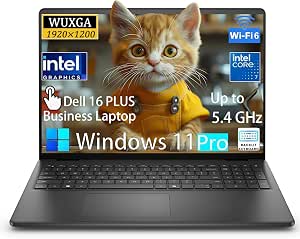 | Best for Business Memory and Storage | Display: 16-inch IPS, 1920 × 1200, 300 nits, anti-glare | Processor: Intel Core 7 150U, 10 cores, 12 threads, up to 5.4 GHz | Graphics: Integrated Intel Graphics | VIEW LATEST PRICE | See Our Full Breakdown |
| Lenovo 16-Inch Laptop with Intel Core i7-13620H, 24GB DDR5 RAM, and 1TB SSD |  | Best for a High-Resolution 16-Inch Screen | Display: 16-inch IPS, 2560 × 1600 | Processor: Intel Core i7-13620H, 13th Gen, 10 cores, up to 4.9 GHz | Graphics: Integrated Intel graphics | VIEW LATEST PRICE | See Our Full Breakdown |
| Microsoft Surface Laptop for Business (2025), 13.8-inch, Intel Core Ultra 7, 16 GB RAM, 512 GB SSD, Black | | Best Compact Business Surface | Display: 13.8-inch LCD capacitive touchscreen, 2256 × 1504, 3:2 aspect ratio | Processor: Intel Core Ultra 7 Series 2 | Memory: 16GB | VIEW LATEST PRICE | See Our Full Breakdown |
| premium Windows laptop | Processor | Display | Memory | Storage |
|---|---|---|---|---|
| Dell XPS 14 Laptop | Intel Core Ultra 7 255H, 16 cores, up to 5.1 GHz | 14.5-inch 3.2K OLED touchscreen, 3200 × 2000, 120Hz, 16:10 | 16GB LPDDR5X, 6400 MHz | 1TB PCIe NVMe SSD |
| Microsoft Surface Laptop 5 13. | Intel Core i7-1265U, 12th Gen, up to 4.8 GHz | 13.5-inch LCD touchscreen, 2256 × 1504 | 16GB LPDDR5, 4800 MHz | 512GB SSD |
| Microsoft Surface Laptop for B | Intel Core Ultra 7 Series 3 | 13.8-inch PixelSense Flow HDR touchscreen with anti-reflective coating | 32GB DDR5 | 512GB SSD |
| Microsoft Surface Laptop 7 15- | Qualcomm Snapdragon X Elite | 15-inch PixelSense touchscreen, 2496 × 1664 | 16GB | 512GB SSD |
| Dell Pro 16 Business Laptop | Intel Core Ultra 7 255U, 12 cores, up to 5.2 GHz | 16-inch WUXGA IPS, 1920 × 1200, anti-glare, 300 nits | 64GB DDR5 | 1TB SSD |
| Dell 16 Premium Laptop | Intel Core Ultra 7 255H, 16 cores, up to 5.10GHz | 16.3-inch IPS, 1900 × 1200, 30–120Hz, 500 nits, non-touch | 32GB LPDDR5X, 7467MT/s | 1TB SSD |
| Dell Pro 16 Business Laptop | Intel Core Ultra 5 235U, 12 cores, 14 threads, up to 4.9GHz | 16-inch FHD+ IPS, 1920 × 1200, anti-glare, 300 nits | 32GB DDR5 | 1TB SSD |
| Microsoft Surface Pro 13-inch | Qualcomm Snapdragon X2 Plus, 10-core | 13-inch PixelSense LCD touchscreen with enriched HDR | 16GB RAM | 512GB SSD |
| Microsoft Surface Laptop for B | Intel Core Ultra 7, Series 2 | 15-inch PixelSense Flow touchscreen, 3:2 aspect ratio | 32GB RAM | 512GB SSD |
| Microsoft Surface Laptop | Qualcomm Snapdragon X2 Elite, 12-core | 13.8-inch PixelSense touchscreen | 16GB RAM | 512GB SSD |
| Dell XPS 14 Premium Laptop | Intel Core Ultra 7 255H | 14.5-inch OLED touchscreen, 3200 × 2000, 48–120Hz | 32GB | 1TB SSD |
| Microsoft Surface Laptop for B | Intel Core Ultra 7 Series 2 | 15-inch LCD touchscreen, 2256 × 1504 | 16GB | 512GB SSD |
| Dell 16 Plus Business Laptop | Intel Core 7 150U, 10 cores, 12 threads, up to 5.4 GHz | 16-inch IPS, 1920 × 1200, 300 nits, anti-glare | 32GB DDR5 | 1TB SSD |
| Lenovo 16-Inch Laptop with Int | Intel Core i7-13620H, 13th Gen, 10 cores, up to 4.9 GHz | 16-inch IPS, 2560 × 1600 | 24GB DDR5 | 1TB PCIe SSD |
| Microsoft Surface Laptop for B | Intel Core Ultra 7 Series 2 | 13.8-inch LCD capacitive touchscreen, 2256 × 1504, 3:2 aspect ratio | 16GB | 512GB SSD |
More Details on Our Top Picks
Dell XPS 14 Laptop, 14.5-Inch 3.2K OLED Touchscreen, Intel Core Ultra 7 255H, 16GB RAM, 1TB SSD
The Dell XPS 14 makes the most sense for buyers who want a compact premium laptop with a sharper, more fluid screen than the business-focused models here. Its 14.5-inch 3.2K OLED touchscreen pairs rich contrast with a 120Hz refresh rate, while the Core Ultra 7 255H and 1TB SSD give everyday work plenty of headroom. Compared with the Dell Pro 16, this is the more display-led, portable choice; the Pro 16 offers far more memory and a wider selection of built-in ports. The XPS keeps its own limits: 16GB of onboard RAM is not suited to buyers who need large memory capacity, and Intel Arc integrated graphics are a poor fit for demanding gaming or heavy GPU work. Its three Thunderbolt 4 ports also make adapters useful for legacy accessories.
Pros:- 3.2K OLED touchscreen with a smooth 120Hz refresh rate
- Core Ultra 7 255H, 16GB LPDDR5X memory, and 1TB SSD
- Three Thunderbolt 4 ports and Wi-Fi 7
- Fingerprint reader and Windows 11 Pro
Cons:- 16GB of onboard memory is listed as the maximum
- Integrated graphics are not suited to demanding GPU workloads
- Thunderbolt-focused port selection may call for adapters
Best for: Professionals and frequent travelers who want a high-resolution OLED touchscreen, fast everyday performance, and a 1TB drive in a smaller premium laptop.
Not ideal for: Buyers running memory-heavy creative projects or demanding 3D and gaming workloads; its listed 16GB RAM ceiling and integrated graphics leave less headroom than higher-memory or discrete-GPU options.
- Processor:Intel Core Ultra 7 255H, 16 cores, up to 5.1 GHz
- Display:14.5-inch 3.2K OLED touchscreen, 3200 × 2000, 120Hz, 16:10
- Memory:16GB LPDDR5X, 6400 MHz
- Storage:1TB PCIe NVMe SSD
- Graphics:Intel Arc integrated graphics
- Operating system:Windows 11 Pro 64-bit
- Ports:3 Thunderbolt 4; headphone/microphone combo jack
- Battery:70Wh, 6-cell
- Weight:3.8 lb
Our verdict“Choose the XPS 14 if display quality and a compact premium design matter more than expandable memory or discrete graphics.”
Microsoft Surface Laptop 5 13.5-Inch Touchscreen Laptop, Intel Core i7-1265U, 16GB RAM, 512GB SSD, Platinum (Renewed)
The renewed Surface Laptop 5 is the small, straightforward option for buyers who value a light touchscreen laptop over the latest components. At 2.8 pounds, it is easier to carry than the Dell XPS 14, and its 13.5-inch, 2256 × 1504 display provides more workspace detail than a basic Full HD panel. The 12th Gen Core i7 and 16GB of RAM suit everyday office tasks, while Windows 11 Pro adds business features. Its age shows beside the newer Surface Laptop for Business, whose newer processor and stated long battery life make it a stronger choice for demanding all-day use. This Surface also comes renewed, with a 90-day limited warranty, and the listing names only one USB port. Choose it only if the lighter design and familiar Surface format outweigh those compromises.
Pros:- Light 2.8-pound design for regular travel
- 2256 × 1504 touchscreen in a compact 13.5-inch format
- 16GB RAM and a 512GB SSD for everyday multitasking
- Windows 11 Pro and Intel Iris Xe integrated graphics
Cons:- Renewed condition with a 90-day limited warranty
- Only one USB port is listed
- Older 12th Gen processor and an advertised battery runtime of up to 8 hours
Best for: Mobile office users who want a light 13.5-inch touchscreen for documents, browsing, video calls, and routine Windows work.
Not ideal for: Buyers who need a new device, a broad port selection, or stronger long-term coverage; this is renewed and carries a 90-day limited warranty.
- Processor:Intel Core i7-1265U, 12th Gen, up to 4.8 GHz
- Display:13.5-inch LCD touchscreen, 2256 × 1504
- Memory:16GB LPDDR5, 4800 MHz
- Storage:512GB SSD
- Graphics:Intel Iris Xe integrated graphics
- Operating system:Windows 11 Pro
- Battery runtime:Advertised up to 8 hours
- Weight:2.8 lb
- Condition and warranty:Renewed; 90-day limited warranty
Our verdict“Pick this renewed Surface Laptop 5 for a lightweight touchscreen work laptop, but skip it if warranty coverage or newer hardware ranks high.”
Microsoft Surface Laptop for Business, 13.8-inch, Intel Core Ultra 7 Series 3, 32 GB RAM, 512 GB SSD, Black
This Surface Laptop for Business stands out for combining a compact 13.8-inch format with 32GB of RAM and a claimed battery life of up to 23.5 hours. That memory gives it more room for large spreadsheets, many open apps, or heavier professional multitasking than the 16GB Dell XPS 14. Its PixelSense Flow HDR touchscreen has an anti-reflective coating, which can make work more comfortable in bright rooms than a glossy screen. The Core Ultra 7 Series 3 platform and Windows 11 Pro also suit managed business environments. Compared with the larger Surface Laptop 7 15-inch, this model favors a smaller display and a longer stated runtime over extra screen area. The tradeoffs are a hefty listed weight of 4.4 pounds for its size, integrated graphics, and no pen support; actual battery life will vary with use.
Pros:- 32GB DDR5 memory for demanding multitasking
- Anti-reflective 13.8-inch PixelSense Flow HDR touchscreen
- Advertised battery life of up to 23.5 hours
- Windows 11 Pro and a backlit keyboard
Cons:- Pen input is not supported
- Listed weight of 4.4 pounds is high for a 13.8-inch laptop
- Integrated graphics limit demanding GPU work, and real battery life varies
Best for: Business users who need substantial memory for multitasking, a compact touchscreen, and long stretches away from a charger.
Not ideal for: People who want pen input, a lightweight travel laptop, or graphics performance for demanding creative and gaming work.
- Processor:Intel Core Ultra 7 Series 3
- Display:13.8-inch PixelSense Flow HDR touchscreen with anti-reflective coating
- Memory:32GB DDR5
- Storage:512GB SSD
- Operating system:Windows 11 Pro
- Graphics:Integrated
- Battery life:Advertised up to 23.5 hours
- Form factor:Clamshell
- Weight:4.4 lb
Our verdict“Choose this Surface for memory-heavy business work and long claimed battery life, provided you do not need pen input or a lighter carry.”
Microsoft Surface Laptop 7 15-inch Copilot+ PC, Snapdragon X Elite, 16 GB RAM, 512 GB SSD, Platinum
The Surface Laptop 7 15-inch is the lineup’s large-screen choice for people who want a spacious touchscreen without moving to a heavier business workstation. Its 2496 × 1664 PixelSense display provides more room for side-by-side documents than the 13.8-inch Surface Laptop for Business, while the Snapdragon X Elite platform is paired with an advertised battery runtime of up to 22 hours. At 3.7 pounds, it remains reasonably portable for a 15-inch notebook. The compromise is its 16GB of memory and 512GB SSD, which offer less capacity than the business Surface’s 32GB RAM or the Dell Pro 16’s 64GB. The 60Hz display is also less fluid than the XPS 14’s 120Hz OLED, and Adreno integrated graphics are not a substitute for a discrete GPU. Buyers should also confirm their required apps work well on this processor platform.
Pros:- 15-inch PixelSense touchscreen with 2496 × 1664 resolution
- Snapdragon X Elite processor
- Advertised battery runtime of up to 22 hours
- 3.7-pound weight for a 15-inch laptop
Cons:- 16GB RAM and 512GB SSD provide less capacity than the Dell Pro 16 and business Surface
- 60Hz screen is less fluid than the Dell XPS 14’s 120Hz display
- Adreno integrated graphics are not intended for demanding GPU workloads
Best for: Students and mobile professionals who want a large, high-resolution touchscreen, long stated battery runtime, and a portable 15-inch Windows laptop.
Not ideal for: Users whose work depends on 32GB or more of memory, discrete graphics, a high-refresh display, or software that may not suit the Snapdragon platform.
- Processor:Qualcomm Snapdragon X Elite
- Display:15-inch PixelSense touchscreen, 2496 × 1664
- Refresh rate:60Hz
- Memory:16GB
- Storage:512GB SSD
- Graphics:Qualcomm Adreno
- Operating system:Windows 11
- Battery runtime:Advertised up to 22 hours
- Weight:3.7 lb
Our verdict“Choose the Surface Laptop 7 if a roomy touchscreen and long claimed battery runtime matter more than upgrade-level memory or graphics.”
Dell Pro 16 Business Laptop, Intel Core Ultra 7 255U, 64GB RAM, 1TB SSD
The Dell Pro 16 prioritizes working capacity over the screen polish of the XPS 14 or Surface Laptop models. Its 64GB of DDR5 RAM and 1TB SSD make it the clearest fit here for large datasets, complex office workloads, and heavy multitasking, while the 16-inch anti-glare screen, numeric keypad, and broad port selection suit desk-based work. Unlike the XPS 14, it includes HDMI 2.1, USB-A, USB-C, and RJ-45, reducing the need for dongles in office setups. That practical focus comes with a less vivid display: the WUXGA IPS panel is listed at 300 nits and 45% NTSC, well behind the XPS’s 3.2K OLED for image richness. Its 55Wh battery and 4.27-pound weight also make it less compelling for frequent travel. The listing notes that the original seal was opened for the memory and storage upgrade.
Pros:- 64GB DDR5 memory and a 1TB SSD
- 16-inch anti-glare display with a 16:10 WUXGA resolution
- Useful office ports, including HDMI 2.1, USB-A, USB-C, and RJ-45
- Windows 11 Pro, fingerprint reader, and backlit numeric keypad
Cons:- Display is listed at 300 nits and 45% NTSC, limiting color richness
- 4.27-pound weight and 55Wh battery are less suited to frequent travel
- Original seal was opened for the memory and storage upgrade
Best for: Office and technical professionals who keep many applications open, work with large files, and need built-in wired connectivity and a numeric keypad.
Not ideal for: Frequent travelers and buyers focused on vivid media, high-resolution creative work, or long unplugged sessions; the laptop is relatively heavy and its listed display specs are modest.
- Processor:Intel Core Ultra 7 255U, 12 cores, up to 5.2 GHz
- Display:16-inch WUXGA IPS, 1920 × 1200, anti-glare, 300 nits
- Memory:64GB DDR5
- Storage:1TB SSD
- Graphics:Integrated Intel Graphics
- Operating system:Windows 11 Pro
- Connectivity:Wi-Fi 6E, Bluetooth 5.3
- Ports:USB-A, USB-C with Power Delivery and DisplayPort, HDMI 2.1, RJ-45, headset port
- Battery and weight:55Wh, 3-cell; 4.27 lb
Our verdict“Pick the Dell Pro 16 for high-memory business workloads and a full set of office ports, not for premium display quality or light travel.”
Dell 16 Premium Laptop, 16.3-Inch 2K Display, Intel Core Ultra 7 255H, 32GB RAM, 1TB SSD, GeForce RTX 5050
The Dell 16 Premium stands apart from the Surface models here by pairing a GeForce RTX 5050 with 32GB of memory, making it the most suitable pick for buyers who need discrete graphics for creative applications or compatible games. Its 16.3-inch 120Hz display gives more room for timelines and spreadsheets, though the 1900 × 1200 resolution is less detailed than the Dell XPS 14’s 3.2K OLED screen. Three Thunderbolt 4 ports offer fast, flexible connections, while the 99.5Wh battery adds capacity for mobile work. The tradeoffs are a non-touch, 16:10 IPS panel and a larger chassis than the compact Surface options. I’d choose it for graphics capability, not for the sharpest display or easiest portability.
Pros:- GeForce RTX 5050 provides dedicated graphics capability beyond the integrated graphics in the Surface Laptop models.
- 32GB RAM and a 1TB SSD give demanding applications room to run and files room to live.
- 16.3-inch display supports a refresh rate up to 120Hz for smoother scrolling and motion.
- Three Thunderbolt 4 ports, Wi-Fi 7, and a fingerprint reader add useful connectivity and access features.
Cons:- The 1900 × 1200 non-touch display is less sharp and less flexible than the Dell XPS 14’s 3.2K OLED touchscreen.
- Its 16.3-inch footprint is less convenient to carry than the 13.8-inch Surface Laptop.
- The listed configuration has no optical drive.
Best for: Creative professionals and power users who want a large Windows laptop with discrete graphics, 32GB RAM, and plenty of fast USB-C connectivity.
Not ideal for: Buyers who prioritize a high-resolution OLED touchscreen, a lightweight travel laptop, or a compact tablet-style device.
- Display:16.3-inch IPS, 1900 × 1200, 30–120Hz, 500 nits, non-touch
- Processor:Intel Core Ultra 7 255H, 16 cores, up to 5.10GHz
- Memory:32GB LPDDR5X, 7467MT/s
- Storage:1TB SSD
- Graphics:NVIDIA GeForce RTX 5050, 8GB GDDR7
- Operating system:Windows 11 Home
- Battery:99.5Wh, 6-cell lithium-ion
- Ports:Three Thunderbolt 4 Type-C ports; one universal audio jack
Our verdict“Choose the Dell 16 Premium if discrete graphics and a large, fast display matter more than touch input or compact portability.”
Dell Pro 16 Business Laptop, Intel Core Ultra 5 235U, 32GB RAM, 1TB SSD
The Dell Pro 16 is the office-first choice in this group: it combines Windows 11 Pro, a numeric keypad, an anti-glare 16-inch screen, and practical connections including HDMI and Ethernet. That makes it more convenient for desk setups and business workflows than the slimmer Surface Laptop models, which rely more heavily on USB-C. Its 32GB RAM and 1TB SSD match the Dell 16 Premium on memory and storage, but the integrated Intel graphics and Core Ultra 5 processor point to everyday productivity rather than graphics-heavy workloads. There’s also a condition caveat: the listing says the laptop was professionally upgraded and its seal was opened. The 300-nit, 45% NTSC display is another compromise, so I’d favor this Dell for document work over color-sensitive creative tasks.
Pros:- Windows 11 Pro and business-focused ports include HDMI 2.1 and RJ-45 Ethernet.
- 32GB DDR5 memory and a 1TB SSD support substantial multitasking and local storage.
- 16-inch 16:10 anti-glare display provides room for documents and spreadsheets.
- Backlit keyboard includes a numeric keypad, useful for frequent data entry.
Cons:- The listing says the unit was professionally upgraded and its seal was opened.
- The 300-nit display with 45% NTSC coverage is a weak fit for color-critical work.
- Integrated Intel graphics are less suited to graphics-heavy tasks than the Dell 16 Premium’s RTX 5050.
Best for: Office staff and small-business buyers who need Windows 11 Pro, a number pad, Ethernet, and generous memory for multitasking.
Not ideal for: Designers who need broad color coverage, buyers seeking discrete graphics, or anyone who wants an unopened retail configuration.
- Display:16-inch FHD+ IPS, 1920 × 1200, anti-glare, 300 nits
- Processor:Intel Core Ultra 5 235U, 12 cores, 14 threads, up to 4.9GHz
- Memory:32GB DDR5
- Storage:1TB SSD
- Graphics:Integrated Intel Graphics
- Operating system:Windows 11 Pro
- Wireless:Wi-Fi 6E, Bluetooth 5.3
- Ports:2 × USB 3.2 Gen 1 Type-A, USB-C with Power Delivery and DisplayPort, HDMI 2.1, RJ-45, headset port
- Weight:Starting at 4.27 lb
Our verdict“Pick this Dell for practical business connectivity and office productivity, but skip it if display color quality or factory-sealed condition is a priority.”
Microsoft Surface Pro 13-inch 2-in-1 Laptop, Snapdragon X2 Plus, 16GB RAM, 512GB SSD, Dune
The Surface Pro is the lineup’s clearest choice for people who want a tablet first and a laptop when needed. Its 13-inch PixelSense touchscreen and adjustable kickstand make it more adaptable for reading, presentations, and touch-led work than the conventional Surface Laptop models. The Snapdragon X2 Plus platform, 16GB of RAM, and 512GB SSD suit everyday productivity, while the stated battery life of up to 15.5 hours gives a useful reference rather than a guarantee. Unlike the Dell 16 Premium, it has no listed discrete graphics and only two USB-C/USB4 ports. Also, the Flex Keyboard is described as a separate accessory, so the tablet configuration alone does not deliver a built-in laptop keyboard. I’d choose it for form flexibility, not maximum memory or ports.
Pros:- 13-inch PixelSense touchscreen and adjustable 165-degree kickstand support tablet and laptop-style use.
- Snapdragon X2 Plus 10-core processor is paired with 16GB RAM for everyday work.
- Enriched HDR display supports richer compatible visual content.
- Two USB-C / USB4 ports provide modern wired connectivity.
Cons:- The Flex Keyboard is described as a separate accessory, so it may not be a complete laptop setup on its own.
- Two USB-C / USB4 ports offer fewer connection types than the Dell Pro 16’s mix of USB-A, HDMI, and Ethernet.
- 16GB RAM and integrated graphics make it less suited to heavier workloads than the Dell 16 Premium.
Best for: Mobile professionals, students, and presenters who want a touchscreen Windows device that can switch between tablet use and kickstand-supported work.
Not ideal for: Buyers who need a keyboard included in the listed configuration, several built-in ports, or discrete graphics for demanding creative software.
- Display:13-inch PixelSense LCD touchscreen with enriched HDR
- Processor:Qualcomm Snapdragon X2 Plus, 10-core
- Memory:16GB RAM
- Storage:512GB SSD
- Operating system:Windows 11
- Battery life:Up to 15.5 hours
- Ports:Two USB-C / USB4
- Color:Dune
Our verdict“Choose the Surface Pro if tablet flexibility matters more than a bundled keyboard, discrete graphics, or a broad selection of built-in ports.”
Microsoft Surface Laptop for Business (2025), 15-inch, Intel Core Ultra 7, 32GB RAM, 512GB SSD, Black
This 15-inch Surface Laptop balances a large workspace with a business-oriented Windows configuration. Its 3:2 PixelSense Flow touchscreen offers more vertical room for documents and web pages than the 16:10 panels on the Dell 16 models, while Windows 11 Pro and Secured-core PC features suit managed workplace environments. The Intel Core Ultra 7 Series 2 chip, 32GB RAM, and integrated AI Boost NPU make it a more capable productivity choice than the Surface Pro with Snapdragon X2 Plus, which has half the memory in this listing and a detachable-style tablet format. The tradeoffs are a 512GB SSD and integrated graphics, so the Dell 16 Premium remains the stronger fit for graphics work and larger local files. Its stated battery figure comes from local video playback testing, not every workload.
Pros:- Windows 11 Pro and Secured-core PC features are suited to business security requirements.
- 15-inch 3:2 touchscreen provides generous vertical workspace.
- 32GB RAM and Intel Core Ultra 7 Series 2 support demanding productivity multitasking.
- Advertised battery life reaches up to 22 hours in local video playback testing.
Cons:- Integrated graphics are less suitable for graphics-heavy work than the Dell 16 Premium’s RTX 5050.
- The listed 512GB SSD offers less storage than the 1TB Dell 16 options.
- The 5.4-pound listed weight may be a drawback for frequent travel, and battery life varies by use.
Best for: Business users who want Windows 11 Pro, security features, substantial memory, and a spacious touchscreen for documents and meetings.
Not ideal for: Creative users who need dedicated graphics, buyers who need more than 512GB of listed storage, or frequent travelers seeking the lightest device.
- Display:15-inch PixelSense Flow touchscreen, 3:2 aspect ratio
- Processor:Intel Core Ultra 7, Series 2
- Memory:32GB RAM
- Storage:512GB SSD
- Operating system:Windows 11 Pro
- AI processor:Intel AI Boost NPU, up to 48 TOPS
- Battery life:Up to 22 hours in local video playback testing
- Weight:5.4 pounds
Our verdict“Choose this Surface Laptop for secure business productivity and a roomy touchscreen, not for dedicated graphics or maximum storage.”
Microsoft Surface Laptop (2026), 13.8-inch, Snapdragon X2 Elite, 16GB RAM, 512GB SSD, Platinum
The 13.8-inch Surface Laptop is the most straightforward compact clamshell here: it keeps a PixelSense touchscreen and 12-core Snapdragon X2 Elite processor in a recycled aluminum chassis, without the Surface Pro’s tablet-first setup. Its stated battery life of up to 20 hours makes it appealing for all-day mobile work, though actual runtime depends on use. Compared with the 15-inch Surface Laptop for Business, this model is smaller and runs Windows 11 Home, while that larger option adds Windows 11 Pro, 32GB RAM, and a roomier 3:2 display. The 16GB RAM and 512GB SSD here should suit routine productivity, but the integrated graphics and two USB-C/USB4 ports limit its fit for graphics-heavy work and older peripherals. Stylus support is mentioned, but the stylus is not listed as included.
Pros:- Compact 13.8-inch touchscreen is easier to carry than the 15- and 16-inch options.
- 12-core Snapdragon X2 Elite processor and 16GB RAM support everyday multitasking.
- Up to 20 hours of stated battery life suits mobile work away from an outlet.
- Chassis uses 100% recycled aluminum alloy.
Cons:- Integrated graphics are not a substitute for the Dell 16 Premium’s dedicated RTX 5050.
- Two USB-C/USB4 ports may require adapters for USB-A, HDMI, or Ethernet accessories.
- Windows 11 Home and 16GB RAM offer less headroom for managed business use than the 15-inch Surface Laptop for Business.
Best for: Frequent travelers and students who want a compact touchscreen clamshell, long stated battery life, and a premium aluminum build.
Not ideal for: Business buyers who require Windows 11 Pro, creative professionals who need dedicated graphics, or users who rely on several different port types.
- Display:13.8-inch PixelSense touchscreen
- Processor:Qualcomm Snapdragon X2 Elite, 12-core
- Memory:16GB RAM
- Storage:512GB SSD
- Operating system:Windows 11 Home
- Battery life:Up to 20 hours
- Ports:Two USB-C / USB4
- Chassis:100% recycled aluminum alloy
Our verdict“Pick this Surface Laptop for compact, touchscreen everyday computing, but choose a business Surface or Dell if you need Pro features or discrete graphics.”
Dell XPS 14 Premium Laptop, 14.5-inch 3.2K OLED Touchscreen, Intel Core Ultra 7 255H, 32GB RAM, 1TB SSD
I’d choose the Dell XPS 14 for its unusually sharp, vivid 14.5-inch OLED touchscreen and flexible convertible design. Its 3.2K resolution and refresh rate up to 120Hz make text, photos, and motion look crisp, while 32GB of memory and a 1TB SSD provide more working room than the 16GB Surface Laptop for Business models in this lineup. The tradeoff is portability: at 3.8 pounds, it is heavier than many buyers expect from a 14-inch laptop. Integrated Intel Arc graphics also make it a weaker fit for demanding 3D work than the Dell 16 Premium with its GeForce RTX 5050. I see this as the display-first choice for people who want a premium Windows convertible, not a gaming or graphics workstation.
Pros:- 3.2K OLED touchscreen with a refresh rate up to 120Hz
- 32GB RAM and 1TB SSD
- Convertible design with fingerprint reader and backlit keyboard
- Wi-Fi 7 and two Thunderbolt 4 ports
Cons:- Integrated graphics are less suited to demanding gaming and GPU-heavy workloads
- 3.8-pound weight makes it less convenient to carry than a typical compact laptop
Best for: Buyers who want a high-resolution OLED touchscreen, convertible flexibility, and ample memory for creative work and multitasking.
Not ideal for: Frequent travelers prioritizing a light 14-inch laptop, or users who need dedicated graphics for demanding games or GPU-heavy applications.
- Display:14.5-inch OLED touchscreen, 3200 × 2000, 48–120Hz
- Processor:Intel Core Ultra 7 255H
- Graphics:Integrated Intel Arc
- Memory:32GB
- Storage:1TB SSD
- Operating system:Windows 11 Home
- Weight:3.8 pounds
- Ports and wireless:3 USB ports, including 2 Thunderbolt 4; microSDXC; Wi-Fi 7; Bluetooth 5.4
Our verdict“Choose the XPS 14 if display quality and convertible flexibility matter more than a lightweight build or dedicated graphics.”
Microsoft Surface Laptop for Business (2025), 15-inch, Intel Core Ultra 7, 16GB RAM, 512GB SSD, Black
The 15-inch Surface Laptop for Business is the straightforward choice here for professionals who want a roomy touchscreen, Windows 11 Pro, and a stated battery life of up to 22 hours. Its Core Ultra 7 Series 2 processor and 48-TOPS AI Boost NPU support local AI workloads, while the larger screen gives documents and side-by-side windows more space than the 13.8-inch Surface Laptop for Business. That smaller model is the better match for compactness, and it lists the same processor family and NPU capability. This 15-inch configuration, however, has only 16GB of RAM and 512GB of storage, below the XPS 14’s 32GB and 1TB. Battery life is a manufacturer estimate, and some Copilot+ experiences may depend on later updates.
Pros:- 15-inch touchscreen gives documents and multitasking more room
- Windows 11 Pro suits business workflows
- Core Ultra 7 Series 2 processor with an NPU rated up to 48 TOPS
- Backlit keyboard and stated battery life of up to 22 hours
Cons:- 16GB RAM and 512GB SSD provide less headroom than the Dell XPS 14 configuration
- Actual battery life varies with usage and configuration
- Some Copilot+ PC experiences may require later updates
Best for: Business users who prefer a large touchscreen for documents and meetings, need Windows 11 Pro, and value a long stated battery-life target.
Not ideal for: Power users who regularly keep many demanding applications open or need more than 512GB of built-in storage.
- Display:15-inch LCD touchscreen, 2256 × 1504
- Processor:Intel Core Ultra 7 Series 2
- Memory:16GB
- Storage:512GB SSD
- Operating system:Windows 11 Pro
- NPU performance:Up to 48 TOPS
- Battery life:Up to 22 hours, as stated
- Keyboard:Backlit
Our verdict“Pick this Surface for a roomy business touchscreen and Windows 11 Pro, but choose a higher-memory option for heavier workloads.”
Dell 16 Plus Business Laptop, 16-inch WUXGA IPS Display, Intel Core 7 150U, 32GB DDR5 RAM, 1TB SSD, Windows 11 Pro
I’d put the Dell 16 Plus Business on the shortlist for office users who value capacity and business software over a premium-looking screen. Its 32GB of DDR5 RAM and 1TB SSD give it more memory and storage than either Surface Laptop for Business configuration listed here, and Windows 11 Pro, a numeric keypad, and a 1080p IR camera suit everyday business tasks. The 16-inch anti-glare display is practical under bright office lighting, but its WUXGA resolution and listed 45% NTSC color coverage are less compelling for image-focused work than the XPS 14’s 3.2K OLED. The listing also says the original seal was opened for the memory and storage upgrade. That detail, along with integrated graphics and a starting weight of 4.4 pounds, makes this a more functional than polished pick.
Pros:- 32GB DDR5 RAM and 1TB SSD
- Windows 11 Pro and a 1080p FHD IR camera
- 16-inch anti-glare display suits bright office settings
- Backlit keyboard includes a numeric keypad
Cons:- Original seal was opened for the memory and storage upgrade
- 45% NTSC display coverage is a limitation for color-sensitive creative work
- Starting weight of 4.4 pounds and integrated graphics limit portability and graphics performance
Best for: Office professionals who need Windows 11 Pro, generous memory and storage, a numeric keypad, and an anti-glare screen.
Not ideal for: Buyers seeking vivid color for photo or video work, a lightweight daily carry, or a factory-sealed configuration.
- Display:16-inch IPS, 1920 × 1200, 300 nits, anti-glare
- Processor:Intel Core 7 150U, 10 cores, 12 threads, up to 5.4 GHz
- Graphics:Integrated Intel Graphics
- Memory:32GB DDR5
- Storage:1TB SSD
- Operating system:Windows 11 Pro
- Weight:Starting at 4.4 pounds
- Ports:2 USB-A 3.2 Gen 1, 1 USB-C 3.2 Gen 2, HDMI 1.4
Our verdict“Choose the Dell 16 Plus for business-focused capacity and practical office features, not for premium display quality or easy carrying.”
Lenovo 16-Inch Laptop with Intel Core i7-13620H, 24GB DDR5 RAM, and 1TB SSD
The Lenovo 16-inch pairs a sharper-than-WUXGA 2560 × 1600 IPS display with a 10-core Core i7-13620H processor, 24GB of memory, and a 1TB SSD. That combination suits buyers who want room for multitasking and detailed spreadsheets or documents without moving to the much heavier Dell 16 Plus, which starts at 4.4 pounds. The Dell counters with 32GB of RAM and Windows 11 Pro, while this Lenovo has Windows 11 Home and 24GB; its advantage is a higher-resolution listed display and a weight under four pounds. Integrated graphics remain the main limit: neither this model nor the Dell 16 Plus is a substitute for the Dell 16 Premium with its GeForce RTX 5050 when GPU-heavy work is involved. I’d favor the Lenovo for general productivity, not specialized graphics tasks.
Pros:- 2560 × 1600 resolution on a 16-inch IPS display
- 10-core Intel Core i7-13620H processor
- 24GB DDR5 memory and 1TB PCIe SSD
- Under-four-pound weight with HDMI and four USB ports
Cons:- Integrated graphics are a poor fit for graphics-intensive workloads
- Windows 11 Home lacks the business-focused features of the Dell 16 Plus
- Wi-Fi 6 rather than the newer Wi-Fi 7 listed for the Dell XPS 14
Best for: Multitaskers who want a high-resolution 16-inch screen, a capable H-series processor, and substantial storage in a laptop under four pounds.
Not ideal for: Business buyers who require Windows 11 Pro or creators and gamers who need dedicated graphics.
- Display:16-inch IPS, 2560 × 1600
- Processor:Intel Core i7-13620H, 13th Gen, 10 cores, up to 4.9 GHz
- Graphics:Integrated Intel graphics
- Memory:24GB DDR5
- Storage:1TB PCIe SSD
- Operating system:Windows 11 Home
- Weight:Under 4 pounds
- Connectivity:Wi-Fi 6, HDMI, 4 USB ports
Our verdict“Choose the Lenovo for a crisp large screen and capable everyday multitasking, but look elsewhere for Pro features or dedicated graphics.”
Microsoft Surface Laptop for Business (2025), 13.8-inch, Intel Core Ultra 7, 16 GB RAM, 512 GB SSD, Black
The 13.8-inch Surface Laptop for Business offers the smaller footprint in Microsoft’s two 2025 business Surface configurations here. It keeps the Core Ultra 7 Series 2 processor, Windows 11 Pro, and NPU rated up to 48 TOPS found in the 15-inch model, but its 13.8-inch touchscreen is better suited to buyers who want to work on the move. The 3:2 display shape gives documents useful vertical space, while the larger Surface’s 15-inch panel is more comfortable for extended side-by-side work. Both configurations list 16GB of memory and 512GB of storage, so the XPS 14 offers more headroom with 32GB and 1TB. This Surface’s listed 4.4-pound weight and single USB port also temper its compact-screen appeal; the battery claim is based on local video playback and varies by use.
Pros:- 13.8-inch 3:2 touchscreen provides useful vertical space for documents
- Windows 11 Pro and Secured-core PC design
- Core Ultra 7 Series 2 with an NPU rated up to 48 TOPS
- Stated battery life of up to 22 hours under local video playback testing
Cons:- Only one USB port is listed, limiting direct peripheral connections
- 16GB RAM and 512GB SSD offer less capacity than the Dell XPS 14
- Listed weight is 4.4 pounds, despite the smaller display
Best for: Mobile business users who want a compact touchscreen laptop with Windows 11 Pro and an AI-capable processor.
Not ideal for: Buyers who need abundant wired connectivity, a very light carry, or more than 16GB of RAM and 512GB of storage.
- Display:13.8-inch LCD capacitive touchscreen, 2256 × 1504, 3:2 aspect ratio
- Processor:Intel Core Ultra 7 Series 2
- Memory:16GB
- Storage:512GB SSD
- Operating system:Windows 11 Pro
- AI processor:Intel AI Boost NPU, up to 48 TOPS
- Battery life:Up to 22 hours in local video playback testing
- Connectivity:Bluetooth, 802.11ac/ax/n Wi-Fi, USB-C, Surface Connect
- Weight:4.4 pounds
Our verdict“Pick the 13.8-inch Surface for Windows 11 Pro and a more compact touchscreen workspace, provided its weight and limited port count suit your setup.”
How We Picked
I ranked these laptops by how well their listed configurations serve distinct premium-laptop needs: everyday performance, display quality, portability, memory and storage, graphics capability, and business use. I gave more weight to meaningful buyer benefits than to premium branding. A dedicated GPU or 32GB of RAM can change what a laptop handles comfortably; a larger display can improve desk work but make travel less convenient. I also considered whether the available details support a clear recommendation and flagged older, renewed, or less fully specified options accordingly.
The order reflects fit and flexibility, not a claim that one laptop suits every buyer. The 32GB Dell XPS 14 ranks first for its balanced combination of a high-resolution OLED touchscreen, capable Intel processor, and roomier memory configuration. The Dell 16 Premium follows for buyers who need dedicated graphics, while the Surface and Dell Pro models earn their places through portability, business-oriented configurations, or high memory capacity. Snapdragon models are ranked with software compatibility in mind, and similar models are separated where screen size, RAM, processor platform, or condition changes the buying decision.
| premium Windows laptop | Operating system |
|---|---|
| Dell XPS 14 Laptop | Windows 11 Pro 64-bit |
| Microsoft Surface Laptop 5 13. | Windows 11 Pro |
| Microsoft Surface Laptop for B | Windows 11 Pro |
| Microsoft Surface Laptop 7 15- | Windows 11 |
| Dell Pro 16 Business Laptop | Windows 11 Pro |
| Dell 16 Premium Laptop | Windows 11 Home |
| Dell Pro 16 Business Laptop | Windows 11 Pro |
| Microsoft Surface Pro 13-inch | Windows 11 |
| Microsoft Surface Laptop for B | Windows 11 Pro |
| Microsoft Surface Laptop | Windows 11 Home |
| Dell XPS 14 Premium Laptop | Windows 11 Home |
| Microsoft Surface Laptop for B | Windows 11 Pro |
| Dell 16 Plus Business Laptop | Windows 11 Pro |
| Lenovo 16-Inch Laptop with Int | Windows 11 Home |
| Microsoft Surface Laptop for B | Windows 11 Pro |
Factors to Consider When Choosing Best Premium Windows Laptops
Premium laptops can share polished designs yet serve very different workdays. I would start with your software and travel habits, then choose the screen, platform, and configuration around those needs rather than paying for specifications that will sit unused.
Match the processor platform to your apps
Processor labels alone do not tell you whether a laptop will suit your workload. Intel configurations are generally the safer starting point for buyers who rely on a mix of established Windows applications, specialist tools, or older peripherals. Snapdragon systems can be compelling for everyday productivity, but application support and accessory compatibility deserve a check before purchase. Confirm that the programs you rely on run natively or have acceptable emulation performance, especially for work-critical software. A common mistake is treating all Windows laptops as equally compatible without checking the processor architecture. If your workflow is browser-based and uses standard office tools, platform differences may matter less than battery behavior, display, and size.
Choose memory for the work you expect to keep doing
Memory affects how comfortably a laptop handles many open apps, large documents, creative projects, and virtual machines. A 16GB configuration can fit routine office work, study, and browsing, while 32GB offers more breathing room for heavier multitasking and longer ownership. Buyers who know they need extensive data work or demanding business workloads may value 64GB, but should confirm that the rest of the system matches that use. Do not assume a premium chassis can be upgraded later; many thin laptops have limited upgrade options. Check the exact memory configuration before buying, since products with the same family name can differ substantially. Pay for added RAM when it prevents workflow limits, not just because a larger number sounds more future-proof.
Treat screen size as a daily-use decision
A 13- or 14-inch laptop is easier to carry and use in tight spaces, while a 15- or 16-inch panel gives documents, timelines, and side-by-side windows more room. Resolution and display technology also affect comfort: a sharp OLED screen can make text and visual content feel more refined, but it is not automatically the best fit for every workday. Think about how often you work away from a desk and whether you normally connect an external monitor. Buyers sometimes choose the largest display available, then find the extra bulk outweighs the workspace gain during commutes. Conversely, a compact model may feel cramped if it is the only screen used for long work sessions. Let your usual setting, not an occasional task, guide the size.
Pay for dedicated graphics only when your workload benefits
Integrated graphics are sufficient for many office tasks, streaming, and everyday creative work, so a dedicated GPU is not a universal premium requirement. It becomes more useful for compatible video workflows, 3D applications, GPU-accelerated tasks, and some games. A discrete graphics chip can also affect heat, fan activity, power use, and portability, so its benefits come with practical costs. Check the recommended hardware for the applications you use instead of assuming a GPU will speed up every task. Buyers focused on documents and calls may get more day-to-day value from extra memory or a better screen. A graphics-focused configuration makes most sense when you can name the workload it improves.
Separate business features from business branding
A model labeled for business is not automatically the right choice for every professional. Compare the actual processor, memory, storage, operating system edition, and support terms rather than relying on the product name. Business buyers should also check device-management requirements, security policies, warranty coverage, and whether their organization supports the chosen processor platform. These details can matter more than a small difference in display size. A laptop with ample memory may suit heavy multitasking, while a more portable configuration can be better for people who travel between meetings. Before ordering, verify the exact model number and configuration, since similarly named business laptops may differ in hardware. This check is especially useful when comparing listings with abbreviated specifications.
Judge value by configuration, condition, and useful lifespan
Premium value is about how well the hardware fits your needs over time, not the prestige of the product line. Compare memory and storage first, then account for display, graphics, size, and the support or condition attached to the listing. A renewed laptop can offer capable hardware, but its age, battery condition, return terms, and warranty deserve extra scrutiny. Similarly, a newer model with modest memory may be a poorer fit than a less flashy configuration with enough capacity for your workload. Avoid paying for storage you do not need if that budget would solve a more immediate bottleneck, such as memory or screen space. Read the full configuration details before treating two laptops with the same family name as equivalent.
Frequently Asked Questions
Should I choose the 16GB or 32GB Dell XPS 14 configuration?
I would choose 16GB if your regular work is mostly browser tabs, office documents, calls, and media, and you do not expect to run several heavy applications at once. The 32GB version is the safer fit for larger creative projects, intensive multitasking, and buyers who want more memory headroom over a longer ownership period. Both listed configurations pair an Intel Core Ultra 7 255H with a 3.2K OLED touchscreen, so the main distinction is the working capacity and storage configuration rather than the overall product role. The higher-memory model also includes a 1TB SSD, compared with 512GB in the lower-memory Surface business configurations listed here. Check whether your apps benefit from added RAM before deciding, since more memory is not a substitute for a dedicated GPU or a faster workflow.
Are the Snapdragon Surface laptops a safe choice for work?
They can be a good fit when your core work uses commonly supported productivity, communication, and web applications. Before buying, check your organization’s required software, printer or docking setup, security tools, and any specialist applications against the exact Snapdragon model. Compatibility can vary by app and accessory, so a general statement that Windows software runs is not enough for a work-critical setup. If you cannot verify support, an Intel Surface or Dell configuration in this roundup is the more conservative choice. If your workflow is well supported, compare the Snapdragon models by screen size, memory, and whether you prefer a laptop or a detachable 2-in-1.
Is a 16-inch premium laptop a better replacement for a desktop?
A 16-inch model can make a stronger laptop-only workstation because the larger display gives you more space for documents and side-by-side applications. The Dell 16 Premium adds dedicated graphics, making it more suited to compatible visual workloads than the business-focused 16-inch options. Still, a laptop screen remains smaller than a desktop monitor, and graphics performance depends on the application and workload. Larger laptops are also less convenient to carry every day, so frequent travelers may prefer a 13- or 14-inch system with an external monitor at their desk. Decide whether you value built-in screen space and graphics more than mobility.
What should I check before buying the renewed Surface Laptop 5?
Check the laptop’s condition, battery expectations, warranty, return terms, and included accessories before comparing it with newer Surface models. The listed configuration has a 12th-generation Intel Core i7, 16GB RAM, and a 512GB SSD, which may suit routine work but is an older platform than the newer options in this roundup. Confirm that the seller identifies the renewed grade and that the return process gives you time to inspect the device. For a primary work computer expected to last several years, compare that uncertainty with a newer model and its support coverage. The renewed choice is most persuasive when its specific condition and terms are clear and its hardware fits your workload.
How much memory should I choose for a premium Windows laptop I plan to keep?
For routine productivity, 16GB can be enough if you use a modest number of applications at once. Choose 32GB if you regularly multitask heavily, work with larger creative files, or want more capacity for changing software demands. A 64GB configuration is aimed at people whose professional workloads can use that headroom; it is not a general speed upgrade for every buyer. Since thin laptops may not allow memory upgrades, decide based on the work you expect to do throughout the laptop’s useful life. If you are uncertain, check the memory requirements of your most demanding applications and prioritize that evidence over a blanket rule.
Conclusion
For most buyers seeking one premium Windows laptop to cover varied work and everyday use, I recommend the 32GB Dell XPS 14 as best overall: it pairs a sharp OLED touchscreen with a capable processor and a generous configuration. The Dell 16 Plus Business is my best value-oriented pick for buyers who want a large Windows Pro system with 32GB RAM and 1TB storage, while the Dell 16 Premium is the best premium choice for people whose work benefits from dedicated graphics. For beginners, I would favor the 13.8-inch Surface Laptop for Business with Intel Core Ultra 7 as a straightforward everyday laptop, provided its 16GB memory fits the workload. Frequent travelers should compare the compact XPS and 13.8-inch Surface models; buyers focused on compatible, efficiency-minded everyday use can look at the Snapdragon Surface options. If specialist software is central to your work, favor a configuration whose platform and accessories you have confirmed will run as needed.
Halloween Picks
halloween
As an affiliate, we earn on qualifying purchases.